
Picasa, the popular free photo management software made by Google, has finally made its way to the Mac. The application has long been noticeably absent on the Macintosh – especially given the fact that it has been available for Linux (which typically lags behind Macs and Windows) since 2006. It’s also a direct competitor to Apple’s long running iPhoto product, which has come with all new Macs for years. So how does it stack up?
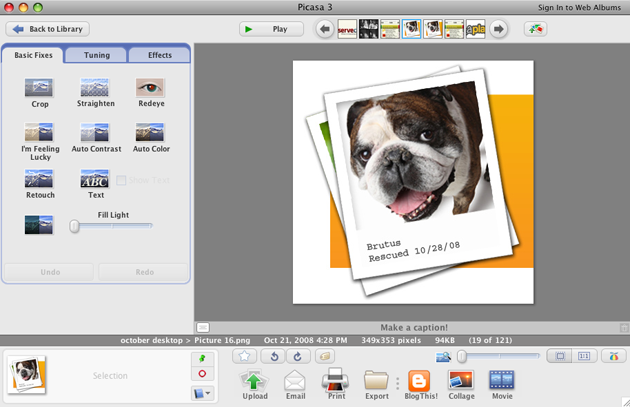
In my brief testing the application seems to be very snappy (much faster than iPhoto), though it lacks the sleek look of Apple’s products. Photos import quickly, effects are easy to find and apply, and most things are intuitive, though the folder browsing can be a little confusing. It might not be as pretty as iPhoto, but I won’t be surprised if power-users make the switch (or at least consider it).
One of the biggest differences between Picasa and iPhoto is that Picasa doesn’t move or reorganize images, but instead keeps track of where your images are scattered across your hard drive and allows you to view them in one place. For users that manually manage their photos by sorting them into folders, this is a very welcome change. In contrast, iPhoto has long transfered your photos to its own library, and encouraged users to sort their photos through the app itself.
Given that iPhoto has come preinstalled on every Mac for years, Google is doing doing everything it can to make Picasa play nice with your existing library. While users can typically modify any image on their hard drive directly from Picasa, all images in iPhoto’s library are treated differently: the application will copy these images to a new location, and only then apply edits. The application also allows users to revert back to previous versions.
Picasa is a welcome alternative to iPhoto, but it’s still premature to drop iPhoto entirely. It’s highly likely that Apple will unveil a new version of iPhoto at tomorrow’s Macworld keynote, and you can be sure that it will include some significant enhancements.


Now, if only Picasa could sync with Flickr, or Picasaweb offered a decent amount of storage …
There are plugins that will upload to Flickr on the windows side, would expect one to come out for the mac as well.
Ditto…really want to upload to flickr more than picasaweb.
But other than that, i feels very snappy..and i love that it integrates with my current iPhoto library.
I hate Flickr
I also like the recently announced http://www.fotonauts.com/
Sorry, got to go now and organize all my pictures that are spread all over 25 apps / computers / drives …
dont really like picasa that much, but good to see they are tryng to improve.
http://gatesand...s.blogspot.com/
but is improving really good enough sometimes?
Create or join a crunchie’s chat group at http://groups.im/
This just pisses me off. They make a release that many have waited long for, and the damn thing is MacIntel only! WTF!
I lost my job in Nov, I can’t afford to pay through the @$$ for a new machine and my iBook is PPC. again, WTF!
Stop making for new platforms only! There are still poor people out here.
OMFG FINALLY !!!
I used it a lot on win than I stopped when I bought my first Mac…now I ‘ll try it again but I’ll probably go on with flickr anyway.
But other than that, i feels very snappy..and i love that it integrates with my current iPhoto library. Thanks.
http://www.jugargame.com/
I switched the moment I saw the headline on TechMeme.
I think I may have discovered a leak for Google Drive. I am not sure if this is in the Windows build, but I was organizing albums I downloaded from PicasaWeb when i noticed a Predefined Album called Google Drive.
Image: http://is.gd/eEGc
It’s fast but it has a horrible UI… sticks out like a sore thumb. Yuck.
Back to iPhoto ‘08 for me.
>and you can be sure that it will include some significant enhancements.
Really? Apple has been downgrading the iLife apps into even more simplistic for the past year. The “significant enhancements” lately have all been in the name of giving you even less control. iPhoto is for mommies to make calendars. I cannot imagine that power users would not switch.
Excellent Article
The Picasa user interface may not blend in with other Mac apps but that’s the same as Picasa on Windows and on Linux – Picasa possibly has its own interface engine and does not rely on the operating system to draw the UI elements. In fact, the video above looks almost like the Windows or Linux version, if not for the Finder and the window title bars.
What about Phanfare? So far it’s the only “cloud” photo service. It lets you store all your photos in full resolution on secure S3 storage and access them from PC, Mac, iPhone, or web. Check it out!
Great, I think picasa is a really useful app. for photo management, easy to upload to website for sharing.
Good job, Google.
I’m so excited to finally see Picasa on Mac. It beats any photo program I’ve ever used.
Unfortunately, the Beta is very buggy. The Help groups are already going crazy with tons of errors. I can’t get Picasa to stop indexing photos! It indexes every photo on my hard drive, despite telling it to look at only predefined albums. Need a fix soon!
I’m using the Snaptu Picasa mobile application.
You can download it for free from: http://snaptu.com/a/picasa
Snaptu has a channel on Youtube where you can see video tours for some of the mobile apps: http://snaptu.com/a/picasa
This is a test to see if my ordinary gravatar displays when Facebook connect is setup
Yes it does…
Great.. finally
test test