For some time now, Google Chrome has been working with a number of extensions — but unofficially. That’s about to change in a big way, maybe as soon as tomorrow. And some digging through backchannel chatter reveals some of Google’s intentions here.
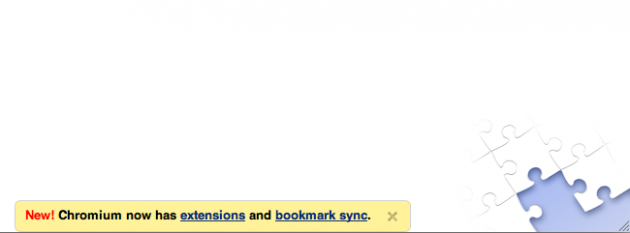
As first spotted by DownloadSquad earlier today, Google appears to have tipped its hand a little early. In the newest builds of Chromium across all the platforms (yes, even Mac and Linux), you can clearly see the jigsaw puzzle area in the lower right hand corner. This is in the same place that the colorful stripes usually appear to take you to the Theme Gallery. But clicking on this area currently redirects you back to google.com — but as you can see when you hover over it, clearly there will be something at https://chrome.google.com/extensions, presumably an Extensions Gallery.
Next to this new jigsaw picture is a note at the bottom of the page reading: “New! Chromium now has extensions and bookmark sync.” “Extensions” links to the URL above, while “bookmark sync” links to a Google help page to show you how to use bookmark sync. Sadly, while this does appear to be working on the Windows and Linux versions of Chromium right now, it’s not yet working for the Mac.
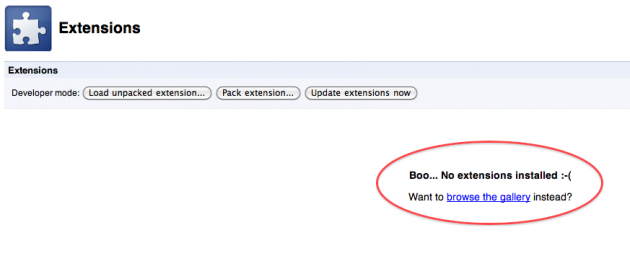
Also note that when you go to the current extension page in Chrome (which you can find by typing chrome://extensions/ into the URL field), you will see a message that reads, “Want to browse the gallery instead?” The phrase “browse the gallery” is again linked to the still non-existant extensions page.
As you may recall, Google also tipped off its Theme Gallery a bit early on this tab page just before it launched. Chatter here by Google employees seems to suggest this Extension launch is indeed imminent. The image on the right would look to be some sort of new Chrome menu placeholder icon related to extensions.
And there’s more. Below, find some other pictures and information I was able to find in the Chromium Code Reviews area (placed by Google employees) that seem to make it very clear that Google is about to unleash extension support to rival that of Firefox. Based on what I’m reading, developers will be able to add icons to the Chrome toolbar (likely what the image above represents), add temporary icons inside the Chrome address bar (think: RSS icon), allow users to customize the extensions, and developers will apparently even be able to implement their own versions of “standard browser pages such as the New Tab page.”
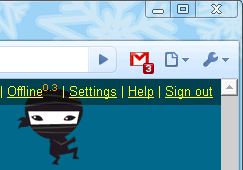
From the backchannel talk, it sounds like Google will have a few of its own extensions ready to go at launch. One will have something to do with Google Maps, another will have to do with Google News, a third will allow you to automatically update builds of Chromium (much like the tool we built several months ago). But by far the most interesting is the Gmail Checker. As you can see in the image up top, it will use badging, tagging a number to the icon to let you know how many unread items you have.
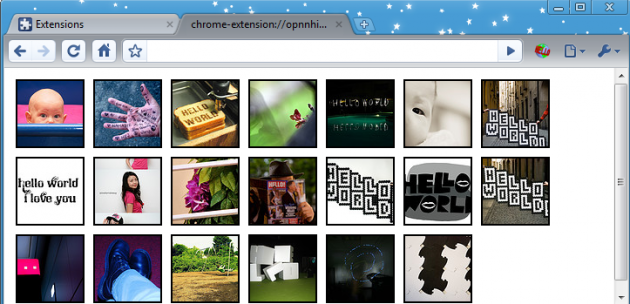
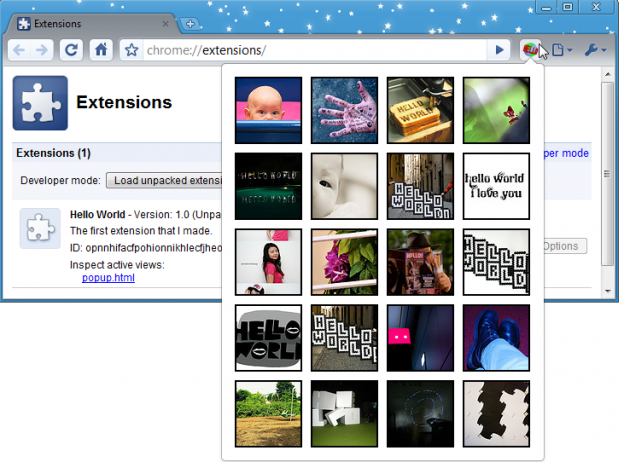
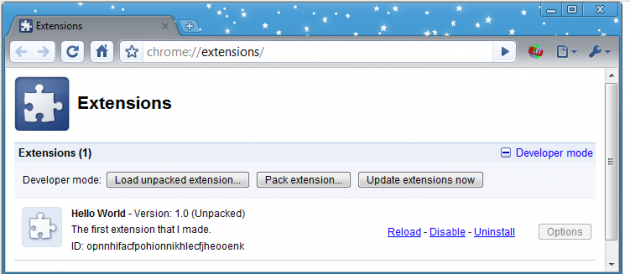
The key for all of this though appears to be to show developers just how easy it is to make your own extension for Chrome. That’s what many of the images below represent, an easy “hello world” extension that can apparently be built in just a few steps. With speed no longer its strong suit, extensions are perhaps the last great feature Firefox has a stranglehold over. If Google gets it way, that could soon change.


I just need a few extensions to be able to completely move to Chrome.
I’m currently using FF only because I need some of the extensions for my work but at home, I prefer Chrome (speed, usability).
Toni, I used to think that, but found that Chrome has some truly wonderful subtleties that means it can do LOTS more than appears at first glance.
(except I’d like to see Google, develop drag-and-drop!).
Definitely worth looking in the menus and playing with it, before you cast it aside on that basis.
There are simply some things not possible on chrome/chromium, e.g. most userscripts (greasemonkey), ftp (firebug), good developer tools (chrome developer tools are incomparable to firebug), change post headers (not sure about name
), etc. etc. etc.
David,
That’s not entirely true. Most user scripts will in fact work via content scripts. As for the rest, they are limitations in the current extension model. Firebug vs. Webkit developer tools is a tough call: both are buggy in various ways so it’s a wash for me.
I just ported over our FF extension to Chrome last week, so I’m pretty familiar with the ins and outs of the extension stuff they are offering.
David – that’s all well and good from a techie perspective, but the likes of Toni (above) and many many other people considering the switch to Chrome don’t often get past the “first-impression” syndrome.
Obviously, this is something that the great Google brains have to contend with, in regards to its stickiness. But I expect he’s referring to the likes of Google toolbar, Yahoo toolbar – and other user-definable features that many “everyday users” are quite used to.
i agree with you.
Oooh – now it says “coming soon”
https://chrome.....com/extensions
n to the ais
i hope it doesn’t become bloated with too much extensions like firefox
You know, you don’t have to install every extension that is released. You’re firefox will be as lean or bloated as you make it.
*Your
I use Chrome for browsing and FF for development. All I need is a good Firebug replacement, and the move will be complete.
+1
Chrome already has its own Firebug-like debugger (CTRL+Shift+I).
dammit. got excited for a sec but that didn’t work. (i’m on chromium + jaunty)
Cmd + Alt + J for Chromium under OS X.
Cmd + Alt + I is Safari/Webkit’s shortcut
Replace Cmd by Ctrl for Windows, it should work.
Still its nothing compared to firebug… up to date I have been unable to practically edit html/css on the fly (css editing is possible, but doesn’t work for me)…
Isn’t it actually Ctrl+Shift+J ?
I also think the web inspector in the latest build of chrome is much better (and stable) than firebug
Sadly, it’s not nearly as god nor as stable as Firebug. Also, Firebug is extensible itself – something I think Chrome is lacking.
+1
It’d be great to have these extensions early.
Give me the Copy Plain Text extension and I’ll be satisfied!
Try using ctrl-shift-v to “paste as plain text”.
Hi
Firebug!
Google should create a tool which allows FF plugins to work in Chrome.
is Chrome still installing in documents & settings\application data
or is it finally installing in program files?
AppData. I agree that it’s confusing and a bit silly, but I’m less annoyed by that than by the myriad programs that do the inverse and put all the user settings in Program Files along with the actual program.
I bet the intention there was to get around the default permissions on the Program Files folder for regular users. People at work don’t generally have admin permissions, but they can still install things to their profile.
I hope they create seo plugin for google crome.
I don’t know why this was even posted. Google Chrome extensions have been available in the Chrome dev channel for a LONG time. There are already TONS of extensions for Chrome available (I have some in the “Labs” at my temporary website here: http://thebraue...group.com/labs/).
A better post would be the fact that extensions is now supported on the Beta channel and the dev team has said that extensions will be available on the Stable channel by the end of this year.
Except that they are a pain in the ass to install and there is no Google Chrome Dev channel (that’s the Chromium Dev channel).
Very few people know of Google Chrome, fewer know of Chromium.
This is very newsworthy because Google is finally making extension installation simple (like in Firefox) in Google Chrome – the version that is advertised and more well-known.
There is no “Chromium Dev Channel”. Release channels are for Google Chrome. Details at http://dev.chro...ved/dev-channel .
I agree this is newsworthy for the reasons you state.
But it’s not difficult to install extensions in Dev channel. Just click a .crx file exactly like you would click the file to install a theme.
Didn’t like chromes bookmark management at first, nor the new tab page, but the speed won me over completely. I use chrome and without even trying have 4 others using it too. I simply said it was good and fast, they tried it and never went back.
Would be interesting to see whether it will have an AdBlocker or not.
That’s a must for many people I would presume.
http://www.chro...ioning/adblock/
Glimmer Blocker works.
Google Chrome is so much better than Firefox. The UI very simplistic and I can fully grasp it in a matter of seconds. Firefox just looks so ugly and cluttered in comparison. I’m about to give up on FF because I don’t feel like waiting months and months for them to finally clean up the UI.
Google appears to have tipped its hand a little early … http://www.cypress.com/
” extension support to rival that of Firefox”
Chrome’s extension support is nowhere near that of Firefox. It doesn’t yet support functionality like adblockplus and noscript (the current adblockers are hacks really). The extensions are more or less like Jetpacks. Still, its easier to create though
no good adblock, no chrome for me
http://www.chro...ioning/adblock/
It’s good in my book, and I transferred over the settings from AdBlock Plus in Firefox over to Chrome, and most of the settings are the same in all the sites I regularly visit, and you can selectively hide elements in a page to catch those ads the extension didn’t. Win in my book.
I’m looking forward to sidewiki, wave, FON downloader, somekinds of 1-click blogging extension (select something, click to blog it).
Firefox isn’t so bad. As long as you’re only using the extensions you actually need, it doesn’t get too cluttered and is just fine on speed. I’m sure Chrome will be the same in the near future.
We’ve got our Xmarks Bookmark Sync add-on working (in alpha) for Chrome. Our users report it’s working well on Chrome Windows and Mac, as well as Chromium on Linux.
Install details here:
http://blog.xmarks.com/?p=1244
-james
nice james.
if this happens firefox is dead. rip firefox its been good knowing you
You’re such an idiot. Why the hell do you even bother to comment on this site? (you and the other 10billion idiots)
Good job moron. There aren’t 10 billion people on this planet.
Google, Mozilla and Microsoft are sponsors of this years Add-on-Con.
Use the event code ev1 and receive $50 off.
Add-on-Con is the only conference designed specifically for people who build and market browser add-ons. Organized by members of the add‐on community, the one day conference brings together platform vendors, developers and marketers, with the goal of facilitating communication, and sharing knowledge.
Why is the link for chrome://extensions/ pointing to http://chrome://extensions/ ?
If one of those extensions can make the tabs go to the bottom, I’ll definitely consider switching.
We are unlikely to ever add that capability.
Peter, you are unlikely to add tabs at the bottom or you are unlikely to allow an add-on to move tabs to the bottom? (or both?)
Both.
interesting, why not allow that if someone wants to build it?
It’s a real shame. I have a lot of things docked at the top of my screen, and I doubt I’ll change the way I’ve been using my PC for the last 7 years just to accommodate a new browser.
Even a 20 pixel gap at the top would have helped (without needed to minize)
@MG wrote, “interesting, why not allow that if someone wants to build it?”
Google knows what’s best for you. Trust them.
- A
I love Chrome but I just wish there were more tab settings I could tweak. For example, in Google Readier, when I press V, I don’t want the new tab focused, I want it unfocused. Simple tweak, but I haven’t been able to get that done in Chrome yet.
this really could extend google chrome…
Love chrome, but as of the last time I used it it seemed to have some sort of conflict with my mouse where an input would be stuck down, which annoyingly meant clicling on a tab closeds said tab. Would happen multiple times a day. Switched back to FF and haven’t had the problem in the months since. It actually did the same with my husbands Logitech mouse, even though they are slightly different models. Once they fix that Ill go back to using it home,and once I can get firebug or a decent equivalent on top of that Ill use it for work. I love chrome, so not being able to use it has been sad.
This is exciting news.
Ever since Google D***ed FireFox, I don’t plan on using them. FireFox For LIFE!
If giving Firefox revenues of $75 million a year is being d***ed by Google, sign me up for a good d***ing.
The best Gmail Notifier can be found here:
http://www.gmailnotifier.com
The only notifier in the world that uses IMAP with delete and mark read !
“Mappy” Finds addresses in the web page you’re on and pops up a map window.
http://src.chro...son?view=markup
You can download the GMail checker from http://code.goo...ns/samples.html
Extensions on Windows are pretty stable. I’ve had a few problems on Linux, though.
I think that Chrome will also get as slow or as fast as FF is, after extensions support is added. After all, it has to run on the same Intel processor that FF runs on, Google can’t do some black magic and get better speed.
Extensions aren’t new!, you need Chrome dev channel to use them.
– if you use the stable version you ‘re fkd.
How come the “interesting” bit is the Gmail extension that tells you how many mails you have? FF has had that for years – it also changes colour depending on whether you have new or old unread mail
https://addons....refox/addon/173.
The Extension library got one step closer today. http://bit.ly/3izydD
I love to have the extensions too, but not if they’re going to clutter up the screen or slow down the browsing speed. If that’s the case I’ll be sticking with the bookmarklets.