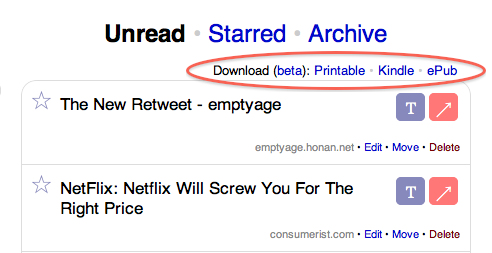
 One of the reasons I broke down and bought a Kindle earlier this year was a favorite service of mine, Instapaper, the simple bookmarking tool, rolled out Kindle support. Despite my belief that the Kindle is a) way too expensive and b) a fleeting technology that will be replaced by all-in-one devices, my job requires that I read a lot of online content, and Instapaper + Kindle support allows me to do so without having to spend all my time at the computer. That said, Instapaper’s Kindle support has always been less than ideal. Today, developer Marco Arment (also the lead developer for the micro-blogging site Tumblr) has done something about that.
There were a number of problems with the Kindle/Instapaper support. The biggest is that the system was completely unreliable. The way Instapaper works on the Kindle is that you have to set up the service to email your Kindle either daily or weekly wrap-ups of the articles you bookmark on the web. In my experience, about half the time this would work, the other half, these summaries simply would not get sent. Arment says he’s tried talking to Amazon about the issue, but has never received a response. Considering that Kindle users are paying $0.15 for each of these emails sent (an unfortunate side effect of the Kindle’s free built-in network), and it still is completely unreliable, this is totally unacceptable. So Arment has come up with a new way of doing Instapaper + Kindle: USB transfers.
To be clear, this isn’t the most ideal solution, since at least the over-the-air sync required you to do nothing and now you’ll have to attach your Kindle to your computer. But USB transfer will be infinitely more reliable and 100% cheaper (as in, free). This new process (which Arment stresses is still very much “beta”) allows you to download a Kindle-compatible .mobi file. These files are populated with your 20 more recent Instapaper saved articles. This also isn’t ideal if you want to see older articles you have saved, but I suppose you could always re-save them if you really wanted them on your Kindle.
On the upside, Instapaper will now work with non-U.S. Kindles (the email service was previously U.S.-only). Also nice is that many articles will now contain images, which previously were not transfered via the email route.
Along with Kindle-ready .mobi files, Instapaper now also allows for ePub downloads, the format that many other popular e-readers use (like Sony Readers). The idea is the same with the Kindle support, you get your 20 most recent articles converted into .epub files which you can then read on these devices. There is also now print support for all Instapaper folders.
Arment notes that because the over-the-air Kindle solution is completely unreliable with no support from Amazon, he plans to completely discontinue it next week in favor of the USB method. And if you’re wondering why you can’t simply use the Kindle’s built-in web browser to visit Instapaper, the answer is because the Kindle’s built-in web browser is awful and Instapaper currently doesn’t work on it (though Arment seems to suggest he is still trying to fix that).
While it’s the Kindle that is the dedicated reading device, it’s interesting to note that Instapaper’s iPhone app is at least a billion times better for consuming Instapaper content away from your computer. Not only does it seamlessly sync over the air, but you can mark items as read from it, visit the actual content on the web, and do about a dozen other more useful things. Of course, the downside is that the iPhone has a backlit screen (harder on your eyes) and is much, much smaller than the Kindle. An Apple Tablet + Instapaper app might be the perfect remedy for the latter.