 Lunascape, the only browser out there that can handle all three major web rendering engines — Firefox’s Gecko, Internet Explorer’s Trident and WebKit (Safari and Chrome) – received a makeover. The new version (released today), Lunascape 6.0 ORION, is free, in beta stage, Windows-only (Windows 7 is supported) and available in 11 languages (English, Chinese, Spanish, German, Japanese, French and others). Tokyo- and Silicon Valley-based Lunascape Corp. made its browser available to an international audience for the first time back in November 2008 (with Lunascape 5, which is the official and stable version and can be installed with 6.0 on the same PC).
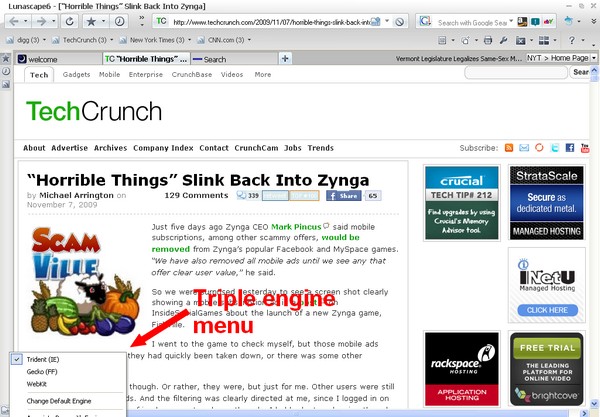
The main selling point of the browser is still intact: Lunascape users can instantly switch between Firefox, IE or Safari/Chrome mode by right-clicking tabs or by clicking on the engine switcher button on the bottom left of the screen.
The browser should come in handy for web developers and designers who have to test sites for browser compatibility or for those people who aren’t satisfied with either one of the five big browsers (in case there are any). But the Lunascape developers say they aim at establishing a “Unified Browsing Platform” for everyone. Their ultimate goal is to help general web users overcome the hassles they encounter when using IE at work and Firefox at home, for example (different UIs, bookmarks, settings, add-ons etc.).
Screenshot: Triple engine selection
But what’s new in Lunascape 6.0?
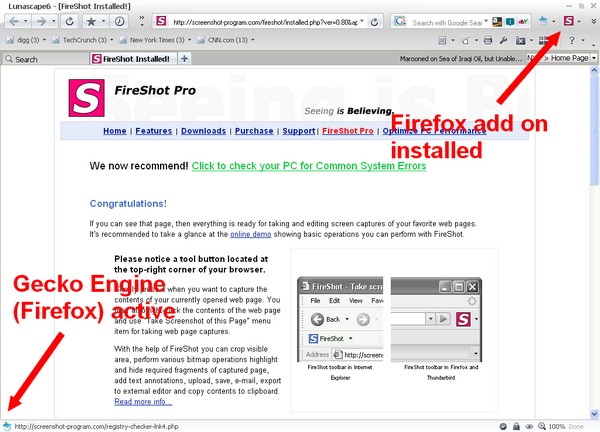
Probably the biggest change in comparison to version 5 is that in addition to IE and Lunascape-specific add-ons, Lunascape now supports Firefox add-ons, too. The browser still doesn’t work with Chrome or Safari plug-ins, but Firefox add-on support was the most requested feature coming from users in the past year. And a new wizard makes it possible to transfer all of your add-ons from Firefox 3.5 to Lunascape 6.0 automatically if you’re so inclined.
Screenshot: Firefox add-on in Lunascape 6.0 browser
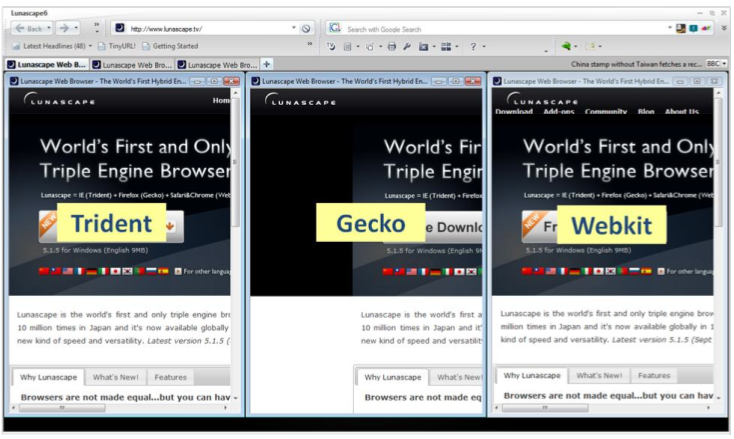
Users can now operate tabs in any kind of window split view, meaning you can compare any given web page rendered by the three different engines side-by-side in one browser window (vertical, horizontal, thumbnail, cascade). This makes a lot of sense and should actually have been included in the previous version already.
Screenshot: Multi-view tab display
Some smaller revisions include a new extra-minimalist interface available that does away with a lot of the clutter of Lunascape ‘s previous version and a revamped “floating” sidebar that can display a number of dedicated add-ons (i.e. a minimap).
I’ve tested Lunascape 6.0 for a few days now, and the browser is still a little buggy but pretty stable for a beta release. Granted, the changes from version 5 aren’t huge, but especially the Firefox add-on support and the new design and interface should make Lunascape 6.0 worth taking for a spin. The race for the ultimate browser continues.