
I haven’t noticed this myself today, but it appears at least a subset of Gmail users are inadvertently drawing closer to an inbox with zero unread e-mails thanks to a nasty bug that marks messages as read even before the user opens them.
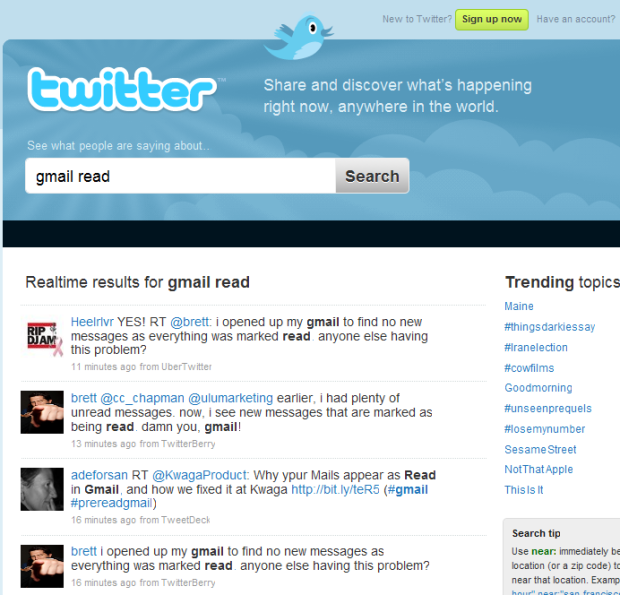
Former TechCrunch writer Ouriel Ohayon was one of the first to signal the bug on Twitter – with many of his followers echoing the phenomenon – and a quick search shows other users are seeing the same thing. Some are evidently fearing that their accounts were hacked or at least accessed by someone else.
According to this post, the error stems from a change Google made in how it treats the body of an e-mail through IMAP, although the company has yet to confirm this to us (or publicly).
The author of the post also offers a quick fix:
I then relaxed and searched on Twitter and it appears others were also impacted when Google modified how it handles IMAP GET MESSAGE BODY. Even mails on my iPhone were effected by this.
Anyway, thank you to our first user who pinged us so that we could correct this in real time. And for all of you IMAP Geeks around the world, set the PEEK mode to TRUE if you get an mail’s BODY from Gmail.
Update: The Next Web got a response from Google about the bug we first reported on – even though we did not despite contacting the company’s PR department well in time – and ran the following statement:
“Last night we pushed a code change in Gmail that negatively affected a small number of IMAP clients, causing unread email to appear as “read.” Only a handful of users experienced this, as most IMAP clients remained unaffected. We’ve since reverted the change and the problem has been resolved.”
(Gfail image from Tecnoblog)


Wow… I thought I was losing my mind with this; then I thought someone had compromised my password…
This is good to hear. This happened to me last night, but it was before there was any buzz on Twitter about it. Fearing my account may have been compromised, I reset my password and some of that kind of stuff.
This bug certainly sucks, but it makes me feel better.
Thanks for the update!
I thought I was going crazy, or someone had hacked into my Gmail!
So did I! I had 5 emails I swear I dind’t read.
It was nice to see the issue and check Techcrunch knowing there was probably a report up about what’s going on.
FYI, I don’t use IMAP and am also having the issue.
Was just about to e-mail TechCrunch and comment on this problem.
For me the problem seems to stem from my Android phone. When the phone syncs with gmail the message in gmail becomes marked as read.
For people who want to follow the users:
http://www.goog...4abee&hl=en
http://www.goog...e86af&hl=en
Hopefully, Google will sort this out soon!
I noticed this today and promptly changed my password. Glad to know it is a bug.
What is this thing about?
Despite not having manners, this bug has not touched my 8,000 unread messages
Wow, thanks for the heads up, this definitely happened in my account.
happened to me too. still not fixed.
at this precise moment, i still have the same issue both on my computer and my iphone…
Google please do or say something.
If this is only triggered by using IMAP to FETCH the BODY element then it is not a bug – the bug was not doing it before.
The difference between a FETCH of BODY and FETCH of BODY.PEEK is that fetching BODY sets the \Seen flag but BODY.PEEK does not.
I haven’t noticed this myself today, but it appears at l..
I had the same thing this morning, which made me change my password immediately! Very strange…
Does Thunderbird fall prey to this bug as well?
When I first heard about this I checked my email by going to Gmail’s webmail.
How do I set IMAP peek mode (as suggested by a linked article) in thunderbird?
Just a few minutes ago my gmail gadget informed me that I had an email. Launched Thunderbird – and there the email was in all its unread glory waiting form me in one of my folders, placed there by a rule.
Thunderbird may not fall prey (but the sample is too small to tell really).
Wow, what a relief. I’ve been working on figuring out who had access to my account (no one), changing passwords, checking for forwarding setups from my account, etc. Should have checked twitter first…
I thought I needed more coffee when I saw this in the AM! Glad I still have my mind intact.
Mine only “auto read” the first page (50 emails) that were unread. I manually put back to unread and they seemed ok.
Just checked again and another got “auto read”; bummer. Got to keep a close eye today.
I have been having this problem for months and I thought it was just my account. Good to know that other people have the same issue.
Hopefully Google will solve the issue now that its getting some attention.
I noticed this also starting this morning. Although this post describes the problem as an IMAP bug I noticed using the “last account activity” link at the bottom of Gmail that my mail was being accessed from somewhere using IMAP.
I don’t check my email using IMAP and my account had been accessed using this other session only seconds before. I promptly changed my password.
I wish I wrote down the address of the site to see if anybody else notices the same thing…
Do you have an email ticker? A widget that sits on your desktop and lets you know how many emails you have waiting (some tickers even show the titles of the waiting emails)
I do, sort of — I use digsby. I did not have it running at the time though, and the IP address of the IMAP client was not the one where I’m at.
I did an nslookup on the IP address of the IMAP source this morning but duh on me for not recording it. Of course, I could always change my password back and see if it starts checking again.
Same here, had IMAP connections from Amazon EC2 ISP this morning and was in a meeting at the time, only IMAP connection I have is the iPhone but has no fetch enabled. So not sure it is as easy, there shouldn’t have been any connection to my inbox.
Other services use IMAP, such as threadsy.com and gist.com to access your emails. (They don’t mark them as read)
fixed now looks like!
Did Google fix this or is there a fix available for iPhone? I’ve been experiencing this for weeks, I thought it was because of a poor iPhone IMAP implementation…
Thanks for having cited Kwaga’s fix!
The Paris-based team is very proud.
This sounds like a highly desirable feature to me
Did anyone else notice who the tweets in the screenshot were from (@brett aka Brett Petersel) and find it funny?
It’s all good!
A minor nit: Can we please quit using the terms “bug”, “glitch” and “issue” and replace them with the more semantically-correct word “defect”?
it seemed ok that it deleted messages till i needed an assignment that my teacher sent and i failed that class
i accidently erased it my fault im a tard
I have gmail and have not encountered this bug
Same issue here, I found it odd that I only had 3 emails between 6:30am and now.
Or they mark mail that I’ve read as unread.
Too bad I cudn’t see the bug.. Generally don’t keep unread message in gmail atleast
n new messages r nt too many 4 a day ..
Though wud be helpful for d guys wid lots of unread
I liked it. So much useful material. I read with great interest.
Testing comments to facebook. Does it post to my wall?
I had this same problem too. It took me 10 mins. to find a new email, and I changed my password because I thought someone got into my account.
I posted this to my blog:
http://dailyram...emails-as-read/
lol at the damn ‘gfail’ graphic… it’s so classic!!
Every time Google has a problem they say “only a handful of users were affected” – For such a large company that is going into literally 10 separate industries you would think they would have better quality assurance going on. What the hell is going on over there?
There couldnt be a much better way to solve the email overload.