Apple’s New Remote Is A Riddle, Wrapped In A Mystery, Inside An Enigma
by MG Siegler on November 4, 2009

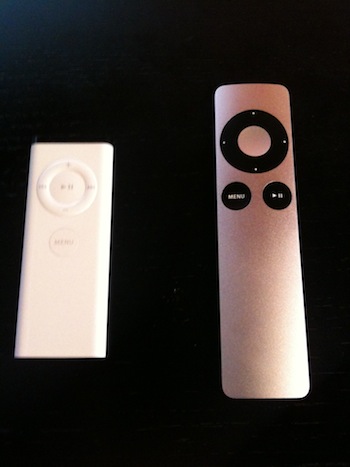
IMG_0676I hold in my hand the new Apple Remote. In case you missed it, Apple quietly launched it alongside the new iMacs, Mac minis, Magic Mice, and MacBooks a couple weeks ago. Simply put: I don’t get it.

That’s not to say it’s not a nice looking product — it is, but there have been some changes that make me confused as to what Apple exactly is trying to do with this thing. From a design perspective, it makes sense. The new remote now has the brushed aluminum and black button exterior that graces both Apple’s MacBook Pro line and the iMac line these days. The original Apple Remote was all white plastic (aside from the top sensor), that matched the older iMacs that it originally launched with.

Back in those days, the remote made more sense. First of all, it came with most new Macs. This, alongside Apple’s Front Row software, made it seem obvious that Apple was going to start taking media (beyond just music) very seriously across the Mac line (for a while it even came with Mac laptops). But today, the remote doesn’t come standard with any Apple product aside from the Apple TV (for obvious reasons). Instead, it’s a $19.00 add-on, even for the new huge 27-inch screen top-of-the-line iMacs (which seem like a natural fit to watch media on).

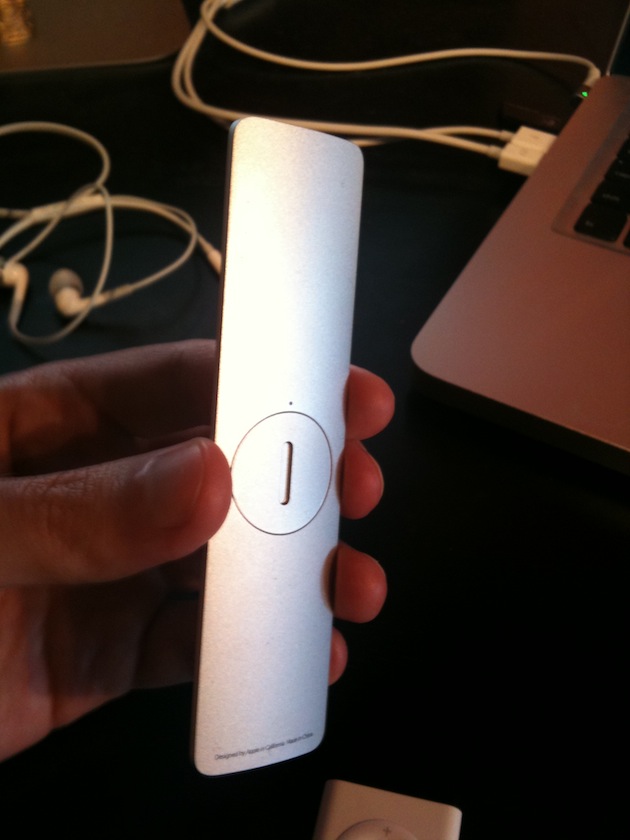
Also odd: while the original white remote had a magnetic back to allow it to easily stick to the side of the iMac, the new remote does not. That means this remote is yet another piece of clutter sitting on your desk if you opt to buy one. It would seem that Apple doesn’t really care about you using this remote anymore, even though without it, Front Row is basically useless. It doesn’t make a lot of sense to use it over simply using iTunes if you have to sit at your computer to do it anyway.

But the oddest thing about the new remote has to be that Apple has for some reason decided to move the Play/Pause button from the center of the navigational circle to the lower right side of the device, shifting the Menu button left to make room. That might make some sense as just a straight-up ergonomic design change, but the weirdest thing is that the center of the navigational circle is still a button, that does the same thing as the Play/Pause button.
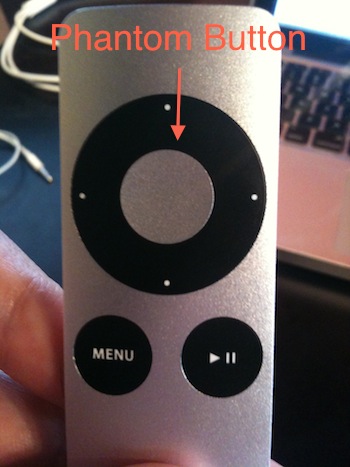
IMG_0679Yes, Apple has added a new useless button. Again, Apple. The company that hates buttons.

Apple’s documentation for the new remote provides little insight, but they do label this new center button as “Select” rather than Play/Pause. But again, it does the exact same thing. Could there be some new funtionality for Front Row in the future that takes advantage of the Select button? Maybe. But even launching something like the new iTunes Extras content now being packaged with movies doesn’t seem like it would need its own button.

Here’s something else: Apple doesn’t even bother mentioning it on the main Remote page on its site, but this new remote does work with the Apple TV. Again, from a design perspective, this makes sense as the new remote looks much more like the Apple TV than the white one that currently comes with it. But again, the remote’s phantom button does nothing different from the Play/Pause button aside from the fact that holding down Play/Pause brings up movie chapters, while holding the phantom button does not seem to. Odd.

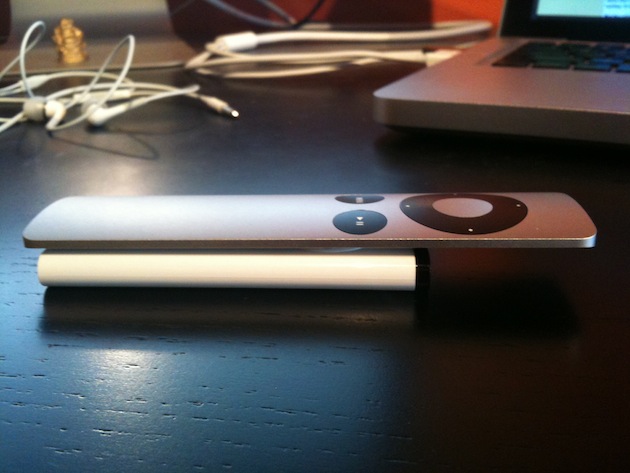
There is one definite advantage of the new remote: It’s much easier to change the battery. I have friends who have stacks of old dead white remotes simply because they didn’t even realize you could previously change the battery. So that’s nice, but does it really warrant the $19 price for a larger, heavier remote that no longer sticks to the iMac? Probably not.

If you want a good remote for iTunes and the Apple TV, just use your iPhone or iPod touch. Apple’s own Remote app makes it much, much more useful than either of the physical remotes. You can, for example, do a search by typing on the device’s keyboard rather than being forced to do a ridiculous amount of clicks to manually enter each letter on the Apple TV’s onscreen keyboard. It’s also much better for scrolling through a bunch of titles. Really, it’s better in every way imaginable. The only downside is that you have to own an iPhone or iPod touch. But if you own an Apple TV, chances are you probably own one of those as well.

I really don’t understand Apple’s thinking with these remotes. It would seem that they’re clearly inching towards products with less buttons and more touch elements, but this new remote is the opposite of that. There’s been a touch screen remote rumored for some time now, but this is what we got instead? What gives, Apple?

Update: A few things from some insightful commenters:

1) It’s also a bit odd that the new remote does not feature an Apple logo anywhere on it. The old one did on the back.

2) It’s true that aluminum is not a magnetic metal, but neither is plastic, which the old remote was.

3) I had forgotten about this, but the old Apple Remote is very similar to the original iPod Shuffle. It’s certainly possible that Apple was using the same manufacturing for both, and with that Shuffle long retired, it was easy to move to a new type of remote.

4) Apparently, the Play/Pause separate button also allows you to stop/start content when you’re not specifically in that section. That could very well be why Apple did this, but that is also not very intuitive since the buttons do the same things the rest of the time.
IMG_0680

IMG_0678

Advertisement

Comments rss icon

  • I use the current white remote with Hulu desktop and it is pretty annoying to have the Play and Select button as the same button.

    For example if I am navigating through Hulu menus and then click the Play/Select button and iTunes is open in the background then it will also play iTunes. Now I should be able to navigate Hulu fine without messing with other apps in the background.

    • Believe me, Luke – I know your frustration. Before Snow Leopard, it wasn’t an issue to use the remote with Hulu Desktop without triggering iTunes and Front Row in the process.

      BUT THERE’S A FIX! An alternate driver for the Apple Remote is available for free, here:

      http://www.iosp...labs/candelair/

      It fixed all my issues with using the remote with Hulu Desktop and Plex. Check it out.

  • Does the new one still use the IR port? If not, it’ll definitely be an improvement when delivering presentations :)

  • i don’t see how this matter is important enough to dedicate a whole techcrunch article to it.

  • Also there is no Apple logo on it. I would buy it but how will people know that it’s made by Apple? No thanks, I think I’d prefer to use my old remotes that actually have an Apple logo.

  • Why is it so hard to understand? I find the ipod and the remote counter intuitive. I like the new remote. It has a clear distinction between functionalities:

    play / pause.
    menu (settings)
    navigation for menu’s and the dvd menu.

  • I think they developed this specifically for their new “rumored” TV subscription plan. Who knows – I most likely am 100% off base. I’ve bought and sold so many mac laptops I’ve got 4 of them in my house so I probably won’t buy any of the new ones even when I buy a new machine.

    • i’d like to think they have some plan for this thing, but I’m really not too sure.

      • Couldn’t it just be Apple experimenting with their “Unibody” construction process to see how small they can make something? it does have the same texture and styling as the Macbook Pro’s etc… Can anyone compare it to an iPod Nano, see if the metal is thinner/thicker sturdier/flimsier. Maybe they just had a ton of useless bits of Aluminium lying around and thought it was a waste and could make money from it (although I thought one of the charms of the unibody process was how easy it was to collect and melt the metal shavings and make new aluminium blocks out of them, I might be wrong). Maybe Steve just hated using his white remote with his Macbook Pro because it didn’t match xD

        Just some thoughts :D

  • No more magnetic back…
    Aluminum is non-magnetic by nature, but I guess the composition of the product is not just pure Al. Also, maybe not enough space for a strong enough magnetic in the slim design? Magnetic field has to pass through the Al too.

  • Awesome. They’ve been missing this extra button for ages, glad to see they’ve finally figured it out.

    Try using Boxee sometime, with the old Apple remote. It’s really frustrating, because there is only one “select” button, which means if you’re playing some music, and you want to browse the rest of your content, you can’t select anything without pausing the music. There are similar problems throughout the app. Any interface with similar power to Boxee would suffer from the same problem. The new remote fixes it.

    • okay but I highly doubt apple made this for the sake of boxee :)

      • I haven’t tried it but I think the button has a use. If you are playing a track in front row and navigate back to the main menu you can select menu items using the middle button. If, for some reason, you are still in the menu system but want to pause your track for a second you press the play/pause button. Seems pretty logical to me. Could you confirm this MG Siegler?

    • I think this is exactly it. When you’re knee deep in menus, and simply want to pause the song that’s currently playing rather than pick a new one to start playing, you hit the p/p button.

      Apple may have realized that there’s such a thing as oversimplification.

  • To summarise:

    + Writing about this remote suggests the boss is out of the office and the mice are slacking off.
    + I like the new remote, so there.
    + Ergonomically it is much better, I think.

    Seriously, slow week at the TC office?

  • As a matter of interest the original white Apple remote used the exact same button components as the original iPod shuffle. One would assume this was to reduce manufacturing costs. However as the shuffle has now done away with buttons the remote is free to use it’s own components.

    Also, I would agree that the iPod Touch and iPhone make great alternatives to the remote when using the Apple TV. Although I never knew you can also use the keyboard – great tip. I also have a Logitech Harmony remote which works as a great alternative with the Apple TV.

  • Then, when everyone hates it, we’ll bring back Slurm Classic, and make billions!

  • MG,
    Aluminum is not a magnetic metal. Poor researching on todays articles.

  • I have a couple of the white remotes and none of them are magnetic. So I’m not sure that’s a newly depreciated feature.

  • The new button is there so you can play/pause the music while you’re in the menu area of Front Row, Apple TV, or Hulu Desktop. Previously, you had to go back to the media to play/pause it.

    • that’s interesting. but not very intuitive since otherwise both do the same things.

      • It is definitely more intuitive. Right now I can be listening to music and browsing something else on-screen in Apple TV. A new song comes on, or I want to hear what my wife is saying, there’s no way for me to pause the music, since hitting the play/pause button on the old remote selects the item I’m viewing.

        This new design provides a more intuitive interface, because the middle button does what I want all of the time, and the play/pause only button is available for those other times, and it’s intuitive. Oh crap, I don’t want to select I just want to pause. OK, hit the play/pause button.

  • As someone that gives a lot of presentations using Keynote… this is actually my next purchase.

    I’m -very- curious about the range of this shiny entrant.

    Any anecdotal evidence on range differences?

    Does bigger mean longer reach?

    Will this mean presenters develop remote envy?

  • Only the old white plastic iMacs support the magnetic attachment of the remote– they dropped this when they moved to the aluminum enclosures.

  • It will all make sense once Apple is going to release the iSticker, which can be placed right on phantom button.

  • Embarrassment: in the second paragraph “censor” should be “sensor”.

  • I could see how some users would be confused by the old remote in that the “select” button in the middle had the play/pause characters on it. I could see that paralyzing someone like my mom if she was using the remote to browse movies on Apple TV. Granted someone like my mom would never use the Apple TV, so this is a theoretical case of confusion.

    Agree with you that Apple’s own Remote app for the iPhone/Touch is the best way to navigate and browes. I really think this is the best kept innovation Apple has brought to market. Once you use it using the old remote becomes really painful.

  • Really? Am I going to be the first person to point this out?

    Guys, Don’t you think the reason for the removal of the remote as standard equipment for macs has something to do with the iphone/ipod touch?

    I mean I use mine as my remote right now. With the free app that Apple developed. Sure it doesn’t control Front Row….yet. But it’s not hard to imagine.

    If I’m running Apple and had probably the best remote ever conceived with the iphone/ipod touch I’d probably phase out the standalone remote too. Especially since, as we know Mac owners tend to be iphone owners as well. Right?

  • Thank you TC for another really poorly researched, poorly constructed article. I really want to embrace the info here, but it always ends up feeling more like watching a train derail.

  • Wouldn’t you need the middle button to make selections, and if you were already clicked on a movie, it would essentially double as a play button?

    Also a separate play/pause button is very helpful for when I need my Mac’s music to pause, without having to pull up iTunes or Front Row.

    I don’t understand why that seems so confusing.

    Chris

  • Come on people! Can’t you see: This is clearly a paid ad for Apple.
    I don’t know how I ended up here!?
    Anyway while I’m here consider the following:
    I’d prefer a hands free remote control maybe with voice control?
    When it’s lost somewhere in the living room can you press a button on your Mac/ tv to make it ring (maybe your favourite tune) so that you can find it. or just shout “REMOTE” then it’ll beep or something?
    Add a finger recognition system to it to prevent unauthorised use?
    Can a beer opener incorporated into this?

  • “but the weirdest thing is that the center of the navigational circle is still a button, that does the same thing as the Play/Pause button.”

    There is another difference: if you look carefully, the wheel doesn’t have any symbols, only generic dots. It looks like they removed the play/pause to make room to a programmable wheel (hence the lack of printed icon on the remote.) My guess is soon will launch something utilizing this hardware and the wheel will be fully customizable by the users.

  • I think the weirdest thing is that the the AppleTV doesn’t ship with the new remote, still comes with old plastic one.

  • It’s weird that there’s no apple logo on it. The question will be, how much extra cred do you get for driving your keynote presentation with it ;)

    And the extra button is _clearly_ used to queue the steve jobs “oh, and just one more thing” sound byte ;)

  • Its a temporary hardware fix for a software problem that cant be attended to right now (namely the play/pause while browsing issue) The phantom button in the middle is still there in the middle so that people who own this mote will still be able to use it the same way in the future when the software change has been made. Yes, they will be returning to a single button mote.

  • Why don’t they just use the click wheels from the iPods no one is buying anymore?

  • Someone should check to see if it has a built in accelerometer ;)

  • but is the key russian national interest?

  • Personally, while I think it looks sexy, I don’t like to feel of that particular mottled aluminum. (It’s not brushed). It feels yucky in my dry fingers like foil feels yucky on teeth.

    It’s even worse when sliding across my wooden coffee table where it feels and sounds in the direct of fingernails on a chalkboard. I traded someone for the old white remote.

    Here’s hoping that Apple starts doing some ergonomic testing on top of their awesome visual design.

  • Shouldn’t this be on CrunchGear?

  • isn’t it almost an upside-down nano?

  • Thanks for the post MG. Sounds like you’re asking all the right questions. And this definately appears to be one big WTF. The first thing I thought about when seeing the super big remote was, is there multi-touch on this bad boy? I guess not, but perhaps they are gonna move to that?

  • Updated Apple Remote? How shiny. Now it would be great if Apple started to pretend like it actually cares about Front Row, which is the reason the remote comes with a Mac in the first place. It’s basically abandonware: Apple hasn’t touched Front Row since February 2008, despite releasing 2 major front-end updates for the AppleTV since then.

    The existence of Plex/Boxee/XBMC doesn’t excuse Apple’s laziness here. It’s one of several examples of Apple releasing a half-assed product and then letting it languish to the point of embarassment.

  • “I have friends who have stacks of old dead white remotes simply because they didn’t even realize you could previously change the battery.”

    1) I think you need some smarter friends.

    2) It’s ironic how we can talk about a new Apple product and one of the features is the easy of battery change.

  • I am glad this got updated!

    I have used various remote applications (Front Row, Apple TV, Hulu desktop, Boxee, Plex, Remote Buddy, etc.) and have noticed it is completely necessary to have a separate button to select something, as opposed to play/pause something!

    This allows you to browse menus while maintaining control of being able to play/pause! Right now this is not a problem in Apple TV or front row, but hopefully this foreshadows new functionality/updates to Apple TV and front row

  • Do you people realize that you spend 9562 words on a remote control?

    Wow. And to think that I added 23 words to this…

  • In soviet Russian, Apple controls you…

  • Your friends have stacks of old white mac remotes with dead batteries? What the heck do they do with these things and how come your friends don’t know how to google for battery change howto? You need smarter friends. Oh wait, are you prone to exaggeration in your posts?

  • I believe the original remote (white one) has never stuck to the new aluminum iMacs. Have you tried it? It worked on the white iMacs but not the new ones. Did you test it before your wrote your article?

  • Does the old remote stick to the side of the new iMac line? If it does it would be handy to get a magnetic battery door to replace the current one.

  • Another important note is that as of I think update 2.3 to the Apple TV it can now learn new remotes. So I setup my AppleTV to work with some buttons on my TVs remote that seem to basically only be used for navigating the TVs settings menu.

  • Speaking of remotes, the latest Apple TV update enables you to use any infrared remote, as it will learn the codes. I haven’s seen this feature written about, it is great. I use my Sony Bravia remote and press the DVD button to control Apple TV.

  • Apple apple apple…it’s so popular it ain’t fun anymore!

  • The Apple Remote does a lot more than Front Row and AppleTV:

    http://www.maci...uct.com/node/79

    I’m sure the extra button does something on one of these apps.

  • Well the magnetic strip is no big loss…it never worked anyway.
    For as much as I love Apple it seems that they never loses a chance to sell something separately.

  • The middle button will be used for guesture mode.

Leave Comment

Commenting Options

Enter your personal information to the left, or sign in with your Facebook account by clicking the button below.

Alternatively, you can create an avatar that will appear whenever you leave a comment on a Gravatar-enabled blog.

Trackback URL
Short URL
bugbugbugbug
Techcrunch on Facebook