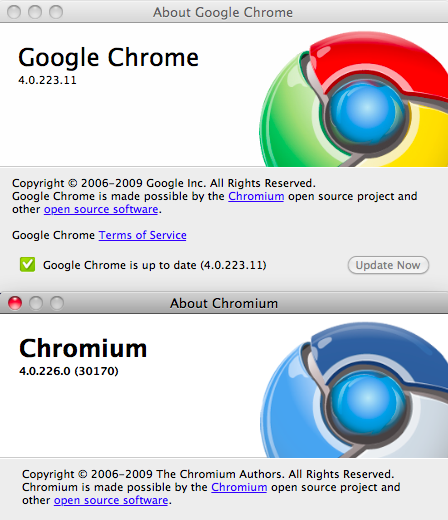
We’ve spent the past several months closely tracking the progress of Chrome for Mac. Well over a year after its release for Windows, there hasn’t been so much as a beta version for Mac (or Linux, for that matter) yet. Even Google co-founder Sergey Brin expressed his displeasure with this last week. But Brin also noted that he was using the pre-beta version of Chrome for the Mac, but warned that it was unstable. After months of using Chromium builds (the open source browser that Chrome is based on), I decided to give the developer version of Chrome for Mac a try once again. The results have been very good.
While recent Chromium builds have been a little shaky with a mixture of UI failures, bugs, and a nasty habit of “Chromium Helper” (the name of separate tab processes in Chromium) eating up your CPU, Chrome itself feels much more stable. It would seem that at some point recently, Google flipped the switch to push Chromium 4.0 releases into the Chrome for Mac developer channel. These don’t come daily like the Chromium builds, but only seem to pop up as an upgrade option when a stable build is found on the Chromium path. For example, right now, Chrome for Mac is 4.0.223.11 whereas Chromium for Mac is currently 4.0.226.0.
This is great because it allows you to skip the bad builds of Chromium, and only get the ones that are ready for primetime. It also allows you to skip digging through the Chromium web file structure to find the latest build as Chrome for Mac now updates for you with the click of a button.
The differences between the latest builds of Chromium and these developer builds of Chrome seem unnoticeable at this point. That’s what stopped me from using the developer builds of Chrome previously, they were far behind Chromium. That’s no longer the case. And, besides being more stable, the Chrome builds offer some additional perks, such as being able to import bookmarks, something which the Chromium builds turned off months ago for some unknown reason. (To be clear, this only works when you first load up Chrome. The Bookmark Manager itself still does not work yet.)
I’ve been using the developer build of Chrome for a solid week now. It has even auto-updated once. Are there crashes? Sure, sometimes. Are there bugs? Of course. But overall, none are keeping me from doing anything I normally do on the web as a relatively heavy surfer. I’ve kept the browser open for days in some cases, and it has remained stable without sucking up too many system resources. And I’ve been sure to try and use it as often as I can with more JavaScript-heavy sites like Facebook, Gmail, Digg, and others. For the most part, it seems to handle them all well.
Chrome Themes are visible from the Thumbnails page (in the lower right corner) just as they are in the Windows versions of Chrome. And yes, they all work, even if some are ugly (and some clash with Chrome for Mac folder icons in the bookmark bar). Sadly, bookmark syncing doesn’t appear to yet work even though it too is shown on the Thumbnail page. Printing does work though.
Chrome for Mac is still not quite as fast as it is on Windows, but it already seems comprable in speed to both Safari and what is still my browser of choice (mostly for its speed), Camino.
Those of you who have been doing the daily downloads of Chromium (maybe using our tool) should consider switching over to this developer build of Chrome. At this point it seems to have all the pluses without the minuses. Plus, it auto-updates for you, so you can remain on the cutting edge of Chrome.
Google has publicly said that it wants to have a version of Chrome for Mac out before the end of the year. A few weeks ago, seeing where the Chromium builds were heading, I would have thought that would be impossible. But the Chrome developer channels offers new hope. We could be nearing beta.
You can find the developer build of Chrome for Mac here.


Been using the new developer release on mac for the last day or so.
It has been stable so far and it is fast fast fast!
I must say it does feel nice not having to be exclusively tied OSX Snow Pus.sy or whatever Novelty OS that comes out of Cupertino.
Nothing quite says you’re an afterthought and irrelevant in the OS space when mighty Google puts their B-Team or the ones who rode the short yellow bus to school on developing for Mac and Linux. Brin can bitch all he wants but that the reality that faces him and his company.
I’ve been using it in Ubuntu. It’s freaking fast.
I’ve been using Chromium for Ubuntu for months. It works perfectly fine. A month or so ago full Flash support was added and Flash in Chromium for Ubuntu works about as good as in Firefox.
I’ve had an issue with Flash in Chromium… where I occasionally can’t start playing streaming audio or video. I’m not the only one either.
Regardless, it’s still the best browser I’ve found for Linux.
Chrome kills FF on Jolicloud, based upon Ubuntu, don’t really need another browser for OSX though.
I want to be able to switch from Safari, but so far, Chrome for Mac doesn’t offer the option to import bookmarks from Safari
In fact, the bookmark manager doesn’t even work. Darn
what about when you first download chrome for mac? it has done it for me every time.
… but, as you noted in your article, that only works the first time you open it, there doesn’t appear to be any way to do it later because the Bookmarks Manager is disabled.
I don’t know about you, but I tend to skip through any initial requests to import anything when installing a browser.
No love for 10.4? Boo.
Switched from Safari a few days ago. Chrome is still far from feature-complete (*still* no bookmarks manager?), but it has some really unique features that make it worth using even now.
agree.
I just run the benchmark of Chrome Mac Beta vs. Safari 4 on http://service....om/peacekeeper/
The result was pretty clear: Safari was far ahead of Chrome in terms of overall benchmark performance.
I don’t know how good this benchmark is, but for me it is already an indicator, that the perceived speed improvement of Chrome – rather subjective is, at least compared to Safari
i’m on Firefox, i’ll do the Chrome jump if i see higher speeds (which i’m sure it will) but ONLY if i can have my favorite plugins with me : adblock, cooliris, delicious, fireFTP and AutoPager.
Are there anything comparable on Chrome ? Will there?
I bought a new mac last week, and had Chrome running on my PC.
I installed the version of Chrome I found (assuming its the dev version), and I have to say – I’d be happy if they never updated it again. It hasn’t crashed (touch wood) once, and is wonderfully fast…
I wonder why no one cares for their privacy anymore …
“…and what is still my browser of choice (mostly for its speed), Camino.”
Ditto that. Camino is my browser of choice as well.
Been using Chromium ( 4.0.202.0 (202.0)) on the side for a while now and like it, but waiting for actual release of chrome beta with bookmark import support before making the switch away from Camino.
If I was able to use the wonderful 1Password with Chrome, it would be the only browser I would need to keep open. The ability to use at least some plugins is a make it or break it issue.
Great – been waiting on this for a while, I’ve found that Safari has been crap on Snow Leopard…
I like it. The speed is great, the unified address field/search box should be in every browser, and the bookmark syncing might actually get me to use bookmarks again.
The most annoying bug is that keyboard shortcuts (everything from opening or closing tabs to going back or forward) often stop working after you click around in Flash heavy sites (i.e. every Youtube page). For a shortcut junkie like me, this is a pain in the ass.
Chrome is available for Linux. Installed it a few weeks ago on Linux Mint, and it runs flawlessly.
“it does look like it’s getting close.” 6/2/09
“it looks like it’s getting pretty close” 7/16/09
“they are close to where they want to be in terms of a general release schedule….we may see a public beta.” 8/1/09
“it’s definitely getting really, really close to being ready for prime time.” 9/16/09
“Judging from the Chromium builds, it seems very close.” 9/18/09
****drumroll****
“We could be nearing beta.” 10/27/09
“We’ve spent the past several months closely tracking the progress of Chrome for Mac” I think you should change it to ” I have”. NO one spends as much time and energy on tracking Google other than you
Disagree. There’s at least two of us
MG, the dev channel is pushed roughly once per week (on all platforms). It gets some basic acceptance tests run on it manually which is why the builds should always start and run.
The continuous builds from our buildbot are made whenever an engineer checks in, automatically, and are pushed onto the website with no manual testing whatsoever. Yes they come out more frequently, and yes they are frequently busted. They’re really intended as a way for engineers to check that their changes work, and QA.
For most tech savvy folk, the dev channel is by far the safer bet.
-Ben
nice writeup. I also switched from chromium back to dev chrome a couple days ago and have seen the same improvements. this latest release of google chrome even lets you use gmail without logging you out immediately because you’re “logged in to a different account on the same browser” – brilliant!
I blogged about this yesterday. I think Google’s Chrome is very fast and feature-incomplete. Overall, I like this browser.
It’ll be interesting to see if they get more market share on Windows or OS X.
I have a PowerPC iMac, so Chrome (Intel only) isn’t an option. And Safari isn’t an option with Ubuntu on my netbook. That said, I’ve been running Chrome on a Linux netbook for about 2 months, and it has been solid, very fast, and much more parsimonious with memory than FireFox. I’m a convert
Been using Google Chrome on my mac for about 12 hours now. So far, I love it more than firefox. Only thing is, the “report bug” button is broken for me…anyone else have this?
I just switched after reading this – thanks. If the stability of Chrome doesn’t outweigh the coolness of the Chromium icon then I’m switching back.
Two things I don’t get. First, Safari/webkit betas are consistently faster than Chrome in the Peacekeeper and Sunspider tests. So what is the big deal with Chrome other than crash proofing? Second, Camino 2 beta seems EXTREMELY slow in Peacekeeper and Sunspider and scores quite low in the Acid3 test. Please tell me what I am missing here….