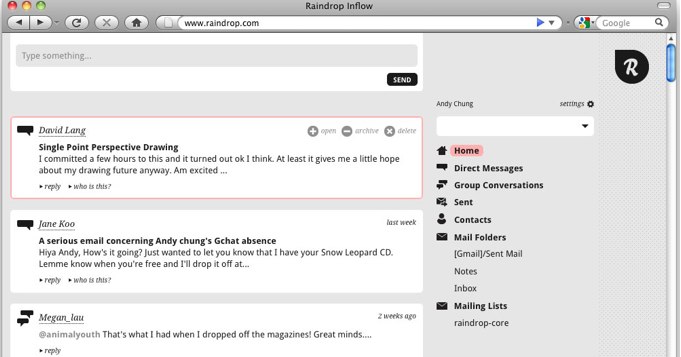
Mozilla Labs, Mozilla’s innovation group, has developed a new open-source, experimental email and communication platform called Raindrop. Mozilla says that Raindrop was built to be focused on highlighting and breaking out personal conversations, making it easier for you to see all of your conversations in one client. It is designed to “bubble up” the important conversations from your messages
According to the site, Raindrop “is an effort that starts by trying to understand today’s web of conversations, and aims to design an interface that helps people get a handle on their digital world.” Still in prototype form, the platform is very young but it aims categorize messages and then separate the personal messages from bulk messages, so you know what to respond to vs. just noting a communication. So Raindrop will import all of your email, but break out your personalized email from your mailing list emails and will portray the personal emails higher on the page. Raindrop will also separate direct messages and @replies from your stream, acting like a Twitter client And you’ll be able to Tweet from the platform and pull in RSS feeds.
I briefly spoke with one of Raindrop’s lead engineer’s and the CEO of Mozilla Messaging, David Ascher, who told me that in the future iterations the platform should include all types of messaging, including IM, Facebook, FriendFeed, YouTube and basically, any communication with an open API. And according to the site, content with in communications, such as links from YouTube or Flickr should be shown near or as part of the message, rather than in a separate tab. Ascher said that Raindrop doesn’t really aim to replace your Gmail account but add to it with an intelligent way to understand your communications. The application works on Firefox, Safari and Chrome.
Mozilla also wants to developers to build applications off of Raindrop and is releasing its API to help users customize their communications experiences. The back-end of the platform is a non-relational database (CouchDB) which was optimized for massive web interactions. The front-end, says Ascher, uses high-powered JavaScript libraries, modern CSS to give your best browser with the platform. Ascher told me that Raindrop is still very, very early stage but the platform will continue to evolve with time.
It takes page from social media messaging aggregation services like FriendFeed but with a strong focus in filtering. It will be interesting to see what two-way interactions the platform will feature and what content it eventually will bring in. Because its a modern communication system, it could compete with open communications platform Google Wave.
If you’re confused, take a look at the video. It explains the purpose of Raindrop pretty well.
Raindrop UX Design and Demo from Mozilla Messaging on Vimeo.
Full disclosure: My husband works for the Mozilla Corp.


Not interesting so far. Im sure the development team will find ways to make it appealing. i have been using google wave with family and co workers and its been a pretty awesome experience.
Information overload is a tough nugget. More ideas is good thing.
This is a good thing for dealing with overload.
It’s bad news for small innovators in this space, like Threadsy.
I think it’s actually good news for Wave. Here’s why:
http://www.exam...is-is-good-news
It seems to me that Raindrop is more of an aggregator of services such as Twitter, Facebook, email, etc, whereas Wave is a new communication paradigm attempting to do away with all of the separate web applications and just have one centralized platform and method for web communication.
They both have their highlights; have not had hands on experience with either of them but it will be interesting to see which option winds up paramount.
True. Raindrop requires downloading the app – think updates – think individuals and their specific needs whereas Wave wipes the slate clean and starts the game start all over.
Rdrop knows your mothers email is more important than Amazon price drops and organizes accordingly.
I find it interesting.
Well, any such initiative to skim through email is interesting. The execution will matter the most. And yes, so far, considering what’s shown in the video, we (at least advanced users) can pretty much do it all pretty easily with a few filters and tags.
But as Frank mentioned, I’m sure it’s only the beginning of their journey and they’ll find great ways to make the most of it.
Stupid question but : haven’t they bought raindrop.com already ? :/ (parking webpage atm)
Personally, I think it is a wonderful idea. Of course, it still needs to grow and mature and the devs have admitted to very fact.
Hopefully the user community will jump in and share ideas that will make this into something worthy of the Mozilla name.
I am looking forward to the chance to see it in action when they really get the ball rolling.
Looks awesome!
This is exactly what I thought google wave wanted to be when I first saw it (of course this looks much more ambitious / innovative / cool and seems to be much more useful).
Kick ass.
This is more ambitious than the Wave protocol? Threadsy, Brizzly, and Streamzy are all possible competitors.
It sounds like a play for relevance where one has to go to their website. I thought Mozilla was all about open source. Are they planning to open source the back-end?
“The cloud” is great when it operates on *my* server and synchronizes with a 3rd party for backup. Consumer-focused ’servers’ like the Sheevaplug platform (from Marvell) are likely where I will direct my interests. Hopefully, others will agree.
I don’t think the original post noted that this was an open source project which is good to know. This post also misses the fact that this is a background process accessed via the browser, so pretty much a web-server. Just like Jaiku, it relies on the twisted framework; hopefully it won’t share Jaiku’s fate.
Has potential but still has a ways to go. I like that it looks simple but design can change.
I like OtherInbox (otherinbox.com). They integrate with my Gmail account and allow me to create new email addresses on the fly (target@johnsmith.oib.com, newegg@johnsmith.oib.com, etc) to keep from whoring up my regular inbox. Plus you can see who’s sold you out at a glance and block that inbox, which is small but satisfying.
I think it is a wonderful and interesting
Could be cool. The UI is horrible and for a product like this, UX will be a major part of adoption.
I’ve been using Thunderbird for quite some time now and have never had an urge to return to Outlook. here’s hoping Mozilla has another hit on its hands.
I use Gmail labels to set up my inbox very similar to this already, except for mixing in the social conversations which would really only add clutter. This way only work and important personal message show in the actual “inbox”. Mailing lists and all that other crap are out of sight until I choose to browse emails under those labels.
It isn’t getting harder to keep up, people are getting lazier. Solution: don’t follow an unrealistic number of people on Twitter and Facebook, and unsubscribe from mailing lists you don’t really care about.
I’m willing to give Raindrop a shot though if it offers some helpful features not found elsewhere.
Eric: “It isn’t getting harder to keep up, people are getting lazier. Solution: don’t follow an unrealistic number of people on Twitter and Facebook, and unsubscribe from mailing lists you don’t really care about.”
Now try writing it as “It isn’t getting harder to get to places, people are getting lazier. Solution: don’t go to places that aren’t walking distance away”
I WANT to follow an unrealistic number of people. I WANT to subscribe to hundreds of RSS feeds and mailing lists. And I want technology to help me deal with this information overload, tone it down, filter it out. I want to be ‘lazy’ in your sense, which means not wasting my time on things a machine can do, and instead focus my efforts in more constructive directions.
Raindrop is a very cool initiative from Mozzila, it has an ability to cut out the noise
and pulling the information of actually interest.Raindrop could make people categorized
and organised
The clutter reducing idea is exactly what http://www.otherinbox.com already does (with Gmail)
Raindrop seems to be a good app for online email clients. However Outlook still holds the majority market share and is the most widely used application for businesses. Nubli (http://nubli.com) that recently launched at demo does good prioritization with Outlook 2003 and 2007. It automatically prioritizes your emails into high medium and low so you can focus on your emails as per your time availability. It also automatically organizes your inbox as it has an automated tagging feature. Its like finding stuff on delicious through tags. Its Dashboard is another good feature that gives a good insight into whats up with your inbox. So Outlook users check it out and download the plugin. Its also coming very soon on iPhone