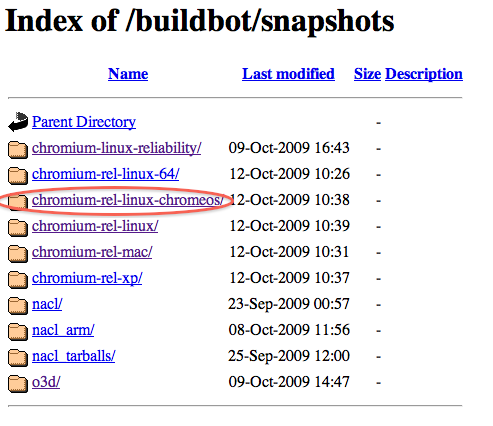
Pretty much every morning and every night I download the newest build of Chromium for Mac (the open source builds that will eventually turn into Chrome for Mac). While we made an auto-updater to do it for you, you can also manually find the latest builds here. This morning, I visited this site and noticed something new: A Chrome OS folder.
Sadly, this is Linux-only for the time-being, but that makes some sense since Chrome OS is Linux-based. And lest you think it’s just the Chromium for Linux build, there are already other folders dedicated to that (including a 64-bit variety), and the Chrome OS builds weigh in at 139 megabytes versus around 19 megabytes for Chromium.
Last month, we poked around some of the open source Chromium directories and were able to find some interesting information about Chrome OS. This included limited information about a status bar and a navigation bar, both of which will likely be key parts of Chrome OS. A scan today of various directories brings up even more interesting information.
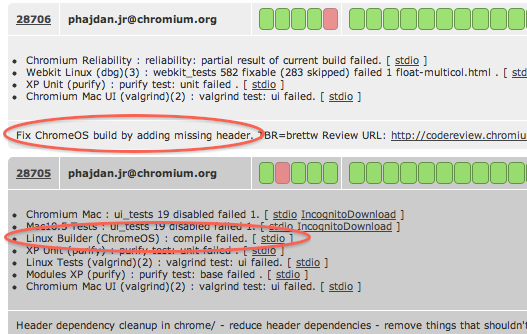
Here, you will find some information about the compact navigation bar (there will be a “main menu” button), there’s some sort of “clock menu button,” there is some kind of document viewer called “GView” (that will at least be able to view PDFs), there will be a network menu button, and this is all being tested on a “touchpad.”
Wait, what?
Yes, at the bottom of the page, you will see two files that reference something called “touchpad.” From the language in these files, it’s not entirely clear if this is refering to a notebook trackpad or some sort of touch tablet that Google is testing Chrome OS on. Here’s an example:
Add touchpad speed factor setting to Chrome OS touchpad settings page. Created slider widget with native gtk widget.
And:
Make vertical edge scroll false by default. Fixed sensitivity parameter values and inverted the relationship between touch sensitivity preference and synclient parameter value.
It could go either way, but the wording on the latter makes me think that it’s just for notebook trackpads, so don’t get your hopes up about an “Apple Tablet Killer” just yet. Still, it seems reasonable that with a lot of manufacturers gettings into the tablet game again, Chrome OS will eventually work on them as well.


“peeks”?
um. yep
This is modern day Indiana Jones, treasure hunting shit right here!
Yup, someone should make a movie out of this brilliant blogging activity!
Peaks or did you perhaps mean “peeks”?
There is Chinaman, er, i mean, a Chink in Chrome’s armor.
Racist dickhead
Are you serious?
Racist pig! Go somewhere else with your hate inspired words.
We believe Chrome OS will be able to handle “files” and could very well include a user “interface.”
Like some kind of system for operating? AMAZING.
The size of the file isn’t that unusual when compared to the other non-standard builds in the repository like the 03D build (I haven’t unpacked it yet, but I’m guessing this is the source code and not a build).
The touchpad stuff is interesting though – I’m guessing the settings dialog for the Chrome OS will be handled in Chrome.
its a trackpad:
http://src.chro...amp;view=markup
To disable vertical edge scroll, we set VertEdgeScroll to 0. Vertical edge
// scroll lets you use the right edge of the touchpad to control the movement
// of the vertical scroll bar.
the compact bar is the typical browser toolbar: http://src.chro...amp;view=markup
Well, i expected you will include a screenshot of the new OS …that would have been a nice touch..and more i get to know about chrome, don’t know why I have this eerie feeling that it’s gonna be a slightly different version of existing OSes..all hype is just that…hype!!
anyways thanks for the update!!
too little too late
actually the “document viewer” is on the web: http://docs.goo....com/gview?url=
plus the default home for chromeos is http://goto.ext...e.com/crux-home
I love journalism based on actually diving into source repositories and bug trackers. That’s realidad. Well done, more please!
Except for the fact that MG shows zero technical ability in his analysis, thus this post is moronic. The blind leading the blind.
Chome OS on the CrunchPad?
Why would I care about an ipad killer from Google?
I don’t even use Google for search, Leave the hardware to Apple.. Google and stick to search.
Why don’t you look at the code if want to know more about the OS? It’s open source!
I’m waiting for an OS that will run .exe and .app and .dmg files natively. Ya think? That would be some trick…..
MG = Mostly Google twice in a row.
oh snap!
Wow. Great find guys.
(I still download the Chromium Mac build from the site everyday, too.)
Well I built it and took these.
http://imgmi.ne.../8/8ca6d771.png
http://imgmi.ne.../3/3b72a295.png
2nd Screenshot: Regular Chromium Build is behind, and the ChromiumOS build is in front.
Also, some basic facts.
– Frequent Crashes
– HTML5 works
– only supports .ogg (No H.264 love)
Browser Info:
Internal Code Name: Mozilla
Browser’s Name: Netscape
Browser Version: 5.0 (X11; U; CrOS i686 9.4.0; en-US)
AppleWebKit/532.2 (KHTML, like Gecko) Chrome/4.0.222.5 Safari/532.2
User Agent String: Mozilla/5.0 (X11; U; CrOS i686 9.4.0; en-US)
AppleWebKit/532.2 (KHTML, like Gecko) Chrome/4.0.222.5 Safari/532.2
Browser Language: en-US
Computer Platform: Linux i686
Images are public domain.
omg look at that user-agent string. they should add ‘MSIE’ for the sake of completeness.=
every morning and every night????
Get a life dude.
Your here aren’t you?
Depends on what you like. I have friends who check porn sites 4 times a day for new content. At least he is checking a cool fast browser.
http://www.tech...s-the-touchpad/
FACEPALM.
Sorry, meant to paste this in >.<
semi-related question; what's the difference between Chromium and Google Chrome for Mac? I've got both installed :S
Chromium is the actual development releases (and project that manages the releases). Chrome is the version of chromium that Google releases.
Chromium can be used and released by anyone. Chrome can’t.
Ah right, thanks
Maybe you should let someone who knows linux/programming to write about things they are well aware off. Some of your references to tech terms are cringe-worthy.
Or at least get someone to proof read it. Just a thought.
Wait. Chrome OS supports The same trackpads we’ve been using for more than a decade = Chrome OS is part of touchscreen tablet rumors?
That’s a stretch even for TechCrunch! This is not front page news at all.
Agreed, this is pretty bad and well below the standards of TechChrunch. Someone got way overexcited about some rather trivial details. It’s clear he doesn’t know almost anything about Linux. Chrome OS netbooks will have trackpads! Inform the president immediately!
The big news for me is that GTK apparently runs on Chrome OS. That’s huge news to me, although perhaps well known elsewhere. It suggests that normal native Linux applications could run on it, as opposed to Android, which only runs Googlified Java apps.
Btw, if you Google your mysterious “gview”, you’ll find out what it is:
http://gview.sourceforge.net/
Long time Linux users will know that off the top of their head though. That proofreading idea is a good one.
“Sadly, this is Linux-only for the time-being, but that makes some sense since Chrome OS is Linux-based.”
This statement makes no sense. The Chrome OS does not run on linux systems — It is a linux OS (or will be once it is out — in the same way that Android is.) And yes linux will run on a Mac (more easily on an Intel based Mac though.) There are even guides on how to dual boot a linux distro with OSX Leopard (so it might be possible to dual boot Leopard with Chrome OS — for someone who knows what s/he is doing.) Earlier commenter about the cringe-worthy references was right on.
I think he was referring to the fact that the browser build is linux-only because Chrome OS is linux-based.
Just downloaded and installed it. It’s quite interesting. The fact that the clock and network buttons can be found at the top of the browser bar does seem to imply that these will be found at the top of the window. The question now is… what do you get if you minimize or close the browser window? There has to be something behind it…
I took 2 screenshots for now, more later I suppose.
http://s841.pho...ia/Chrome%20OS/
How did you install this Jonathan? I don’t know how to make an ISO of it.
More screenshots and info on my blog.
http://livingin...le-look-at.html
How did you install this Jonathan???
Just download the zip and extract it and run the file “chrome” in it. (You must be running linux to do this)
wowowowoww!!!
that looks great!!
Can’t wait for it!
Looks very good. I hope it will be easy and good as android. Google IS easy and good
The Chrome OS folder has been taken down as of now. I managed to grab the latest unstable build just minutes before it was taken down. It’s nearly identical to the previous builds we’ve seen, unfortunately, so there wasn’t really anything new I could show. Just posted a pic of the “About” screen.
Wait, no, found something. The “New Window” option in the “Compact nav bar” menu is now functional.
Yes…I’ve been testing since yesterday and now they have restricted access to the chrome os directory…anyone knows another link from where we can download and test chrome os? BTW It looks great, very early stage but to me it looks great. Wave runs smoothly on chrome os
Well to be clear, if you’re testing this, you’re not testing Chrome OS. You’re testing the version of Chrome that’s to be run inside it.
Did you try it?
Because it says Chrome OS on “about:version”
Of course it doesn’t look like an OS quite yet because it’s and early version but it’s definately different from Chrome browser
The mysterious “touchpad” is probably just a regular mouse, since the “synclient” is a standard utility co control trackpads through the “synaptics” X11 driver… Im 99% sure
It turns out that the reason the file is 128mb compressed and 530mb uncompressed is that the file is 95% debugging symbols, and when stripped (http://www.110m...l;msg432910#new using the unix binutils strip program).