Facebook Connect launched to the public less than a year ago, and already it’s seen an incredible amount of traction. Unfortunately, for those people with little to no coding experience, implementing Facebook Connect has seemed like more trouble that it was worth. Today, Facebook has an answer: Facebook Connect Wizard and Playground.
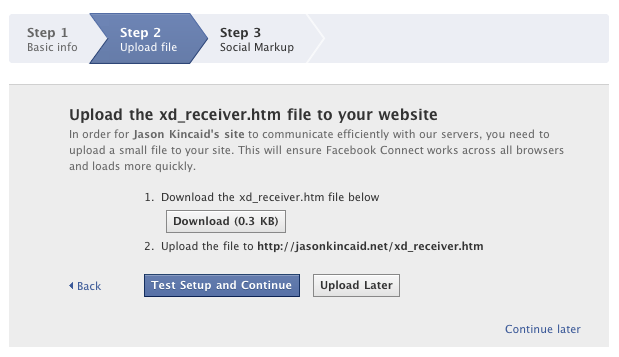
Facebook writes that “you can now incorporate Facebook Connect into your site in 3 easy steps.” The process is simple. First, you enter the name of your site and its URL. Then Facebook asks you to download and then upload a special file to your site’s main directory. And.. that’s about it. Once you’ve done that, Facebook will present you with its Playground — a list of code snippets you can embed on your site to round out the functionality, including Login buttons, profile photos, publishing items to News Feeds, and rendering photos of a user’s friends.
Deciding to put their little wizard to the test, I tried to implement Connect on one of my personal sites (note that I’ve never tried to implement Connect before so I really didn’t know what I was doing). And to my surprise, it worked: I managed to have a very basic form of Connect up and running on my site within all of two minutes. It will obviously take longer to make sure the new icons and buttons play nicely with your site’s design, but it’s really surprisingly easy.


pretty slick. will try it out later on with our site. congrats to the facebook dev team
This is awesome1
Pretty cool
So we’re willing aiding Facebook’s ability to become a dominant operating system of the web. Doesn’t contributing to their semi-walled off garden concentrate the balance of power on the web, damaging innovation in the long-term?
Well, Connect is the part of their product that is breaking open the garden (by “connecting other gardens”), so really it’s doing the opposite.
oh just buy their stock next year
+1
welcome to the real world!
This is the opposite of the walled-garden! it’s opening it up!
Arghh.. I’ve just spent hours figuring it out and they offer this!!
Does anyone know how to upload photos using the photos.upload function?
Well, this is about time. I just wrote a post a few days ago about how frustrating Facebook Connect was to integrate into Wordpress http://www.chad...dpress-plugins/ so hopefully this is a lot better.
Still, it seems to me that both Google and Facebook could somehow offer these functionalities as a couple lines of Javascript – then these services would really take off (look at Google Analytics) – but maybe that is not technically possible. Anyone have thoughts on this?
I completely agree. I wish Facebook had something as simple as Twitter. In my opinion, OAuth is the way of the future. I managed to get Twitter integration done in a matter of hours and I’ve been working over a week with Facebook.
I don’t understand why a lot of other sites don’t adopt OAuth…it just makes sense.
This is big, we will be implementing Connect for many of our clients with this new development. If your into marketing check out our steeze… we be way new school. Join our Fanpage at facebook.com/videoarmy
Erik,
This looks more like a cheap way to extend the Facebook brand by making Facebook widgets easy to install, with authentication to “you” (for whatever definition of “you” Facebook believes is authentic). But the interaction between your site and the facebook widgets looks non-existent. If I wanted to write a Rails or Django app which used Facebook IDs and interacted with Facebook knowledge, I’d need some client-server action on my side of the garden wall, which this doesn’t seem to provide.
If you’re going to be “implementing Connect” to make your clients’ lives more interesting, this isn’t a big help. It’s a great play for Facebook; everyone who loves FB will be putting widgets on their site to make it seem more “friendsy” and “connected,” but it really won’t; the connection between a non-FB site and Facebook won’t exist without some responsible heavy lifting on the back-end.
This is awesome. Works really well. This is a great move for Facebook. They’re doing a lot of cool things but sometimes it’s kind of complicated.
I just finished integrating Connect on to a site. It was really easy, it was just hard to find the information you needed. Their documentation and developer wiki is real scattered and thin. This brings the basics together quite nicely. It would have been a huge help about a week ago!
Really good !
I’ve already added Facebook Connect on my website for a tutorial and it’s true, this was not easy but it was a really nice experience.
Super cool, I can’t wait to give it a try.
Its awsome, but they should add more code snippets to the playground like for example how to invite facebook friends to a website!
I hope the personal site you implemented it on was http://www.nevernudeland.com – this could provide the boost in membership that we’ve been looking for and get us into the dozens.
Sounds promising, but I hope they are going to also have documentation that is aimed at non-programmers. Looking quickly at the wizard and playground, documentation links are definitely not written for the non or new programmer hoping to get some Facebook integration for their personal site (example: “The JavaScript should be evaluated into either a boolean or an FB.Waitable object whose result field is a boolean”).
Facebook Connect was not difficult to implement for us web developers. But I can see A LOT of value for people that don’t have the knowledge but want to take advantage of the technology.
Think about it, you can still go ahead and do it the old way, which is more difficult but gives you more control, or the new way, which will get you up and running in no time.
one big disadvantage i see right now is that regular non-facebook users won’t be able to comment on the site – unless i’m wrong.
there should be an option for some sort of guest comments, that way no one is excluded from the conversation on any site…until that happens, we can’t adopt it on our site as much as we’d like to – Disqus will do for now.
sorry, I take that back! you can post as a guest – I didn’t see it cuz I was already logged in.
This is great for user of Joomla CMS. The one module we have has issues with IE (Operation Abort).
q; any idea how to make this work for a fan page not profile?
yeah i was playing around with this on my website about 1 month ago i thought it was quite good but i would like to be able to use more of the FBconnect features.
Just posted a “How To” for adding Playground to your Wordpress Blog at >> http://socialme...ordpress-blogs/
geeky cool
I just want to use it for comment section and not for entire blog. how do i do this? i suppose using it in the header.php file will add the users to the wordpress users list everytime someone comments with fbconnect login which i do not want
geeky news again
how cool.
Added a comments box to my site http://www.luxu...index.php/talk/
Sure as heck isn’t working for me. I’ve pasted in all the code, don’t see the Connect button plus the test page loads and then reloads with a long string beginning with ?fbc_channel.
Bizarre one here, it’s up on my blog as a widget on Wordpress.. but it doesn’t seem to actually ‘connect’ with anything. Once you connect, that’s it.. What am I missing?
It’s official.. Facebook is the new annoying Jon and Kate Plus Eight on the Web. 2nd comes Facebook Connect users.
Does anyone know if a facebook connect login system can be run in parallel with one on a custom site…? Or is it a case of one or the other?
Any tutorials to hand if it is possible?
Sounds promising, what about those users who just don’ t know how to FTP stuff?
would be nice if the wizard would work… this damn thing tells me the whole time “not logged in”..
stuck in step1.. and btw thanks for the info, where i’m not logged in
Yeah I got that too. Go login to Facebook normally, then go back to the page.
Not sure what’s up with the comments here as I am only seeing my name and blank messages. Anyway this is good but for people that use Blogger this doesn’t change anything! I seriously need to switch to Wordpress soon!!
Very cool
I implemented FB connect on my comments on PokerDIY.com but I was a little confused as to what the advantages were!?
My system knows nothing about the FB account so when the comments are displayed there is no connection – the only advantage is that instead of a possible anonymous commenter you know have a link to FB.
What advantage does it give the site where you are commenting?
So what’s the point of having a Connect button? To have more advanced features you will still need to do some advanced coding.
Alex, it seems we share the same confusion – I really don’t understand what the point of it is – so this person ha sa FB account – who cares? What does it DO? How does it benefit the site?
We really need a true Facebook Connect for DRUPAL.
How exactly does one change the width of those widgets using the playground scripts?
Now this is extremely better than making ur application on FB than the canvas than linking… thx 4 postin xD
this really really easy process to add your content to your site .. thanks for giving this information
Cool! I will have to try this out.
seems like a good move forward
Dear TC,
How much harder can my launch get? I’m launching SetJam on Tuesday, and left work last night FINALLY happy with how stable our system is. I even asked a couple of friends to take a look and bang on the system a little.
Strangely, it was completely unstable for them. Nothing seemed to be working. I’ve been up all night trying to figure this out. Just now, I remembered your little 1,2,3 easy article.
You see, we use FB Connect as our means of authentication (back when it took a month to figure out all the issues with FB Connect and Django). Now every idiot and asshole in the world is testing out the 123 easy, and FB connect can’t handle it! And now I can’t test my software 3 days before launch. So sad.
I just replaced my disqus board to facebook in 20 minutes. Oh boy, it is easy. The best thing is: I have dozends of friend in facebook but none in disqus. Check my web site out: Tagsup.com.
I agree with my friend Testun