
Earlier tonight, Xobni quietly released, at least to some users, a new version of its Outlook plug-in that brings Twitter streams into your email in an intelligent way. Instead of acting like any other Twitter client and showing you the full stream of everyone you follow, it shows you only the recent Tweets of the person whose email you are reading, whether or not you follow them on Twitter. (A Xobni blog post went up briefly about it and then was taken down, but not before I was able to grab the screenshot at right).
Instead of replicating Twitter outright, it shows you the Tweets in the context of an email to help you learn more about the person with whom you are communicating. This is consistent with the way Xobni brings up similar information about a contact from Facebook or LinkedIn or Skype. If you don’t know the person, it gives you some more context. If you do, it gives you something personal to talk about. (Threadsy, which launched at this year’s TC50, also shows Tweets in context alongside emails).
With both the full Facebook stream and now Twitter built into the product, chances are you’ll see what each contact has been doing recently. Xobni also lets you reply via Twitter, and follow a contact from within its application.
One of Xobni’s investors is Vinod Khosla, who told me a few weeks ago that Xobni is getting “great traction.” I’ve since heard that the product is approaching 3 million downloads.
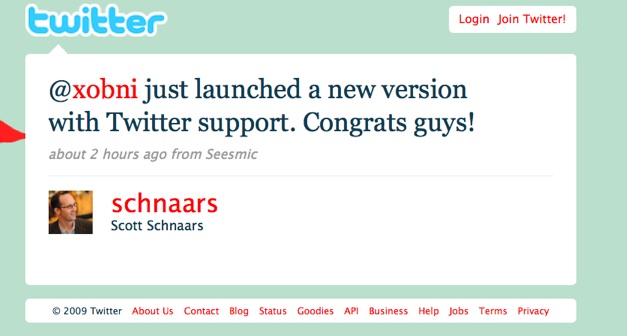


note that the congrats tweet from Xobni’s investor Vinod Khosla is coming from Seesmic
congrats Xobni and Vinod, thanks for using Seesmic it’s works great together.
Loic, it seems that tweet is coming from someone named “Scott” not Vinod Khosla. Erick is referring to an interview he had with Vinod, not the tweet. The tweet is from Seesmic, though.
That would clutter up my inbox and annoy me.
And lets see, crash my outlook since I have over 6000 emails including all the emails in folders.
I like to keep my email ‘area’ separate from all junk. Email is where I handle serious business. Going to an inbox is like going into the dentist office. It has to be quiet and simple to move around. Don’t make inboxes like malls.
I’ve been using Xobni during their beta and loved it. Then I switched to web mail and am finally back using Outlook because it’s still the best PIM.
I gave Xobni another try and almost freaked out. Never seen so many memory lags. Outlook 2007 wasn’t usable anymore and well serious… it simply clutters Outlook.
I love twitter to death. I use it everyday. But honestly, I have so many applications going on right now, and I have mastered my time to manage them, I don’t think this would really benefit me much.
I love Xobni, it’s an awesome tool. Can’t wait for the Twitter add-on to be implemented into it.
Ah yes .. have been using Xobni for a long long time now! Must say, its bloody good!
this is really cooool.
I am a huge fan of Xobni. The best thing about it for me is that for anyone who emails me, I can see their Facebook and LinkedIn profiles in the Xobni pane. It’s great for adding a bit of context to emails that come in.
I have a normal Sony Vaio laptop and haven’t noticed any change in performance in Outlook from having Xobni.
I love Xobni, it’s an awesome tool
That would be nice. Loads of unwanted message on twitter. I guess this brings back the original meaning of twitter. Finding out what your FRIENDS are doing. Not what everybody else has to say.
I m already using it .. its an amzing tool !!!!
Cheers!
Daina
Mental note: no more “Finally sent stupid proposal to moronic client” tweets immediately after sending the email.
Similar-ish function in 37Signal’s Highrise CRM where you can list your contacts’ Twitter stream for each person.
I’ve been so dissapointed with Xobni since they launched Xobni Plus. I feel like the free version has become so annoying trying to push me to the paid version.
See, the biggest reason to use Xobni is to deal with email overload. However, if you have a lot of email, you need to separate your email into multiple PSTs in order to improve performance. But, since Xobni free will no longer index multiple PSTs (it did before there was a paid version), you can either degrade Outlook performance, degrade Xobni performance, or pay for a feature you used to have.
And it still indexes the other PSTs. It just won’t show you the contents, instead reminding you that you need to buy the paid version to read them. So you don’t even save processor power, since it still indexes them just to upsell you! So annoying.
I installed the other day. It is nice. But I recently switched out from Outlook to using Gmail. But I did like what I saw with it.
I agree to Mike D, I also find those things with twitter and skype etc. in my inbox more a gadget than a help! It is nice if you haven´t anything to do but I think my boss wouldn´t very pleased when he sees me spending my time with twitter etc in my inbox instead of working! Beside this is it really that necessary that you have to have those things everywhere? A search tool in Outlook should one thing do: search and this should be fast, accurate and without slowing you pc down! One of these tools is Lookeen (www.lookeen.net), we´re working with it and we are more than satisfied!
never used xobni before, but I’m installing it right now.. see how that goes!
I wasn’t aware that people still use outlook as an email client…
Seriously, I liked Xobni since it’s beginning, but since I switched to Google Apps and a Mac, I can’t imagine working with something that’s so slow and unresponsive (I mainly blame Windows for that, although Xobni was sucking a lot of memory and cpu usage).
Adding Twitter is a nice touch but might be too late and too little with potential game changers such as Google Wave.
We’ll see.
I think that’s very clever. Twitter is a great engagement platform but in the following of brands, newsy websites and celebs we may lose sight of its ability to enhance day-to-day engagements between people.
It’s a pity Xobni runs so slowly on machine though.