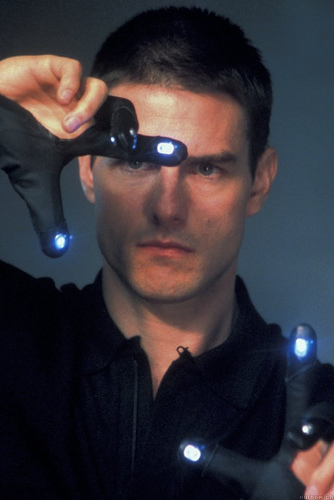
Anyone who has followed Apple news/rumors/patents over the past couple of years has probably noticed a certain trend emerging: Apple seems to be slowly shifting its entire line of products to touch-based computing. That is to say, it’s moving its products away from buttons and keys, towards manipulation through a touchscreen interface.
While obviously, MacBook trackpads have used some level of touch for a long time, this trend really started with the iPhone, which presented the first excellent use of multi-touch in a consumer device. From there, Apple slowly began adding multi-touch support to the aforementioned notebook trackpads, to the point where they all now feature it. And then of course, there’s the iPod touch, which is an iPod with multi-touch support.
But where things really start to get interesting is when you look at Apple’s patents and the rumors that spin out of them. If you name any Apple product now, you’re almost for sure able to find some sort of rumor that it will be gaining touch support in the future. In fact, a few more have hit just this week; including a touch screen remote for the Apple TV and a new multi-touch enabled mouse.
Touch Remote
These latest two make varying degrees of sense. Apple’s current remote (that tiny white one), which comes with the Apple TV and as an additional add-on with any Mac, is pretty bad. It’s especially bad for the Apple TV, which now has so much content on it, that it can take dozens of clicks to find what you want. And God-forbid you have to search for anything (nothing is worse than text-input on that thing). But Apple came up with a very smart solution for it: Turn the iPhone and iPod touch into a remote. The result is brilliant.
But would Apple really create a new touch device that is only a remote? Such a peripheral would undoubtedly be exponentially more expensive than what it costs to produce the current Apple remote. But if Apple is finally ready to consider the Apple TV a real product (rather than just a “hobby”), it could well put in the effort to perfect a new kind of remote for a new kind of living room experience.
Boy Genius Report, which is reporting on the rumor, says it comes from the same source that was dead-on in naming some of the iTunes 9 features weeks before that product launched.
Touch Mouse
A touch-enabled mouse is much more interesting to me. Some of you may recall my rant a few months ago against Apple’s Mighty Mouse. The device, quite frankly, sucks. And really, it continues a line of Apple mice (or whatever the plural of “mouse” is) that have been laughably sub-par. And what’s interesting about that is the reason they have been sub-par: Because Apple did not want to add multiple buttons to the thing.
So in that regard, a multi-touch mouse makes perfect sense. It could eliminate the need for Apple to add more buttons to make a competent mouse, while at the same time adding new input functionality that we probably don’t even realize we’re missing with current mice (swipe left, swipe right, pinch to zoom, anyone?).
And the worst part of the Mighty Mouse, in my opinion, is the track ball. The reason it’s awful is because it gets dirty way too easily, and it’s annoying to clean. Again, a mouse with say, a multi-touch top, would eliminate that ball, and thus, the headache.
Touch Tablet
Of course, the big fish in the touch sea is Apple’s long-rumored tablet. More rumors today suggest that device could be announced in January 2010 (which is what earlier rumors suggested as well), and would be released sometime around the middle of 2010.
I don’t think I’m going out on any limb by assuming the device is real at this point (we, along with many others, have been hearing about it for months now). So when it does launch, it will likely be the most important test yet of Apple’s touch goals. For all intents and purposes it will be a computer that is just a 9 or 10 inch screen. It undoubtedly will not have a physical keyboard, which means it will be entirely touch-based.
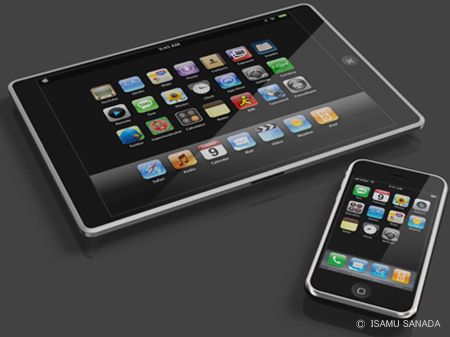
How consumers react to this will be important. I would bet that at first, many will wish there was a physical keyboard to go along with it (and maybe Apple would even offer such an accessory as an option add-on). But then, as they get used to it, many of those people will forget all about the keyboard.
The same thing has happened with iPhone. While plenty of people still bitch about its lack of keyboard, most of those people seem to be those who don’t actually have one (yes, there are exceptions), and/or haven’t used the touch keyboard extensively. Many iPhone users I talk to thought they would hate having no keyboard, but now would just consider it a waste of space.
Touch Beyond
And the idea that a physical keyboard is a waste of space is an interesting one, and one that I definitely agree with. The notion of a physical keyboard in this day and age is kind of silly. Back in the day they made sense as keyboard keys were physically connected to typewriter letters, and pushing one would produce type. But today, on computers, touching a key simply triggers a digital signal. Really, the keys are not necessary beyond our desire for tactile feedback. And they are a huge waste of space.
While it may be hard to imagine right now, eventually there will not be physical keyboards. Apple’s tablet may well be the first product that will get users accustomed to this idea. And yes, as I said, plenty will bitch. But eventually, technology will improve, and virtual tacile feedback will improve, and there will be no need to take up so much surface area on any device with physical keys that really serve no purpose.
That’s not to say that all computers will look like tablets. Certainly, there is something to be said for the ergonomics of the notebook — the keyboard on the bottom with screen on top. If you had to type long emails on a tablet, you’d either be looking straight down or your arms would get very tired. But eventually, notebooks will be folding devices with two screens, one where the current screen is, and one where the current keyboard is. This bottom screen could then be turned into a virtual keyboard as needed. Otherwise, it would be a touch manipulation area — or even just a screen.
Or another idea is to have a tablet computer which could be converted into a keyboard with a screen that is then projected on some surface. Or vice versa; a screen with a virtual keyboard projected on some surface. Stuff like this graces the pages of publications like Popular Science every month, and it’s probably closer than we think, and certainly closer than some of us would like to think (remember: people don’t like change).
Touch Microsoft
Of course, Apple rival Microsoft is working on a lot of interesting things with touch computing as well, including the Surface and touch-support in Windows 7.
Microsoft’s first true test of touch in its consumers products is the Zune HD. Early reviews are good, and you can probably expect Microsoft to pass along its notes on the device to some of its phone-making partners.
Meanwhile, the Surface is an interesting device but it’s still too much of a gimmick at this point. There needs to be third-party software support (we’ve been told that has been coming forever), and more importantly, the thing needs to be thousands of dollars cheaper if anyone is ever expected to actually use it.
Microsoft’s TouchWall is probably the much more interesting technology to watch as it relates to consumers. But there hasn’t been much word on that in a long time.
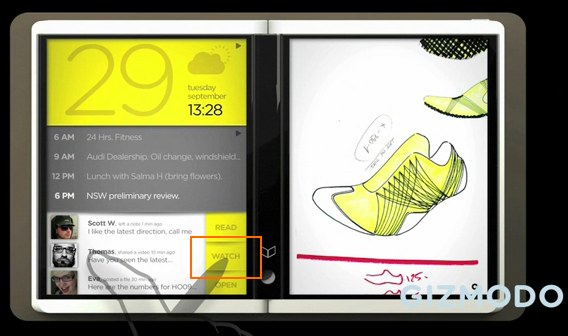
Microsoft’s touch device getting the most buzz the past couple of weeks is the Courier tablet. Unlike Apple’s tablet, which is expected to be media-centric, it appears the Courier will be a virtual notebook of sorts that you manipulate with both your hands and a special pen. It looks very cool, and it’s apparently running Windows 7. And that means it’s likely much closer than the mock-ups and videos may have you believe.
In fact, it could come as soon as mid-2010, just like Apple’s tablet, sources tell Mary Jo Foley. If that’s true, Microsoft looks to be at the leading edge of the touch revolution right alongside Apple. But because Apple has much tighter control over its entire ecosystem, it will undoubtedly be able to fully shift towards touch computing first, and as such, could well become synonymous with the technology (just as the iPhone has with multi-touch, even though other devices use it).
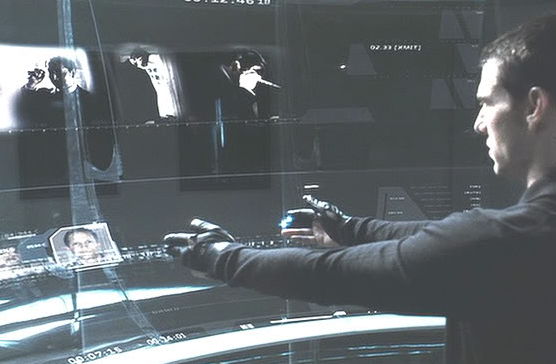
The Golden Age Of Touch
Computing, as we know it, is on the verge of a transformation. The input devices of yesteryear finally look ready to be replaced by methods that are not based on technologies that are decades (the mouse) or even centuries (the keyboard) old.
It won’t happen right away, but it is starting to happen already. We just need devices like the ones listed above to serve as gateway drugs to touch.
I, personally, can’t wait for my Minority Report-style computer system (yes, I seem to bring this up every few months). But for now, I’ll settle for a multi-touch mouse. Oh, and a touch tablet. No matter who makes it.
[Minority Report images: 20th Century Fox/Dreamworks]


Nice round up.
thanks zee. apple heavy no doubt, but that’s probably to be expected.
Pretty long post. Yet, worth reading. Thanks MG for the insight into the coming Touch generation.
I completely agree with the ergonomics of Notebooks you talk about. Sure, there should be two screens, else we will find it hard to stretch over and type…I wonder if the Tablet would be ideal for a writer in that way…
Good article but a bit too much wishful thinking. We’re a tactile species y’see.
Too much wishful thinking, really? Maybe when Minority Report came out this was a lot of wishful thinking, but I think the last few years have shown that these technologies are fast becoming reality.
this means the end of keyword search as we know it. simple rolodex natural language index “keytabs” will take over. is google’s user interface overrated? how will it compete in a touch tab world. how will adsense sell keywords that nobody types?
The windows 7 implementation of touch is quite good actually with 4 point touch recognition and a pretty good developers set of tools to create touch aware applications. The OS itself is much more touch aware, and I am looking forward to hardware from HP, Dell and others to fully take advantage of this – Touch is certainly the wave of the future.
wow I have always agreed with you on the ‘mighty’ mouse. I totally prefer my macbook pro over a mac pro due to the fact that I can use a trackpad.
i’ve been thinking about getting another desktop machine (currently use a laptop hooked up to a big monitor), but then I realize that I will miss the gestures on the trackpad. I hope apple/someone comes out with a external keyboard with a trackpad if not the multi-touch mouse, both have been rumored forever.
Wacom. Bamboo.
The other Chris above beat me to the reply. Yes, Wacom has a new tablet in their Bamboo line that is both a pen tablet and a touch tablet in one device.
I use a Bamboo myself, and intent to try out that new model soon.
There’s a Wacom Bamboo Pen & Touch and there’s a Bamboo Touch.
The Touch is smaller (and cheaper) than the Pen/Touch version, and as such better suited as a trackpad replacement. It supports most of the “standard” single and two-finger guestures (clicking, dragging scrolling, zooming, rotating).
Recommended. In fact I’m using one right now to click the Add Comment button…
Well said. I cannot move away from my Macbook Pro now because I miss my trackpad. The mouse is too far away. Even when designing on a burning hot machine (not that my machine overheats erm…) I still find myself using the trackpad over my wireless mouse…
Looks like Steve will achieve the dreams of interfaces seen in Iron Man & Minority Report before all us small timers. Bring it on Apple. Then maybe open it up a little bit?
Microsofts Natal will be the real touch innovation.
yeah didn’t really go into that (was already at 1,500 words) nor that patent today about some apple 3D glasses. but yes, all of that stuff is awesome as well.
I think the way of the future is always going to be with the company that gives you something new to work with, ipod wheel, track pad, touch screen, etc. So far apple has that covered and seems to continue to be far ahead except in tablets. All we can do now is wait to see Apple’s take on it.
Been waiting year for this story ! Very nice ! … and soon “Immersive Touch” for 3D virtual spaces
cant wait.
===
Ehh, I still need a physical keyboard. I owned an iPhone and traded it in for a Blackberry precisely because of the keyboard/typing problem.
As a UI person, I think devices need to pass “the drunk test,” as in, could I use this successfully while I was drunk or on a crowded subway car or while I’m driving? My Blackberry? Most definitely. Multitouch devices like an iPhone? Nope. I end up inputting gibberish when I type.
The thing about the physical keyboard is that it gives you physical feedback and allows you to place yourself and your fingers in relation to the keys without looking and without first activating any buttons. The iPhone and other flat screened multitouch devices just don’t have this property, and as such, require a lot more concentration and focus to operate, and result in slower typing speeds.
This is not to knock the iPhone as a general platform (i mailed one to my co-founder in Sweden just so he could know/understand the power of the device), but it limits it severely as a textual input device.
And just as counterpoint…
A friend loaned me a Backberry and I absolutely hated it. Same with a Pre. Why? The slow keyboard.
I can type much, much faster on an iPhone simply because I don’t have to spend the time to hit and fully depress each and every key I touch. Sorry, but physically pressing cheap plastic keys after over two years of iPhone use feels absolutely, positively archaic.
Yes, you do have to keep a closer eye on the screen, but that’s not a problem unless, perhaps, you’re driving, in which case you’re an idiot and probably have other issues to contend with…
Completely agree. Typing is much faster, simpler and easier with Touch devices…come on, who would want to slog on physical keys and wait for them to respond… unless of course there are other issues..
As for the drunk test, I think the iPhone will pass it…
How many words per minute can you type on your iPhone? I bet you I can double it on a keyboard. It’s not only the tactile feedback, but the layout. I use Skype all the time to send SMSs because I can do it faster from my keyboard than I can from my phone.
The discussion in this particular thread is about Blackberry vs. iPhone, and I seriously doubt that the blackberry keypad is twice as fast as the iPhone touch keyboard. A real computer keyboard, yes for sure… probably even more than twice as fast.
The nice thing about the iPhone is the predictive text. Type a few letters, and if the word you intend shows up in a tag below it, hit the spacebar and it automatically completes your typing for you. Get used to that and you can fly. I update websites on my iPod touch and the text tools and copy/paste tools make it simple.
Comparing a couple-hundred word email I composed on a Blackberry Curve versus an iPhone, my WPM was higher on an iPhone. Not having to physically press tiny plastic buttons and getting to use predictive text helps a lot once you get used to things.
No it isn’t unless the keyboard is really accurate and the interpretation routines outstanding. Apple comes close but its predictive lexicon is too restrictive for anything outside base consumer use.
Try using business terminology and acronyms – you’ll see what I mean and why a Blackberry is still the best option for corporate warriors.
@Mark A: And if you continue to use those terms, over time the dictionary the auto-suggest uses will learn and start suggesting them. So it’s fully adaptable to whatever ‘business terminology’ you might be using.
This is true on a touch screen but my primitive BB Curve is the best to type on, and that physical feedback is going to be very hard to replace. Got a BB Storm and feel like jail breaking the old curve so I can use it on my new contract. The Storm completely fails to match the touch and response feel from the iphone. It also crashes when I type to fast, or try and answer a simple call. Apple is way ahead, but BB Curve is the only one to pass the “drunk test”.
Someone will have to pry a QWERTY keyboard from my cold, dead hands.
it can still be QWERTY, just not physical QWERTY
Yeah but onscreen QWERTY is a subpar input at best. Not everybody does alot of typing but surely writers and bloggers like yourselves have to have noticed how much slower your WPM is when typing onscreen vs on a real keyboard.
I guess there’s always voice recognition, Vista even includes it by default. But that’s not quite a 100% mature technology yet either.
Sooo last millennium
A touchscreen replacing a keyboard for serious work? That would have to be a pretty amazing touchscreen. The tactile feedback from a keyboard tells you where the keys are relative to your hands, and tell you whether you have pressed a key or not due to the non-linear snapping action of the keys. Plus, since you need to depress the key for it to register, you can rest your fingers on the keys without activating them.
The lack of tactile feedback on the iPhone is acceptable because I usually don’t type very much on it. But, whenever I do, it still bothers me that I have to constantly look at the virtual keypad while I type.
Any ideas how the above tactile feedback of physical keyboards will be accomplished using a touchscreen?
sure, it’s a tricky problem, but there are a number of companies working on it. blackberry had that click screen, though no one seemed to like it. i’m sure there will be a number of better solutions.
The two biggest problems are fatigue and no physical indicator on the keys for touch typists (ex. bulges on the F and J on American Keyboards).
The fatigue issue is going to be a real problem. The difference between a good and bad keyboard is noticeable, never mind pounding your fingers into a surface with no give or bounce back.
So all I need are two little plastic nibs on the screen for my fingers to find the home screen?
One interesting possibilty too is that with a virtual keyboard the system could actually adjust the key spacing to match the size of your hands and your finger span, prefectly.
Surely you’ve notice how badly you type when you go to a friends computer that has a different keyboard. Your hands and fingers have to adjust.
And just how hard do you “pound” your keyboard? A smart system could easily determine the difference in pressure between a light touch and an actual keypress, and both could still be much lighter than the force needed to drive a physical key.
Besides, I already spend days “pounding” a surface with no give or bounce back: my trackpad.
Imagine what it’s going to be like when the stuff you pull out of your arse has no tactile experience associated with it, MG.
I believe the myTouch 3g Android phone had tiny vibrations when tapping keys on the keyboard. Also, the click sounds when tapping on the iPhone keyboard actually helps psychologically quite a bit, though I’m usually operating in vibrate mode too often to take advantage of that.
Tiny electric shocks?
How long until the touch keyboard?
the plural of mouse is
mice when your talking about the animal
mouses when your talking about the electronic device
I agree with this but sometimes you want buttons doing stuff without looking
I can think of one reason in which buttons would be better is during an emergency and you need to call 911;
you may not have the time to look at your phone
may not want to pull out your phone from your pocket or wherever
with a button phone you could dial without looking and without altering to anyone your making a call.
thanks for the mouses clarification. in terms of no-look dialing, the answer is still about tactile feedback. it needs to improve, but it will get there.
True, but that imaginged scenario hasn’t stopped millions of people from buying iPhones, Blackberry Storms, and Palm Pre’s.
“the plural of mouse is mice when your talking about the animal, mouses when your talking about the electronic device”
Mice is perfectly acceptable and far more common plural of the computer mouse. Look at 99% of computer retailers (e.g. amazon) or the manufacturers themselves (e.g. logitech), they all use the term mice.
Emergency call is possible for touch devices. One example is SAMSUNG Star 3G mobile phone, which you can assign a speed dial then activate it by drawing the character on the screen anytime, even when it’s locked.
This is actually a better solution than no-look dial because not everyone memorize position of keys.
I’d really like to see a pair of glasses that we could wear with wrap around video. It could also scan your eye to see what you are looking at and pull up a list of searches, wiki, whatever you define it to search for related to what you are looking at. It would be like what the Terminator sees
Touch keyboards are useless for me, a phone like the iphone or mytouch would never work for me. I’ve literally typed 500 word e-mails on a nokia n series and sony c series without looking even once at the phone or its keyboard (mostly while driving). I would never be able to do this with a virtual keyboard or even a qwerty keyboard on a blackberry.
So you wouldn’t be able to send email while driving? You’re right, that would be a disaster.
I do see the argument for being able to type without looking, but your justification just cannot be overlooked.
“…(mostly while driving). I would never be able to do this with a virtual keyboard…”
Sounds like the best reason in the world to mandate virtual keyboards on ALL phones. (grin)
I’m an absolutely dedicated user of my touch pad. The button almost never gets touched, and I use almost the full range of gestures – twisting, back swipes, clicks, click-and-hold, and two-finger taps. I’ve owned every iPhone from pretty much the day they were released. I’m almost incapable of using MacBook Pros (older ones) without the extended gestures. I have zero need for a mouse button – haven’t used one in weeks.
But, I can’t even conceive of trying to type long-text on a touch pad. There is so much value associated with my fingers detecting where the proper keys are, and having them automatically, without looking, return to the home row. It’s probably been months since I’ve actually _looked_ at my keyboard, and I’m pretty certain that if someone removed the characters from them, I could go for days without actually noticing them.
No – the tablet would be much, much more successful with a keyboard if it is to be used for any type of significant input. If Apple delivers the tables (which I’m eagerly anticipating) without a keyboard option, an entire realm of activity will be eliminated.
Not to say they won’t still sell 10 million of them as ebooks, web browsers, and game platforms – but people will still need to buy the laptops…
Oh, hey….
Err… MS has been at the forefront of touch computing for at least five years – I have been handwriting and red-penning my manuscripts on a tablet PC since 2004 and just replaced my burned out old ACER with the HP tx2. I would not be without one.
I know they didn’t take off well and that Microsoft screwed we early adopters (and almost destroyed the whole touch nature of the tablets) by removing the write-anywhere feature with the SP2 “upgrade” to Tablet 2005 but it still counts as touch tech.
no mention of how the touch revolution may impact users with disabilities? specifically, people with blindness?
If you are talking about next-gen interfaces to replace the usual keyboard and mouse, and even mention Minority Report, you got to at least mention gesture interfaces like Oblong’s G-speak (high-end) – http://www.yout...r_embedded#t=40
or Primesense (low-end)
It will be interesting to see how touch computing develops. My MacBook is on it’s last legs (thanks to me spilling beer on the keyboard) so I am awaiting eagerly for the tablet.
What I’m curious about is not the interface, but the interaction of external devices with these products. I’m sure the keyboard option will be a given. What about wireless printing, wireless data storage and applications such as photoshop that require precision movement to manipulate objects.
Apple has their wireless wifi hard drive that I believe can connect other devices to it, but they will need to come down in price in order for consumers to adapt to it.
Another area I hope they didn’t miss are creative professionals. Currently, I have a Wacom Cintiq tablet that I use for photo editing and illustrating. The Cintiq requires a USB cable, HDMI to DVI cable, and a power cable all while attached to my mac. It would be great if I could eliminate all those cables and just have a stylus to work with for drawing.
RHB: Check out Autodesk SketchBook Mobile Express on the iPhone as a precursor of things to come. Impressive!
I appreciate that Apple pushes beyond convention. Many conventions we continue with today are based on standards adopted long ago, for purposes no longer relevant, other than a comfort level with the status quo.
There is already stuff available to do minority report type interface interaction. Has been for a while. Check this out.
http://www.code...x.com/touchless
Granted, not a lot has been done with it consumer wise, but that is just because no one has really grabbed hold of it yet.
Right now, manufacturers’ biggest concern with keyboards and mouses is that how could they make them more comfortable to use. They provide much more easiness then touchscreens or Minority Report-style magic gloves since your wrists are lying on a table all the time. With those Tom Cruise-gloves you’d have to flail your arms for hours, which would be pretty exhausting. Touchscreens, escpecially the bigger ones (think Microsoft Surface) have the same issue. Your hands are up in the air the whole time, and you cannot lay down your elbows or wrists anywhere.
I, like many above, must disagree.
Many cell phones are moving towards physical QWERTY keyboards precisely because of the advantages.
We may have screens that can form three-dimensional bumps and provide feedback, but then it becomes less a screen and more a morphable physical interface. As much an evolution of the keyboard as the screen.
There was a great College Humor skit about the Macbook Wheel that included such jabs as “Steve Jobs: People who use keyboards ’standing in the way of human progress,” and “it remains to be seen if the wheel will catch on in the business world where people use computers for actual work and not just dicking around.”
A new pointing interface will be great. But even there, there are many advanced applications that will not be able to use anything but a mouse or pen and tablet. Ever try to use Photoshop or 3DStudioMax on a touchpad? It’s not pretty.
No, I think we’ll see neuroconnective interfaces before we see the end of the keyboard.
“Many [quantify?] cell phones are moving towards physical QWERTY keyboards precisely because of the advantages.”
Actually, I’d say that SOME cell phones are moving towards physical QWERTY keyboards precisely because of the PERCEIVED advantages by some users.
Hence, they’re marketing those features to those users.
“No, I think we’ll see neuroconnective interfaces before we see the end of the keyboard.”
100% agreed.
I’ve envisioned something like the touch tablet for a couple of years. I think if you combine a full touch screen with a color E-Ink display, a solid state drive, wireless that automatically links to any node (including other tablets) and one of the new Ultra capacitance batteries EEStor is developing, along with a couple of USB ports for connecting peripherals/charging, you could make a computer that you could seal entirely in a solid shell so that it could be completely waterproof (gold usb contacts for corrosion resistance) that could truly be the ideal One Laptop Per Child device. with an E-Ink display it could be an always off device that only activates when in actual use, particularly if they perfect memristors soon. Imagine a school tablet for children which consists of one single item on which their school work can be displayed, textbooks, class notes, and which will automatically access the schools network for data, so that the child can always be sure to have all of his school materials without having to lug around a heavy book bag.
It could even automatically log attendance when the computer comes on property, provide a map of the school for new students and if it’s fully sealed, even dunking it in the water fountain won’t harm it.
And in the third world if they link to each other, one single internet connection could provide the whole village with net connectivity, and it’s sealed state makes it impervious to the likely dust and rain.
Just an idea, and it looks like Steve Jobs is a few steps ahead of me XDDDDDDD
Have you ever try Fluidtunes? You can control your itunes library by using your gestures. Pretty cool!!!
http://fluidtunes.com/
I don’t get how you’d touch type. When you press keys on my regular keyboard I feel loads – like the edges of the key I want to press, the small indentation when I know I’ve got the right key spot on. All these help me stay in position on the keyboard.
I like my iphone but you have to look at the keyboard when you type. For longer emails or docs this would be difficult.
An interface like Minority Report…..it looks cool and stuff but have you heard about the Zombie syndrome? Could you really keep your arms up that long? This is one of the problems of the HP touchsmart.
I guess it’ll be a good work out for the arms.
Btw, a good test would be to play some shooting games at the arcade and see how long you can keep your arms up.
Like Eric said, Touch input or other gestural interfaces are very overrated, there are a lot of actions which simply cannot be replaced by touch or arm movement. You can do it but it’ll be less efficient and if you work on a computer for a living, using a touchscreen all day will seriously increase the amount of tunnel carpal syndrome related complaints. I’d hate to build websites waving my arms around all the time and once used to dozens keyboard combinations and shortcuts I’d go crazy if I had to select every tool or anything.
Another advantage of touch keyboards is that they should be easier to waterproof (or coffee-proof) – it’s just a glass surface, how hard could it be? Perhaps they are reluctant since this would extend the longevity of the product, reducing sales…
I can hardly wait until touch is ubiquitous, but I hope it’s an evolutionary step toward touch-less gesture and voice control. Either way, investing in companies that make glass cleaner is probably a good plan.
You TechCrunch bozos are late to the party. Apple’s next gen touch interface us already upon us.
http://bit.ly/IjGj
The physical keyboard isn’t going anywhere for a very long time. Typing on a touch keyboard still sucks right now, and most people tend to underestimate the importance of haptic feedback.
We agree that the convenience and upgrade of being able to just touch a key simply to trigger a digital signal allows for a faster interaction with different pieces of technology. Hence our design of a next generation digital photo frame, called Vizit, that showcases touch as a critical piece of its offering. The user interface is summoned with a touch and the easy-to-use buttons are iconic enough to “explain” to users what their next step is. Apple’s self-explanatory buttons that allow the user to fluidly move through applications and have a fun and quick user experience is just the beginning and the above are good examples. Nice post.
Seriously? An article on touch devices and tablets and no mention of the CrunchPad? WTF? You guys are being way too coy with this thing. Is it going to happen or not?
If a next-gen remote control is an iPhone-like touch device, the possibilities for a “near screen, far screen” TV experience get interesting (much more interesting than just apps on the TV):
http://bit.ly/1a3yzk
Touch input is great for devices the CONSUMES content (navigating through UI) but not so great for devices that PRODUCES content. I still can’t see how you can write blog post or program efficiently using entirely touch input.
Wa fix it if it ain’t broken? I like my keyboard, mouse, and screen the way they are.
Innovation should make life easier, not harder. Don’t innovate just for the sake of innovation.
I predicted this 30 years ago.
25 years ago I introduced graphic touchscreen software in the form of a point of sale display and it has been adopted worldwide.
The biggest problem today, though, is that the application developers generally don’t have much of a clue as to what to do with touchscreens.
Who is you?
maybe a chorded keyboard/mouse combo?
http://en.wikip...horded_keyboard
I am very excited about where human interfaces are heading, and I truly believe that 10-20 years from now our homes, cars and other systems requiring interface will all be touch enabled. But for heavy data input the keyboard will never go away and will always be needed.
That said I can certainly envision a future where I can control everything around me with touch and I also think voice activation will be embeded in there too as this is another quick method for inputing data into a system. It’s going to be very exciting indeed..
Control everything with a touch?
Don’t tell that to Arrington. GERMS !!!!
After thinking about this for three minutes, if I were an inventor with the competence, like Jerome Lemelson, who was most proud of his machine vision, or a corporate lab with the resources, the next big thing to work on in human/electronic interfaces would be a machine vision device that could read lips. This would combine the advantages of the speed of voice recognition with the privacy and low noise level of typing and texting. Voice recognition is getting there, and cameras are ubiquitous, so this seems a logical next step.
Tongue flicks Luther !!
Flick, flick, flick !!!!
Nice article MC –
And not one mention of twitter
I think the tech is too new for people (including the author of this article) to appreciate it’s likely future. Simply: there will be different preferences for different people. This article’s premise seems to be like saying the pen will replace the pencil, (because it’s just so hot and new).
In my experience working for NaturalPoint Inc. (who make optical motion tracking devices for several different markets. gaming/accessibility/animation), I found that sometimes you’ll put up with uncool things because you want super precision – and sometimes you want easy to use (slash “cool”? Do ease of use always go hand in hand with cool? i guess?).
Like: sometimes you want to just touch your lil’ iphone with your fingertips. Other times you want the speed and reliability of a giant (stupid) keyboard. Sometimes you want the ease of use of an Eyetoy (flail), and sometimes you want the precision that comes from wearing a couple (stupid) markers for a TrackIR (very subtle).
I think in a couple years, people are going to realize they want both buttons and touch screens. And they’ll probably just have both options lying around. (just as i have both pens and pencils in a jar on my desk, next to my iphone and my wacom).
I was gonna put a comment up, but you said it all!
Some uses of a computer will just not be appropriate for simple (or even complex) touch gestures. As someone said above, typing prose without having to stare at your hands is much easier if you can feel what your pressing. Until they can make a surface that reacts to your fingertips, physical keyboards are the only sensible option.
I sit in my house with six mac, and no button-less mac mouse. Might mouse is a travesty. Strangely enough, Microsoft Intellimouse with 5 buttons is my all-time fav. iPhone is great w/o buttons. iTablet is great w/o buttons. But a mouse needs buttons. BTW: Wacom’s newest table is the coolest button-less input device for shizzle. Try a new Bamboo is you don’t believe me.
I definitely agree that a flat glass surface (using gestures and taps) should replace the mouse as we know it today. Wait.. isn’t this the trackpad on my macbook? Hmm..
The first one to put a solution out there that works for developers to replace keyboards and mice will earn my endless love!
However it is just awkward to use Dragon Naturally Speaking write Ruby or Java code.
Please excuse me while I torture a poor metaphor to death, but it is the most succinct way to illustrate my point.
If all you have is a screwdriver (keyboard) and pair of pliers (mouse), then a multi-tool (touchscreen) seems like an incredible step forward. However, if those screwdriver and pliers are just part of a complete toolkit with wrenches (a graphics tablet), sockets (a 3D mouse), power tools (slider/dial boxes), hex keys (programmable keypad), chisels (jog shuttle), specialty tools (joystick, throttle, foot pedals), then trying to use a multi-tool to get the job done just seems silly.
The very advantage of a touchscreen interface, namely that it can be configured to do anything, is its very undoing as soon as you start trying to do anything difficult or complicated. Sure, gestures are nice and easy, as long as you just have a few that are standard between all apps. As soon as you start trying to develop more meaningful uses for touch interfaces than just zoom, pan and right click though, you start getting into the problem of remembering which gesture does what in which program. In a 3D program, for example, does the pinch zoom change the zoom of the camera, or does it actually dolly the camera in towards the focal point? Does the gesture that rotates an image in Photoshop, cause the time-line to jog forward in Final Cut, or change EQ in Pro-Tools? Pretty soon you have to remember an entire lexicon of ninja hand sign gestures to hop from one program to another, and everything becomes far less easy than it would have been with dedicated hardware devices, and good old fashioned muscle memory.
Can a touch interface replace a mouse? Sure, it is just a different way to map movement on a 2D plane. Can a touch interface replace a keyboard? Sure it can, but it is debatable how many people will ever be willing to give up the tactile feedback. Can a touch interface replace a pressure and tilt sensitive graphics tablet? Maybe, but it would get very computationally expensive to calculate pressure and attack as accurately as a tablet does. Can a tablet replace a 3D mouse, or other 6-axis input device? No, there is just no way to efficiently map 6 degrees of freedom to a 2D plane. By the same token it can’t replace sliders, dials, musical keyboards, drum pads, or any other millions of specialty input devices, either, because their tactile nature is the whole point of the device.
If all you are talking about is consumer devices to surf the web or consume media, then sure, I guess that it really doesn’t matter what input device you have. However, if you really believe that we are looking at a future where edit bays and graphics workstations look like Minority Report, then I think you will be very disappointed.
Look ma, I invented the invisible square wheel!
Am I under an incorrect assumption that Minority Report style computer system is already a reality. I swear I’ve seen an ad/news video or something.
In the new NCIS: LA , LL Cool J uses one often, and it sure doesn’t look green screen; it’d be expensive for them to green screen that over and over again.
I really do think it’s a reality. An expensive, expensive, expensive reality.
Have any of you people every actually used touch input on a device bigger than a phone? I work for a company that develops touch-screen kiosk software, and very single kiosk in the building also has a keyboard and mouse connected to it. Why? Because after more than 10 or so minutes, which is the amount of time the average user spends at the kiosk, the touch interface becomes extremely annoying to use.
Consider this: To move the cursor from the far left side of my dual screen to the far right side takes only a few inches, and I can accomplish that only moving my writs. To do that using touch, I need to either use both arms (not just hands, ARMS) or move one arm almost 2 feet. Which is more efficient, less tiring, and more ergonomically friendly?
I hope that touch never moves beyond shiny gadget phones. Yes, I’ve borrowed and used an iPod touch. Then bought a netbook instead. The keyboard on the Touch is horrible.
Check out this cool photo tagging software called Fotobounce! It can help you sort your images using face recognition! It can also download & tag your photos from facebook & flickr! You can get it for free at: http://fotoboun.../index.php?blog
Wondering what to do on new years eve???
MyNewYearBash.com contains details of the hottest new year parties happening in the major Indian cities of Bangalore, Mumbai, New Delhi – NCR, Gurgaon, Noida etc. It displays comprehensive details of the most happening new year parites in town making it the most sought after resource of new year parties in India.
With MyNewYearBash you can search parties on the basis of ticket price, venues, cuisine, music, DJs etc.
Happy Partying and Happy New Year 2010 !!!
OMG.. you are going to let your life and new years party be dictated by what a commercial company plugs into your personal communications device to try and get your money? Computers are useful to help you expedite doing the things you want to do. They are extremely not useful if they take you as a person, and limit your choices to a few items constructed by people who’s primary objective is to part you with your money by creating things you don’t need.
Can’t wait for a new Mighty Mouse.
I wrote a blog about it here: http://gizmoele...-in-my-day.html
http://www.stophighcosts.com