Google has been aggressively marketing Google Apps to schools, recently launching a centralized site designed to recruit universities and colleges. Now, Google is tweaking Google Docs, which is a part of Google Apps’ productivity suite, by adding a few student-friendly features.
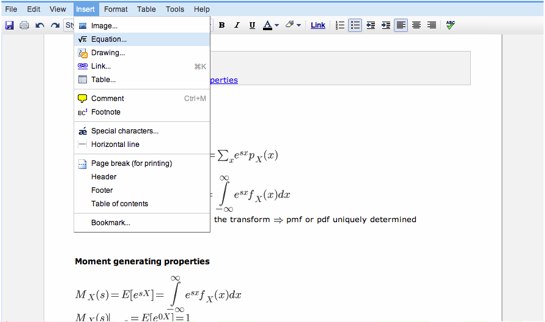
Google Docs has added an equation editor so students can actually complete math problems within a document, allowing students to not only write papers that include numbers and equations but also take notes from quantitative classes using Google Docs. Google has also added the ability to insert superscripts and subscripts, which can be useful for writing out chemical compounds or algebraic expressions.
Google is also trying to make Docs appealing to those humanities majors out there by letting users to select from various bulleting styles for creating outlines and giving students ability to print footnotes as endnotes for term papers. And a few weeks ago, Google launched a translation feature in Google Docs.
As we’ve written in the past, Google is wise to recruit educational institutions because that’s where many people get trained, start relying on, and form brand allegiances to productivity apps. Drawing from Apple’s strategy, Google knows that brand loyalty is definitely forged at these schools and is steadily developing its products to become more appealing to students. Rival Microsoft is also launching web-based versions of its Office products aimed at the student audience. And startup Zohooffers a free web-based productivity suite.


Thanks to Google and its team.
I’m wondering when teachers will ask all their students to ’share’ their docs with them and then grade them on the fly, using version control
Talk about efficient and reduction of paper!
Hi – people are doing what you are suggesting (share & grade) at grammar school level. Please check out http://www.readinglogs.com. When this generation grows up, they will want to be graded on the electronic version, not a print & submit version!
TC-quality turkey or web portal quality
Now there’s a compelling use case right there. Wow. That would have been awesome when I was a student.
easy to cheat and copy other peoples homework too.
That is already happening. I grade my students essays and return via a program the college uses.
Almost no need to start the engine of the car, just boot up the ole computer!
Google will not have a hard time winning the hearts and minds of students, however, I fear for the future of cloud computing when it comes to large-scale roll-outs to big campuses and all of the performance and privacy implications.
this is some old ass news Leena, step your game up! JP
yeah – the Equation Editor is old school – waiting for BibTex integration
There is an app called Study Hall on Facebook – peer to peer learning app. It has a FULL LaTEX editor built into it. The equation editor is not obvious, (buried deep inside the whiteboard) you need to access the app, then access the whiteboard. The whiteboard has a LaTEX based equation editor – really neat app.
Teachers can interact with students via the website http://www.grpbook.com. There is a degree of separation between teachers/students.
First the enterprise market and now the education market. Interesting strategy. Not sure that I want all my important docs up on the cloud though. What happens if they go down and at a critical time for my business?
Office Web Apps might put this product to sleep
Where is that redesign they were promising us?
google has to keep up with Microsoft office online. GO GOOGLE!
“Bing – why does Microsoft always copy everyone?”
“Google Docs – awesome! This is the end of M$!!!”
Until there’s double-spacing (which might be coming out soon?), I don’t think any student will use Docs for writing papers.
There already has double spacing. I use Google Docs for all my college papers already. Double spacing has been in Docs for quite some time…
There already is double spacing**, Epic Word Failure
They have spacing (normal, single, double, 1.5, triple). It’s been there since earlier this year. Prior to that, it could still “hacked” by changing the line spacing via its HTML edit.
In the document: Edit > Document Styles > Line Spacing
That’s one nice feature. Now how about making these tools more robust? I.e. More than 100 pages in Docs? Or more than 50 ImportHTML per spreadsheet?
burn baby burn burn burn… m$ burnnnnn
I love the Google Docs love letter
You are making some bold claims without ever backing any of it up. Just choose two sentences from the post as examples to prove your point.
I had a new writer that didn’t want to spend the money for MS Office so I pointed him to our Google Business Account with Docs in addition to Open Office. He liked Google Docs the best as he could easily share his work with me.
Good. Sharing homework becomes easy. :p
Yawning….. Zoho did this atleast a year before.
I have to say I was the biggest Docs pessimist.
But what started off as “messing around” led me to adopting it as my note taking took this semester.
The biggest problem I had was scattered notes all over my computer.
I do have to say that Docs is very weak feature wise. Examples…
1. when you create a new file it puts it in the root even if you are in a sub sub folder. So you do another 3-4 clicks to move any new file to the right folder.
2. cant import large xls/doc files. doesn’t seem to support docx
3. PLEASE PLEASE PLEASE build a feature to allow you to record and save audio. And if somehow you can do magic and have the audio transcribed, you will become an overnight hit on campuses with people recording lectures. DO IT google.
I can imagine using a pen like a livescribe and using a tablet pc to write all those equations and they get recognized and translated into the google docs.
I also mostly used it. Thanks a lot to GOOGLE.
Where was Google when I was in School?? Well its grt .. for the new kiddos who are supposed to work on equations…
Best,
Daina
I can’t figure out how to edit the bullet styles. Does anyone know where this new feature is?
Catch kids when they’re young, and they’ll be customers for life. Good strategy.
http://www.trad...spx?symbol=goog