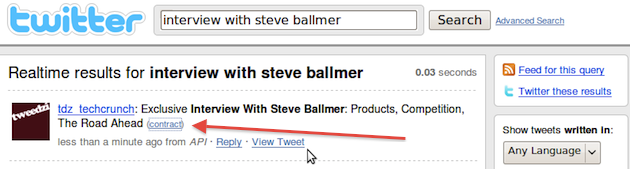
 Normally, when you use Twitter’s search service, you can avoid clicking shortened URLs blindly – which is a security risk – by expanding them and taking a look at where they’ll be taking you exactly. I use it all the time, and I’ve even gotten accustomed to using Brizzly for Twitter on the web partly because it automatically expands any shortened URL.
I’d recommend anyone never to click short URLs without knowing where it goes, even when it comes from people you know and trust, because that’s not a guarantee for safe links either. In that regard, it doesn’t help that Twitter Search now no longer appears to expand Bit.ly URLs, which is the default web address shortener used by Twitter.
Update: and poof, it works again.
We’re not sure when this problem started occurring, but Twitter app developer Mallikarjun Reddy noticed it earlier today and adds that it is not an issue on Bit.ly’s side since its API for URL expansion seems to work just fine. Fortunately, the expansion for most other URL shorteners still functions, but since bit.ly is the most widely used tool of its kind on the social network, this is not something to simply brush off. Even if bit.ly is doing its own part to warn users of malicious links, Twitter has a responsibility to its users to protect them as good as they possibly can.
One more item to add to the ever-expanding to-do list of Twitter’s engineers.
Update: yes we use bit.ly when we push content to our Twitter stream. No, that has absolutely nothing to do with what I wrote above.