
Imitation isn’t always the sincerest form of flattery, and this is certainly the case for Microsoft in the development and launch of its web-based browser versions of Word, PowerPoint, Excel and OneNote. All based in the cloud, the web-based versions of these products, which are aggressive competitors to Google Apps, have fewer features than their desktop cousins but still give users basic tools to edit and change documents in the cloud. We wrote about these products during Microsoft’s announcement about the new features of Office 2010 back in July. Today, Microsoft is officially rolling out the FREE web-based version of its Office suite, which is officially called Microsoft Office Web Applications, to a select amount of Windows Live SkyDrive users in anticipation of the public release in the first half of 2010.
Microsoft Office’s move to the cloud isn’t surprising. Facing challenges from Google’s browser-based Apps products and its new Chrome OS, Microsoft is under pressure to make its three screens strategy, which is the ability for products to synchronize across the phone, browser, and desktop, a successful reality. We received a hands-on demo of the SkyDrive-based, collaborative web-based apps (our previous demo in July was for apps based on Microsoft Sharepoint) and I must admit, it’s impressive. Here’s a comprehensive view of what to expect at some point next year:
Windows Live SkyDrive:
Microsoft Office Web Applications will be a part of Windows Live SkyDrive, which is an online file storage provided by Microsoft. Users sign in to SkyDrive by using their Windows Live IDs so anyone who has a Windows Live account will be able to access the free web-based versions (Microsoft currently has 500 million Windows Live customers). All of the documents and files created and stored in the office suite will be hosted in SkyDrive’s 25 GB of free online storage.
It’s important to note that SkyDrive is for or non-enterprise users. Microsoft’s Web Applications will also be available in its secure, behind the firewall storage system Sharepoint which will eventually have integration with Windows Azure.
When you sign into SkyDrive, you click on the “My Documents” tab which will take you to you an interface where you can create, share and edit PowerPoint presentations, Excel spreadsheets, Word documents and OneNote files.
All of the applications are shareable even if the recipient doesn’t have Microsoft Office’s web-based or desktop applications installed on the computers. So you can share a web-based PowerPoint presentation with an individual who doesn’t have PowerPoint installed on his or her computers. Also, in order to share a file, you type in the recipients email address. The recipient doesn’t need a Windows Live account to see or comment on the file.
Also, Microsoft Office Web Applications works on Internet Explorer, Firefox and Safari (versions for Chrome are still being developed).
PowerPoint Web Application:
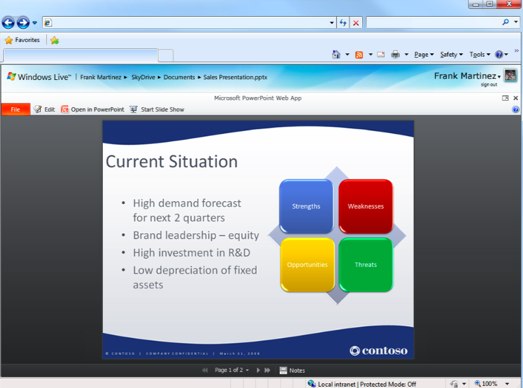
The web-based application lets you open, create and edit PowerPoint presentations in a lightweight version of the desktop application. What does lightweight mean? Well, you can change fonts, colors, text and some graphics. But most of the bells and whistles that create the impressive looking PowerPoint decks are in the desktop version only. The experience is very similar to the desktop version of the application, which is achieved through the power of javascript and AJAX. Presentations look the same on the web and in the desktop version, even though there are some features that you cannot create in the web-based product.
Microsoft has made it very simple to switch between the desktop and web. In the browser-based version, you simply click an “Open in PowerPoint” button and the desktop version will open up the file. If you make any changes to either the desktop or web-versions of a presentation, your file will be saved on both platforms simultaneously, making the transitions seamless. It’s ideal for presentations (think Web-Ex), where you have more functionality to play with in the desktop version (giving you the ability to create sleeker decks), but can easily share and save comments and edits during a live presentation.
Excel Web Application:
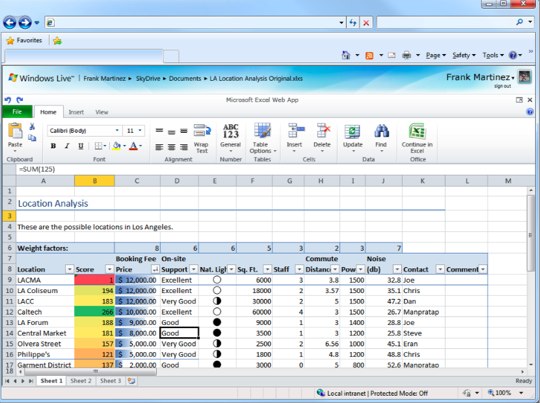
Similar to PowerPoint, the web-based version of Excel is a lightweight application that offers the basic features. You can modify data, make formatting changes, enter new columns, create new headers, change colors and sort and filter data. One key lacking feature in the web-based product: the ability to create charts. This is a significant part of the Excel’s desktop version that’s missing from it’s browser cousin. Of course, if you create a spreadsheet with charts in the desktop version of Excel, the file will look exactly the same in the web-based version, but you won’t be able to re-create charts.
But whereas there are limitations in the creation of spreadsheets, Microsoft has possibly made up for this in its collaboration sharing capabilities. Spreadsheets can be edited by multiple users in real-time. And spreadsheets can be shared and commented on by anyone, even those who don’t have the desktop version of Excel.
Word Web Application/OneNote:
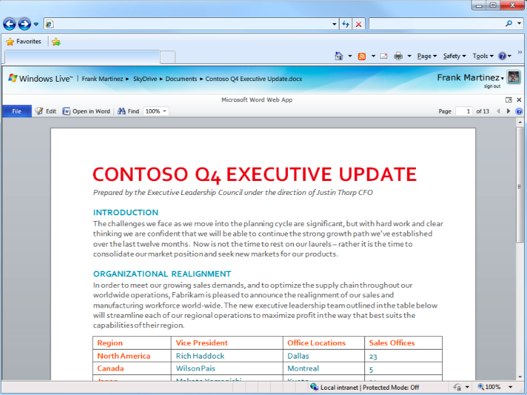
Documents in the Word desktop application look exactly the same in the web-based version and can be shared and commented on by anyone. If you have Microsoft Silverlight installed on your computers, you’ll have the added bonus of being able to zoom in and out high degrees.
In the version that will be rolled out to beta testers today, the the web application of Word and OneNote will not be feature the ability to edit but this functionality will be available when the products are launched next year. Unfortunately, the real-time collaborative editing feature of Word is missing in this version, but the hope is that this will be added next year as well.
Mobile:
We mentioned in our original post in July that the ability to use products across the OS, browser, and mobile device is a key part of Microsoft’s strategy. We actually demo’d the Sharepoint-based version of PowerPoint on an iPhone and it was disarmingly sleek. While this functionality has already been established for Sharepoint, the SkyDrive-based apps are still being developed to work on mobile browsers. Microsoft says it will be done by the time the product launches next year.
The Wrapup:
Microsoft says it will be adding beta testers in waves of 1000 users until the product launches. There’s no doubt that the web-based apps are impressive. And the ability to seamlessly switch between the desktop and web versions is key, and one that Google currently can’t compete with. But one of the important innovations that Microsoft has made in this consumer-facing version is the sharing and collaborative features, which are certainly the future of any professional applications suite.
As we wrote in the past, Microsoft’s move to the browser could pay off in a big way, especially when it comes to giving Google Apps a run for its money. Microsoft seems certain that Microsoft Office Web Applications will be popular amongst students, which is a sector that Google has been gaining traction. But the more successful Microsoft is in its browser strategy, the more they validate Google’s approach in the space, which will eventually put price pressure on Office. Let the wars begin.


As always. The consumer wins. Let the wars begin.
About time!
This isn’t the time Microsoft steals something, read this http://bit.ly/4EKKnV
what sucks about microsoft products is the amount of vertical space (the shorter dimension) is wasted. I mean look at EXCEL… about HALF of the screen is for stuff, browser, toolsbars, before you actually see the cells. Same with the other components.
And that’s just one thing.
MS just has a history of developing really a$s backwards stuff. And that’s just one I can see right of the bat from just a screenshot….
Just like in the desktop version, the ribbon can be collapsed
oh didnt know that you’re right it works… even without ribbons still too much.. IE wastes too muc space that way too with all the crappy tool bars.
Is this where i come in and say that those toolbars are your own doing and you can easily remove them. And then after that is where you come in and say
*Insert Next Microsoft Product here* wastes too much space with all the crappy {Toolbars|Ribbons|Icons}
Must be your own toolbars first of all and these apps work on Firefox and Safari on a Mac
Step 1: Right-click somewhere on the IE navigation UI.
Step 2: De-select those parts of the chrome that you don’t want
Easy enough?
Huh. More button, more feature, more useful. I guess you like Google Docs which is Notepad with fews ‘add-on’ features. =))
Google Notepad may be enough for you but not everyone.
We don’t see how Word works yet, so right now at least the notepad has editing feature.
Google spreadsheets is so clunky…kills me using it.
Impressive! Glad to get MS Office – one of the most admired and amazing software – online!
This is fantastic.
Looks like Microsoft does have some aces up its sleeve. how many guys had made up their minds that Google would be the ultimate winner of this face-off? Correct me if I am wrong, but there were too many!
MS is leveraging on its own strength, and the swapping ability between web and desktop would give them an edge! first Bing, now this….
Yes, Google has Google Gears, but Microsoft have done quite well in the full blown featured desktop software market for quite some time. So Google would have to take gears to a whole new level.
Anyway, I have always though that Competition is a good thing for the general pop. So its all good!
Surely MS will find a way to totally screw it up! Probably with markup that only works on IE or some such rubbish
RTFA
“Also, Microsoft Office Web Applications works on Internet Explore, Firefox and Safari (versions for Chrome are still being developed). “
and silverlight doesn’t work on linux.
Every company has screw ups. MS just gets more press about them because they’ve been around longer.
MS didn’t have a lot of competition, either, so there was little “encouragement” to excel.
Now they have that encouragement and are doing something about it. This war will benefit both Google and MS.
Didn’t MS Office compete with Lotus back in the day? But ya, after that Office had little competition (just like IE, Windows etc).
Most importantly, the ‘war’ will benefit the consumers.
Yes they did compete with the Lotus suite.
yeah because MS’s 96% market share in Office is due to screwing up
Even if Microsoft wins here, it loses.
If the battle is which free browser-based office suite wins, Microsoft has already lost, because even if it takes that *entire* market, it will be making 1/10 or less of what it was making on desktop Office sales.
but if it does make these web apps, google (or zoho, or someone) comes in and makes then, takes the *entire* market, and MS loses all of what it was making.
er should read- “but if it [MS] doesn’t make these web apps…comes in and makes them,…”
too many typos, not enough coffee
That’s like saying Google is losing in search because it’s free and they don’t charge people money to use it. Or TC is a fail because they don’t charge people $1 a day to read the content.
Get real, you put something in front of millions of people you can monetize it.
That’s what’s so hilarious about this. Yes, they can monetize it, but they aren’t going be making back that ridiculously profitable $400 per seat from ads alone!
This is one of the most fatal blows Microsoft could ever have happen to them, and the most interesting thing is it appears they have no choice but to cannibalize their own market!
These aren’t targeted for the enterprise and by the way, Office doesn’t cost that much unless you are buying 1 license at a time. These are clearly geared towards people who already use free tools and don’t purchase Office anyway.
Any word on whether the offering will be crippled if you do not use IE?
Was wondering the same… all those screenies stem from MSIE
“I must admit, it’s impressive”
How so? I want to know what type of features Microsoft is implementing in its product that differentiates it from the other cloud-based suites (especiall Google Docs).
From what I’m reading, there’s no exciting and innovative features.
How about guaranteed compatibility with desktop versions of Office, something that Google Apps not only doesn’t have, but is miles away from. I love Google Apps, but if I’m building a document of anything beyond basic complexity I won’t use it because I know it won’t import properly into Office when I need to do so.
Google has showed the mass market needs simplicity. I use office for simple documents, mailing, formating printing rarely with macros. Yes our company is a power user of Free Online Google Docs. The same goes to Outlook. They may have connectivity to exchange, but even though I am on outlook 12 hours a day I do not need the connectivity. I need a faster Outlook with no nonsense pst limitations.
If MS Online office is simple and free then they will attract users. But by that time Google would be implementing quiet a free stuff into it’s office too.
As a user I am happy to see a very positive product enhancements in OFFICE SUITE SPACE.
How have they showed the market need simplicity? Google Apps have no market share … in other words it is not working outside of consumers who would never pay for Office anyway.
I have a feeling that MS will bring something good to table, but I doubt it will be enough unless they have a lot more in the pipeline. The biggest thing MS has is seamless integration with desktop, which will help because of familiarity. The big flaw for MS is the bigger picture of their online offering, and another thing–where’s their Gmail competitor? Hotmail? Hah, they have a ways to go.
MS is still playing catch up massively–but they’re doing with a different (worse) model than Goog is/
Google has so much in the pipline, a fantastic devlopment model. All of their current products are always adding more–Gmail, Cal, Reader, Chrome, Android, etc. Not to mention all the new stuff–Wave, Voice, Chrome OS, APIs, etc.
MS needs much more than a pretty Office suite to compete in the cloud. Google’s development progress is way faster than MS. Unless MS makes some big changes, I just don’t see them hitting big in the cloud.
@Eddie
“…the ability to seamlessly switch between the desktop and web versions is key, and one that Google currently can’t compete with.”
Google Docs is a joke. Lets not even start the comparisons here.
Microsoft always moves later, but they have phenomenal success when they do it: Word perfect, Lotus, Borland, Dbase, Novell, Netscape.
its not always because they have a better product.
……Zune…..oh wait…..nevermind
It is because all those are built on, umm, Windows. If you get the secrets of the internal APIs, you surely could build it better. However on the web, nobody get that benefit (except silverlight…) And there were no example from Microsoft that they came later and have phenomenal success on web yet.
Yep, Microsoft has YET to produce a dominate web platform for anything. They’ve done well with the Windows fat-client monopoly, no doubt.
Yes, but these words have been said over and over about MS. “they are not going to success in business apps” “they are not going to success in the server market” “they are not going to success in the database market” “they are not going to success in video game console market” all statements that have been proven wrong. To underestimate MS is really stupid. Good thing for Google they don’t have people who post comments on here running the show. I am sure Google is taking this seriously
Hopefully Microsoft includes a feature to start a webinar (Live Meeting) directly from viewing a powerpoint. That would be a very useful integration.
Overall this looks promising. I think if they can figure out how to do away with requiring Silverlight to enable some features it reduces the cost of entry some people aren’t willing to pay. The nice thing about Google is that it has all of its Web 2.0 functionality without add-ons. Not that I don’t like Silverlight, it’s just a reason for someone not to use the service.
They have the live meeting feature in the desktop version. Though I am not sure whether the same feature is there in the web version or not
Typical. You can’t see the video unless you download and install Silverlight from Microsoft. Nothing to see folks move along.
I don’t see you complaining if Google installs Gears on the backend to get some of their nifty Ajax stuff working.
GooSuckers forget about Gears and video chat plugin.
would you prefer Flash?
Well, impressive after ages of R&D.
But I’m very skeptic if it will work properly on non IE browsers. Outlook Web Access is notorious for that, so don’t be surprised if MS ignores millions of IE-haters.
I still prefer Zoho over both. No fuss, it just works everywhere, for free.
I guess “after ages of R&D” should mean “after ages of C&D (Copying and Development)”
To say that, you must be really, really naive or misinformed or up there in Google’s ass or (likely) all of the above.
But do they work in any browser other than Internet Exploder? I bet the apps will be buggy or even blocked in Chrome. M$ love playing dirty.
Here’s a question for anyone who can answer: Why isn’t Open Office available as a cloud app suite? Surely Oracle have the $$$s to make it happen.
From Paul Thurrott’s SuperSite for Windows review:
“One high point is browser compatibility. Microsoft is offering an identical experience in Internet Explorer 7 and 8 on Windows, Safari 4 on the Mac, and Firefox 3.5 on Windows, Mac, and Linux.”
http://www.wins...fice/owa_tp.asp
Thanks.
I guess then that the real question is who do you trust more to store your data, Google or M$.
If you are Smart , you’ll not trust any of them and keep your important data at multiple location. Also I do not want google to read all my mails, documents, spreadsheets. With MS I’ll have choice to use hosted sharepoint.
Sounds to me like Thurrott – as usual – is taking Redmond’s press release(s) at face value. In four years of hopeful reading & listening, he has yet to offer a serious critique of Vista’s shortcomings. In fact, Thurrott seems entirely immune to that platform’s most common glitches…no hardware incompatibilities or missing drivers, etc.
Of course, why should he grouse when it risks straining his admittedly cozy relationship with various MS folks? Thus, I think some skepticism is appropriate, here. Until and unless Thurrott specifically writes of having tested – thoroughly and at some length – the competing browsers for said ‘identical experience’, my money says its just more MS happy horsebleep.
Face it: they _always_ nail you for using somebody else’s app. Just as in the old scorpion & frog fable (http://tinyurl.com/2ezgyo), its their nature.
Sadly, Open Office is getting left behind, bad. I setup some clients with their suite as a good free solution, but it’s a world difference from MS Office. Whichever product works best among the cloud will most likey be the winner. Open Office needs to make some changes too…
IT progress is hindered because some companies rejecting standards like open document format… that way consumers can really have great offerings from a lot of vendors or service providers.
I think we should tweet our/consumers voice for companies to stick to standards, what do you think?
If by their ignorance they get more money, they would do it just for that. Only the biggest player has the say to “standards”.
I am not sure why Oracle would care about OpenOffice.
True.
They did also just by Star Office.
What about Star Office Online?
Oracle also have brains to not go into every market in which MS is and kill itself stretching on competitor home turf.
Since none of you will even bother to RTFA, is this enough proof for you.
http://img182.i...7/chromeppt.png
it even works in Chrome
As a celebrity genecologist chef I’m excited to join Martha Stewart and deliver healthy recipes
I’m sure she’s tickled…err, pink.
Don’t mean this to be snarky…but what exactly qualifies as ‘the cloud’? Are we just talking about online storage?
So where’s the “Microsoft drops a nuclear bomb on Google” headline? MG, where art thou?
I never get Microsoft UI design decision.. It’s almost if they are trying to make the document viewport as small as possible.. There is at least 350 to 400 pixels almost useless app-/task-/bookmark-/tab-/account-/(another)app-/file-/etc. bars at the top.. Yeah, that would do pretty nice on a widescreen laptop
press F11
This sounds like Microsoft has squandered an opportunity to steal a march on Google Apps.
A spreadsheet application that does not allow creation of charts? It is clear that this is a half-hearted move to the web by MS, because every user of the web-based version will still need the desktop version of Office to do serious work. This is more about file-sharing than cloud computing.
As long as MS still clings to the desktop business model, they’ll keep falling further behind in the cloud race. Go all out, or don’t go at all.
Google Apps is currently inferior to MS Office. By offering a full-featured cloud version, MS could have deflivered a knockout punch to Google. As it is, both products are weak, stripped-down versions of what they could be.
http://www.amusis.com
“As long as MS still clings to the desktop business model, they’ll keep falling further behind in the cloud race. Go all out, or don’t go at all”
That makes no sense at all. What business model do you expect MS to adopt? Google’s business model is search. Sure, there is a nominal fee for business use of Google Apps, but that isn’t what really supports Google Apps existence. It is search.
Microsoft sells software (and IMHO, Office is good software). Bing is coming along, but to suggest that Microsoft out and out abandons a $10-20B software sales business model in favor of a search business model is unbelievably naive. Also, it is far from a certainty that such a dramatic business model evolution will ever need to occur.
FF why do you assume that my recommendation for MS to go all out for cloud computing had anything to do with search? Did I ever mention search or Bing? Or abandoning the Office business?
To answer your question as to what business model MS should adopt, the answer is with pureplay cloud companies like Netsuite and Salesforce.com. They have proved that business users will pay a monthly subscription fee for good, enterprise-class web software.
MS’s strategy for the cloud should be to offer full-featured versions of Office to business users for a monthly subscription- and maybe a full-featured ad-supported version to individual users.
They key phrase here is full-featured. Cloud computing is here to stay. MS can either embrace it whole-heartedly or continue sitting on the fence until someone else (like Google) dominates the market.
http://www.amusis.com
I’m not sure cloud computing is even here yet, especially in the enterprise. Is every company going to suddenly give up on privacy laws and concerns and just start storing confidential documents on other companies’ servers? Microsoft has a version of Web Apps coming where a company can host a Sharepoint-powered version of Web Apps on their intranet so users can use Web Apps yet keep their files within the network and on their own hardware. For now, I think that is a much better solution.
Also, check out Microsoft Dynamics CRM. You can host it yourself, on a Microsoft partner’s servers, or on Microsoft’s own servers. It’s already a strong competitor to salesforce.com, can be purely cloud-based (if you want it to be) and is pretty damn full-featured.
I think sitting on the fence until everyone decides one way or the other is a great strategy. When the market sways fully in one direction, they can throw all of their resources behind it. IMO, that won’t be happening for quite a few years yet. The hybrid model that Microsoft has right now is a good one for the time being.
As someone who worked with 3.0 and 4.0 of CRM (More like Alpha 1.0 and Beta 1.0), I find your definition of “full-featured” intriguing. I give it points for being highly customizable, but I wouldn’t call it full-featured compared to the competition just yet.
How is this version different than what I’m logged into now, Office Live Workspace?
It allows editing Excel / Powerpoint online and preview Word (editing coming soon).
Is it platform agnostic?
Is it free?
Is it open to other formats (import/export), or continued vendor lock-in?
These are the 3 things I like about google docs.
Yes, yes, and not too sure.
It will most likely support both OOXML (ISO standard) and the legacy Office file formats.
Not sure where is the vendor lock-in you are talking about. Practically all productivity software support the Office file formats…
I agree.
Another question:
- Can it be used offline (i.e. when there is no internet connection?
I think Google Apps uses HTML5/Gears to achieve this…at least partially.
get 99$ MS Office
And how exactly is that going to work, if you are using Office Web Apps on Ubuntu Linux? You can’t install MS Office (at least without using WINE, etc.).
Google Apps works on any platform.
Office Web Apps work on any platform. The fact that Google doesn’t provide a PC client version is their problem, not Microsoft’s.
All I have to say about this is how exciting this is to see competition!!! Microsoft takes competition serious!! Same with Google, which is only good for the consumer!!!
Let the wars begin!
It is about time.
I’d be really curious how the PPT fidelity holds up. Does it play video? How about transitions, builds, path animation, etc. What I’d you use a corporate font?
* Motion path animations are supported (along with almost all other animations, as well as triggers)
* If your corporate font is embedded in the document, it will be used correctly (you can use the option to only embed the characters used in the presentation to keep the size down).
* Only the fade transition is supported — all others are mapped into the fade transition (timings are maintained, and if you edit the document on the web and open it in the PowerPoint desktop app, the original transitions will be still there).
* No video/audio support yet (embedded videos are converted to images with the poster frames).
If you want to know how it works with a specific presentation, go try it yourself. Upload your it to Skydrive and look out for an invite.
Will Clippy make a comeback in the cloud?
http://www.micr...om/office/2010/
is totally jacked up in Safari. Great QA !
Looks pretty nice
Microsoft is developing a competitor to Google Apps, as Google is about to release Google Wave; a product which will all but obsolete Google Apps. Brilliant!
huh? that is like saying Jelly made peanut butter obsolete. No offense but I don’t get your point.
The “three screens” strategy is not browser, desktop, and phone but rather phone, PC, and TV.
So Google has now forced Microsoft to offer a free, online version of Office. How is that a Microsoft victory? What’s next, a stripped down, free Windows?
I just don’t like the new menu of MS Office Suite. It’s a shame to see this integrated into online version as well. This was ma main reason why I switched to Google Apps. I was getting lost in their super-complicated products.
Before getting too excited, remember:
- Google’s strength comes from its support of open standards.
- Microsoft’s strength comes from its ability to lock-in users with proprietary technology.
Google’s builds web apps & services that are intended to run EQUALLY WELL on any platform with a modern, standards-compliant browser.
Microsoft’s builds web apps & services than only run/always run BETTER, with other Microsoft products (Windows/Office/IE/Silverlight).
Look at the hell businesses are going through now, just to move from IE6, to a modern web browser.
Unless Microsoft can demonstrate that they have truly changed, I’ll take Google, thank-you.
As they say: Buyer beware.
and you think Google will sleep till 2010…no way…….
Google Docs Killer? When was Google Docs ever good? It still looks childish and very unprofessional. Even the small Zoho looks light years better.
agreed, you have to be top dog to have another app be your killer … and Google apps is a peon in this space. MS Office like it or not is the King of the hill and nobody is even close.
Wow! This is really a useful service. My SkyDrive has come alive. I’m already using this on my Netbook to save system resources while other processes are running.
Monopoly leverage involves using a monopoly in one market to achieve market power or monopoly in a second adjacent market.
As an open source developer, both Google and MS offerings are useless. Try to embed them in your apps and you’re SOL.
I found Sheetster from Extentech and these guys are way ahead of MS —
Sheetster is free, downloadable (you can run it on YOUR servers and control your data), and 100% compatible with XLS and XLSX and you can create charts.
Sheetster Server is a free downloadable web spreadsheet released under the AGPL on http://sourcefo...jects/sheetster.
Everybody complains about vendor lockin and limitations, but a quick search for “web spreadsheet” shows there are alternatives that not only work but do not force you into vendor lockin.
“But one of the important innovations that Microsoft has made in this consumer-facing version is the sharing and collaborative features”
I’ve been using real-time simultaneous editing on Google Spreadsheets for between 2-3 years now. That’s innovation?
yawn! collaborative spreadsheet editing is old news…
check this video out – collaborative *chart* editing and this is open source and all-java / ajax as well…
http://extentec...laboration.html
with Sheetster you can already create 20 types of AJAX Vector charts, resizable, realtime adn multi-user editable.
NICE.
You’d think the TechCrunch crowd would give more attention to open source efforts in this area. Wierd.
Yet another way for M$ to lock idiots into their desktop suite. All the bosses and bosses sons will have to have Office just to easily connect and share the same data that they could share for free if they only had a brain.
This is a useful article about Office Web Apps with some useful info.
BUT — I just wanted to clarify something:
“Imitation isn’t always flattery”
No doubt aspects of the Office Web Apps product and timing may be influenced by Google Apps.
However, I just wanted to emphasise that . Microsoft had web-based Office apps before Google. In fact MS was there before Google had even acquired the third-party product that was then repackaged as Google Docs:
http://www.tima...tions#comment86
This is to counter a popular misconception which arises among less well-informed bloggers who read and cite statements like “imitation” in relation to Office Web Apps.
Microsoft is going the Google way with web apps it seems. It seems like Office web apps will work only in the collaborative context of SharePoint, just as Google Docs work only within Google Apps.