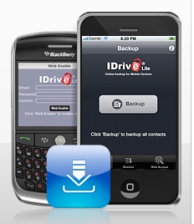
IDrive Lite is easily one of my favorite iPhone applications.
It backs up my contacts to the cloud so I don’t have to worry about losing that vital information were I to lose the device or accidentally drop it into a river (don’t ask), it works like a charm and it’s absolutely free. And today the company behind the app, Pro Softnet Corporation, made the tool even more useful.
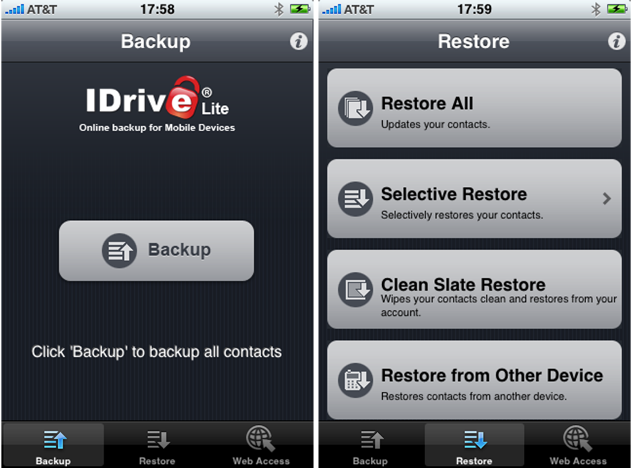
IDrive Lite for iPhone and Blackberry (links go to respective app stores) got upgraded with a number of reliability and performance fixes, and now allows you to restore contacts that you saved to a different device.
That means you can now backup your contacts from your BlackBerry and switch to the iPhone – or vice versa – and still be able to restore all the contact details you saved using the tool. The same goes for when you’re sticking with the same brand but switching from an earlier version to a newer model.
If you’d like to view and manage your contacts database online, you can head to idrivelite.com and log in with your IDrive account. The dashboard allows you to add, edit or delete contact information, import contacts from Facebook and view logs of the activities performed from the app and/or the website.
I’ll repeat it again: the mobile application is totally free.
For an alternative solution, check out My.Memova.


grab iDrive Lite at the direct appsto.re URL: http://appsto.re/idrivelite
and My.Memova’s app (the alternative solution Robin mentioned) is at http://appsto.re/contactssync
Been doing pretty good with Gmail contact sync. No app needed. Had to restore my iPhone to factory default and just had to enter the sync info and voilà my contacts where all there.
Right, for gmail users, the contact and calendar sync work perfectly.
I can see how this app would be valuable if you don’t already use google to manage contacts… but why not?
Been using gmail to OTA sync contacts and calendar since it’s been available. Why would anyone pay and on top of that take additional steps to backup?
Could someone think of a scenario?
Google Sync works so well (without an app, and with push) that I’d venture to say it’s worth getting a GMail account even if you never use it for mail.
I’ve been a GMail user for years, but Google Sync enabled me to dump MobileMe.
But if you already use Microsoft Exchange ActiveSync on your iPhone for another email account, you can’t sync Google Calendar or GMail Contacts.
How did get your contacts from gmail to iphone?
I am using http://www.zyb.com for years now.
They have iPhone app which does the trick.
Doesnt MobileMe do that?
yeah, but not everyone have mobileme, and not everyone want to pay the $99 apple is asking for…
I believe MobileMe is some 99$ per year. But it also does a lot more. It wont work for blackberries though.
Yes. And almost 25% of the time!
What about Google Contacts + Google Sync? I think that combo is far more “standard” than IDrive. It’s also free and works perfectly.
I would love to use Google contacts+sync, but I like keeping my phone contacts (maybe 100-200 contacts) separate from my EMail contacts (thousands of contacts).
Also there is funambol. Might have to check out these other solutions though.
I’ve been waiting for good backup apps.
Is it worth try?
yoda – http://onioning.com/yoda
Arent they stored on your sim card too? I sync with google anyways, but I had a blackberry before that, and just copied everything off my sim card when moving…
iPhone doesn’t use the SIM card for storing contacts, though it can import numbers off a SIM card to its contact database.
Before you use this app, you should read this cautionary tail about how imported contacts were spammed (they have since promised not to do it again, but once is enough for me).
http://aviary.c...-gmail-contacts
Google gmail does the same thing and you don’t need to install anything on the iphone. They have an app for blackberry that also syncs your contacts.
Here are my gripes with I drive Lite;
Does not support custom labels from my contacts. I created custom labels when the standard Home, Main, etc. do not apply. For example; my BofA entry has a phone number for “Cust Svc” IDrive will not show this label or the number. Also if there are two phone numbers labeled as “home” it will only accept/backup one of them. Finally, when my contacts are viewed at idrivelite.com there is no sort option, it sorts by first name.
FIx these issues and it would be great.
It is a cool app. I need my videos backed up too.
Doesn’t iTunes do a full backup of all of the data and apps on your phone each time you sync? In addition, I have my phone setup to sync with my contacts in Outlook, so if my phone is trashed or lost, I still have all of my contact info intact in Outlook. What does this app do that iTunes and Outlook don’t to as far as a backup is concerned?
Didn’t work for twice. Trying for the third time.
Nope, not working for me. Keeps saying “Your contacts couldn’t be backed up, try again”
BMW’s computer system is called iDrive.
uh… it already backs up to Address Book.
Oh that’s right, you need extra software to make something that obvious work on a PC.
http://www.sociallifeworld.com thinks that this will make it easier for people to keep contact with friend even if their phones are broken
IDrive is a very nice backup. Toughest thing to backup on iPhone is contacts, and this is a life saver. You do have a backup with iTunes, but you need to backup the iPhone backup files on your computer as well as the Library folders where you media is stored (music, videos, etc). IDrive can take care of that for you also.
http://theonlin...com/newsletter/