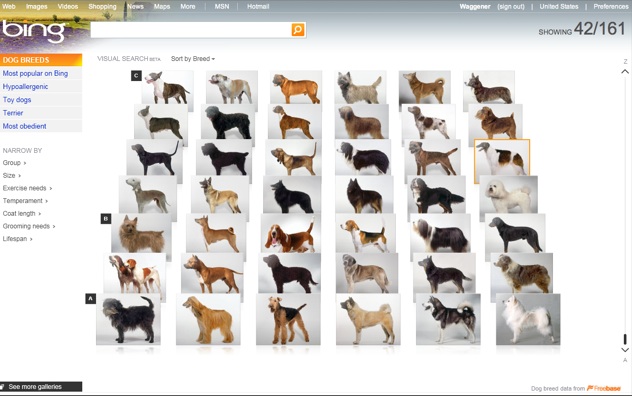
Sometimes a picture is worth a thousand keywords. Today at TechCrunch50, Microsoft senior vice president Yusuf Mehdi announced a new visual search feature on Bing which returns results as an interactive gallery of images.
For instance, if you type in “dog breeds,” it organizes them for you in a grid of images that you can scroll through using a slider on the right. When you hover over a particular image, it enters the name of that dog breed in the search box. And you can re-order the image results by size, breed, exercise needs, and Bing popularity.
There are more than 100 visual galleries ranging from movies, books, and cars to products, animals, and sports teams. The sorting categories change each time. So for movies, you can filter by release date, title, or rating. Cars can be sorted visually by make, price or mileage.
When you resort, the images fly around the screen to find their new positions. The visual search acts as a showcase for Microsoft’s Silverlight technology, which makes the animations and visual rendering possible.
“The whole concept,” says Mehdi, “is that the world of search will change. There will be a more graphic way people will search, and it will pivot how people search.”
The judges were impressed with his demo. Ron Conway noted, “I think the huge winner here will be consumers because competition breeds innovation, and this nice little battle between Google and Microsoft is fantastic for consumers.”
Video:
Other Coverage:
Microsoft launches Bing ‘Visual Search’ CNET.
Microsoft’s next attack on Google: Bing gets visual search VentureBeat.
Bing Tries More Pictures, Less Text Silicon Alley Insider.
Microsoft’s Bing Introduces Visual Search Feature paidContent.
Making Search Prettier: Bing Launches Visual Search ReadWriteWeb.
Microsoft Updates Bing with ‘Visual Search’ FeaturePC World.
Microsoft Bing Adds Visual Search Option Bits NYTimes.
Bing: Now With Visual Search Digital Daily.
Meet an Awesome Search Engine for iPhone Apps – Bing Digital Inspiration.
Bing Search Gets Visual Technologizer.
Hands on: Bing gains Silverlight-only Visual Search feature Ars Technica.
Microsoft Bing Adds Picture Searches for Some Queries Bloomberg.
Microsoft Bing gets visual search; full 2.0 update later this fall All About Microsoft.
Microsoft Adds Visual Search to Bing PC Magazine.
Bing’s new visual search tools are both stupid and cool Daily Finance.
Bing 2.0 “Visual Search” Launches, Allows Search By Pictures Search Engine Land.
Is Bing Optimizing for the Short Snout? The Noisy Channel.
Microsoft announces Bing Visual Search MobileTechWorld.
Bing Goes the Visual Internet AppScout.
Visual Search – Why type when you can see it? Bing Blog.
Microsoft Bing Visual Search Option Helps Us Become Lazier Searchers Google Watch.
Bing encourages visual search Computer World.
Google Leads in Search Engine Quality Test, But Bing ImpresseseWeek.
Bing 2? Microsoft Debuts Visual Search Engine internetnews.com


Link doesn’t work as of yet: http://www.bing...om/visualsearch
Hope Soon the site come alive..
Bing comes out with greater innovations with the battle to catch the query search market hitting down Google. The competition anyway helps consumers to get accurate, well refined query results in seconds. Let the battle continue and let people benefit from it.
An effective visual search! Animations and visual rendering during search is quite interesting.
Thus in the Bing it is easy to scroll and re-order the image results by size. So let us wait and watch how effective this Microsoft’s product competes with the Google?
Let’s try that again
That web page doesn’t exist. Let’s see if we can help you find what you are looking for.
Tips
* Check that the web address that you entered doesn’t contain a typo.
* Use the search box instead of the address bar to find what you’re looking for.
* Find more search tips in Help.
He said next 10 mins, wait a few.
Where in the article does it say “10 minutes”?
This feature, while very awesome, still is not live as of right now.
It’s now LIVE
WTF, I need to install SilverLight for it to work
silverlight install is a dealbreaker
Why don’t you have SIlverlight installed? Do you have Flash installed? I hope you realize the hypocrisy of installing one but deliberately, actively avoiding the other.
Agreed, SilverLight is a joke.
HOURS LATER!!! STILL NOTHING!!
In the real-time world, it should have been available mere seconds after the announcement
Woah, this is truely new…
I love that
“When you resort, the images fly around the screen to find their new positions. The visual search acts as a showcase for Microsoft’s Silverlight technology, which makes the animations and visual rendering possible.”
Blah. I was hoping they were showcasing some new fancy animation plugin or perhaps canvas/SVG. Sad to see its proprietary… but it is Microsoft after all.
Is it just me or is Bing doing a much better job with image search than Google?
My understanding is that this isn’t “image search” at all, it is “visual search”.
In other words, the images help them build query strings for you to do standard searches. They are not necessarily the end results of a search.
yes it’s just you
Nice, Bing is looking better each day.
Not working
meh. lost interest already. Should make it live before making an announcement.
Dude…it is live. Try it?
Dude… it’s dead, get lost.
I tihnk you have to set your country to the US before you can see the page.. looks like its only beta in us only at the min
Tried to change my country to the US but the browser redirected me to the following page: http://www.usci...rtal/site/uscis
First time I’ve been excited about a MSFT product/service in years. Good on you, Bingers.
I am really looking forward to using this. I really need to pick out a dog.
It’s live now ; Visual Search Galleries (Beta)
http://www.bing...om/visualsearch
Its dead .. nothing here .. This is what I got ..
Let’s try that again
That web page doesn’t exist. Let’s see if we can help you find what you are looking for.
Tips
* Check that the web address that you entered doesn’t contain a typo.
* Use the search box instead of the address bar to find what you’re looking for.
* Find more search tips in Help.
Its not working ..
Best,
Daina Thomas
yeah you need US preferences, just got it to work from uk
This kind of reminds me of the experimental search Google has that uses the spreadsheet view except this uses images and from the demo actually appears to work correctly unlike Google’s version.
Really liking all the work Microsoft has put into Bing, off to a surprisingly great start, hope it continues.
It uses silverlight… Not that I don’t appreciate it, but it won’t appeal to the masses.
Why is downloading Silverlight such a big thing for you? did you care when you installed Adobe Flash?
So fanboyish…
You realize that literally hundreds of millions of people already have Silverlight installed, right?
http://bit.ly/1757BM
The Olympics online streaming appealed to the masses like crazy and was incredibly successful. Something like visual search could easily be too.
doesn’t work on my chrome
works on the dev channel chrome
If I was a PM at Google Search I would need to put some serious down time to catch up with Bing
I see they’ve even added “iPhone Apps” as one of the visual categories. … With this Bing might actually now be a better way to search and filter for iphone apps than the official app store… Never would have thought.
Link: http://www.bing...amp;FORM=Z9GE62
I can’t see why they spend more time on features like this compared with say podcasts, or international release. Bing in the UK is a joke when compared to Bing US (although I still prefer it to Google oddly).
Why when I search for podcasts (that Microsoft’s own websites (zune.net) allow me to listen) does it not give me a synopsis, the current episode, an official site and the option to play inside the results- surely that is addressing how people use the web more than this? Although if they added visual search for podcasts, e.g. narrowing down by genre, I imagine I’d like that.
Edit: The iPhone apps search isn’t bad… that’s the sort of thing I had in mind, I also like how the metacritic ratings are shown. But why can’t I do simple things like filter out some of the 854 “current movies” that aren’t really new films. Needs work, sort of promising.
Very interesting.
Search and visualization are very much connected. So it makes sense to use visualization. Actually a few charts could also help (distribution of the keyword, etc.)
Bing are definitely going for the ‘not so web savvy’ and ’shopper’ audience with their features. Smart move I reckon as they are just the people who will move away from Google to something more appealing and useful to their specific needs. That’s just the segments Google should be fighting to keep as they’re the ones who bring in the ad dollars too.
That said, we’ve seen a lot of visual search attempts and I’ve yet to see one succeed for anything except retail ecommerce (although thats a market worth fighting for).
Installed Silverlight successfully (according to MSFT’s dialog box) but still get this error when trying to view the visual search ’sets’ –
There was a problem loading this page. Refresh your browser to try again.
I guess I won’t try this on my iMac when I get home.
I think this is really cool – there are a lot of times when I’m searching and don’t know the name of something but I can identify it visually. It seems to be more useful for some categories than others.
Did this launch take up one of the 50 spots for new companies? Seems pretty crappy if that’s true.
This is pretty cool, and works really for some categories e.g. http://www.bing...amp;FORM=Z9GE32
Sounds like Cool Iris
Hi Folks,
There is an interesting talk at Stanford GSB on AI. Panelists include WillowGarage, Evolved Machines and Siri. Check it out http://bit.ly/t2F7q
Requires Silverlight installation, hence won’t work for millions who don’t have admin rights to their workplace machines, yet utilize web searches constantly for job-related activities. Me no likey.
Why the hell are you using Visual Search – something meant mostly for personal interests, shopping, etc. – at work, and why do you expect it to be there as if it’s your right?
Besides, if you think you require Silverlight as much as you require Flash, yet your sys admin allows the latter, but denies the former from being installed, then it’s time you talk with your sys admin about hypocritical installation rights.
For the hundreds of millions of other people who already have Silverlight installed, this will work just fine.
hahaha good 1
I could see where this could be helpful. I agree that there are times you need a visual when you can’t think of what it is you are looking for, which as someone pointed out earlier is very very useful to the e-commerce market. And I say why not go for the “not so web savvy” audience? I would have to assume there are way more of those people out there than those otherwise. I just think its great that Bing is doing some out of the ordinary things and presenting them in a major way. This is exactly how you get attention and make an attempt to swing the momentum your way.
I hope some of the lesser known search engines are able to capitalize on the new “arms race” in search. I think it would be great to see some new names jump to the forefront. A place like eZanga which is really working at improving its results all the time could be a dark horse in getting near the top in the next couple of years.
I’m not too excited about a major web site coming out with a product that only works with javascript enabled.
Show me the same product with progressive enhancement for all people to use. Microsoft’s Bing has released other features that disregard web standards.
show me how its possible with out javascript, silverlight or flash….
If you want HTML only go to the REGULAR search
Javascript? Try Silverlight (much worse IMHO).
But.. you *can* still use regular old Bing search without Javascript, so I don’t get your progressive enhancement complaint.
It doesn’t work outside the US: http://www.watc...om/visualsearch (click on the [check] button to see the result from different countries))
It works in England. Can’t provide anything other than anecdotal evidence though.
it does work outside the US if you use camelcase I found out: http://www.bing...om/VisualSearch
weird
does not work in Thailand
Great visual search on apparel at http://www.empora.com leading visual relevancy with Modista.com
joke?
“That web page doesn’t exist.”
Does this means those dogs are now extinct?
Booerns Bing…
I’m running http://www.gooncity.com with silverlight’s deep zoom. It really is a great technology.
Take the link out of the article until it works.
PS: Twitter is down too.
Link is down. I tried to open using both IE and Chrome.
I agree with lazysupper, can you place a warning on top of the article that the link doesn’t work, so that people won’t get frustrated trying.
Very cool. I can sort the Washingtons Redskins by highest reported salary
Maybe a nice idea but they made it using Silverlight. Just imagine Google returning search results in Flash instead of plain HTML. How successful they could have been?
MS could have done this in HTML+JavaScript with similar results if only their browser were good at running JavaScript fast and at implementing the new HTML technologies of the last years (canvas, SVG) that all the other browser include.
Check this game http://www.kevs.../dev/asteroids/ to see what doesn’t need Flash or Silverlight to be done in a browser. It won’t work in IE, try it in Firefox, Safari, Opera or Chrome.
But the application seems to be down currently
any news on when it’s going to be available/visible to us. seems off line atm
Very Impressive!
To get it to work, you have to assign your search results to “United States”
1. Goto the top right corner of Bing.
2. Choose “United States”
3. Goto http://www.bing...om/visualsearch
I like this feature of Bing.
Seems to be broken/non-existent. Is this a hoax?
http://www.bing...om/visualsearch
displays:
“Let’s try that again
That web page doesn’t exist. Let’s see if we can help you find what you are looking for.
Tips
* Check that the web address that you entered doesn’t contain a typo.
* Use the search box instead of the address bar to find what you’re looking for.
* Find more search tips in Help.”
This is fancy, it’s not smart, flashy (though with Silverlight!) but not elegant. What I appreciate with Google is its semantic power which is so elaborated that it finds my thoughts when my words lack. Microsoft has always been to straighforward, in my opinion of course.
Wow, the ignorant level of most people here..
CHANGE YOUR COUNTRY SETTING TO UNITED STATE
http://www.bing....aspx?FORM=WHLH
United-ed STATE!
=P
Bing is pushing some innovative concepts. The concept of assisting people with “making decisions” is also resonating well with me.
Strategically, it will be interesting to see if their collection of service offerings will incrementally sum up to a marginal increase in performance which justifies the switching costs of moving from the “verb” of the industry.
Now, That’s really cool from MS. Bing is going to be a big-big threat to Google for sure.
While visual search is an interesting product, don’t forget the bigger picture that Bing is planning to roll-out Bing Wave 2, which has some other features that will impact SEO.
SEOMoz has a decent post about Bing wave 2 here.
http://bit.ly/fj9QP
Why silverlight?
Interestingly, I had the same problem– visual search didn’t work in Firefox (”That web page doesn’t exist.”) for me, but it worked fine in Safari.
I don’t know why, but my Firefox seemed to think I was in Canada. When I clicked on Canada in the upper-right corner, then changed my country to “United States – English” — it started working.
One would think a more helpful error page (like, “Visual Search is not supported in your country, which is Canada” would be more helpful.
Why would bing think I was in Canada? I have English selected as my default language in Firefox preferences.
While this feature will most likely make online shopping easier, there will be more incentive for Web sites to feature larger ads on prominent parts of the page. It might seem cool, but it is really a ploy to hook consumers. http://tinyurl.com/llza45
http://tinyurl.com/o6lwry sorry, Mr. Carter has little to do with bing