
People who bought the original iPhone will remember perhaps the most annoying original feature: The long sync. That is, when you plugged the iPhone into iTunes it took forever for it to complete its syncing process. The main holdup was the backup process, that would take a ridiculous amount of time to complete, each time. Luckily, Apple fixed the issue with subsequent updates to the iPhone, and sped up the backing up process to mere seconds. But with iTunes 9, things are starting to look grim again.
One main culprit is what should be a nice, new feature in iTunes 9 called “Automatically fill free space with songs.” It does exactly what it says, finds songs to put on your iPhone to fill it up. This is great for people like me with too large of a music library to sync it all with the iPhone, and who don’t really use playlists (the main way to sync music to the iPhone). Unfortunately, if you click this “Automatically fill free space” option, it seems that sometimes it wants to remove and replace much of the random music. If you have a 32 GB iPhone, that is going to take a while.
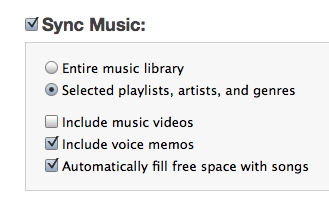
It doesn’t do it every time, it only seems to when you have made a change such as installing new apps, which obviously changes the amount of storage available on your iPhone. That’s somewhat understandable, but it doesn’t make up for the fact that it still takes a long time to complete. And I don’t know why it has to remove 10+ GB of music to install one new app.
So easy enough fix, right? Just don’t check that box. Well yes, except that regular syncing itself seems to take significantly longer with iTunes 9 as well. Previously, it would take me about a minute to sync my iPhone with iTunes 8. With iTunes 9, I’m seeing wait times of about 5 to 10 minutes. And sometimes the system just hangs, and you have to manually stop it.
This doesn’t appear to be the backing up process, which is still being done in just seconds, but is some other process involved in the syncing. The status indicator simply reads “Syncing iPhone” as the progress bar spins for minutes.
Hopefully, this is just a matter of another firmware update from Apple for the iPhone. You would have thought they would have checked the syncing speed on the just released iPhone 3.1 firmware, but apparently not. So now, if I want to sync just a couple of songs before leaving my desk, I have to wait 5 to 10 minutes. It’s like the original iPhone all over again.


Sort of glad I’m not the only one that has a slow sync again… I’m sure Apple will fix it soon enough, it’s not THAT slow.
not as bad as the original slow sync, but pretty bad. especially if you have to wait while it recopies 10+ GB of music.
Surprised you didn’t blame Bush for the slow sync. Isn’t that how it works?
the band? everything zen?
I have a crazy idea… turn it off.
Somebody pay me some money cause that was just brilliant.
Apples iTunes wants to makes us to think otherwise!it is true. The few new features to add a little bit of that old record store and the white backgrounds are bright and clear which are quite interesting. The Attitude interface definitely shows a heavier influence of the use of Webkit.But the sync is slow and just a couple of songs is interesting too.
Home Sharing functions essentially turns any computer into an Apple TV with full cross-syncing capabilities. Simply good.
also the minimalization doesn’t work when clicking the green button (to get the mini-player). you have to go to ‘view’ then ’switch to mini player’
You can also Option + Click the Green Orb to activate the Mini-Player.
Sad to receive a slower syncing from iTunes 9.0. Apple could give a better performance. Hope it would fix this soon and provide alternatives to syncing. This slower performance is an added disappointment in case of Apple’s service.
heh. my phone syncs over bluetooth. get with the times, apple.
Bluetooth would be even slower. No matter what they do on the software side to make the sync faster, USB is still faster than bluetooth.
Especially because iPhones have a lot of stuff on them—music, apps, etc—as opposed to just messages, emails and contacts like other phones have.
Though, it would definitely be nice to have this feature anyway.
I would prefer to have syncing (in the background) over Wi-Fi whenever I am at my home network. Sort of like what my laptop does when it detects my Time Capsule. This would be the best option. Bluetooth would be insanely slow for my 32 GB iPhone.
Apple should introduce sync over wireless or bluetooth for calendars, contacts, notes, bookmarks and all that stuff that doesn’t really take up much space. I could do this with my Sony Ericsson phone 5 years ago on a Mac, why not the iPhone? Also, it should sync automatically as soon as the phone is within range (also possible 5 years ago with third party software).
I really don’t need to sync my music and pictures every day.
This will never happen of course.
Not likely, my WinMo just dies before ever completing syncing as the bluetooth stack sucks the battery dry like a vampire…
Huh? I have my Bluetooth on all the time, and that’s absolutely not the case.
Bluetooth will burn battery faster
If you have mobileme, you get continuous syncing of bookmarks, calendars, contacts and email instantly over WiFi or cell network, wherever you are.
My iPhone hasn’t had a successful backup since iPhone 3.1/iTunes 9. I have been killing the backup process after about 2+ hours or so.
Sadly, I’m about 3 hours in at my latest attempt and I’ve taken screenshots every hour or so just to make sure the process (or at least the progress bar) hasn’t died.
It’s not the cable either. After killing the backup, content transfers just fine. Ugh.
Same sad story here. Takes hours and backup stalls. One issue might be the new feature allowing to re-arrange apps in iTunes. With my 164 being shuffled around I guess I over taxed the feature…..!
Do hope they fix this soon. Am surprised they don’t test this kind of stuff on their own phones before launch!
My first sync/backup took hours but subsequent syncs have been fine. Hopefully if you can wait out this first one yours too will improve.
Thursday Night I detached my iPhone from my computer and took it with me. A few minutes later I went to check on something, and the iPod app came up with “Updating Library… this may take a few minutes.” A few seconds later, that went away and I found my entire music and podcast library gone except for a single episode of Buzz Out Loud. I resynced it during breakfast yesterday and everything was back to normal in a couple of minutes, making me think that everything was there but the indexing was broken. I thought perhaps I had accidentally detached the phone during a sync. Last night I left it attached while I was shutting down my computer. I didn’t check it until I was in the car and found: everything gone except the BOL episode.
I am hoping that I can figure out what is causing this so I can not do it again.
I have a lot of user data on my iPhone, and my first sync after a restore or a major OS update takes all night. Subsequent syncs are quick.
yup i agree
Have you checked your camera roll? I’d be curious to know if you have a lot of media on it – especially videos as that will slow down backups a great deal.
See http://reviews....333957-233.html
Since installing Windows 7, my iPhone sync takes just under 2 hours!!
Mine’s slow too but I don’t have very many mp3’s so I think it’s something else. For me it’s doing a new optimization process for the photos. It’s strange since 100% were taken on the iphone itself.
Why can’t the iPhone and Touch sync over wifi? Technically I can get new podcasts on my Touch over Wifi so why not allow iTunes to “push” to the device?
I have a Blackberry Bold on a BES server and I never have to connect it to a PC/Mac because everything sync OTA (WiFi or cell network).
And how much is the BES server? I have OTA syncing of Mail, Calendar and contacts too. No need to buy BES server with iPhone. I sync apps, movies, music and podcast over USB. Right… I am going sync a 1 GB movie over wifi at 50Mb while the 480 Mb USB with charging stay idle. humm….
Your synch only takes about 10 minutes -consider yourself lucky
My synch/backup took 6 hours to complete the other night – and that is normal.
I usually skip the backup process and only do a synch – which completes in under 3 or 4 minutes – it’s the backup that just hangs and takes all night long.
I dunno about most techies, but I’m pretty sure I’m migrating to Google Android after my term is up with the AT&T.
10K apps says it’s ready and everyone and their mother seems to be rolling out a phone for it so it’s picking up quickly.
It’s been real Apple, but I grow tired of you.
wow, your so hip.
you’re not your
Oh I know!!! I was late for school today because my iPhone was still syncing when I was trying to leave this morning.
this is a total joke. apple has millions of these phones on the market and the 3.1 update screwed up the wifi (done a lot of research and found many other people cannot connect to wifi anymore), messed up the sync, temporarily caused my phone to lock and become unresponsive, and killed my voicemail. My message to Apple: Are you guys out of your friggin’ minds? Releasing unstable software to millions of users who not only depend on your device for their daily business and personal activities, but also who pay an arm and a leg to get this equipment? “HELLO, anyone there??”
It’s freaking amazing, isn’t it. It’s one thing to break things when you have thousands of permuation of hardware you need to run on, but when you’re dealing with a closed hardware, this should never ever be an issue.
iTunes 9, a very big disappointment. Previous version worked great, and the new layout for iTunes 9 is horrible, especially the movie/video sync page. Also experiencing the same problems as noted in this blog, plus photo and video syncing. iTunes 9 is a premature release for sure.
I still have no idea why they can’t get the thing to sync via WiFi.
Sure, firmware updates, fine, require a plug-in. But WTF Apple? The thing has WiFi, it’s on my home network… Where’s the Sync App?
I have this problem once in awhile on iTunes 8 with OS 3.0. It happens exactly like you describe. I cancel the sync by disconnecting my phone and resync and it goes back to normal.
I don’t think this is an iTunes 9 specific issue.
After upgrading to iPhone OS 3.1 and iTunes 9.0, I was seeing slow/buggy syncing. So, I restored my iPhone to factory settings and this seems to have fixed the problem. Factory restore of the iPhone is much less of a pain with the app organization tools in iTunes 9.0. The only drawback is that the first sync took an hour to reload my media. One upside is that the iPhone is running much faster now!
great point actually. i was so leery of doing that in the past only because app organization was such a pain. but now, i really should do it.
I think when the sync lags at the end and just spins in iTunes, but doesn’t show as syncing on your phone, it has to so with your music library. If you pop right into the iPod while this is going on you get a message stating “library updating, this may take a few minutes,” or something tothat effect.
maybe it’s trying to make sure it’s not a palm pre?
Why is it that TechCrunch always reports on hardware problems that don’t affect me? My iPhone is not heating up, nor blowing up, and I am not suffering from those apps which Arrington comically calls “too slow to run”. And no, there does not seem to be a difference between the “old” sync time and the new.
I think the iPhone sync is shocking, I can literally grow a beard whilst waiting for the sync to complete..
My 3GS actually syncs way faster with iTunes 9 and OS 3.1.
The time it takes to sync ipods and iphones has been an issue for a long time. It takes forever to sync my iphone 3GS. I wish it didn’t, but the problem isn’t the software; It’s the hardware. Trying to download multiple gigs of information through a USB cable is like trying to syphon an elephant through a garden hose. Originally iPod had a firewire connection, but because many people did not have a firewire port for their computer, they gradually went to USB. It’s slower but opened up a larger market for Apple when firewire was still had very little market saturation. It’s still not standard on many computers. There is hope though…USB 3.0 should be around the corner. It peeks out at 4.8 GBPS. That’s ridiculously fast. Apparently it’s supposed to charge up USB devices quicker too. Not only this, apparently it’s backwards compatable with most USB 2.0 devides. I can’t imagine Apple looking at the potential of USB 3.0 and scoffing. There’s too much potential there.
Hey MG you all forgot to mention that the 3.1 update screwed a lot of iphones bluetooth+Wifi.
My 3G iphone WIFI is totally broke now, can’t recognize any networks at all.
Tried everything, restored a few times, rested network settings etc…. Nothing works.
Just search twitter for 3.1+WIFI and see how many people got screwed by this update. Also Apple apparently stopped signing older firmwares so you can’t downgrade (also tried).
Big FAIL
How to backup an iPhone on 3.1:
Click sync.
Wait until it gets to the backing up part.
Plug your laptop or your battery will surely die.
Watch some tv.
Eat dinner.
Take a really long shower, >30 min.
Count all blue objects in your house.
Go to sleep.
Wake up.
Eat a huge breakfeast you are in no hurry.
Shave.
Brush your teeth.
Go to work.
Come home.
Kiss your wife.
Take her out to a restraunt with a really long wait.
Drive home the long way.
Beat all pokemon games.
Get online.
Go to techcrunch.com.
Make a really long comment on an article about iPhones.
Breathe in.
Breathe out.
iPhone sync complete. It is know OK to disconnect iPhone.
DO NOT – Repeat – DO NOT Download iTunes 9.0 unless you love to see a spinning wheel and an unresponsive iTunes.
Try to use time machine to go back to iTunes 8 and all it won’t have access to your music because you have a newer version.
This is with an iMac w/Snow Leopard.
Are you listening iTunes Support?
Add me to the list of those with slow sync. Mine got slow around v8. Still slow. Almost appears to hang. But, if I just leave it connected it eventually goes. Very annoying.
Sync for me is fine – just a minute or two, depending on how much needs syncing. Your phones or systems sound sick. Which bit is going slow for you all?
My problem is since iTunes 9 I get frequent ’spinning beach ball’ stalls. Hoping someone will discover why soon.
My jailbroken yellowsnowed 3gs works perfectly fine with 3.0 and Itunes 8, but I was thinking about updating as soon as the dev team unlock the 3.1 fw. Now Im gonna hold off until all this pans out. 5 hour sync time? Are u effing kidding me??
for me it took only 20 minutes.
30 mins forb me.
MORE THAN 5 HOURS HERE, AND STILL BACKING UP. WTF?
Spent an hour re-arranging apps in Itunes. Tried to sync. No custom ringtones came over. All the work done re-arranging apps apparently lost. Now 90 minutes into a new sync. Not a good start!
I just gave up after 2 hours. It seemed to hang during backup with no movement of the bar. I canceled sync and got a report that the app crashed and needed to be restarted.
Auto Fill feature is not new with iTunes 9.
It was there in iTunes 8. Turn it off, no problem.
Try re-building your iTunes library as here:
http://support....e.com/kb/HT1451
After it has rebuilt the library don’t interrupt the ‘gapless albums’ process you see at the top.
This has fixed a lot of iTunes problems for a lot of people, but not expressly slow syncs that I know of. Worth a try though – your syncs should only take a couple of mins if there’s not much new stuff to sync.
Warning though – the above resets the ‘date added’ data for all your songs.
iPhone Syncing can be slow with OS 3.1 and iTunes 9 if you have lots of photos in your Camera Roll on your iPhone (photos you took on the iPhone) . To speed up iPhone syncing, download photos from your phone to your computer, then delete all photos in the Camera Roll on the iPhone. It makes a big difference. Here’s how:
1. Ensure the iPhone is connected to your computer.
2. Open iPhoto.
3. Select the iPhone in the Devices list in the left column.
4. Select all your photos in the camera roll.
5. Make sure to uncheck ‘Hide photos already imported’. This is important so you will be able to delete all photos in the Camera Roll on your iPhone after the sync.
6. Click Import All.
7. Make sure all your photos imported properly (check the # of photos in the dialogue box that appears)
8. Click the Delete Photos button at the end of the import.
9. Make any new albums you want, delete any photos you might have previously imported.
10. Quit iPhoto
11. In iTunes, select your iPhone under Devices in the left column
12 Click on the Photos tab. Select any new events or albums you created or want to sync back to your iPhone
13. Click on the Sync/Apply button
14. Watch in wonder how much quicker your backup of the iPhone proceeds
I can’t believe how much quicker my sync is after downloading 212 photos from my camera roll. My backup used to take forever. Now things are much quicker. Can’t believe such a simple thing made such as difference.
I use my AVG to stop the slow backup syncs. Delete out Itunes or reset permissions to ask you… and of course, let the normals ones go thru…. but you can see the 2 cycles when it asks if mobilebackupblahblah can sync, so leave them on ask every time.. so that you can deny manually.. and voila.. straight into just updating your apps, etc. So I always know now when it’s trying to do it’s backup sync, because my popups start coming – just a quick deny and I’m back jamming!
It’s MD CrashReport.exe and AppleMobileBackup.exe that you want to manually deny to stop the backups..
Glad someone mentioned this – was ready to blame my newly installed network sharing gadget!
Buy a Nokia 5800,N97, Samsung omnia HD, etc, buy non-DRM MP3s from amazon or any other store and your problems are gone!
Fish man, did you know there’s a huge rivalry between Columbia and Harvard?
Neither does Harvard.
Mine is in the 6+ hours to backup group. Seems reasonable otherwise.
It has also claimed that I don’t have the rights to a couple of things that I most certainly DO have the rights to, although that problem has not cropped back up.
It also crashes a LOT.
There has been a recurrence of an old problem – it forgets which podcasts are new or listened to. Lame.
I have also recently had problems with alarm sounds going away – my phone will fail to wake me with its alarm, I will check to see what’s up and find that the alarm is dead – when I choose a different sound for it, that sound goes off just fine, but if I move back to the original (now dead) sound, it’s still listed but makes no noise.
Generally the stupid thing is just buggy as hell right now. On top of that, I have NEVER had a good experience in one of the Apple stores – I’ve had 3 terrible ones, not a single good one. They just plain suck.
It’s kinda startling – their stuff is supposed to just work, that’s its best reason for being – and they’re supposed to provide good cs, that’s their second best reason for being.
I will not be replacing my current (3G) iphone with a new one after my contract is over unless they are able to both fix the current crop of SEVERE issues and avoid creating a new crop of them between now and my upgrade time (probably summer after next).
I’ll let them get away with being obnoxious, deceptive, slimy jerks at the store- at least that’s not a problem I have to live with all day every day like the stupid issues I described above
I downloaded the 9.0 and it locked my iPhone. I tried to restore it and still nothing happened. Now I have a message on iTunes telling me the “SIM Card does not appear to be supported” when it worked just fine this afternoon. The iPhone screen just shows the iTunes symbol and the USB cord, nothing else.
Does anyone know what to do?
iTunes 9 suck too many bugs.I might have to reactivte my mini disc
iTunes 9 is so slow on my PC that it is unusable