Last year, Google rolled out forms that link into Google Doc’s spreadsheets, providing elementary database-style form support for its online office suite. Forms basically let you add data to a spreadsheet without having to enter it directly into the spreadsheet itself, or even having to log in because you can add the data through a survey.
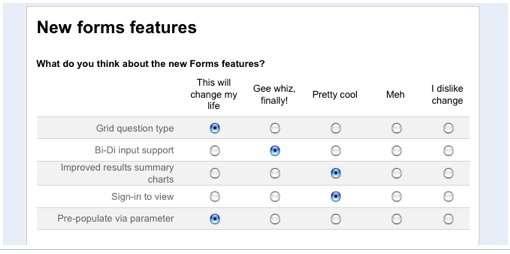
Today, Google is upgrading its Forms tool in Google Docs, adding a number of new features. Forms is basically a way to conduct a survey, with responses added automatically to a spreadsheet. Users now have a more compact, grid-like form in which to collect data. They can now quickly gather responses for a group of similar questions by simply labeling a few columns and creating as many rows as they like.
Summary charts also have clearer formatting of statistics and now support right-to-left text input, helping out those users whose written languages go from right-to-left. Developers can also integrate forms with their own applications and pre-populate a form with data.
Since its launch, Google forms has been an easy and accessible way to collect large amounts of data. Of course, the obvious use for forms is for surveys where you are collecting a massive amount of data and then need to make sense of it. You can either embed surveys into a blog post or site or you can share a link to the survey. Any responses are collected in a spreadsheet.
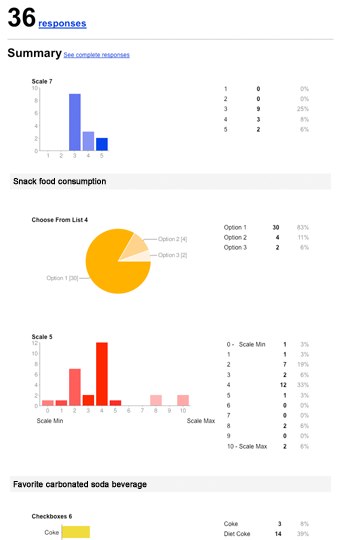
These new features make forms a little bit more user-friendly and attractive. Forms aren’t the most popular Google app out there, but I’m sure to try them out the next time I post a survey on TechCrunch, instead of using SurveyMonkey or another survey application. I actually created a survey (see below) but my one complaint is that it doesn’t show respondents the results, or at least if it does, it is hard to figure out and is not an automatic function.


Very cool, I hope it works in google apps as well ! Im excited to try it out !
Google Forms serve more now. Google Apps have broadened their free services providing most friendly user interface. It makes life simple. Hope this improvisation makes Google Forms a popular Google App.
http://www.tech...in-google-docs/
Good news from Google. Google is upgrading their surveys through Google Docs, adding a number of new features. In these spread sheet surveys users now have a more compact, grid-like form in which to collect data. They can now quickly gather responses for a group of similar questions by simply labeling a few columns and rows. They are more user-friendly and attractive
We are very excited to try these data rich surveys!!
still not as great as Wufoo.
Yep, my vote is for Wufoo. Why isn’t that in your survey?
I heard the real reason TC went down was because Arrington neglected to pay the bill. The whole TC team had to pool together they lunch money and then Arrington ran down to Amscot to purchase a money order to pay the internet service provider
Compare Google Forms and SurveyMonkey to FluidSurveys:
http://fluidsur...s-fluidsurveys/
I personally think Formspring smokes em’ all.
http://www.formspring.com
Compare Google Forms to SurveyMonkey to FluidSurveys:
http://fluidsur...ure-comparison/
sounds impartial. no?
We should clarify. Our goal wasn’t to point out what tools like SurveyMonkey and Google Forms don’t have. Our goal was to simply point out how we as FluidSurveys stand out.
The online survey software market, as we all know, is quite vast in nature and there are hundreds if not thousands of players on a world wide basis. We simply want to point out what makes FluidSurveys different. We invite you to read our updated blog post to see what we mean.
If anyone is interested in seeing our feature list, please check it out here: http://fluidsur...ys.com/pricing/
If you like what you see, feel free to sign up and try our Free account.
To further our point, check out our URL grabber feature on youtube (hopefully the embed code below works – if not check it out here: http://www.yout...SkJjPs& )
Great news. We use google forms a lot but mostly for the CYA type surveys that no one really cares about. Who *really* knows the difference between “mostly happy”, “partially happy” and “marginally happy”
If your goal is to discover the root-cause try Idea Magnet (http://idea-magnet.com) — that we fell in love with a while back. Great product — not so great website. I think they have just changed the conventional definition of surveys. Mind you, they might be an overkill for your CYA surveys (surveymonkey, fluid or google forms are great for showing your boss that you did something), but if you are looking for diagnosis and discovery as they say in their sales pitch — they are awesome.
What’s unique about them is that they let the respondents speak in a microphone without giving them a set of pre-defined choices. We have had good success using them in the “root cause” type campaigns.
Try Idea Magnet. We did and we love it. Don’t know what to call it in the Analyst speak. But it is different and it effective as heck.
None of these advances have any relevance to me until they take off the stupid Powered by Google Docs label. I can understand this on the free version but I’m paying for Gapps so I expect to be able to use it without having Google’s brand platered all over it.
Having Powered by Google Docs makes any form you create look cheap and nasty when Google has done a really good job of making it a service that is as powerful as much more expensive survey.
C’mon Google, drop the amateur hour.
Furthermore to FormSprings, FluidSurveys and any other commercial forms provider I don’t understand why you don’t have per-survey pricing. There is a big market IMO for people who may do 4 or 5 surveys a year but want all the bells and whistles for those 4 or 5 surveys.
FluidSurveys just launched One Time Fee Surveys: http://fluidsur...-pay-as-you-go/
great, this is very usefull.
Thanks for the kind words Jason and Norm.
You can reach IdeaMagnet here. And feel free to contact me if you need more information on features or differentiation.
You can show the survey results to the respondents.To do this Select More Actions->Edit confirmation.In the Confirmation window select the check box “Let everyone see response summary” and then save.your survey results can now be seen by others.
you can see the results after the survey, in the embedded form given below
http://bit.ly/AhYjZ
damn, you keep getting me with your stupid-ass, no-followed Vakantie St. Maarten links.
I must be retarded!