Translate Google Docs And Share Them Around The World
by Leena Rao on August 27, 2009

Google docs is a useful application for sharing documents, but previously didn’t allow for sharing across different languages. Today, Google is launching a feature in Google Docs that will automatically translate documents into 42 different languages.

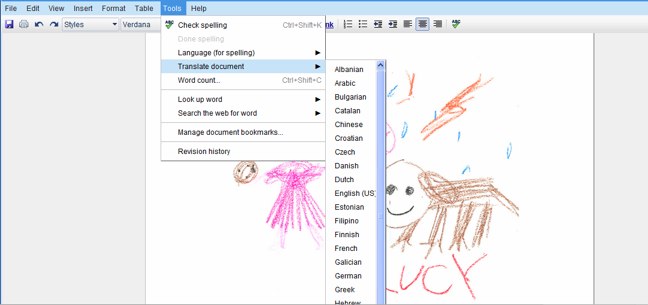
In the tools menu of Google Docs, you can now click “Translate document” and choose the language to translate too. This functionality uses Google Translate’s technology. You can replace the original document with the translation or save the new translated version as a different document.

Google says that formatting and layout of translated documents remains the same regardless of what what language it’s in. It looks like along with new features, Google Docs may be getting a new interface soon, perhaps in the fight to one-up Microsoft Office’s new web-based productivity suite. Google also peeled off the beta label for Docs in July.

It seems that this is just another example of Google’s tying its apps together. Other examples of this trend are bringing Google Gadgets into Gmail, Docs and Calendar, Picasa pictures in Google Maps and more.

Advertisement

Comments rss icon

  • That’s a very nice feature!

  • Translation services still have a long way to go before they become usable. However google is on the right track.

    • The initiative is good but the translation part does not sound well. Translation may not give the actual meaning of the original doc. Hope Google will improvise the performance and reduce the bugs.

  • I like the picture in your screenshot

  • Never mind being able to translate within a doc.

    Google need to focus on basic functionality like being able to change the *default* language for spelling.

  • Prince Momar Shackleford - August 27th, 2009 at 10:16 am PDT

    I love the World Wide Web!!! I just love it. You can email, telnet, and even IRC!!

    I thought my company was advanced in having a built-in Intranet, but then I visited my GF’s office and they have the Internet over there!!!

    I’m going to go home and sign up for a dailup connection so I can learn how to use email so I can save on my Long Distance phone bill. Right now, I’m paying 27 cents per minute.

    Go Information Super Highway!!!

  • Prince Momar Shackleford - August 27th, 2009 at 10:16 am PDT

    I would like to Surf The Web all day long.

  • The “a new interface” link is broken.

  • the “a new interface” link it’s broken, where did u get this from? I hope they build a chrome looking interface across all services, that way it blends in nicely with the browser.

  • Certainly one of the features of Docs that I look forward to.

  • Whatever happened to the all-new Google Docs interface we were promised over a month ago?

  • People should be a little bit more careful when they translate their documents to other languages using machine translation. Both Google and MS state clearly (but not bold enough) that they do not take responsibility for errors that may be resulted by using their translation tools. I’m still using paid professional translation to translate my documents (I use OneHourTranslation.com since they’re also commited to doing it quickly, but there are many translation agencies around). I wish I could use Google Doc’s translation tool but I really can’t.

  • Bingo !! I loved it .. This is the way I jumped on the floor when I translated a document. It was a ‘English’ to ‘Hindi’ translation.

    But, when I started reading the translated document, I was really disappointed.

    Here is a translated para from ‘English’ to ‘hindi’ that doesn’t make any sense:

    Original Paragraph
    ““Social networking continued to grow strongly in India this past year, with several of the top global brands carving out a more prominent position,” said Will Hodgman, comScore executive vice president. “While there is certainly room for several players in the social networking space in India, the sites that have the right blend of having both a strong brand and cultural relevance will be best positioned for future growth.””

    Translated one
    “,, ComScore के कार्यकारी उपाध्यक्ष करेंगे Hodgman “सामाजिक नेटवर्किंग के लिए भारत में यह पिछले साल जोरदार निरंतर बढ़ती रही, ऊपर वैश्विक बाहर एक और प्रमुख स्थान नक्काशी के कई ब्रांडों के साथ” कहा था. “हालांकि निश्चित रूप से भारत में सामाजिक नेटवर्किंग अंतरिक्ष में कई खिलाड़ी, साइटों है कि दोनों एक मजबूत ब्रांड और सांस्कृतिक प्रासंगिकता होने का सही मिश्रण है के लिए कमरा है सबसे अच्छा भविष्य के विकास के लिए तैनात हो जाएगी.” ”

    Ohh.. am scratching my head.

  • I’ve tried this feature japanese/english. Well let’s say we hope they improve the translation a bit more, and voila.. I’ll be in love with google docs even more ;)

  • There is a chat website that uses Google technology to translate on the fly at http://babelwith.me.

  • I’ve used Google translate from English to Thai for some SE Asia clients and the translation quality is terrible. Thais often complain to me that they have to “translate the translation” just to understand. It’s a great feature, but still a ways to go in development.

  • We tried to use machine translation for a multilingual project using Systran. It might be a good idea to use Google translations for a rough understanding of a foreign text. I used to translate Greece texts without any understanding of this language by translating it to English and doing a persoal translation to German.

    For this kind of use it might be o.K. and you can really have fun trying to understand this kind of foreign “languages”

  • Sounds good..but how accurate and “in context” will be translation be? Last year my team used G Translator to translate ‘OK’ among other things into Japanese, and it gave ‘オクラホマ’ (read ‘Oklahoma’ (!!) in katakana) . And this actually stayed on the login page button for quite sometime till I discovered it.

    • If you’re creating a professional product in a foreign language, perhaps you should have someone who speaks the language verify or hire a professional rather than relying on machine translation.

  • One thing that did not work for me was the “Download file as PDF”, the PDF file does not have the font embedded, so the document is mostly “???” characters.

  • they already hAVE A website that translates google docs

  • If you don’t care what you say, then you can use google translate. If you care, then don’t use it.

  • hmmmm. my day will finish on the net :)
    nice stuff

  • Please stop pretending that Google or any automated tool is able to do translation. It’s completely and utterly useless, even for a rough draft of an attempt to try to begin to start looking at thinking about translating a document.

    Using this feature makes less sense than feeding the document to a squirrel and wait for it to come out translated in the other end. If you speak any other language than English natively, try out the feature and see for yourself.

  • Thank you Google!
    Google Translate is the best tool for translating unofficial documents. Thanks for making it easier to use with documents.

    By the way, in my company they use Tomedes.com for official translations

Leave Comment

Commenting Options

Enter your personal information to the left, or sign in with your Facebook account by clicking the button below.

Alternatively, you can create an avatar that will appear whenever you leave a comment on a Gravatar-enabled blog.

Trackback URL
Short URL
bugbugbugbug
Techcrunch on Facebook