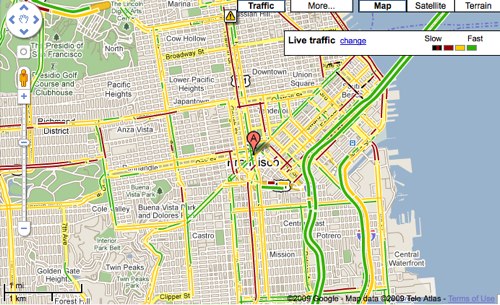
Any one who commutes in major cities knows the value of back roads when it comes to avoiding traffic on the highways during peak rush hour times. Google Maps just added a nifty feature that will show you live traffic conditions on arterial roads (non-highway roads) in selected cities. Google Maps will also show traffic patterns on main highways as well, helping you see what the least-trafficked route is for your commute.
When you zoom-in on the city you’re interested in and click the “Traffic” button in the upper-right corner of the map, you’ll see the traffic conditions of both arterial roads and highways. The colors correspond to the speed of traffic green is little to no traffic, yellow is medium congestion, red is heavy congestion, and red/black is stop-and-go traffic.
Google says that this feature can also be accessed on Google Maps for Mobile, which is particularly useful when trying to figure out the best route on the go. Google also shed a little bit of light as to how they crowdsource traffic info via Google Maps on mobile phones. When you enable Google Maps with My Location, the phone sends anonymous bits of data back to Google describing how fast you’re moving. When Google combines your speed with the speed of other phones on the road, across thousands of phones moving around a city at any given time, they can get an idea of traffic live conditions. They continuously combine this data and send it back to you for free in the Google Maps traffic layers.
Google assures users that they only use anonymous speed and location information to calculate traffic conditions, and only do so when the user has opted to enable location services on his or her phone.


um, theres always traffic, so they just turned the yellow grid into a red one.
Yeah!!!! Very useful tool from Google because avoiding traffic on the highways during peak hours is really a tough job, but Google has cracked that too. In a way, it would be a remarkable tool in the hands of users.
just added? i remember seeing this when i used G-maps a week back
Google keeps on adding new features in Google Maps. Of course, Google is now monetizing the geographical locations too.
Showing the traffic head in maps is really good. Eager to see what is next from Google
Just added? This has been in Atlanta’s traffic maps for months.
It works near my area also in Raleigh-Durham.
Yep! I was kinda surprised to see it was there when I looked. Pretty good coverage around Raleigh and RDU Aipport.
They’ve had secondary roads for some time now in my area although there is a slight increase in coverage now.
Google also uses AirSage and TrafficCast. I believe they combine the feeds somehow.
What if I’m walking down a street with Google Maps open?
Good point!
Those are statistical outliers. As long as there is enough data to go by, you can remove them from the data.
What if I bike down the street with my GPS on?
Doesn’t seem to work on iPhone maps
It’s been available in Boston for quite a while already. Including Google Maps for iPhone.
When is TechCrunch going to start writing for the international audience they already have?
This is available only in the US.
Please, less provincialism and more globalism. We’re not all living in Silicon Valley.
In other words, qualify geographical availability when writing about things available only in the centre of the universe.
When would they start showing for India?
Deeps, calm down Man, Google will definitely look into the India… After all India stands among the Big IT and Technology builder and developers.
That must be Airsage’s data:
http://www.airs...SAGE___NEWS.cfm
If they would only fix the memory issues that turn Traffic off after ~30 seconds for Android users.
it’s definitely not new, but it’s also quite cool.
As others mentioned, while they just announced this many cities have had this for months. For Chicago, it’s been a bit hit-or-miss on backroads though it can be helpful with construction. (It’s not as good with accidents and temporary slowdowns/congestion)
Google is capturing my GPS location when I use Google Maps. OK, I thought Google Maps for the iPhone was was just using my location to show me a map of the area around me.
I didn’t know it was being used for this aggregation purpose too. Hmm. What other purposes is it used for? Is it being saved? Is it REALLY anonymous? How can I tell it really is?
I like the idea of this feature for aggregation, but it continues to be amazed/scare me at how much personal data Google has about me, data that I don’t even have/store.
They also capture the data about the strength of the various cellular and WiFi signals you’re receiving (assuming the phone has that information). This, along with your GPS data, is used to slowly refine their location services, in order to make them more accurate and precise.
They admitted that data gathering back when they came out with the “find me” function on Google Maps in the first place.
There is an opt-out. Without access to the GPS, this stuff don’t work. So, just turn off the Location Aware service part of Google Maps and voila, no data gathering.
This is another great example of the benefits of always on / persistent location. As Jim talks about above, Google is relying heavily on AirSage and TrafficCast for this information. This approach represents the future of how location will be consumed.
At Xtify, we provide persistent user location information for use by marketers, business developers, and web application providers.
We do this in a way that strictly protects a user’s privacy while offering marketers and advertisers a highly efficient mechanism for providing messages and services when the user opts in.
Google maps on the iPhone is ALWAYS at least 20-60 minutes behind the traffic curve. It will show green when it is actually RED, stop and go traffic. You NEED to get this fixed as it makes the traffic feature completely useless.
Yeah, this doesn’t work so well. It seem traffic lights really mess with this data. Also what happens when people are in foot? Does it show slow traffic?
I think traffic lights cause the most delays and are therefore completely necessary. I just wished city planners would notice and prioritize routes to improve traffic flow. As a pedestrian, I would be happy to spend less time stuck in my car and more time on foot at my destination.
I meant “necessary” to see on the maps. Traffic circles could do a much better job of improving traffic flow for many but not all intersections.
Does anyone here know how to reach someone at Google Maps via email?
Thanks,
Jack
dash.net has had this feature for years.
This is the one good feature which is added to the Google Maps. Thanks Google for this added feature
Good post. I’ll try using this soon.