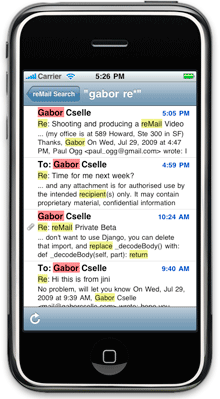
Last May I wrote about reMail, a new iPhone application that brought full-text search to the iPhone. It was quite impressive (especially given that the iPhone lacked any search functionaly at all at that point), but the application had a few problems that kept it from really catching on, including a subscription fee and some possible privacy issues (it required users to hand over their Email login credentials). Today, that changes: reMail is launching an entirely new application on the App Store that should allay any privacy concerns and features a one-time price of $4.99 instead of a subscription. You can download it here.
The last version of reMail relied on the company’s optimized servers, which were much more efficient at running search queries than most Email providers. However, that technique came with one caveat: it required users to hand over their login credentials. I pointed this out last time I wrote about the company, figuring that most people probably wouldn’t mind too much, but CEO Gabor Cselle says that it was a surprisingly common complaint — people are just unwilling to hand over that login data (which is probably a good thing). Fortunately, reMail 2.0 does away with this problem.
The new version of reMail downloads the entire contents of your Mailbox — every single message — onto your iPhone, which it then stores locally. That may sound undesirable for those of us with large Email boxes that are many gigabytes large, but the reMail team has done an excellent job at compressing data for its search index: Cselle says that they’ve managed to squeeze 100,000 Emails into 500 megabytes (most Email accounts are only a fraction of that size).
To get started, you’ll have to download your entire mailbox to your phone which will take some time (Cselle recommends setting the phone to Wi-Fi and leaving it over night), but the service will pick up where it left off if you have to have to cut it off mid-way through the download process. Searching itself works exactly as you’d hope, showing results only a second or two after you’ve typed a query, with matching words highlighted.
Of course, the iPhone 3.0 software update finally introduced Email search to the iPhone, which may lead some people to wonder why reMail is even necessary. Cselle points out a few major benefits: for one, reMail’s search is around five times faster than the iPhone’s, and it searches full-text (the iPhone only searches headers). And reMail retains its full functionally offline, while the iPhone’s search often requires a data connection to search older messages.
As I’ve written before CEO Gabor Cselle is a guy who really knows Email. Here’s a brief bio of Cselle from our last post:
He wrote his Master’s thesis on Organizing Email, worked on the Gmail team, and was also VP of Engineering at Xobni, which he left last year to pursue his own company. The company’s backers include Paul Buchheit and Sanjeev Singh, who built a little application called Gmail (they also co-founded FriendFeed). These guys know what they’re doing.


I want to stress one point with this new version: It really does download ALL your email to your iPhone for offline access. For the first time ever, you can have all your emails in your pocket.
And they take less space than you’d think: 100k emails need about 500MB on your phone.
Great (much needed) app … headed to the app store to get myself a copy!
This sound like a great application. We want more control over our document ,and it looks like we will have it. Searching for keyword saves a lot of time when we need to eyeball a huge document.
sounds like something I’d like to use
I like what I am reading about this app, I think it is well priced too, I wish the makers of this app all the success for bringin such a useful app to the iPhone.
Lets hope I get the opportunity to promote this app myself on http://www.appgiveaway.com
I enjoy promoting useful apps like this on my website.
How long til Apple pulls this application, for “duplicating native functionality”?
They don’t do full-text email search or have all your mails on your phone.
Um, the gmail mobile web app already does this.
Not quite. It keeps the last few hundred messages on the phone. And it’s far slower than reMail. And it’s only for Gmail accounts.
gmail search works instantly.
Not really clear but it also downloads the attachments to e-mails as well.
I can now start using my GMail account to store everything knowing I will access to everything on my iPhone. This is huge!
Thanks Doug!
It’s certainly comfortable to know that you have all your emails in your pocket.
sold! just downloaded it. nice work.
This app wouldn’t be necessary if you use Google Voice/Mail
Not sure I understand, especially the Google Voice part. Can you elaborate.
The Gmail web app is pretty cool. But reMail is faster and keeps all your mail on the phone (not just the last couple of hundred messages).
So all searching is now done on the iphone? The remail servers are no longer required for any indexing/searching?
Yes, downloading, parsing, searching are now all done on the iPhone. There’s no more reMail server or reMail service.
We found out the hard way that people don’t like sharing their information with third parties, so we built this new app
Talk about being agile! What an incredible change from your first version. Almost a complete technology shift. Server-side code to native iphone search that rocks!
Nice job.
Thanks. Yeah, everyone’s writing about how this is a new “version”, but it’s really a new “product”: Only some of the artwork stayed the same, and maybe a few lines of code.
Gabor:
Some one asked if attachments were downloaded, along with the email. I don’t think you caught that question.
Yes, lazily. You open them, they get downloaded, and then remain on your phone permanently. If you have a PDF or something that you always want with you, just open it in reMail and it’ll be on your phone. Pretty useful to know that you’ll always have that file with you.
Is that a one way sync? Can you delete the attachment after you open it with or without the email it’s attached to? Will they come back the next time reMail syncs?
I’m using remail, it saved my ass at conferences/meetings a couple of times already. Get this app.
Use Gmail mobile, folks, it’s FREE! And you’re not giving some unknown little startup with shitty security access to your ENTIRE EMAIL ARCHIVE!
Those of you that actually do this, are you people crazy? Haven’t you learned anything yet?
Hi Brian,
reMail is entirely on your phone. None of your email, address, password, etc. gets sent to reMail, ever. You’re not giving us access to your email archive.
reMail is faster than Gmail web access, and has all your email on your phone. You can have all your email in your pocket. Gmail only has the last few hundred emails on your phone in their web client.
Hope this clarifies it a bit.
Gabor
Sounds interesting. Are attachments indexed for search too – like pdf files?
No, we don’t index the contents of attachments. However we do index their names. So if you search for “pdf” it will show you all your emails with pdf attachments. Gabor
Is indexing contents of attachments going to be in a future release of the app? That would be an uber feature to include. Other than that, it sounds like a solid app to have.
Not anytime soon … indexing attachments is harder than it sounds
So far, the #1 feature request has been multiple account support. E.g. people have one account for personal and one account for work usage, and they want to search both at the same time in reMail.
Gabor, congrats on the launch.
ReMail is very impressive. It’s on of the most useful apps I have on my iPhone. Most apps are so gimmicky, you lose interest after a few uses.
But I use remail everyday. Constantly everyday.
I don’t know if it’s just me, but anytime I try to search my email using the iPhone Mail’s built in search, it flat out FAILS. It doesn’t find anything.
But ReMail always finds what i need, very quickly.
I stayed away from the app when I first heard about it because I did not want to turn my password over to a 3rd party. So when I read about the app’s new approach I took a chance for $5. I can say that it works as advertised and the searches are incredibly fast.
I archive my e-mails on the server by creating different directories for each client. I was really happy that it was able to grab those e-mails as well not just the default Inbox.
Thumbs up so far!
Thank you Glenn! I’m happy to hear you’re liking your reMail!
I’m excited to try this new release of remail, sounds a lot better than the mail app!
I have been using Remail for a couple of weeks. It has saved me 4-5 times when I’m away from my desk, and need to find an email in my inbox or sent mail.
It’s great for when you don’t have a cellphone signal, but I use it even when I do have a signal, as it’s way faster to search my locally stored mail than anything else – it’s literally instant.
Now I have it, I have really come to rely on it!
Does reMail support email threading like gmail?
No it doesn’t. We’re very focused on search
This will index sent mail as well as all received mail? That’s been one frustrating limitation for me of the native iPhone search – so much of what I need to find is in email messages that I’ve sent, and it does not appear that the iPhone is searching sent messages at all. “Buy this app” is definitely on my to do list for tomorrow…
Correct, it searches sent as well as received. Not per-folder like the Mail.app.
Last time Gabor said:
“Even if the phone had an index of your Email stored locally (which would be costly in storage space), Cselle says that the iPhone doesn’t have the processing power to quickly scan through multiple gigabytes of messages.”
And now it’s possible?
Good catch! Well, I changed my mind on that. At that point I thought it wasn’t possible, and then I came up with a way to do it
I tried this app and am using it a lot. Good work TechCrunch on finding this.
Recommended it to a friend at work who has an IMAP account with a small provider here in the UK. reMail got hung up on that account, but when said friend contacted support they responded quickly and sent a beta that solved the problem.