We’ve already written a half dozen times or so about how the Mac version of Google’s Chrome browser continues to surge towards being fully usable on a daily basis. And today brings another update on that front.
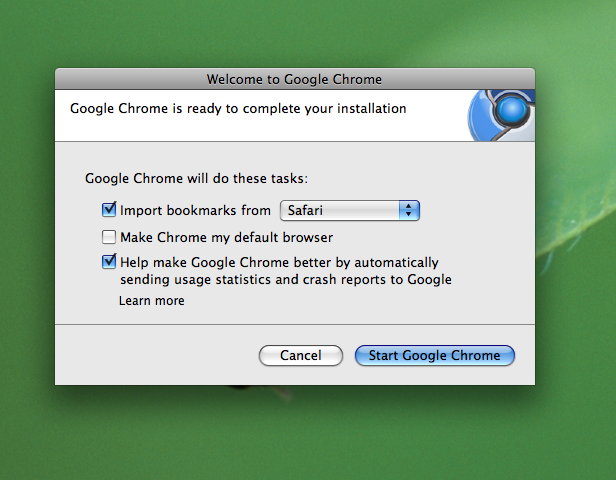
The latest builds of Chromium for Mac have added support for the importing of bookmarks and now features a bookmarks bar by default. This was one of the features that many users had been stating they would need before they started using it full time. Well, now those users can.
There’s also good news on another front: Flash is now much more usable in Chrome for Mac. Previously, we wrote when it started working to play videos on YouTube, but now you can actually pause and jump around those videos just like on any other web browser.
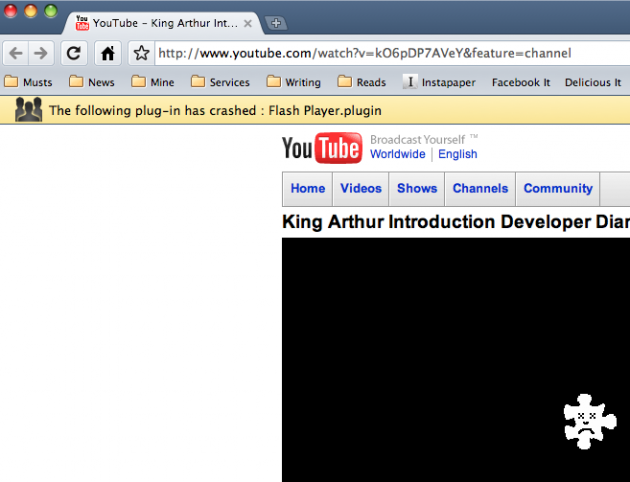
One word of caution is a few times, entering HD mode for YouTube videos caused the Flash plug-in to crash. But, as Google has been touting, the crash did not crash the whole browser, instead I just got a small drop-down notification that to plug-in was shut down. Opening a new tab, re-enabled it.
There is also a slightly new Tab homepage in these latest builds. And there is now the ability restore thumbnails that you have previously removed on this Tab page, which is nice. And while I’m not entirely sure that this is new, you can set the default search engine as well. Though, humorously, Bing is not an option, only Live Search is.
While I’ve been using these Chromium builds on and off for casual browsing, mostly just to test them, I think I’ve hit the point where I’m ready to try using it full-time. I’m simply having a hard time finding things that don’t work on it. Sure, plug-in support isn’t fully baked yet, but as a non-Firefox user, I don’t really use plug-ins anyway. And yes, many of the themes are hideous, but the default one looks pretty nice — though I would like to see nicer-looking folders for bookmarks. The yellow ones remind me of Windows 3.1.
As DownloadSquad noted earlier today, these latest builds of Chromium are labeled as version 4.0+. Might we see an official public launch of Chrome for Mac when the software is ready to hit version 4.0? It’s looking possible, and I’d bet that will be sooner rather than later.



When they add Firebug, I’m completely switching.
Oh that reminds me, I haven’t used them extensively but have you tried the built-in Dev Tools? They seems pretty solid, similar to Firebug.
Included dev tools are similar to Firebug, but don’t seem as powerful or friendly.
Just like going to iPhone or Mac from PPC/Win, I’ll happily switch when the professional user base hits critical mass. So far, it’s still FF for me (and Chrome for the wife’s computer
…hopes for comments from the Firebug team…
This is a good rule of thumb in general, mac products for the wife, and real products for serious work.
This.
… and Adblock and iMacros
Until then, Chrome is unusable as main browser for me. I only use occasionally it for testing websites.
For adblock, you can use a hosts file. Just do a search for “hosts file adblock” and you’ll come across a pretty good one that blocks around 95% of ads.
Or you could just do a search for “Firefox” and you’ll come across a REALLY good one that blocks around 99% of ads, AND updates itself and has a great UI and works pretty much exactly like Chrome except with 1,000,000 optional features/skins.
Subtle, true and right on cue
You say, “set default browser”, but I think you mean default search.
I like Chrome, but can’t see myself using it over Firefox due to extensions like Xmarks and PasswordHasher. Last I remember, Chrome didn’t even have a built in Master Password option, which is a big security flaw. Once Chrome gets simple plug-in support, I think I’ll really use it alongside Firefox, and maybe even over Firefox. But for now, it’s just not quite there yet.
yep, thx. fixed. true, for those who love FF plug-ins, i’m sure it’s not enough to switch yet, but for me it’s there, i think.
if you were going to switch from FF to something else on Mac, why wouldn’t you want to use Camino? why doesn’t anyone seem to use that?
I think it’s great those nice people at Google are writing their browser for minority systems. True, it’s about six months behind the ones that matter, but it’s the though that counts.
I must confess that I’d really love to have the option to disable Flash. In fact I think I might repurpose your YouTube HD crash hint for doing exactly this.
heh.
If you run chrome with the –enable-extensions flag, you can install the extension linked from here:
http://userscri...ipts/show/46673
which is an effective flashblock. (Direct link to the extension: http://ruzanow..../flashblock.crx)
I found this useful tutorial to run any Greasemonkey script in Google Chrome.
http://jaxov.co...-google-chrome/
It crashes when trying to import data from Firefox 3.5…then you have to restart and all. I’m sure Chrome for mac will be amazing once it’s actually done. Trying it out now is just not worth it yet.
I’m excited for Chrome for Mac. Even though I have not tried it out for my self yet. I do use Chrome on Windows and I love it. From the images that I’ve seen so far, one complaint that I would have is the look. Sure it’s just cosmetic but, Chrome on Windows has a unique feel to it and I’m not getting that from the all gray look of Chromium. It makes the UI of YouTube’s landing page where there is basically no color. Don’t get me wrong Google, I love you, much; but I’m picky! I think I will give it a try, it will need to be good though because I have became accustom to Safari.
It’s looking pretty good. I’m using it full time. Tried Chrome on Linux last week and that was pretty useful and fast.
It’s ready to be my full time browser. The few extensions I use seem to be working (have to manually –enable-extensions) and Flash works about as well as it ever has on OSX.
Love Chrome for Windows, but what features does it have over Safari 4?
Firefox is in a league of its own with all of its extensions, but I find a two-browser approach works for me: FF open for plug-in support, and a Webkit browser for speed.
Chrome for Mac continues the march forward…toward availability? Hah! Not holding breath. Chromium schmomium.
Sigh, I forgot why I haven’t tested it out earlier …. Intel only.
Long live my Powerbook G4 12″!
Google Chrome is the next big thing. If you do business online and want to find out how you can benefit from it, than check our website and ask us: http://www.echo...30;..equest.php
reply
Is it possible to use Internet Explorer on a Mac?
Nope for Mac OS X. If you’ve Mac OS 9 you can have I.E. 5 on it.
or IE6 using CrossOver (maybe IE7 ?)
IE7 (?) and IE8 require a virtual machine.
Yes. Install VMWARE, Windows, then you have IE8. Nice…erm?
I need my firebug and web developer toolbar personally. If they could grab all that functionality they got me.
I was using an older version of chrome on mac, but when deleting that one and installing the newest, the bookmark feature still doesn’t show up, do I have to clear the old preferences or something?
Google chrome is baby browser. It need more tools to convince me to switch
MG, how do you spend so much time on the web without AdblockPlus or Flashblock? Do you really enjoy waiting for those Flash ads to load and then obscure all the content that you’re trying to read on the page? And with AdblockPlus, pages just generally load much faster and you’re not being screamed at all day by advertisers trying to get your attention. DownloadHelper is another gem – just dropdown the menu and it shows you all the media assets on the current page ready to rip to your hard drive, especially handy for grabbing YouTube, DailyMotion, MetaCafe videos.
mmhh… maybe we don’t spend as much time on porn and warez website as you do
I have not been annoyed by flash ads too much, it’s usually 1 or 2 banners…
And you know, it’s lots of website sole source of revenues, some of those website are worth it…
Is the final version going to be universal binary or intel only? I’ve been sensing the impending doom of my G4 for a while, I guess this is just one more sign….
Funny how no one mentioned any comparison to Safari. Looks like most Mac users use Firefox. I’m going to install it on my mac for the first time and check it out.
How many development updates have we had on Chrome for Mac now? Just review it when its done, this isnt a Chrome developers blog
Here is to hoping for more thoughtful posts like this from MG and less of the sensationalism and link baiting headlines.
I’ve all but switched. Just waiting for 1Password support. Which means I will not have to wait long. =)
Looks pretty, unfortunately the “open all in tabs” feature is missing. any idea?
Yes! MG continues his march to keep the Mac Google Chrome meme alive.
I am using build 30631 which, for all intents and purposes, seems to be pretty darn close to a final version. The only thing that seems to be missing is the Bookmarks Manager. It is still greyed out. Or is it something I am doing wrong?