File sharing services are not as popular today as they were four years ago. It’s not that people are sharing any less. Rather, they just found easier ways to do it. Would you upload a funny video from a friend’s email to any of those services or would you search for it on Youtube and share only the link? Would you upload an MP3 file in order to share with whomever, or would you search for it online, grab the link and then share it? And finally, would you use a file-sharing app just to share a picture on Facebook when you can do it directly from your desktop to your Facebook profile? Of course, you wouldn’t!
So why would you use an file-sharing app anyway? Actually for many reasons: for larger files, for privacy, multiple files, file format support, and more.
In this post, I compare 16 file-sharing services. I took three main issues under consideration when creating the comprehensive app list below: Free, Fast, and Useful . . .
Most of the services suggested require no registration. None of them will ask you to download anything to your computer, and all of them are easy to use, and worth using. It is actually great to see services, such as Yousendit, MailBigFile, and Rapidshare, that are still relevant and are good choices, but if I had to pick one it would be Mediafire.
Don’t get confused now. This is not a list of services that let you store all your files in the cloud, organizes them, or allows you to collaborate with friends. It’s more focused on file-sharing only, in the richest capacity—well, okay, you be the judge of that.
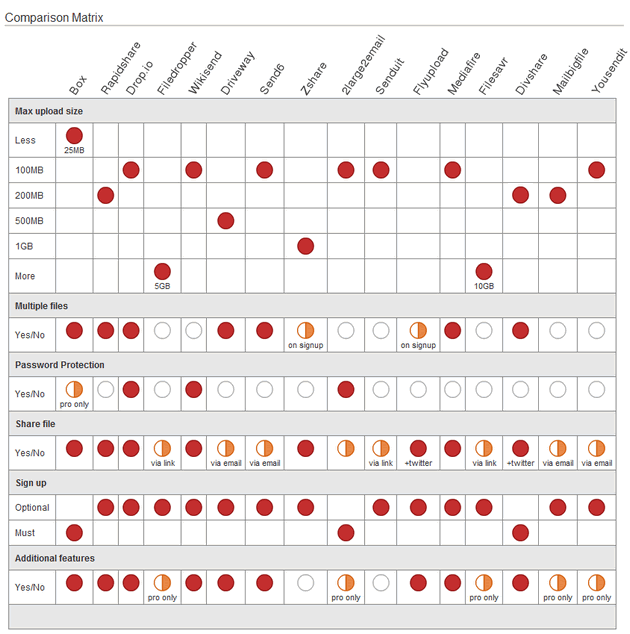
 Box.net is probably the most commonly-known site featured here. But I couldn’t keep it from the list because it’s really a good one and despite all its features, it’s actually simple to use. The light version is not so attractive though. Here’s what you get: File uploads up to 25MB/file (OK, that’s pretty lame). 5 collaboration folders, 1GB storage, mobile access, public file sharing, folder widget, and a few more options. The other plans are far richer, but for personal use, the free one is enough (except for the lame file uploads limit). One thing that bothered me is that you can’t upload a file without signing up. That’s the old fashion way, don’t you think?
 Rapidshare is lacking in features & design, but if you’re looking for a one-click file host, you came to the right place. Founded in 2006, the service is the twelfth most visited homepage in the world. With Rapidshare, users can upload big files (200MB) in one step and subsequently make them available to friends and family via the download link. Premium accounts offer additional convenience, through TrafficShare that provides the option to make files available for direct downloading. The recipient of the file can access it instantaneously even if he/she is not a premium account member of RapidShare. A file can be downloaded 10 times, and will be deleted after 90 days.
 I always liked drop.io and even now with much more usage than before, it is still simple to understand. No need to sign up in order to quickly send a private link with your file(s). Maximum file upload is 100MB, but there are three different packages that will give you a whole lot more. Back to the free service; you can share, collaborate, and present music, videos, documents, audio, in a private drop, through email, web, phone, fax, and more. Additionally, you’ll be able to privately chat with the people you share a file with, in real-time.
 Filedropper aims to give the most basic file hosting service that enables you to share stuff quickly. Therefore, there’s nothing complicated here, just upload the file, and share it. Simple as that. Filedropper says you can upload up to 5GB per file, which looks a bit odd to me – after all, who needs that (unless you are transferring HD videos, I guess)? Very similar to Filedropper, is FileSavr, which offers you the same package completely, with a slight change: uploads up to 10GB per file…
 I actually marked this one as a favorite: Wikisend – an elegant and simple interface that helps you share files quickly. Share files with your friends using email, social networks, your blog, forums and so on. You can also protect the file with a password and choose the range of the file’s lifetime up to 90 days (max)
 You can use Driveway even without registration and send up to 500MB max for each upload. Signing up for a free account offers several advantages: A registered user can upload up to 2 GB of data to the Driveway account. Additionally, you can upload, manage and create widgets for files and folders and search for files/folders within your account.
 With the free plan of Send6, you can send files up to 100MB size, which you can store in your 250MB free space. Send6 also has a free plug-in for Outlook that allows you to send large files directly from your Desktop. Please note that you don’t need to register to send files to friends. Sharing is done via email only.
 Zshare is mainly used to share files that are too big to be sent via e-mail. With Zshare you can host files, images, videos, audio and flash in the same place, and as long as they remain active they can be downloaded limitlessly. Zshare lets you upload files up to 1GB, and if you register for the service (still free), you’ll be able to share them privately. Premium members get faster downloads (like most of the services here) and the ability to upload up to 2GB per each upload. Multiple files are allowed in both free and premium lines.
 Overall, 2large2email has a nice and comfortable email-like interface for sharing large files. How large? 100MB in the free plan. However, if you’re looking for something good and free, 2larg2email is not your answer. The service won’t give you any additional features but password protection, and your files can be downloaded up to 7 times, will be saved for only 7 days, and will expire after that. For more features, you’ll have to pay, or move and chose another service. BTW, I’m not saying that you shouldn’t pay for premium services, but if there are other services for personal use, that offer you more for less, you may want to check them out first.
 For busy people, Senduit is the best choice there is! It’s a one-page platform that generates a private link from the file you upload (100MB Max) for easy sharing. You can send the link via email through Senduit’s page directly, or copy-paste the link to any other communication channel (IM, Social networks, etc.). You get to choose when the link will expire—from 30 min. to 1 week.
 I couldn’t find the exact amount that you can upload per file to Flyupload, but the service looks great. Flyupload allows you to store, access, share and backup your digital documents, photographs, and music easily with complete privacy online. Registered users get extra features like 2GB space of files, Multi-uploads with an upload progress bar. You can also upload large files via FTP or create folders and keep track of files and Images. Additionally, Flyupload lets you share files from your database, to your Twitter account with a side tool called: Flyontwit.
 If I had to choose one service only from this list, Mediafire would be it. The service has a good looking UI, with some great usability. It lets you share files even when you’re not logged in and gives you a set of tools to complete this experience. For individual use, you can freely share files up to 100MB with unlimited uploads, unlimited downloads, unlimited bandwidth, and unlimited storage. This is why you might choose Mediafire over 2large2email, for example. When signing up, Mediafire enables you to organize your files in folders, search and view your files, and email/share/embed with others. It’s the best service that you can get for free.
 I was surprised to see that underneath the new layout of DivShare is the same great service from three years ago. And, even more surprised to discover some files I had stored 3 years ago in the service are still there! DivShare is a file management service that not only lets you share files, but also saves them for later (for an unlimited period of time). The maximum size per file is 200MB and you have 5GB space for free to start. After the upload, you’ll be able to embed your videos, audio and slide shows on any web site or profile. Diveshare has an iPhone and Facebook applications, a WordPress plug-in and an open API, if you want to build something yourself.
 Back when I tried MailBigFile in 2005, I thought this was a great service that offered a convenient solution to sending larger files. I still think it’s a good service. You don’t need to sign up, but if you choose to this is the best pro account for your dollar. Even though, you can use the service for free and as long as you want to send up to 200MB per file via email (but with no additional features). MailBigFile has the best price for a pro account – $15/year with an impressive list of features.
 Last but not least is good old Yousendit, which has never plummeted in its presence online. A reliable and secure service since 2004 that offers the ability to send free 100MB files with a maximum number of 100 downloads allowed per file. You use it just like an email, choose a recipient, send it directly to a person’s inbox, and you get a notification when your file is downloaded.
Sharing files, large or small, should be a simple act, in my opinion—not something that should require a major effort or thought process on your behalf or make you create a complicated profile/account to use it. The options I listed here will help you explore the diverse file-sharing opportunities currently available. Whether you need to send a file privately or publicly, small or big, temporary or permanent, the options are all in this list, you just need to find the best match for your needs.
(Folder graphic by Photoxpress)