In The Pre-Chrome OS World, Google Optimizes Gmail For Netbooks
by MG Siegler on August 5, 2009

labnolabGoogle is clearly enamored with the netbook space. We already know that it’s serving as an entry point for the new Chrome OS, but Google isn’t just going to sit around and wait for that, it’s starting to optimize its experience for netbooks already.

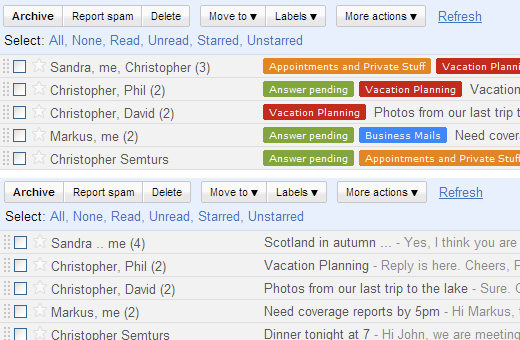
Tonight, Google has just released a small new feature in Gmail Labs so that users can optimize their email service for viewing on netbooks. It’s a small, but noteworthy setting as netbooks have become popular, yet most still run sites just as full-sized laptops would. Gmail’s engineers apparently had a problem with that, so they launched the new “Remove Labels from Subjects” feature.

Basically, this does exactly what it says, removes the labels that are normally in front of subject lines in Gmail. The idea is that this will save a lot of screen real estate, especially on netbooks.

While a lot has been said recently about the growing differences between Apple and Google, this attitude towards the netbook is as good of an example as any. While Apple has said time and time again that it isn’t interested in the netbook space (at least as it’s currently comprised), Google is clearly thinking about it a lot.

Google also notes that using its Chrome browser in full screen mode is a good solution for netbooks. That is, of course, until Chrome OS is released.

Advertisement

Comments rss icon

  • Wish u guys had Google Connect on this website.

    • This is indeed a good feature. Saves a lot of screen real estate. Looks like Google is now more into netbook world. This is a tweak in the whole labeling system. But, a much needed opt-in tweak. Good to note that Google has identified it and done the needful.

  • One has to admit professionalism and perseverance pays in the long run http://www.thessayist.com is an excellent aide for your academic needs.
    Come to us to get admitted………! Learn more about it @ http://bit.ly/w4JeK

  • I think the differences in mentality regarding the netbook space probably aren’t as wide as they appear. Though the approach certainly is.

    Its the difference between a hardware company who has traditionally used secrecy as a means to releasing innovation in a particular segment, vs. a software/services company who has used a long, very public process of beta development to release innovation.

    either way, both of them are going towards the same goal – netbooks, fad or not, will evolve and innovate into something very mainstream.

  • Are you kidding ?! This have nothing to do with netbooks … I use Gmail most of the time from my netbook and it’s really useless without labels. The feature have been released just as its name indicates, for people who just need it.

  • Not a big improvement to delete the labels !

    I use Gmail with Jolicloud OS for netbooks and I need the labels. I just set shorter ones!

    What Gmail could do for netbooks is to reduce the unused space in the upper part of the screen.

  • This isn’t particularly well thought through. Why haven’t they just enable the ability for the whole line to adopt the label’s colour scheme?

    I know that would be a complete pain if an email has more than one label, but still, it’s got to be more helpful than stripping away all classification.

    Try again Labs team!

    • Um, perhaps because there can be more than one label per message?

      How do we solve this? Assign priorities to labels?

      Say

      Mom > Project X > Boss > Work > Newsletters > Notifications ??

      So when boss writes about project X, it will show up as project X.

      When Boss writes from work, it will show up as Boss.

      When someone at work writes about project X, it shows up as Project X.

      Yeah, I think its possible.

  • I have a netbook and I would not give up my labels for anything! They keep me organized.

  • I also do not see how this is related to netbook~

  • pretty simple change and you turn in to a big deal – “Google ___Optimizes___ Gmail For Netbooks”…. wtf…

  • Such a basic feature, you’d think it should have been there from day one :)

  • I also do not see how this is related to netbook~

  • Ok, a step in the right direction…
    However, on a 7″ 800×480 Eee PC 701SD screen, the top line where Google’s other products are & my email address, etc. run over 2 lines… Not helpful in saving space.
    Also, I wish the Search box was scalable. That + the 2 buttons next to it run over 2 lines too..

    I’d also love to be able to customise column widths, even with this Labs feature on, I can only fit the first 3-4 words of the subject on the screen.

    The left sidebar is also somewhat large, a lot more than it needs to be.

    It’d be great if Google was listening & took these suggestions onboard.

    Shaun_R

  • i dont know how this relates to net book.

Leave Comment

Commenting Options

Enter your personal information to the left, or sign in with your Facebook account by clicking the button below.

Alternatively, you can create an avatar that will appear whenever you leave a comment on a Gravatar-enabled blog.

Trackback URL
Short URL
bugbugbugbug
Techcrunch on Facebook