
YC-Funded HighlightCam Makes It Easy To Remotely Watch Babies, Pets And Burglars
by MG Siegler on July 28, 2009

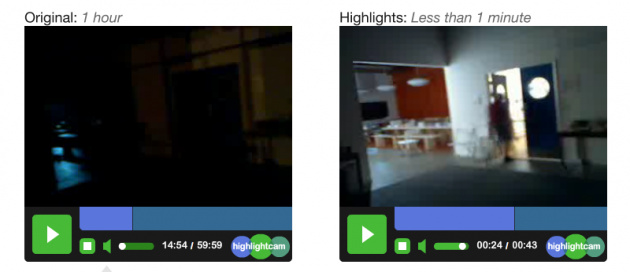
picture-1212Live video monitoring systems are great — except for the fact that someone actually has to be watching for them to be of much use. Even if that doesn’t mean watching it live, that means pouring over hours of footage that likely contains a lot of the same thing: Nothing. And that’s why HighlightCam is cool. It condenses video down to just moments where there is actual activity.

It does this by watching for changes in video streams, which is to say that it looks for motion happening within the video. When it senses something, it knows to remember that portion of the video. And, if you set it up to do so, it can also send an email to you to let you know there is activity currently happening on the video stream. You can probably dream up a bunch of uses for something like this, but the obvious ones are monitoring babies from other room, watching your pets when you’re away, and yes, watching to make sure no one is breaking into your house.

This sort of technology has only existed up until now in high-end security systems for big commercial buildings, we’re told. But HighlightCam does this at a fraction of the cost. To use it, you simply have to set up a webcam and then visit the HighlightCam site. The service is entirely browser-based. And you don’t even need an account to start using it (though you will need one to access recordings later).

If you want to see it in action, Justin.tv has been using it for their pets section, and it was a part of their recent API launch.

The Y Combinator-funded HighlighCam makes use of the freemium model. With the free version you get the core features including the ability to use any webcam and e-mail notifications. But the main limitation is that your recorded videos are only stored for 24 hours. With the premium version (which is $8.99 a month), videos are archived for 2 weeks, and you get higher resolution recordings, no ads on the site and the ability to download recorded videos.

I think we definitely need to set this up for the TechCrunch CrunchCam. Most of the time when I’m not in the office and I tune in, I just see Jason and Leena diligently typing away with absolutely no perceivable motion occuring. It’d be great to get an alert for the 15 minutes a day when there is actually something going on, like Segway jousting.
picture-147

Advertisement

Responses

Comments rss icon

  • Great concept, I like it! Getting in with Justin.tv should also help as well.

    • Ok, but something smells fishy here:

      “You can probably dream up a bunch of uses [...] and yes, watching to make sure no one is breaking into your house.”

      That’s a lie.

      When your system senses anything moving, the crook is already in your house.

      There.

  • This system can help us. That’s great

  • The part about this not existing previously is false. SecuritySpy is software for the Mac that I’ve been using for this exact purpose for over a year; it costs less than $50, a one-time fee, and also propagates the video to my iPhone, activated upon motion detection. Nothing more than a web-cam is needed.

    • You’re missing the point. Its not just security speedup footage.

      • Video motion detection software, services, and systems have been around for quite a while. It’s the most basic form of video analytics.

        This is novel idea for simple low-budget applications, especially when used mostly indoors. Outdoor environments and scenes with a lot of dynamic motion will be more problematic.

  • An API would be cool. That way you could implement it with an existing system. Currently, it’s not that practical, but it is free so I’ll give it a try.

  • This has existed for years. I have a linksys webcam that emails me when activty happens. I can set the thresholds, etc. It also has a webpage I can log into to view the video. I think it even emails the video clip itself. I could be wrong though.

    I think I bought it about 4 years ago. I’m sure they have newer/better models out now. For even cheaper.

    • I should add that while the technology has existed, I really think something like this should be sold WITH a physical camera that connects up to a website. Rather than needing a physical computer to run the software.

    • Yea, the technology has existed.

      I don’t see it as them claiming to have invented something 100% original (nor do I see them rushing the the USPO to claim such).

      Yes, there are security cameras with thresholds. To the best of my knowledge, this doesn’t exist previously as a web application. Telephones existed 100 years before Skype. That doesn’t mean that Skype isn’t massively useful or wanted.

  • This is clever. I’m a fan of ZoneMinder on various Linux distros. Here’s a similar capture from 2006 that involved a Linux server, a network camera, router, switch, installing ZoneMinder and configuring everything just so…

    http://www.yout...h?v=Y4Q8UuPfuZA

    I’ve used ZoneMinder to figure out which cat had a UTI and when a stray was coming around for fights.

    I expect that highlightcam will be popular with a segment that wishes to avoid all the “fun” I went through.

  • good concept, but i question if this is slightly behind the market. there are several webcams out there today that will email you snapshots when motion is detected, and moving a pan/tilt camera to predefined spots, etc. i used a few with great results. also these webcams don’t need to hook up to a computer that’s turned on as they have their own web servers for direct access.

    • Go try it out. It’s speeding up the video intelligently. Not just checking the video for motion or watching a feed for changes.

    • May be they can try & use it in medical domain monitoring and I think that there is a market for them there. Here is an example:

      The volume of patient monitoring video acquired in hospitals is very huge and hence there is a need for better compression of the same for effective storage and transmission. This paper presents a new motion segmentation technique, which improves the compression of patient monitoring video. The proposed motion segmentation technique makes use of a binary mask, which is obtained by thresholding the standard deviation values of the pixels along the temporal axis. Two compression methods, which make use of the proposed motion segmentation technique, are presented. The first method uses MPEG-4 coder and 9/7-biorthogonal wavelet for compressing the moving and stationary portions of the video respectively. The second method uses 5/3-biorthogonal wavelet for compressing both the moving and the stationary portions of the video. The performances of these compression algorithms are evaluated in terms of PSNR and bitrate. From the experimental results, it is found that the proposed motion technique improves the performance of the MPEG-4 coder. Among the two compression methods presented, the MPEG-4 based method performs better for bitrates less than 767 Kbps whereas for bitrates above 767 Kbps the performance of the wavelet based method is found superior.

      Title: Compression of Patient Monitoring Video Using Motion Segmentation Technique

      • Here is another paper that is also useful for the development team at highlightcam:

        Abstract
        ======
        In many surveillance systems the video is stored in wavelet compressed form. In this paper, an algorithm for moving object and region detection in video which is compressed using a wavelet transform (WT) is developed. The algorithm estimates the WT of the background scene from the WTs of the past image frames of the video. The WT of the current image is compared with the WT of the background and the moving objects are determined from the difference. The algorithm does not perform inverse WT to obtain the actual pixels of the current image nor the estimated background. This leads to a computationally efficient method and a system compared to the existing motion estimation methods.

        Title : Moving object detection in wavelet compressed video

        Also, check out the Matlab WaveLab project (wavelet software) from Stanford which the source code is freely downloadable. This is the best frree package that is available out there.

  • looks cool! any API in the works for post-processing non-live video?

  • “This sort of technology has only existed up until now in high-end security systems for big commercial buildings, we’re told.”

    Security camera systems have been doing this for at least 10 years, if not longer. I’ve helped install systems with similar capabilities that sold for less than 5K to small businesses.

  • What a genius idea. Somebody was just talking about this – they own a Chevron and was sick of looking at tapes 24/7 for theft. This is vital to save lives… of gas station owners.

  • Yeah, like what about Periscope for Mac. Works with built-in iSight or any webcam, does motion detection, $25.

  • This is a very good idea. I’ve used these with very good results

  • Similarly, there’s HomeCamera (www.homecamera.com) which is completely free but doesn’t stream – at least not yet. The guys at sfgate had good things to say about it.

  • This capability has been available for years on Linux using “motion” software and a webcam. Assuming you already have a computer and a webcam total cost is $0.

  • Uhhhhh, you could also just have a motion detector (I think these are $5 from Sparkfun electronics) as part of your monitoring system.

    Analyzing the video is pretty nifty though.

  • Just wondering – can you still find hacked webcam URLs on 4chan?

  • osnndnnnodoooobbbs - July 29th, 2009 at 7:26 am PDT

    siegler you are so yesterday… all current webcams..have that feature built in.. so pleaaasse, do your research.. I recently bought 2 networked webcams and BOTH have that built in….

    TC is going down the drain with that crappy reporting everywhere…

  • “This sort of technology has only existed up until now in high-end security systems for big commercial buildings, we’re told.”

    Nice reporting on that one …..

  • I guess this is nice if it makes me some kind of highlight reel automatically but I’ve already been using the iCam iPhone app which only cost me $4.99. It detects motion and will send you a push notification. It also supports up to four cameras, audio, and works great out of the box. It is perfect for a puppy cam or security cam.

    http://skjm.com...cam/support.php

  • Excellent idea. Should sell to retailers to monitor store aisles.

    • A company named Brickstream Corporation is already doing that. Brickstream uses an embedded stereo camera called the Clarity to track people. We can deliver customer metrics such at number to enter/exit, queue length, wait time, service time, number served, etc. In security we can do intrusion detection, wrong way travel, and tailgating. All of the analytics are done onboard the device and the metrics are sent out in an XML stream.
      http://www.brickstream.com if you are interested in learning more.

  • I have recently spent weeks researching and testing existing spy camera technology for home use. Let’s just say that we are a LONG way from a useable, reliable system for home use, that is of course talking about a sub $1000 system.

    This technology is not new, motion detection on both security and web cameras have been around for awhile now. The problem is unless you have a really good camera, they are utterly crap. You need a camera with automatic night vision mode, not just a camera that offers good images in low light (typically by using LEDs). No, you need a $1000+ camera with proper night vision in order for this to be reliable.

    After weeks of research and testing (ever since getting my car broken into on my drive way) the only system that sort of worked was the WiLife system ($299 for camera and software). The software which is similar to the one being discussed here, was easy to set up and send you alerts with a screenshot ONLY when motion was detected on the camera and within “zones” that you set up to cover parts of your property. Works great in the daytime but then during nighttime you had to manually adjust the camera’s contrast and brightness settings in order to have it detect any kind of motion at all. And there lies the problem, with a sub-par camera the software is pretty much useless. So unless you wanted to drop $1-2k on a couple of cameras around your house you’re better off with a cheapo fake camera to scare the robbers away!

  • MG is a major JTV nug hugger.

Leave Comment

Commenting Options

Enter your personal information to the left, or sign in with your Facebook account by clicking the button below.

Alternatively, you can create an avatar that will appear whenever you leave a comment on a Gravatar-enabled blog.

Trackback URL
Short URL
bugbugbugbug
Techcrunch on Facebook