Free: Pack Of MySpace Branded Playing Cards »
Push Gmail Comes To The iPhone — Through An App (If It’s Accepted)
by MG Siegler on July 7, 2009

1You’d think on a phone that can do as many cool things as the iPhone, push email through one of the world’s most popular email services, Gmail, would be one of them. But for some reason, Google and Apple haven’t turned on the functionality for Gmail accounts on the iPhone. Sure, you can get push email through MobileMe, Yahoo Mail or Exchange, but basic Gmail users are basically out of luck. Until now, maybe.

Let me be clear, I’m still not certain that this app will even be approved for the App Store. But if it is, it’s pretty awesome.

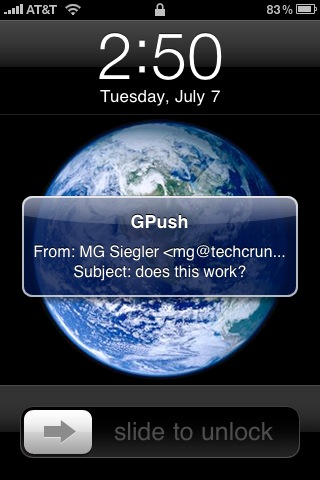
It’s called GPush; it’s a very simple app that uses the new Push Notifications in the iPhone 3.0 software to ping your iPhone every time a new message comes in. Yes, not only is it push Gmail, it gives you Gmail with notifications. While you might think that could be annoying, it actually works quite well.

And the app couldn’t be simpler. You fire it up, enter your Gmail username and password, and if you choose, you never have to open the actual app ever again. The app doesn’t even have anything besides the log-in screen. It technically works by using IMAP IDLE functionality which Gmail supports (but doesn’t on the iPhone for whatever reason). This is the same way that push Gmail works on devices like the Palm Pre and Android phones.

And while IMAP IDLE is generally thought to be not as good as actual push, GPush works pretty well. In my tests, new emails would show up about 10-30 seconds after I sent them. Not “instantaneous,” but not bad either. Especially when you compare it to having to open the email app and have it manually check if any email is there. Or setting the iPhone to check it every 15 or 30 minutes.

And both of those methods require the use of iPhone battery life. GPush does not because it’s doing all the work in the background, on Tiverias‘ (the company behind the app) servers. You will still have to open the iPhone’s email app to read the email beyond the subject, but with GPush you will know when there is actually email there to read.

As I noted, for all this to work, you have to enter your Gmail username and password into the app. The developers promise that it uses SSL encryption to protect your password and send it to Google securely.

So, the big question is: Will Apple approve this app? “Apple should technically speaking approve the application, nothing went into the code that violated either Apple’s or Google’s Terms of Service,” we’re told. Ahh, but it’s Apple, they’ve done quite a few things that don’t make sense when it comes to approving/rejecting apps. And they have a history of being picky when it comes to apps that revolve around email. So, we’ll see.

If and when it is accepted into the store, it will cost $0.99.

Advertisement

Responses

Comments rss icon

  • Good stuff. Interesting if Apple accept it or not; would probably strain their servers.

  • I can’t believe that there hasn’t been any signs of Gmail having an integration with the iPhone, not even an app or anything. Until now, but as you said, its release isn’t 100% confirmed!

    I think it would be a great addition and is something that needs to be done!

  • Is someone can write few words about how that push technology works.
    Is the device polling the service every x seconds.
    I’m curious about that since I never realized how services such FriendFeed managed to update my stream within seconds.

    • its called push because google is pushing the notification to you, instead of you having to poll the server – ever. Basically you run a small server on your phone, that updates google with your IP information everytime it changes, When google gets an e-mail, they ping or send your phone some info so the phone knows it NOW has to poll the imap server for the message. No polling ever x seconds – that would just be imap polling every x seconds, lol.

      cfg
      chozenfewmixtapes.com

      • That’s not how it’s working in this case c.los, since your phone isn’t interacting with google directly. The app’s remote server is either polling your account very frequently or google is pushing to that server, and then when the app finds that there is a new message it sends a push msg to your phone.

  • This really needs to happen but i’d feel safer putting money on not happening if Apple has anything to do with it.

  • i just forward my gmail to mobile me and it gets pushed that way. I have never been able to get gmail to my phone any other way WITHOUT it being deleted on googlees servers if I delete it on my phone imap setup just didnt work so that was my way round it enabling forward in gmail to mobileme. I wonder if gpush can push and when deleted it can stay on the server. I like to get my emails stored on my laptop

    • to be clear shane, GPush just notifies you of the new email, all management is still done through the mail app.

    • You can set the delete function in the mail app to archive instead of delete. Just go to settings for your Gmail account, click Advanced, then there’s a section called “Mailbox Behaviors”. Change “Deleted Mailbox” to “\AllMail” and now your delete button functions as the archive button does in Gmail.

  • It’d be good if this could work with any IMAP-IDLE-compatible email server, not just GMail.

  • Oooo Gmail with notifications, very nice. This app gets the thumbs up from me.

    I agree where has Google been all this time??? Why hasnt Google roled out iPhone apps before???

    I am sure it will get approved.

    I have been waiting nearly 2 weeks for the http://www.appgiveaway.com app to be approved.

    • Ummm… where have you been all this time? Google has several native apps for the iPhone. However, this one is made by a third party and NOT by Google — as mentioned in the article…

  • This really should be a standard function with the iphone OS. I don’t mind paying 0.99 cents for it but it seems like something that really should be included with the OS.

    Fingers crossed it gets approved.

  • Theres an app that just came out called Prowl and it pushes growl notifications to your phone. im not really to sure how but if theres a mail client that uses growl than it will push your gmail to your phone. im already using this app for transmission to notify me when torrents are completed, adium and tweetie. check it out its 2.99 and quick to set up im impressed

  • Are you saying you have to give out your gmail id/password to some small time company? No freaking way. With that, they can log on to not only to GMail, but all your other Google services, as well.

    • My thought EXACTLY! I’m waiting for the gmail-developed app. I’m especially waiting for a Gmail app that will do Google Talk too – and ping me when a new GT message comes in. Google Talk on the Blackberry works great – but, owing to no push/pull or whatever on the original iPhone, it still doesn’t exist on the iPhone. I’m betting that Google is working on an update to its iPhone Apple to do all this wonderous stuff that should work under the new OS3.

    • When using such kind of web service you don’t, usually, give you user name and password. Instead you are redirected to the main provider that acknowledges it.
      In Google there are 2 ways to do that using its APIs (e.g. OAuth) and the 3rd party service provider is only keeping a session id in it servers. That gives it the reveals only the information you, as the user, accept to share with him.

  • Having a constant TCP connections onto the phone will not only give you a large bill (when using GPRS) but also drain out the battery. In my experience with mobileme, a completely charged iPhone 3G lasted just about a day.

    Can we have a push solution where new sessions are made only when notifications are needed to be delivered?

    • How would your phone *know* something is being pushed if it has no connection to anything knowing there is something needed to be pushed?

      You can’t have it both ways.

      • As GSM and 3G already have a signalling channel that’s always listening (which is also used for SMS messages) why did Apple need to waste power with a high-level process maintaining a TCP/IP all the time?

        Why couldn’t the carrier just effectively send an SMS to the phone with a specific structure to signal an incoming push notification? The TCP-based system could be triggered by the SMS (if the notification was too big to fit inside the SMS itself) or when WiFi kicks in.

        I must say I’m disappointed by the implementation of Push Notifications. I’m guessing Apple’s estimates assume the phone is always in a good reception area and therefore can maintain the data connection with little handshaking. My 3G’s battery is easily halved by having it switched on. Unacceptable.

  • Andy, you don´t know what you´re talking about, clearly. Push Notifications data usage is minimal…

    • Antonio, Andy is correct in saying that push requires a constant TCP connection. While it doesn’t use a lot of data on its own (your mileage may vary if you have lots of apps using it) it does hit battery life.

      And Apple itself quoted push as reducing battery life by about 20% when it talked about iPhone 3.0 back in January.

  • Yahoo Mail’s push mail doesn’t even resemble push email. It’s absolute bs actually.

  • Am I mistaken in thinking that using Gmail IMAP settings doesn’t already push email to the device then? I only have an iTouch but I never really noticed any delay in emails arriving to the device…

    hmmm

  • There’s already real push email for Gmail/iPhone, through Nuevasync – they announced it a couple of days ago.

  • Forwarding Gmail to Mobileme mail account (if you have one) or to Yahoo Mail gives you push notifications on the iPhone already.

  • There seems to be a lot of misunderstanding here about how this works. Here’s what’s going on:

    - You give your username/password to Tiverias through the app.
    - They create a connection to your Gmail account from their server through IMAP and keep this connection open.
    - Gmail notifies Tiverias when an email arrives for you through this persistent connection.
    - Tiverias sends a message to Apple through the Push Notification service. This message is forwarded to your iPhone.

    This means that your phone simply gives the login details and then waits for push notifications from Apple. Your phone does not have to keep connections open and therefore does not use any more battery/data than usual.

    If GPush ran in the background with a persistent connection there’d be no way Apple would approve it, but with this set-up there’s no reason why not.

  • Apple should listen to their community and approve this app which is already a trending topic on Twiter :)

  • You know the Pre ALREADY had this out of the gate.

    • Your life would be better spent being less of a blog douchebag. I dont care if the Pre is the best phone to sniff the earth. You are a douchebag.

  • Please Apple, please let this app go through – all us Gmail users with iPhones need this!!!!

  • I agree with Rob Hurst – IMAPing your iPhone/touch to Gmail works just as well as “push” – almost think IMAP is better – especially if you use gmail as your email hub for multiple accounts – just use the gmail filters and it creates different sub folders. Works really well.

  • I have Gmail set up on my Iphone now through the email app and eveb though I dont get the notification, I get the email less than a ininute after it being sent out and all my folders are there and I can do all the other functions.

    You don’t need Mobile Me for this

  • msgpush.com takes a similar approach in that we notify users of new messages sent to Gmail (or other IMAP mail provider). If anyone is interested, we are looking for beta testers and would love to hear your feedback.

  • Do most people really need to be randomly pinged throughout the day of new emails?

    What if you were to schedule and batch process your emails instead of reacting to the beck and call (read: SLAVE) of your beeping/buzzing phone?

  • could it be something as simple as a business issue. how many mobile me accounts would apple sell if there was full push syncronization with all google apps?

    i would love to have push gmail but i can see apples side of it if it is truely a business minded decision. RIM isnt trying to sell a competing product and i would assume that is why they have no problems pushing various email providers.

  • I also downloaded the isignature app from the app store so I can use a different signature for each of my mail accounts. I don’t know why Apple does not incorporate multiple signatures in email, they make it difficult to use it for business and also personal use without it.

  • It’s ridiculous this is only just happening, and we’re still at an “if”.

  • so i have to give my gmail login to a third party who i know very little about, right? just like if i were to want Push IM services, right? no thanks.

  • IMAP-IDLE is not push, and IMAP-IDLE is not only supported on the iPhone, you cannot turn it off. Using an IMAP-IDLE enabled account on the iPhone WILL drain your battery because it keeps the data connection to the mail server open all the time, constantly actively listening and checking for new email.

  • I want Gmail pushed to my iPhone as much as anyone, but why is a company going to all the trouble of developing and marketing a product that will become redundant as soon as Google and Apple support it? It’s not exactly a long term investment is it guys?

    • Because (1) it’s a great business opportunity. If, say 50k users pay the $.99 it probably pays for itself (2) There is always the possibility of selling GPush to Google or Apple. (3) I reckon -wild guesswork though, I admit- that if a week later Apple or GMail come out with a free app that does the same thing it could make for a nice antitrust case on behalf of this little company against whoever does the non-competitive strike.

      It always surprises me that Apple didn’t add a push service option to the built-in mail app in iPhone 3.0 . Perhaps they were afraid of cannibalizing MobileMe, but of course they must have seen something like this coming. Now they will have to pay for it.

  • Don’t know how I feel about some random no-name company keeping my Gmail info on their servers. It’s kind of pathetic that the Pre and Android can do this, but Apple/Google are dragging their feet for the iPhone. It’s probably has to do with Apple whining about “battery life” issues again.

  • Good god…… if this is approved I’ll be SET… I really need this.

    For people who need to monitor a running application (in my case Spinn3r) it can be vital to monitor notifications.

    It would be REALLY nice to setup alarms.

    If anyone is listening, I would PAY for a professional push notification service that has persistent alarms, full message preview, URL and image support, etc.

    This is a CRITICAL application that has been needed for years if have to monitor web applications.

  • great app to in iPhone, looking forwad for this application seriously…. and undoubtedly one of the best article…..

  • is there an option that you open your mail in the online app instead of through the mail app?

  • I am using PROWL for exactly that! Gmail push notifications.

    works flawless!

    Growlmail sends the notification from my mac mini at home the same moment Apple Mail receives new messages thru the imap-idle gmail account.

    I get notified on the iPhone with message details like sender, subject etc…, no need to open the mail app!

  • To all the people who are constantly asking “why does Apple not just integrate push gmail into their mail.app?” :

    Apple is not in control of what Gmail offers to the platform, if it was to be an option then Google would have to turn the option on.

    Also, why would Google integrate this into their own “Apps” (which are really just portals to their WebApps) instead of allowing it to work through mail.app? I wish Google would simply allow Push email natively on the iPhone OS as they had done with Blackberry and Android (correct me if I’m wrong).

  • i think google will make it officially for free

  • This app DOES NOT GIVE YOU PUSH GMAIL on iPhone. It is a separate app which gives you a notification that gmail IMAP has a new mail msg for you. The mail app on the iPhone still has to pull the msg from the server, which still only happens after you open the app, or your polling interval expires. So when a new email comes in, your gpush will show a number in it’s icon, but your mail app won’t until you pull it from the server, just like before.

    I think it’s a waste of money. I’ve heard that google is going to be supporting real push gmail to iPhone through google mobile sync, which oddly uses the ms exchange/activesync protocols. I’ll wait for the real thing.

  • just go to NuevaSync.com …sign up for a premium account ($25/yr) and get real push Gmail. It works great, and the support staff is extremely helpful and quick to respond if you end up with any trouble.

  • nuevasync rocks!

  • Who care if Apple approve it or not, put it on Cydia and let everyone use it. Screw apple.

  • Does this application need an Internet connection always turned on? I mean, how the servers of GPush company could contact with the app? In my city there are no hot-spots and I can surf the Internet with my iPhone only via Vodafone Carrier, which gives me only 1Gb per month. If I install GPush do I risk to finish my 1Gb data traffic in just one week?
    Thank you

  • GPush inspired me to create an application for the desktop that takes advantage of unlimited sms plans. The windows application I created is here: http://code.goo...om/p/gmailpush/. I’m not the greatest developer, but hopefully someone will get some use out of this besides me :)

  • Apple still has not approved GPush.

  • Forget appstore, come to cydia´s world,
    its better, you will recibe donations, im sure,
    your app is the best.

  • What about “New Email”, it just came up on the app store on the 3rd of August. I haven’t been able to download it yet though! I really hope it’s just an error and not Apple pulling the same junk that happened to google voice!

  • Gmail is by far NOT one of the world’s most popular email service.

Leave Comment

Commenting Options

Enter your personal information to the left, or sign in with your Facebook account by clicking the button below.

Alternatively, you can create an avatar that will appear whenever you leave a comment on a Gravatar-enabled blog.

Trackback URL
Short URL
bugbugbug