 If you’re like me, you always try to avoid storing or backing up files, even those that are important to you. It’s too boring, time-consuming and cumbersome to remember doing it regularly.
This is where a new service called quanp (short for “quantum paper” and pronounced “kwan-puh”), launched today in beta, comes in. Developed by Japanese technology giant Ricoh, quanp wants to become your online center for collecting and organizing all of your personal “digital life memories”.
Dropbox and many other services basically do the same, but the idea behind quanp is to turn storing and sharing pictures, music, videos, PDFs etc. online into a more enjoyable experience by making it more “visual”. The service is currently free and as Ricoh says, mainly aimed at US residents for the time being (in Japan, quanp is available in free and paid versions since March). The US version is being managed by a Ricoh office based out of Cupertino in California.
The structure of the quanp site is a tad confusing, but you basically get a suite of three tools:
- quanp.on (a Windows-only online storage client)
- quanp.net (a browser version)
- quanp drop (a desktop widget)
Here is a quick rundown:
quanp.on
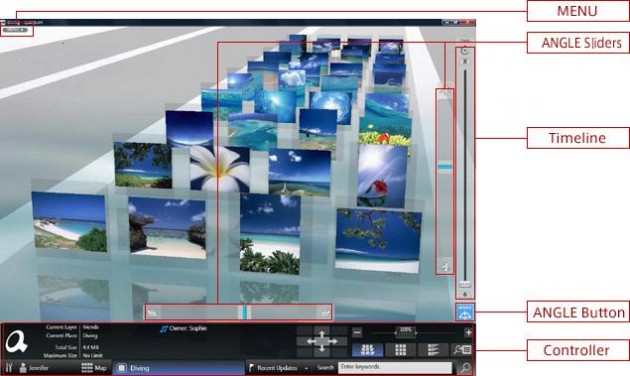
I had to unearth my Windows machine for quanp.on, but once installed (system requirements), the software works as promised. It lets you drag and drop, tag and date files you can then navigate through a pretty “3D” interface (Ricoh calls this 3D visual browsing). Files can also be easily shared with other quanp users over the web.
quanp.net
Definitely not as sexy as quanp.on or the widget, this browser version (for Mac and Windows users) doesn’t offer anything similar services have been offering for years.
quanp drop
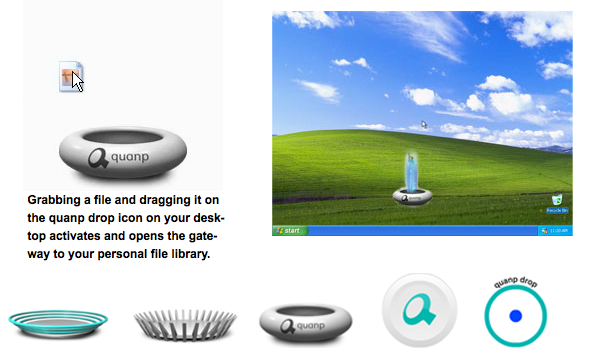
“quanp drop” is an animated, customizable widget that sits on your Mac or Windows desktop (system requirements) and allows you to share files by dragging and dropping them into it as if you’re adding files to a folder. You need to register in order to then manage and share these files. quanp drop also requires Adobe AIR to function.
Ricoh says these beta versions of their tools are mainly aimed at geeks and heavy web users whose opinions the company wants to use as a basis for further improvements. So give one of the tools a shot (personally I recommend the widget and the client version), follow them on Twitter, and post your feedback in the forum (or write an email).
The following video provides more background on the service.