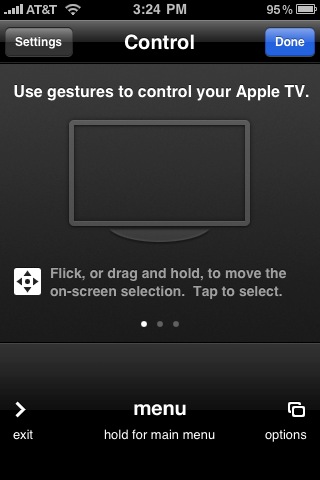
I like the Apple TV as a device, but its remote is awful. It’s the same little dinky white one that used to come with all Apple computers a few years ago. While it’s pretty good for using the FrontRow feature on a computer, your computer also has a keyboard for navigation and things like searching — the Apple TV does not. And so the white remote by itself is painfully slow navigating the Apple TV. But with an update to both the Apple TV and its Remote app available for the iPhone and iPod touch, Apple has completely revamped the way you can navigate the system using gestures and multi-touch.
Watch the videos below to see it in action, but to say this is improved is beyond an understatement. Rather than clicking those little buttons dozens of times, you can now just slide around the iPhone screen to move around. And it’s much easier to get to the iPhone’s keyboard to do things like searches — a funtionality which is basically unusable with the white remote.
Find the updated Remote app in the App Store here, it’s a free download and will work with iTunes on your computer as well.


Hi MG,
It looks really cool. I’m gonna download the app on my iPod Touch. It’s gonna be fun.
Thanks for a great post.
Mani Raj
Havoc Marketing
You have got to be kidding me!!!
Looks similar to the Boxee app.
Which was similar to the remote app before it. In fact, I would say this knew remote app is very similar to the old remote app with gestures.
Another reason to get an AppleTV!
LOL!! havoc seems to be running a script to reply to every tech crunch post.
No, I’m not using a script. I’m doing it myself.
Mani Raj
Havoc Marketing
It has become self aware.
lol
haha,… read the post not the name of the person who comments
I agree with Dan, it looks similar to the Boxee
Each of his comments still has a slight relevance to the article though. That’s one kick ass script he’s developed… to be able to discern the meaning of the article, and attach a comment that at least is in the same ballpark as the story. Hey, if that is the case… that boy’s gonna be rich.
Cool, assuming you have an Apple TV. Once a company can bridge the gap between our computer and our television without an expensive and confusing 3rd device we will have reached technological bliss. More likely though people will eventually stop consuming content on their television.
fanboy spam
hateboy spew
Dude, you seriously have got to stop drinking the haterade. Though I can count with 3 fingers of my right hand the times I’ve agreed with anything MG has had to say, it’s real childish to call everything someone posts “fanboy spam”.
Great video! As far as I know the keyboard on the Remote app was there before. I’ve used it to enter user names and passwords and even in Couch Surfer (a hacked application for Apple TV). I haven’t updated yet because I need to wait for the USB hack update for Apple TV 2.4, but I wonder if they changed the interface on the Apple TV at all. Thanks again for the video!
yeah it was, i didn’t even remember that because I used it so infrequently because it wasn’t very intuitive, but now I will for sure. have a new video going up shortly that will hopefully look better (shot in landscape mode)
This really is fantastic. It would be even better if the Apple TV was also a gaming platform – imagine downloading games and controlling them through the iPhone. Suddenly the iPhone becomes a gaming device in the home too.
And from a purely business perspective – I’d love use this kind of device to control a virtual world through the TV!
Matt
Very similar to the Boxee remote. Which bring up the question: Boxee still works, right?
Does it work with the Hulu desktop app? If not, it should.
Would be cool if you could control Front Row with this app. Anyone know of any app that allows you to do that?
Men’s Health. I didn’t know anybody actually reads this crap. Well, you don’t. But you seem to have bought it, at least. Great 2 impress girls?
Does the new version allow you to control media that AppleTV accesses via a share on the network? It always used to only work for content actually synced locally to the device.
do you mean content that only resides on the actual apple tv? if that’s what you mean, no, i’m accessing movies stored on my computer streaming to the apple tv.
I’m referring to an AppleTV playing content via the remote app that the device shares from another source on the network. I only have the original, smaller drive model, so I share all my content from an iMac that has an external drive attached. Shared stuff would never turn up in the browsable list of media in the past.
I won’t be able to test this until I get home later, but it sounds like this is new in this version too then. Excellent!
yep, that’ll work. as i said, streaming movies shared from my computer to the apple tv.
Just tried it and it still doesn’t do what I was referring to. I’m talking about browsing artwork and movie/song/etc items that come from a share on the remote app on the phone itself.
If you hit Movies (or More -> Movies specifically) and don’t have any local, it just says ‘No Movies’ and won’t list the shared ones. You have to actually go to ‘Shared Movies’ in the menu on the AppleTV screen and look at the list there. Local content gets listed right on the remote app on the iPhone.
If you want Boxee to run on your tv don’t bother with the under powered mess that is AppleTV. Yea it plays apples content fine but Boxee shows you what it should really do. Sadly Boxee runs terribly on the ATV and to get this remote to work you have to re-install Boxee. Oh and Boxee’s remote app has been doing the same thing for awhile now…
Wow. I had opted out of this update but somehow it just updates for me all the sudden.
Now Boxee is gone. I will try and reinstall it though!
Ugh!!!!!!!!
Is it wifi controlled or IR?
I imagine wifi since the iPhone doesn’t have IR
Blah
The Mobile Air Mouse app could do this for a long time + a whole lot more.
Hey, TechCrunch, if you’re going to hire a writer, hire one that knows how to write.
“it’s” means “it is”. “its” denotes possession.
Was those videos shot with an iPhone 3GS?
yes.
Looks slick.
Were these videos shot with a piece of jello, though?
b
Nice, execution Apple. But Boxee did it first. =)
http://idlemode...g-room-context/
I’ve updated and am using the Remote app, but haven’t figured out how to use the “flick” gesture with the iPhone to control ATV. Have you tried this out?
Cool rug.
Very cool demo, but Men’s Health… Really?
Do you honeatly believe it’s a good source of information on healthy living, and not just a superficial fashion magazine with photoshopped abs written to pump products?
Why not just get Vogue & Cosmo while you’re at it. Or wait, let me guess… maybe you keep that stuff in the closet? ;-P
thank all.