Aviary, the small New York-based startup with the ambitions of recreating Adobe Photoshop’s most popular design tools in the browser, has launched a simple, free tool, called Falcon, that lets you quickly grab and edit images within the browser. Falcon, since it is web-based and works in any browser, can be used on a Mac or PC. Skitch, another similar fast, simple editing tool, is a desktop app that only works on Macs. Both Skitch and Falcon offer a simple subset of tools which was previously only available in Photoshop. As we’ve said in the past, these simple tools are especially useful to bloggers and others who spend a lot of time manipulating and editing images on the fly.
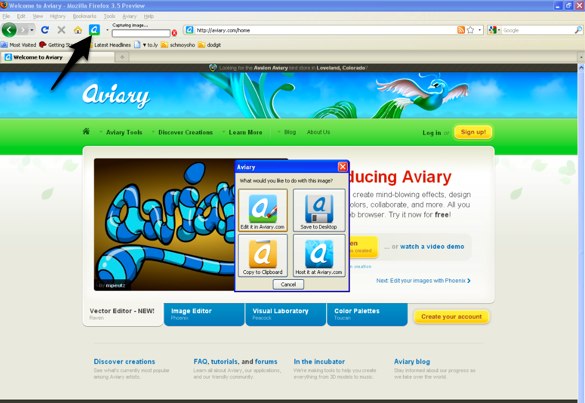
The beauty of Aviary is in its Firefox plugin, called Talon, which let’s you grab a screen shot or portion of a screen at any time and automatically imports the image into Aviary’s browser-based editing platform. When you click on the icon on your browser when you are on a page you want to capture, you are given the choice of capturing a portion of the screen, the entire viewed screen, or the entire page (below the fold). The option of capturing the entire page is a useful; and a feature that Skitch currently doesn’t allow. Once you capture the image, Falcon gives you the option of editing the image on Aviary.com, saving the image to your desktop, copying it to your clipboard or hosting the image at Aviary.com.
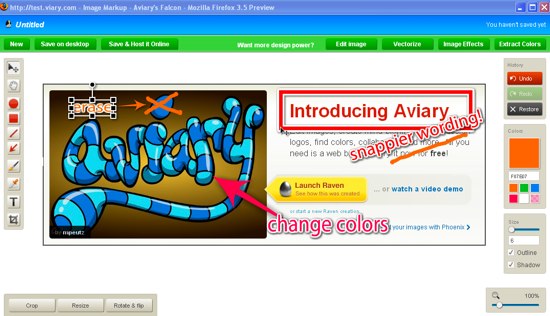
Aviary’s in-browser editing platform is similar to Skitch’s desktop app and adds much of the same functionality. You can add arrows and text to an image, as well as crop, rotate, and resize your image. Falcon also has a built-in color picker tool to extract web color values from images and screenshots. For more design power, you can port your image into 4 different powerful Aviary tools, including color editor, advanced image editor, effects editor and vector editor.
Once you are finished with editing your image, you can save the image as a PNG or JPG either on your desktop or host it on Aviary. Aviary Pro members can gain additional storage options like privacy and watermark control for $24.99 per year. Like with Skitch, images that are uploaded to your Aviary account can be commented by other users, and there are a number of options to embed that image in other websites or link to an image from other sites, like Twitter or Facebook. Aviary has also released the API for Falcon, so that any website can integrate the tool. The drawback of Falcon is that if you don’t use Firefox, the tool isn’t as simple as with the plug-in. You have to import a image into Aviary’s browser editing platform or or you can paste link into the platform to get the entire page imported in, which you can then edit.
Since we first covered the company, Aviary had kept most of its tools in private beta. Only four have become publicly available: Phoenix, an image editor along the lines of Photoshop; Peacock, a so-called “visual laboratory” for pixel-based images; Toucan, a color palette tool; and Raven, a vector-based image editor that mimics (and therefore competes with) Adobe Illustrator.
Adobe also released a simple, browser-based photo editing tool at Photoshop.com, but it is designed more as an application to edit photos as opposed to grabbing and editing items and screenshots from websites .