
Spiceworks Spices Up Social IT Management Software
by Leena Rao on June 15, 2009

IT software maker Spiceworks is launching version 4.0 of their desktop software suite that helps a company’s IT staff collaborate with each other and manage “everything IT.” The IT management software, which is free and ad-supported, is currently being used by 700,000 IT professionals at small to medium businesses to inventory, monitor, troubleshoot, report on and run a help desk for their IT networks. The company says the upgrade will be rolled out later this week.

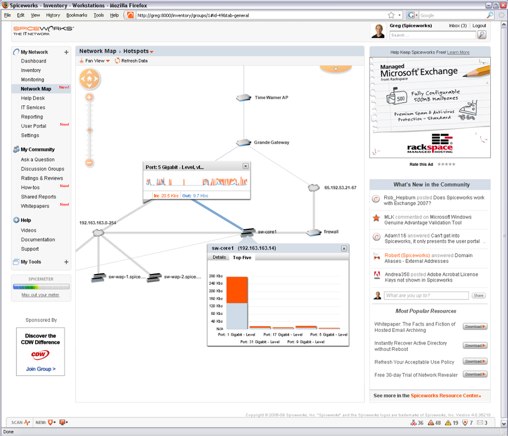
The interesting part of Spicework’s software is that it includes a social network for IT pros that they use to help each other out. Its product roadmap is visible to all members, who can vote on which features they want to see next. The top feature, which will be in the new release, is a network map, visually showing every computer and network device on a company’s IT network, along with their relationships and bandwidth consumption. Spiceworks will be integrated with Twitter as well, allowing activity updates to be published to Twitter.

IT pros at small and mid-sized companies can band together in buying clubs. And allows users to see how other IT pros have prioritized and managed various Windows Events. Users can now view Windows event background pages and read community group discussions on how to best troubleshoot and resolve related problems. Spiceworks calls this crowdsourced troubleshooting.
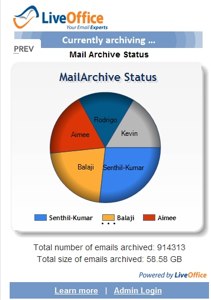
The new version also offers plug-ins to manage apps from vendors including Microsoft, LiveOffice, Intel and Trend Micro. For example, the LiveOffice Mail Archive Widget will let IT staff archive email accounts from within Spiceworks from the dashboard itself. The Microsoft License Organizer allows users to automatically track Microsoft licenses and to order additional licenses when needed. Spiceworks charges companies like Microsoft and Intel to add these features.

Spiceworks has ramped up its virtual help desk feature, letting users now control a help desk from a mobile phone. Users can create new tickets, edit & update existing tickets, and delete tickets remotely.

Spiceworks recently added a host of plug-ins and social media widgets, letting users keep track track of alerts, tickets, new software, and new hardware, as well as inventory summaries. Spiceworks also lets users add themes and skins to the desktop, create customized user portals, and lets users drop in news widgets from RSS feeds and social networking widgets for Digg, Facebook, and MySpace
Advertisement

Comments rss icon

  • Would love to try it, but we also have Macs in the office.

  • nice advertisement

  • @Robert Basil

    While Spiceworks cannot run on a Mac (unless you’re using a VM) you can inventory Macs and Linux machines.

    Please see: http://communit...n_Work#Software

  • Also worth noting is that it is agentless on the client side. It provided better PC and Printer discovery counts than the $xxx,xxx solution the desktop mgmt team uses. Plus it reported on software installations, low drive space, downtimes, low toner, etc…

  • oh great ..!! it’s new features and good for IT .

  • This article should point out that this is 700,000 registrations, not active daily average users. You should dig a little because otherwise you’re grossly overstating the usage of a mostly useless service and just serving as a mouthpiece for their marketing department.

    I’ve tried this service out a few times over the years and it’s never really done anything useful. It manages to inventory about half of what’s on my small business network after a long wait and that’s pretty much all it does. For most devices it can actually manage to find it just provides an IP address and for windows machines it can sometimes show the services running, which dozens of free apps have done for about a decade now. And I’m not sure why it’s less effective at finding IP devices than free tools that have been around for 25 years. So my vote for the next great feature would be “something that makes this useful”. Of the “700,000″ IT professionals no doubt 699,000 downloaded and tried it because it’s free and never returned.

    Show some average monthly stats, not the number of people that registered to try it out, IT people will always try out new stuff. I can’t imagine that given it’s limited feature set that IT admins actually come into work in the morning and fire up spiceworks to see how things are going.

    • I’m sorry you didn’t find it useful and it didn’t work out on your network. To see that it has for most IT pros I suggest you check out the discussions at community.Spiceworks.com.

      Also, feel free to take advantage of our free (yes, free) support. As you know networks are complicated and it could be a variety of issues with Active Directory, WMI, or firewalls that are causing the issues you experienced. We’ve tried to address those in the product and our help pages and videos but have a support team that will help get you a complete scan and answer any other questions you have.

      • Auto discovery and network management in general are complicated tasks. I disagree with locutus’ analysis. You can’t expect magic from the software, but I would like to see a true analysis of spiceworks, this post had none of that.

      • Thanks Jay. I appreciate your response and look forward to assimilating you into my collective.

    • he he.. very well said indeed.

    • Beg to differ locutus.

      I can only speak for myself but Spiceworks is invaluable to me in a small business environment as it just makes it so much easier for me to run my network etc.

      I’m “very IT literate” but don’t know everything there is to know, particularly when it comes to networking but Spiceworks enables me to do my job, look after my users, and keep our network ticking over very nicely. In my situation, I am able to escalate level 3+ calls out to my support contractor, but below that generally either I have the knowledge or it “tap-into-able” thru Spiceworks.

      I do however know of many other users who run it in completely different environments (and sizes) to me.

      I guess you’ve not tried it for a while, but it is bloody good and as Jay Hallberg has pointed out – it is free. (That’s a winner for me every time!)

      You say about firing “spiceworks up in the morning” to see how things are going. You sure you’ve installed it several times already? Doesn’t sound like it to me, coz that ain’t how it works buddy.

      Perhaps you should install it and give it a try again before posting any more and making yourself look a bit of a dick.

      • I just wanted to clarify that Jay wasn’t pointing out that the app is free (which it is). He was pointing out that we also offer free *support* for our free product.

        Disclaimer: I’m a Spiceworks employee. We’re pretty geeked out about our product, which is why Myshell, Jay Hallberg and myself have all popped in over here.

    • @locutus

      I’m just one of the 700,000 IT admins that use Spiceworks everyday, and yes I do come into work in the morning and fire up Spiceworks to see what is going on.

      I’m not employed by Spiceworks and I haven’t been paid to say that either.

      I did have the complete opposite experience that you did though. The first time I used it a year and a half ago it was able to find and categorize about 90% of my network. I figured out what the other 10% were and it has worked great ever since.

      • If knowing what 90% of the devices plugged into your network are keeps you employed then I guess that’s cool. That’s like a CFO saying, “yeah, my free financial software rocks. It tells me where about 90% of our money is going”.

  • Spiceworks is great :-)

    4.0 is going to rock, i use the beta at the moment and love it :-)

  • Hey for those of you complaining that spiceworks doesn’t run on a mac, check out GroundWork Monitor Community Edition. It’s web based, a much more complete package, and the community edition is also free. AND –it doesn’t come with a bunch of ads like spiceworks.

    • So it doesn’t install on a Mac. Can you elaborate on GroundWork Monitor Community Edition and how you believe that it is a more “complete” package than Spiceworks?

Leave Comment

Commenting Options

Enter your personal information to the left, or sign in with your Facebook account by clicking the button below.

Alternatively, you can create an avatar that will appear whenever you leave a comment on a Gravatar-enabled blog.

Trackback URL
Short URL
bugbugbug