Have you nominated someone for a Crunchie today? »
How The Different Mobile Data Syncing Services Stack Up
by Erick Schonfeld on June 8, 2009

synced-data-chart

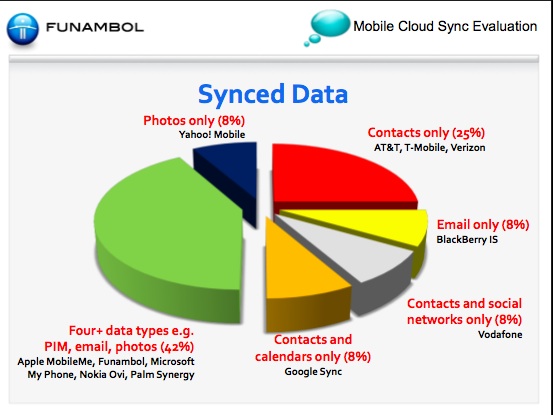
As the phones in our pockets become our second computers, it will become increasingly important to sync data between the two. Not just emails, but contacts, calendars, photos, music, apps, browser bookmarks, files, and more. Nearly every Web phone out there comes with at least some sort of rudimentary syncing app. Apple has MobileMe, Nokia has Ovi, Palm has Synergy, Blackberry has Internet Services, and Microsoft has My Phone.

An open-source competitor to all of these is Funambol. The startup evaluated all of the syncing services and scored them based on criteria such as how many kinds of data each one supports, cost, usability, and number of supported devices. (Full study embedded at bottom of post). It came up with a score for each out of a maximum of 40. Naturally enough, Funambol scored the highest, but if you throw that out you end up with the list below (with accompanying scores).

Nokia Ovi – 28
Apple MobileMe – 27
Palm Synergy – 26
Microsoft My Phone – 26
Vodafone Zyb – 26
Google Sync – 23
BlackBerry IS – 21
Yahoo! Mobile – 21
AT&T – 19
T-Mobile – 19
Verizon – 19

As you can see, Nokia’s Ovi edged out Apple’s MobileMe, but that was because it offers a free version, supports more phones (although, they are all Nokia), and can sync photos with Flickr. Despite MobileMe’s early hiccups, Apple seems to have fixed the problems. MobileMe supports a lot of different data types (email, photos, contacts, calendar) and gets high marks for usability.

Palm, Microsoft, and Vodafone’s Zyb all tie for third place. And Blackberry has a poor showing in fifth place after Google Sync.

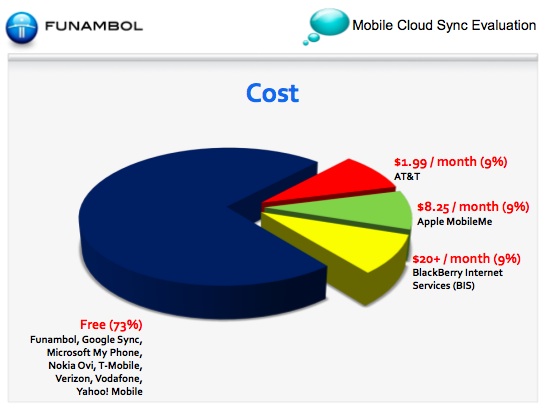
Blackberry’s service is the most expensive at $20 a month,and it only syncs e-mail. MobileMe is about half that price, but still not cheap enough. Nearly three quaters of the syncing apps are free.
funambol-cost-chart


FunambolCloud Sync Report

Advertisement

Comments rss icon

  • I personally use Google Sync on my Blackberry

  • SPOT ON!!!!!!!!!!!!

  • I believe that http://www.scheduleworld.com is worth mentioning too. From my personal experience it is the most complete sync solution today for calendar, contacts and tasks to date.
    Used to be free but recently moved to a paid model.

  • They forgot fruux (contacts, calendars, bookmarks), Macbay (contacts, calendars, bookmarks, files and more) and Soocial (contacts).

  • What about vufone (www.vufone.com)?
    it has more features than others and works great.

  • Ashutosh Kadakia - June 9th, 2009 at 12:43 am PDT

    One you use Microsoft Exchange and Blackberry Enterprise Server, you will never go back. There is a reason why Exchange has a stranglehold on the corporate email market — it works, and works flawlessly. Contacts, calendar, email, tasks, notes and more sync perfectly with as many devices as you want — computer, laptop, netbook, iphone, and blackberry. Microsoft Exchange is the greatest communication platform ever built, and Google Apps doesn’t even come close to comparing.

  • Are there any services/phone combinations that sync and backup your txt messages? I’m in the market for a new phone (London based with O2) and am interested.

    I’d love to have my txt messages saved forever somewhere online and searchable. I’m sure I remember a service that backed up your txt messages into your gmail account for unified search a while back, where each txt message is represented by an email and using a label to identify it.

    • Mike,

      If you are on O2 in the UK, you can use the Bluebook service – this backs up all of your text messages online and is a contacts back up service too.

    • You can also back up your SMS messages with Synkia.com depending whether your mobile handset supports that functionality; Synkia works globally and is carrier independent.

      SYNKIA first in the world to offer SyncML based SMS backup

      NESØYA, NORWAY–(Marketwire – June 23, 2008) – SYNKIA, the Norwegian online personal data management service, that has been offered globally to clients since July 2006, is the first and only synchronization service, that offers fully sms backup as a part of SyncML protocol. SYNKIA users are able to back up all their sent and received sms messages, store them on SYNKIA server and access them via the SYNKIA web application.

      Sms backup is realized as one time action of synchronization between a mobile phone and the SYNKIA server, together with all personal data. In the sms section of SYNKIA web application users have a backup of messages still present on their phones and an unlimited archive of all messages ever backed up with SYNKIA, no matter if they are still on the phone or not. Rich search functions allow to find a specific message by key words, date sent or received and sender name.

      “I’m a heavy sms user myself and with SYNKIA sms backup I know, that the 5000 sms’es that I store are safe and easy to access. Unlike other synchronization service providers, we offer sms backup without asking clients to send all of the messages, each one separately as a single sms, to the server. I’m glad that our clients may use such simple sms backup service as this saves their time and money” – says Morten Sundstø, the President and co-founder of SYNKIA.

      The SYNKIA personal data management service is available at http://www.synkia.com and can be used with any SyncML enabled handset. With SYNKIA one can store and manage their contacts, calendar appointments, tasks, notes and sms’es. SYNKIA offers 100% safety for users data both during transmission and on its servers. SYNKIA is the first SyncML based service to offer sms backup functionality.

    • My Phone backs up text messages, stores them on the web and makes them searchable, sortable, etc. Windows Mobile phones only, but free.

  • mike, check out rseven. (http://www.rseven.com).

    it sync your phone. and also backup your text messages.

  • Rseven.com backups call logs, SMS, MMS, emails, images, audio & video and presents it back to you in Timeline view online. And yes, you can search through all your past SMS. It also has a threaded SMS view to see all your conversations for each contact.

    Rseven.com also syncs your contact & calendar. Useful for managing contacts, you can also share contacts or a calender event with friends in your group.

    Rseven.com supports all Nokia Symbian S60 and Windows Mobile phones, you can use it with any phone network. An iPhone version is under development now.

    The current features are free, we will be introducing a paid version with more features later.

  • Why didn’t you mention Contails.com, Mybyko, Synkia and few other services? Zyb has a nice userbase, but it’s changes since Vodafone acquisition are going in quite different direction.

    I personally use Contails and agree not to pay for contacts synchronization. Besides, I want my photos sent to flickr, vox or wordpress – not synced.

  • There are other “Mobile Cloud Sync Specialist” that would score high marks if its included in the evaluation.

    Rseven.com (Four+ data type, free, S60 & WM, AJAX website)
    Dashwire.com (Four+ data type, free, S60 & WM, AJAX website)
    Vufone.com (Four+ data type, paid, S60, WM & J2ME, AJAX website)

    All the above “sync specialist” backup more data than Funambol (such as SMS, images).

    I’m not sure about criteria 10: Branded and Customized Sync to 3rd Parties. This would only matter to operators only, the end user wouldn’t evaluate using this criteria.

  • Thanks Tom, yes I know about bluebook for O2 but it is not searchable, breaks long messages +160 chars as separate messages and doesn’t associate messages with contacts just with the number sent/received. It is ok for a basic backup but not very good.

    If I want to find some information from my past it is either in my gmail messages or contacts, google docs, google calendar, local documents, live mesh, facebook account or an sms message. Most of my information is already stored with google. Whatever I can do to unify searching across all that the better and to have access from my phone even better.

    Great thanks for the tips guys, phones I will look in to them. The main phones I am considering are either the new iPhone 3G S, HTC Magic (G2) or Palm Pre any recommendations?

  • Reading articles like this makes me wish the techcrunch crowd was a bit more diverse than iphone+mac+twitter.

    Most (if not all) corporate Blackberries keep everything on your phone in sync at any time. And unlike other platforms, it does so without killing your battery life. It is such an integral part of the (corporate) Blackberry that it seems strange to talk about it as a “feature”.

    • I love Exchange and BES. Set it and forget it. Network Admins also have a great deal of control over the devices. This is the way to go for business users.

  • Does anyone use MS ActiveSync with exchange server. Not according to this blog entry.

  • if you use the G1 from T-Mobile, you can sync email, contacts, docs, pictures, videos, tasks, calenders etc.

  • well, there is an app called SMS Backup that will sync all your SMS messages to your gmail.

  • I think, I should also specify the http://fonet.mobi mobile web site can store also your contacts, images, files etc and you can access your data from any phone or computers. You also don’t have to install any client on the phone.

  • I’m surprised Nexthaus isn’t included. Fabrizio and the funambol folks can pick and choose I suppose, since it is their white paper :)

    Nexthaus has BlackBerry, Windows Mobile, iPhone, Palm, Outlook, Outlook Express, and Android clients. Plus a web portal, plus much more private label experience than Funambol.

    Also, it’s a bit of a misnomer to say that all funambol clients are SyncML, since they are not. More often than not, if you try a funambol client with a non-funambol, but fully compliant, SyncML server, issues ensue. So much for interoperability :)

    Anyhow, guess I should email Hal to try and have us included.

    Lou
    Nexthaus.com

  • This article reads like paid advertizing by Funambol. There are numerous companies that provide white lable sync services to carriers – Newbay, FusionOne, O3SIS, VoxMobili, Remoba etc. To claim that Funambol is the only company to do so with a 8% share of the market is beyond exaggeration. Similarly, Verizon runs its sync services on syncML and has the largest subscriber base and adoption rate for their service – to label it as non-syncml is false. I wish the editors would provide some oversight on the veracity of articles.

  • For $99/yr Apple MobileMe comes with 20GB of storage. How much does Funambol have? MobileMe is a real service with an email account, calendar sync, and photo editior, I can’t wait to start sharing videos on MobileMe when my new iPhone 3GS arrives!!!!

  • Microsoft exchange does a great job, too. check out http://mail2web.com/ to see how to sync your email, contacts, calendar, etc. with your mobile phone.

  • Funambol cannot limit their comparison to solely operator and device manufacturer branded services and then claim themselves the “only” re-brandable solution on the market. As the other posters have said, there are many white label solutions out there. Also, when counting supported phones, operators offer services on phones used by their subscribers, not their competitors.

  • The company that I work for have tried many backup services, including Funambol. The ones that have an easy setup are the ones that always have a real phone client that has tested to work. There are no account names or HTTP sync addresses to type in using the phone keys.

    Many times the Funambol automatic backup didn’t always work, and our clients hate that. What’s the point of a backup if it doesn’t work half the time? It’s kind of hollow to award yourself a high usability ranking, especially if your product is unreliable.

    Being theoretically available for a phone and having a tested, working phone client are two different things. It would be a huge surprise if Funambol has downloadable clients for even HALF of their 700+ phones.

  • There are numerous fallacies and inaccurate statements that border on fantasy.

    For example, the Blackberry mobile email service is considered by many to be one of the most reliable for delivering email service with Active Sync to Exchange enterprise servers. For small businesses without enterprise mail servers, they can install Blackberry Unite, which has over-the-air contacts, calendar, and documents. The fine print in the slides makes a disclaimer that “it is a bit of an apple and orange comparison.” So, why include an invalid chart?

    Verizon should not be grouped in the Proprietary SyncML category since its Backup Assistant service is powered by FusionOne, and uses open SyncML APIs.

    Those are just two examples, but I think you get the point. You can drive a truck through many of the article’s arguments.

Leave Comment

Commenting Options

Enter your personal information to the left, or sign in with your Facebook account by clicking the button below.

Alternatively, you can create an avatar that will appear whenever you leave a comment on a Gravatar-enabled blog.

Trackback URL
Short URL
bugbugbugbug
Techcrunch on Facebook