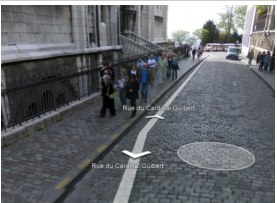
Moving around in Google Street View is not always intuitive. You always end up clicking aimlessly a few times before you can really figure out how to move about. Well, now navigating within Street View is easier thanks to the “pancake.” Google is adding a useful tool called the “pancake” to Street View on Google Maps that lets you travel to a new point within a photo panorama by double clicking on the place or object you would like to see. Google says that it has been able to accomplish this by making a compact representation of the building facade and road geometry for all the Street View panoramas. As you move your mouse within Street View, you’ll see the pancake, which you can move up and down a street and then click on a restaurant, road, building or object nearby. The pancake is shown as a circle on roads and a rectangle when following the facade of a building.
The pancake will transport you to the best view of an object in that direction. Google also says that the pancake will often show a little magnifying glass in the bottom right to indicate that double clicking will zoom in on the current image rather than transport you to a closer location.
The pancake also prevents you from getting lost. If you want to go back to the original view of the street from the pancake, you can hit the return arrow in the address box to get back to the previous location. Previously, you could only move backward and forward along a street to view the next panorama, so the ability to quickly zoom in from anywhere to various spots along a particular road actually makes navigating within Street View much less frustrating.
Check it out in the embedded interactive Street View below, or watch the video:


That’s pretty sweet! Its like introducing Page Down functionality instead of having to hit the down arrow repeatedly.
earthmine’s has been doing this for a while. You can see it in their wild style city demo app which launched a few weeks ago at Where 2.0 http://www.wildstylecity.com
it is so efficient compared to the first version of google street view
Really Good
Holy crap; that’s cool!
Thanks for the heads up on this one – great news…
Thank God. This is sooo much better now. Well done Google. A little late, but well done…
Love the UI
Heh, wow, that is really cool!
Isn’t it much more interesting that Street View now recognizes the perspective and shape of every built structure? These are some insane algorhythms at work.
(From my short test) it only shows the pancake on walls parallel with the street.
excellent, now we can use our right hand to click the mouse.
Fantastic! Makes me want to visit Paris again.
That full screen option is coool..
Google Rocks..
They are slowing towards Wave..
ooohhhhh… I like it!!
Wow!! This is so much better. Very exciting.
Kudos to Google’s UX team!
just tried using this feature at an address near my office in san francisco is it worked terribly. it wouldn’t recognize facades beyond about a half block or so, so jumping deep into the pano wasnt possible.
check out earthmine at earthmine.com if you want to see a much more robust, true 3d implementation of this approach. also you can play with earthmine’s new app at wildstylecity.com if you want a better sense of just how robust their 3d data is.
Didn’t know that you could embed StreetView… cool!
Pancake is also good!
This must have taken a lot of work… I don’t understand how this is possible without manually going through the images.
I love it – such a HUGE improvement! It’s great to see famous buildings in detail but you can also see the faces of people standing by the buildings in detail so I predict a wave of paranoid people who haven’t watched Steve Rambam’s presentation “Privacy is dead, Get over it” complaining about that in 3 … 2 … 1 …
I love pancakes more than I love Google!!!!
That’s a pretty neat feature! I love it. It’s so much better than the first one!
soooo much better,
google hit another home run!
HATE IT. that little gray square is completely annoying. and it really doesn’t get me anywhere any faster anyway.