
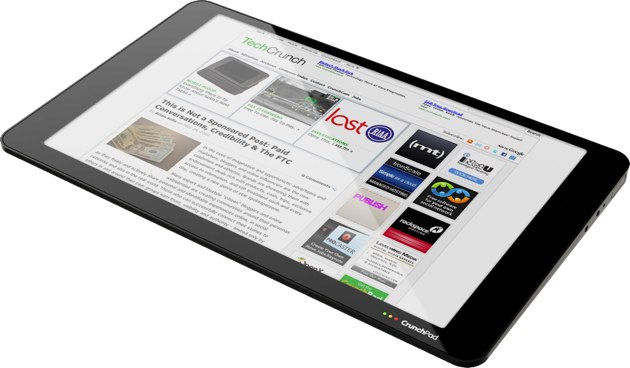
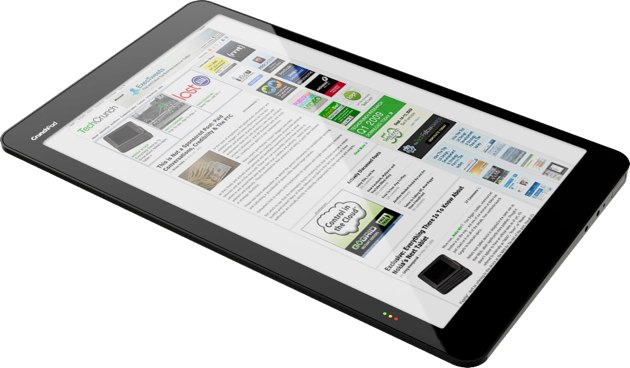
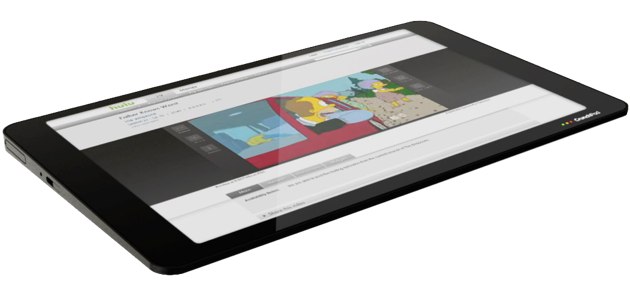
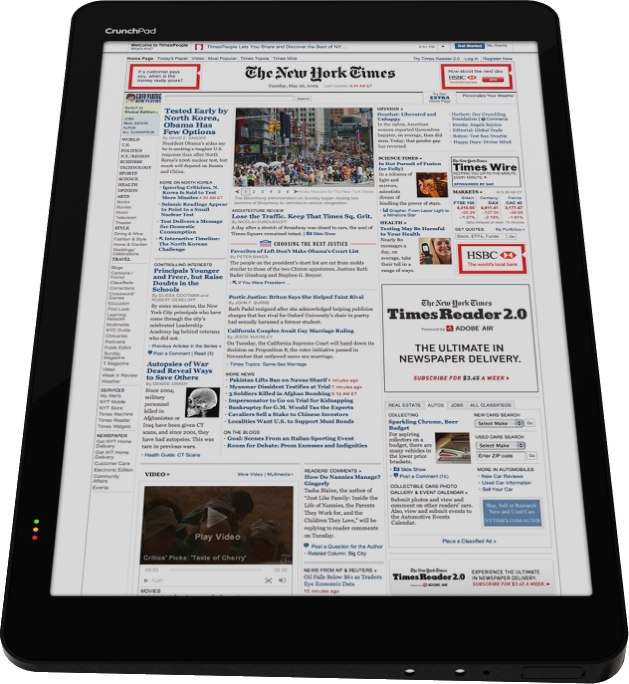
We’ve been working hard behind the scenes on the CrunchPad since our last update in April, and have just about nailed down the final design for the device. We’re showing the conceptual drawings here today. In another few weeks we’ll have the first working prototypes in our office.
This launch prototype is another significant step forward from the last prototype. The screen is now flush with the case and we’ve decreased the overall thickness to about 18 mm. The case will be aluminum, which is more expensive than plastic but is sturdier and lets us shave a little more off the overall thickness of the device.
I believe the device now actually looks better than the original concept design we published last summer. Compare the images below to the first prototype and you can see how far we’ve come. If you’re interested, here’s Prototype B. Pictures of Prototype C, which is the device we’re actually demo’ing to people now, are here.
A lot has happened behind the scenes, too. Our partner Fusion Garage continues to drive the software forward, and we are in deep discussions with key partners to bring the device to market. If you’d like to see the previous CrunchPad in action, we have a previously-private video available on YouTube that shows our vision for the user interface and the last version of the software stack. This is a Linux based operating system and a Webkit based browser. The device boots directly into the browser.
The next time we talk about the CrunchPad publicly will be at a special press and user event in July in Silicon Valley. If you’d like to be emailed when new news comes out, send an email to crunchpad@techcrunch.com and we’ll put you on the list.
Here is the near-final industrial design for the CrunchPad:


Looks great, congrats! I am ready to buy one as soon as you have it ready!
Cool but it better come with an on screen keyboard. How else am I gonna leave comments?
Scroll lines (horizontal and vertical lines next to mousepad in most laptops) beside the screen are a must. Other than power button.
imagine mouse without scroll wheel.
I humbly disagree. I am currently on a macbook and I see no point in having those pesky scroll lines on the side of the screen.
I would love to have multi-touch but Apple will probably demand a bunch in licensing fees.
Looking forward to a hand’s on experience
Multi-touch is NOT an apple designed item. It’s a style of reading digital input. Basically the hardware device–the Microsoft Surface utilizes Multi-Touch for instance. What IS apple’s property is the software on the Iphone.
Actually, Apple has patents on aspects of the multi-touch interface which came along with their (then odd, now brilliant) acquiring of Fingerworks, which made multitouch pads.
To come back to Rubric: Apple has only patents on the type of multi-touch on “thingis” exactly like the iPhone – i have an asus Eee PC and it has also Multi-Touch. I mean they have to pay licensing fees to Synaptics (C) to have multi-touch on MacBooks as Synaptic(C) owns the rights of the multi-touch mouse pad
It’d better come with a WIRELESS keyboard.
It will, never fear.
OOoo! – no keyboard please, That’s the only way to shut hiHIM up.
Yeah, what’s the battery time like?
Im guessing the battery life wont be too great for the first prototype. But I think it looks great and it will be very interesting to see what the pricing is going to be like.
Will it still cost $200 as initially wanted?
No, it will be more like $300, as written in an earlier post last month or so.
I think I am still interested as long as it is still below 300 dollars.
I’m interested. But the browser is completely odd? You have gone for the iphone controls, on a device that doesn’t need them. Why the heck would I want to do one function to bring up a page with all the pages I have open? Instead of having a traditional taskbar in which I can switch pages quickly in one click? It makes sense on a small iphone that fits in your pocket, but on a larger device I’d much prefer a taskbar.
yeah a tab bar would be much better imo.
and the onscreen keyboard doesn’t look that great for typing large amounts of text, eg for blogging.
uhhh yea…. thats why there is cloud computing (i.e. google docs, and open whatever) which makes this pad multifunctional. As long as you have a server you can save data in, you’re good to go for almost anything.
I’m sure this device would have the ability to download apps. Even if it doesn’t out of the box, since it’s based on Linux, it’ll be easy to hack, and will be open to customization.
Look really really cool. Hey when it will be out and what would could be it’s price?
http://www.smartbloggerz.com
It’s amazing!
Please, try ARM. Is cheaper and more power efficient than ATOM. x86 on mobile devices is a mistake.
ARM… I was thinking about ARM on CrunchPad but surely they want something newer and faster. ARM isn’t the perfect choice for them I believe in their opinion. The fastest ARM processor you can get is a Tegra clocked at 750 MHz or a 1.5 GHz Snapdragon which is for phones.
i want one… O_O;
U E B E R C O O L !
Congrats on the progress.
Needless 2 say, I want 1 (at least)
Wow.
Looks amazing. Looking forward to an exact price and release date.
Color me excited. Well done Mike.
I’m in Canada, so colour me excited!
Well played.
Can I haz cheezbu….er I mean crunchpad???
I hope you’re going to use these screens: http://www.enga...ed-at-computex/
That demo over at Engadget looked stunning!
Bravo Mike…seriously, bravo. (that wasn’t meant to sound sarcastic btw…)
It looks absolutely gorgeous.
Please, please open pdf files…if so, I’m in for two!
Firefox with various add-ons already does this. I would hope this thing runs Firefox or a browser where add-ons can be built and installed.
It runs linux, so I’d guess it does Firefox by default, since Chrome, Safari, and IE don’t run on Linux. The only other option is Opera, and that’s just not ok.
My bad, it runs a “custom WebKIt browser”, according to http://www.tech...te-prototype-b/
Webkit.
Something along the lines of konqueror? But not so bloated I’d hope
Opera is much better and faster than Firefox and has much more options. WTF are you talking about????!!!
Options wise nothing beats Firefox. You just can’t beat the add-ons. Why isn’t it running firefox? Now it has dropped from a must buy to maybe.
Stop with this Opera spam already. Gosh!
Compared to Opera Firefox is a bloated piece of shit.
@edalbnug: As more and more information comes out reguarding system design decisions the crunchpad will go from maybe to epic fail.
Firefox is bloated? I want some of that stuff you are smoking …
Teh I’m basically lokking for an A4 pdf reader less fxns (less $) the better. This aint it but your the closest I’ve seen.
KINDLE KILLER!!!
Not a chance!
Exactly what I was thinking….
It’d be easy to create a good eBook reader on that device.
If you had ever used a Kindle, you’d know what makes it tick is the e-Ink screen and the battery life — not the form factor.
who gives a crap about e-ink, oh wow black and white! yay!
its not revolutionary, its the same technology as seen in basic calculator screens
You have no idea what you are talking about. I just can’t understand people who pass out judgment without ever using a product.
~ A happy kindle user
No, that’s a basic LCD. E-Ink is something else entirely.
http://en.wikip....org/wiki/E_Ink
E-Ink uses absolutely no power except when the screen is being updated, so eBook readers like Kindle and Sony Reader get wicked long battery life.
Educate yourself before you embarrass yourself by making comments that millions of people will read…
Um, its gray scale, not black and white. Its ok though.
I could finally read my Safari library in comfort, though.
The only reason I don’t think it won’t be a Kindle killer is because of the screen rendering. This doesn’t look like it’s designed for reading books. Looks like it’s designed for browsing the internet with sharp colors
I meant to say that I don’t think it will be a Kindle killer
I usually read my ebooks in two page across pdf myself, which is how real books are read. You have to be a pretty slow reader not to be irritated by the small Kindle screen.
I’m not a big fan of batteries, however, or porting around delicate electronics.
And there is the lack of functionality for downloading any book Amazon has the rights to sell at any hour of the day.
Not bad. This looks sort of like what the Kindle DX should have been.
yeah, the last picture kinda says it all.
no. The kindle has incredible battery life. There’s no way to compete with that. I want both.
go with an arm cpu.
you’d be amazed at how much juice the screen uses. We don’t believe the tradeoffs with ARM are worth it.
screens use juice, i agree.
what trade offs are you referring to in terms of the cpu?
Looks good. Michael, you finally did something I can say you did good. Is that LED display, with that you should get at least 8-14 hours depending of the CPU and software.
Could you hook up with the PixelQi folks and get some early versions of those screens into version 2?
How abut the new Pixel-Qi screen? It probably isn’t ready for production, but perhaps the CrunchPad 2? (You know, the Kindle killer)
The problem with using a Pixel Qi screen (their current version at least) is that the touch screen interface conflicts with the transflexive display properties, or at least so their COO John Ryan says in this video: http://techvide...ve-from-taipei/
you seem to have learned some lessons we had learned back in 2005 with 770
meanwhile ARM can do save some mA/hours for you, once you change TFT to OLED
That’s the only thing the Kindle and other e-book readers has going for them, the battery life. Due to it’s functionality , The CrunchPad has a much greater potential market wise compared to the Kindle and it’s like.
The e-books readers have a very limited functionality and a rather hefty price tag when that enter the consideration. Baring being a total gadget geek, you have to be a pretty dedicated reader of books for it to justify the cost. Truth be told, if you consider price, functionality and usability those readers still have lots of catching up to do compared to simple dead tree books.
With the CrunchPad you tap into a much greater market segment than the heavy reading gadget geeks. With e-book added to the surf pad you cover a audience with broader more varied reading habits, covering several kinds of media outlets. And it makes the cost much more justifiable, by simply not being a single task device.
No, actually the battery life is only the second best thing. It’s the screen which is the best. Because it’s e-ink, not an LCD, there is no eye-strain. It really is closer to paper than any other screen available. It also works well in very bright light, unlike LCD’s that wash out. For people who do a lot of reading, it makes a big difference.
I may well end up buying one of these. But I wouldn’t be using it for reading.
I think the battery life is deadly impotent for such type of gadgets.
Is it possible to use in feature CrunchPad models color e-ink screen or something like “Pixel Qi 3qi” (http://pixelqi....-qi-3qi-screen/) LCD screen with “backlight off” mode?
If the device is a true representation of your conceptual drawings the product will be giving a run to netbooks, and e-readers too.
Can’t wait, trying to find the video on Youtube now.
It looks awesome. One thing that I’m not sure of is the dimensions weight x height
If you can put one standard object to pictures it’ll be easier to figure out about the dimensions (an iphone for example)
Congrats!
we’re still looking at a 12 inch screen. 18 mm thick is what we think is possible. its roughly the same size as the previous prototype, which you can see with a person using it in the YouTube video.
Please make it the same thickness throughout even if it’s full of air. I have a feeling that the slanted screen would be annoying for typing.
The thing that immediately came to mind at the last picture was similar for me, actually. I often hold my laptop sideways or rotate my LCD on my desktop for reading of things like documentation and papers. But it’s like a book there; I want to hold it (by the thick edge, if it must be a wedge) and “flip” pages with the right. Please be sure to allow rotation in any direction or you risk an ergonomic backlash as everyone and the left-handed sharpen their pitchforks.
Otherwise, it’s looking great; I hope I can ssh in.
Looks like vaporware.
don’t be a hater. http://www.yout...player_embedded by definition shows this is not vaporware.
It’s beautiful! Congratulations on the progress. I’m gonna sell my Air while it still has value…
this is really stunning….I’m looking forward to learning more soon!
Very nice!!
Would like to see more details – is there a link?
Looks amazing, if you can stay on goal with the price these will fly out the door
Woah. I now understand why you endorse an Apple Pad. Apple releasing their own would be great for the segment, in getting the idea of owning one mainstream… where your beautiful product would have a head start as an alternative. Michael… you clever little monkey. Well done.
i Imagine apple pad will be close to $3000 where as the crunchpad will be around $300-$600 range. both will have near identical specks.
Apple is all about marketing bull$hyt where as crunchpad is a real deal.
LOL.
It’s highly unlikely that Apple (if they release a tablet/pad) would price it at $3000. The consensus out there is that the Apple ‘pad would run a variant of the OS X used on the iPhone – not a full-blown Mac OS X install.
On top of that, how much is a MacBook? Not anywhere near $3000. I strongly doubt that their ‘pad would have any more power than that.
If Apple were to release a tablet, I’d guesstimate the price somewhere between $499 and $899.
$499? they’d charge that for a mouse if they could get away with it $899 sounds about right.
Good work!
Well done Mike. If the price is right this could be HUGE.
Any chance on e-ink technology when this goes into production?
I don’t think so, at least not for the next 5 or so years, color e-ink of any resolution and depth is still a ways off.
Congrats Mike,
it does look good on pictures, if you can translate that into product, and I am sure it isn’t easy, that would be easy to work, has good batery life, isn’t scorching hot, there will be a lot of us who would want this.
Absolutely. Will buy in a heartbeat if it’s easy to use and not hot. This is not eBook reader but an eMagazine reader so PDF support should be a must.
If Apple release something right this it’d be awesome. I can install VNC program on it and use it controlling my music in the house.
Can’t believe it’s real!
Awesome job! Keep up the hard work! I can’t wait to buy one.
I want to buy one of these.
looks like a gigantic iphone
(i’ll buy one)
I’ll take THREE! Especially if the stated price point stays…
Looks like you might have trumped Apple to the rumored Apple tablet. Man, your’s is beautiful!
Is there a keyboard? The video makes scrolling look like a pain in the ass. For large pages, scrolling with gestures is annoying.
it has a USB port that you can plug whatever you want into. like a keyboard.
go with an arm cpu
K. Also, why the teardrop shape? That makes vertical orientation a bit awkward no?
You need the widescreen shape to watch videos and TV online, and the newspaper shape to read something. Thus, the teardrop.
If your point is that the tear drop shape with give it some angle and improve visibility when laid flat on a table, I highly doubt that this kind of angle will be enough.
A small rest that you can flip out in the back would be a lot more useful, if it’s not too fugly.
yeah, what’s with the triangular profile. It looks just weird in portrait orientation (or in any orientation for that matter).
It would look a lot slicker being a thin flat slab.
Will it come with any internal USB ports for hiding dongles?
Thanks,
Trooper P
Love the design…
Yep, internal usb or PCIe would be great or 3G modem…
An e-paper version would be so fantastic !
If it scrolls with gestures like an iPhone, I’m in love.
The real question is, will it have copy/paste functionality.
)
Yes, that’s what I want. Scrolling through out the screen. not just in the corner. Oh, and as I said earlier, multi-finger touch would be great!
(but not absolutely essential if that means selling an arm and a leg to Apple in licensing fees)
as you can see in the vid the scrolling is anywhere on the screen. observe the part when he visits wikipedia.
http://www.yout...player_embedded
Want.
Wow, I wish I worked for TechCrunch so I could get a prototype version. oh wait
Bragger!
fuck you
lol what a bragger lol.
Tosser!
Are there somewhere some technical data about the device?
looks good if you need beta testers i am available
this, is absolutely sexy!
Mmmmmm, totally tasty tech. I’ll buy one. Well done!
OMG, I soo want this! This would put the kindle to shame in more ways than one! Sign me up!
This looks absolutely awesome. Very Apple-like.
screw apple. this is leaps beyond apple.
lol. clueless!
Awesome concept pictures. Very sexy device.
I almost wish that it would somehow change where the “Crunchpad” label shows on the device based on what orientation it is in as it does in these concept photos
– I wish it would do that in real, that is
it will do that.
Ha, that’d be a new one – live-updates to the persistant logo on your device. Next might be putting AdSense around the edges in the black area to subsidize the cost
. It is an internet tablet…
I’ll bet Mike is serious. Don’t underestimate branding. Remember when Dell had their logo displayed upside down when opened? Not anymore!
Actually, all it takes is switching which LED is turned on based on orientation.
It works like that in the photos, and yes, cool idea
Yep. My Dell Studio Hybrid does the same thing–the “Hybrid” logo changes orientation depending on whether you have it standing upright or laying flat.
How much do you want for this.
No, wait, scratch that.
How much will I be paying you for one?
Neat, just don’t let the peaches fall off the tree mike.
In that second image in the renderings above, is that an expresscard slot? Does this mean that it will be open to handle any 3G wireless carrier, or will it have built-in 3G?
I’m buying as many of these as you’ll sell me.
I want to be able to fold it to avoid damaging the screen and getting it to fit into a briefcase.
BTW, exactly how does CrunchPad differ from tablet computers?
Web browser as the ‘operating system’ (I really like the idea) and for less than $200? Count me in for one, for the European launch.
Google Chrome OS anyone?
Looks nice…too bad that as soon as TC beloved Apple launches its own version all TC R&D money will go down the toilet.
On the bright side maybe that will make TC kiss Apple’s ass a little less
Maybe so but it depends on the price point. For a tablet this size I imagine Apple will put a hefty price tag on it. But if they can get this tablet out for a lower price it should still compete pretty well.
I just don’t see this coming in at $200.
If this comes in at $200, I’ll eat my hat, and your hat too. And then I’ll find the nearest hat factory and get to chowing down.
But (gods willing) I’ll have one of these on my lap as I’m eating.
If you’ve read the previous posts, it isn’t going to come in at 200. More like 300 – they have to get a better screen and it is already over 200.
PC enthusiasts will buy from TC and not from Apple, remember, there’s more of us
I’ll buy both, and whichever works the best will be the one I use. I don’t care if it says Crunchpad, Apple, MApple, or Peachfuzz on the tablet. If everyone just picked the right tool for the job there’d be a lot less “AAA is better than BBB” comments on the net…
(then again, what else would we have to talk about?)
have a bigger question. what is the battery life on that thing?
12 minutes.
Many commenters from the various crunchpad posts have praying the battery life won’t suck… hopefully someone has been listening.
bigger batt = longer life? O_O;;
Interesting what will the price be? Will it have a touch keyboard?
multi-touch?
Much improved over the last concept. The last one was functionally sexy, this one is visually sexy as well.
Where can I pre-order?
I really hope it supports 4-way orientation because unless it is feather-light you probably want the thicker side in the hand that you’re holding it with.
Yeah, I was wondering if it actually is a wedge shape as it appears in the images.
Is there a blue bird icon so I can get all news related to twitter front and center?
Really I cant wait to read about twitter some more from techcrunch in every 4/5 articles
how about rename it to TwitPad?
Lol, so you’re tired of hearing about Twitter, and your ingenious plan is to head into an article that isn’t about Twitter, and bring Twitter up.
whining != commentary
Whoa.
What are the specs? Can it run MS Office or OpenOffice?
The device boots directly into the browser. So what ever you can run in a browser.
So Google Docs it is. At least until it is eventually hacked.
Or Zoho
thats why there is cloud computing
it’s Linux-based, so no Microsoft products, but it should run Open Office just fine
Hack it and install Wine on it. xD