
Make Your Mark: RightSignature Lets You Sign Documents Online (Or On Your iPhone)
by Jason Kincaid on May 29, 2009

Over the last 15 years or so, most of us have adapted to the new forms of communication that pervade the web, ditching letters (and in many cases, phone calls) in favor of rapid fire IMs and Email. But there’s still at least one formality embedded in most of us that’s been hard to overcome: the personal signature. The simple act of signing a document, silly as it may seem in an era of fingerprints, photographs, and passwords, is something that has been engrained in us. And while signing a digital document with an “Okay” button or check box may be legally binding, they’re so basic that it makes the gesture feel insincere.

Cue the digital signature – handwritten signatures input using either your mouse or a tablet, which are then embedded alongside the document in question. These have around for quite a while, with companies in this space including DocuSign and EchoSign. Now RightSignature, a new startup that launched to the public last month, is looking to make things even easier.

CEO Daryl Bernstein says that the existing digital signature companies don’t focus enough on the user experience, making it difficult to actually read the document you’re meant to sign. So RightSignature has built a proprietary PDF viewer that shows a large portion of the document alongside a box for your John Hancock. Bernstein also says that competitors tend to focus on large companies, so RightSignature is trying to make its service more accessible to smaller businesses (you can send a document out for signing in around sixty seconds). You can get a feel for the document signing process on this page.
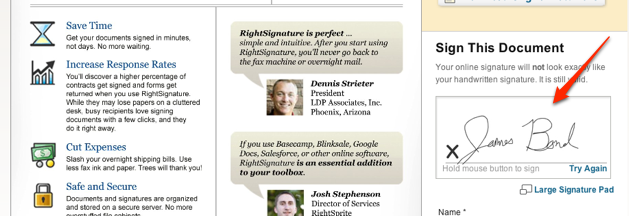
The service supports Google Docs, as well as native formats like PDF and .DOCX. Other extras include the option of requiring a photo taken by your computer’s camera alongside a signature and a free iPhone app that lets you sign documents on the go. The service offers a variety of distribution options, allowing users to send documents to a bulk list of users, and can also be used for petitions.

Users can send five documents per month for free, or can choose from a number of plans starting at $11 a month per user to get unlimited document sending. TechCrunch readers can get two months of the premium service for free by signing up through this link.

The service seems to work well, but RightSignature has a long road ahead – its competition is already quite well established, and some businesses may be hesitant to rely on a new service for their important document signatures. That said, the simplified UI may be enough to entice small businesses who had previously been scared off by the daunting nature of some of these other services.

Advertisement

Comments rss icon

  • If this leads to a strong authentication system (similar to FB Connect has the potential to) this would be really amazing, and would make online contracts really powerful.

    As long as it were legally binding.

    • The concept of signing using your handwritten signature is so anachronistic.

      REAL digital signature through encryption has been around for 20 years online thanks to Phil Zimmermann.

      And if anyone needs a user friendly tool, just try out cGeep

      The only advantage to “handwritten” is that it is easier for a sales guy to explain to the small business owner over 50.

      • True enough. I suppose I should have said strong, simple, form of authentication. The average user doesn’t know about more sophisticated forms of online authentication, so this is definitely a move in the direction of what the masses can understand and make good use of.

  • I’d love to see a way to record and fit a signature to the signature line, rather than using the mouse to draw it every time.

    Digital signatures are great, though. I hate faxing contracts back and forth just for the addition of a signature.

    • Their plans page says you can save and re-use signatures, and is available on the $11 a month plan. Guess that would save any RSI if you were pumping them out.

  • It’s funny how I mocked this season of 24 when the President signed a pardon over the net while teleconferencing, I thought it was a convenient plot device, now it turns out they really exist and they are poping up everywhere!

  • Is it able to use signature recognition?

  • Congrats Daryl and Jonathan! RightSignature came through big for Animoto last week when we needed our CTO to sign a contract while he was in Kinkos-less Japan.

  • This is useless. The USPTO has solved this problem. Hold on let me sign this message.

    /Chris/

    There, I signed it. That’s called a digital signature, and it is legal and valid in the United States of America.

    Plus it requires no hardware and it’s faster.

    • BTW, I am glad I supported no one in the Election. Obama is horrible. How could you possibly let GM go down in flames, screw all the stock investors and let them default on all their existing loans from the government. That borderlines on communism.

      and we’re still in Iraq. I am horribly unsatisfied.

      • The “gales of creative destruction” must be allowed to blow. GM has nobody to blame but itself. It failed to innovate. It dies. And the people, capital, assets, etc. get redeployed somewhere else, where they can earn a higher return. GM, in its current form, earns a negative return. That is unsustainable.

        And why shouldn’t stock investors lose money? They should only get the upside? And what happens when things go bad? Oh, someone should bail them out. Right. Don’t take responsability for your own actions, expect others to bail you out. Smart.

    • You might have “signed”, but we have no authentication that it was you who signed. With services like EchoSign (which I use) and now RightSignature, there is authentication through e-mail before the signing begins.

      Authentication is what makes the contract legally binding and that is what handwriting was supposed to do previously (on the crude assumption that only you could reproduce your handwriting as authentication).

      • That is not acceptable authentication for a signature.
        There is no such thing as an online notary and notarization with physical ID is the ONLY way that any thing beyond /Chris/ can be authenticated in terms of a signature.

        So nope, /Chris/ is just as good as me taking a USB drawing pad and signing my name in the PDF.

        • The illusion of authentication, or the perceived authentication is what these companies are riding on.

          On the internet “perceived” is the key word. Actual is not.

          The internet is inherently intrinsic

  • What if the document requires more than one signature?

    Can the document (pdf) be sent to one recipient for a signature, and then forwarded to another (by the initial recipient) – for an additional signature?

    We work with a lot of people 55+ and would love to find a very user-friendly fax replacement.

    • Hey Dave!

      When sending a document, you can add as many recipients as you need. The recipients can be required to sign, or, just marked as CC’s. You can also send out a document as a “Multiple Document”, and each recipient will be signing a unique copy.

      You can also create public Petitions, and Self-Service style documents (imagine having a thumbnail of your companies Contract on your site, where a user just clicks it, signs, and done).

      You can also sign by sending in a Fax as well if you “really” needed to (each document has a unique QR Code we can work with).

      We’d love for you to give it a whirl, and let us know what you think!

    • I don’t know about RightSignature (which I quite like, very nicely done team) but EchoSign takes care of all the signatures for me. You just enter the email addresses and then it takes care of each signature in the same sequence as the email addresses. I am guessing RightSignature does it the same way.

      One thing EchoSign does not have but I am really pleased by is RightSignature’s integration with Google docs, which is where I start for most of my contracts.

  • I’m digging this. I have to put together contracts via static pdf’s & I have to go through the signing box, but then my recipient has to go through getting Adobe Certification & blah blah. I like THIS deal with RightSignature much more.

  • Wow, this is awesome. The iPhone is sure changing what we do…. so quickly to. Once the tablet comes out imaging how much more we’ll be able to do.

  • Very interesting… I think this will help a lot people that need it…

  • I was looking for something like this about 5 minutes ago, techcrunch saves me once again ;)

  • This is absolutely not new!!!

    I know a Dutch firm that is using such an online tool for years now.

  • I seem to have a problem with it; I can upload a document only sometimes and when it does go through, the signature doesn’t appear on the document, it seems to white out half the document. What a shame, I was looking forward to this :(

  • Where was this when I was trying to do a deal while traveling and only had my iphone for http://www.rev2.org!

  • I’m sorry to get a bit off-topic here, but is it a pure coincidence that a RightSignature advertisement shows up on the same day that you write about them…? I’d appreciate your clarification on this.

  • These people don’t understand what the legalities behind signatures mean.

    Hint: being able to sign in cursive doesn’t mean squat! You can type a single letter or click a button for sig to be valid!

    • I think they and ?other people in this space understand the legalities. It’s just that our target users don’t. They want something that makes them feel more secure that just clicking a button.

      It’s funny because a ’single letter’ on a website is infinitely better than verbal agreements, but those are valid too. Come to think of it any agreement signed in the absence of the other even on original paper is still open to validity questions (is it real or not).

      I blame legislators for all the ‘directives’ with regard to what’s valid and what isn’t. If you agree to something it’s valid, whether you agreed to it verbally, in print or online. Otherwise all the tick-this-box agreements on just about every website or service are invalid.

  • It’s exciting to see what’s happening in the electronic signature and online contract execution space, especially given the impact on business – lowered operational costs and faster document/contract turnaround.

    DocuSign recently released a free e signature service w/ Drawloop Technologies – check it out here: http://apps.dra...com/loop/upload

  • You have to use an online notary and notarization with physical ID is the ONLY way that any thing beyond /Chris/ can be authenticated in terms of a signature.
    Every other thing will make a judge to laugh!
    This is the positive for this “technology”, judges dont laugh every day….

    • In all reality, an acutal visual signature created online is really just a security blanket – legal contracts can be verified by a single keystroke or even by voice signature contract (as is used extensively in call centres everywhere).

      The real challenge for RightSignature is that it is a fundamentally different way of doing business – irrespective of the legality, they’ll have to do a heap of work convincing business people to put down their pens and trust an onscreen/iphone scribble.

      Another persective on RightSignature here: http://bit.ly/JNND8

  • this could have been an interesting discussion if fewer friends/family/employees posted comments about this groundbreaking new technology.

  • I’m always surprised when using “analog” signature techniques to sign a digital documents. In 76, Diffie and Hellman published the first scheme of asymmetric cryptography. A few years later, Rivest, Shamir and Adleman designed the RSA scheme. Few years later, Phil Zimmerman wrote PGP. Signature and authentication are daily used in SSL transactions or even more secure protocols. Digital signature is a mature field. In France, we can digitally sign our tax return. It is legally binding. Several millions tax payers use it.

    Digital signature has the advantage to enforce the integrity of the signed document. It cannot be altered once signed. In the case of RightSignature, they have to keep your document to be able to proof later the integrity.
    [quote]Tamper-Proof

    RightSignature keeps a copy of both the original and executed document on a secure server. This ensures the contract cannot be manipulated after execution. [/quote]

    This means that you have to trust RightSignature that they will keep secret your signed documents. What a strong assumption…

  • It’ll be interesting to have a look at their API and see what can be done.

  • thankyou for everything twitter

  • I have never seen such links but still its shocking that passwords can be stolen so easily.. Use firefox and Kaspersky for better protection…

Leave Comment

Commenting Options

Enter your personal information to the left, or sign in with your Facebook account by clicking the button below.

Alternatively, you can create an avatar that will appear whenever you leave a comment on a Gravatar-enabled blog.

Trackback URL
Short URL
bugbugbug