
Weebly, a popular WYSIWYG webpage maker, is launching a new feature today that will allow users to quickly make fully customized web stores using the Weebly interface they’re already familiar with.
Using the new feature is simple. Weebly has added a handful of new ‘revenue’ elements to its main menubar, which allows you to drag-and-drop items onto your page. Simply drag one of the four available ‘Product’ elements onto your page, and you’ll be presented with a small box where you can describe your product, add a photo, and set a price (you can easily create a new item in less than a minute). After creating a product once, you can add it to your other pages without having to recreate it.
The store supports both PayPal and Google Checkout accounts, and allows users to add items to a virtual shopping cart as they browse (you don’t have to buy one item at a time). And aside from any fees you might have from PayPal or Google, the Weebly storefront is totally free – the company isn’t taking a cut of any of your sales. To make money, Weebly plans to offer ‘pro’ features for power users at a premium in the future (the site also generates revenue through its pro accounts and domain sales).
There are already quite a few services online that allow you to generate your own virtual marketplace, but Weebly cofounder David Rusenko says that most of these do a poor job allowing you to customize the look and feel of your store, which often leads to something generic. Because Weebly can already be used to build your own fully customized webpage, adding the ability to sell items seemed like a natural extension to the product (especially since many users were already trying to sell items from their Weebly pages on their own).
At this point my only complaint about the Weebly store is that it doesn’t yet offer templates, though Rusenko says they’re on the way. This means that whenever you create a page for an item, you’re going to have to re-drag all of the links to your other items back to the bottom of the page. This may allow for a wide degree of flexibility, but I think it will also lead to inconsistency on some stores, as some designers forget to add links to their other products (or they get lazy). Rusenko ackowledges that this could get frustrating, but says that the Weebly storefront is really meant for people with small inventories, so this shouldnt be as much of a hassle as it would be for major retailers.
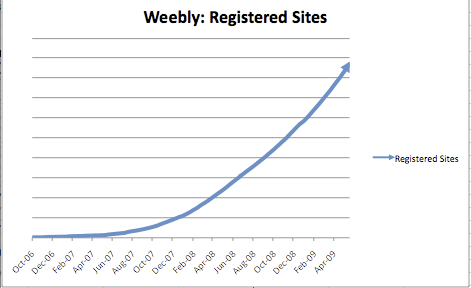
Beyond the new storefront functionality, Weebly is doing quite well. The site has almost 2 million registered sites (and is growing steadily, see graph below).







If you don’t have a strong technical background (most of us) and want to sell a few things through an online store with Paypal, this is a great option. Weebly isn’t the most robust service, but it is easy to use for the average internet user.
doesn’t rank that high in google either
Comment here if you know of other well done sites with similar functionality.
I am working on a “somehat” similar solution and want to know if I should go it alone or pitch it to an existing provider (perhaps Weebly or Zuora or Gambit or Vindicia or . . .)
Thanks for the post Jason.
Just my $.02, but creating this functionality is not terribly difficult (we managed to do it so it can’t be that hard), so if I were in your shoes, I would think that your only real option would be to go it alone. I just can’t see what why an existing operation would feel compelled to acquire a tool that would then require as much integration time as a fresh product would have required to create.
I usually refer people to http://cartfly.com
It’s very easy for people with a non-technical background. A couple people at my work wanted quick shopping cart systems and didn’t want to pay me on my time off to build them a custom solution. They shouldn’t have to pay someone like me though to be honest when a simple solution works perfect for them.
Jason, Webnode has had this functionality and more since 2008. It was launched in early 2009. That is why Weebly has done it to catch up.
That has to be the stupidest chart I’ve ever seen – it’s just a useless arrow over time without any y-axis units of measure.
I wonder what does it offer that other hosted third-party stores like CoreCommerce.com don’t?
Excellent… I get emails all the time from people looking to setup a simple storefront on the Internet but lacking in technical skills.
In the past, I’ve recommended they setup an eBay store, Shopify.com, Clicshop or Yahoo! Storefront.
This will be one more service to add to that list…
What’s the revenue model?
We generate revenue from our Weebly pro accounts, and from the sale of domain names.
We were especially excited about offering a free service for people to begin selling online, easily. In its current incarnation, it is perfect for your average, every day seller of hand-made goods, for example.
As we start to get a better feel for how people are using the system and what features they want, we may release an advanced store upgrade in the future.
Congrats!!!
thats cool. weebly is simple to use but that simplicity also comes with a price – it can look crappy or have a sucky layout
We take pride in having 40+ great looking themes — but if you don’t like one of the existing templates, you can always upload your own, for free, by adding 3 tags to the HTML.
Everything else is automatically laid out with proper margins and spacing, and the end result is clear, standards-compliant code.
In other words, creating a crappy looking website is relatively difficult with Weebly — the content, though, is up to you.
I wanted to know about SEO, do weebly sites rank well in google, are the pages SEO friendly with title ,meta and H1 tags and can we increase rankings through normal seo on page and of page SEO techniques ?
Regards
Jay
After view many free web site builders I have to say that weebly is easy and gives the most options. I think they have the best lay outs. The only thing I need now is a whole sale drop and getting my site out there. Weebly keep up the good work.
Dave,
After reading the techrunch article and kicking the weebly tires I signed up for a 2 year pro account (bye bye Squarespace). Fantastic interface. Zero learning curve. Can you sell digital products (ebooks, video’s etc?). If so, how? Keep up the great work.
Absolutely. Just drag on the product element, fill out the details and… you’re done!
You can choose to accept payment via either PayPal or Google Checkout.
how does the delivery of the ebooks work?
Can I have it available for instant download?
is there a way to set up having it sent automatically to email?
Most people that buy ebooks want them available ASAP.
How does this compare to Yahoo Store and Amazon Webstore?
Weebly is one of our favourite website builder tools that we recommend to our customers and just got better with this additional functionality. Well done!
I’ve recommended Weebly to several of my friends; even walked them through it in person. I was already happy with the recent improvements to the blogging feature, but this looks even better.
*************************************************
Is this supposed to be news?
*************************************************
The site builder/eshop leader is WEBNODE who did this in 2008! I have been using it.
So the pressure is on to copy what WEBNODE is doing but WEBNODE is doing these things first.
There is a HUGE difference in the quality of site builder and eshop. WEBNODE eshop is for real businesses and it already has Professional upgrades.
*************************************************
*************************************************
Are you a promoter? Look, I’ve never used WebNode, but I just spent 30 seconds on the site and I’m already unhappy about the bandwidth limit. I like Weebly for a number of reasons, but I also like that they’re a genuine bootstrapped startup, and they’ve still only taken $650k to this point. I think they were started though an incubator too (can’t remember right now). I believe in supporting businesses like this.
David: This is the time for Weebly to be on guard. There are so many options out for people to choice from. The templates needs more improvement and I dont know why some features in advance editing are turned off. Can’t even increase the height of the template. Step up your game Dave.
After reading the article I played with it to create the above. I thought it was very intuitive and easy to use. My one complaint would be the inability to resize the different drag and drop elements and rearrange with new sizes.
For simplicity, I think this is great.
Hadn’t used this comment facility before. Click on my name to see the simple site I created with Weebly.
Weebly is fantastic. I have been using it for months and they continue to do a great job and impress me. Regarding the new revenue elements, how do you go about changing your google checkout or paypal account after you already entered your email? I put in a paypal account but now I want to change my store to go to a different paypal account. Gotta add a way to do that
I am a MEGA fan of Weebly!…I happen to be a jazz pianist and composer, and love the ease of updates and stuff with Weebly…up to now, have been able to do so much great stuff in creating my site…the only thing missing for me is the ability to put up a music player with previews of the songs I want to sell…some sort of integrated widget or something that is basic…doesnt require many clicks from site visitors…I’m signed up with CdBaby which is great…but I’d love to enhance my own ability to make direct sales from my own site…I’m hoping weebly might have something coming in this area?? or if somebody could suggest some widget out there, that would be cool…I’m currently trying out Audiolife which is pretty cool….but it’s a flash widget that kind of requires lots of clicks to get to the point where you can preview songs…
any ideas?
WEEBLY RULES! checkin out the new Storefront features NOW!
-Tony
For Tony the musician, Weebly has a audio element for pro users. Drag and drop it anywhere on your page and upload an MP3 file.
Here’s how I would do it… On new page, drag and drop a two column element.
In the left side, drop a title element, then title your song. Then below the title in the same side, drop an audio element and upload your tune, or a sample of the tune.
On the right side drop in a shopping cart element, title it, give it a description, price and upload your album art for a photo. Keep doing that on that page.
You could set these up to sell just a song or a complete CD.
When you get a paid for an order you could provide a link to a hidden password protected page that allows the customer to download the song. To facilitate the downloading use the file element in your Weebly admin. Drop a file element on your hidden password protected page and upload your song(s)…
Beyond my advice, refer to your Weebly help screens or write Weebly support. But you should be able to pull this off on your own…
Good luck and have fun…
Hey Mike…thanks for the creative advice…the part I’m concerned about is how to automate the part which enables the customer to download the file?…would they need to wait until I get the email from Paypal saying “You have been sent $”?…and then , send them the link?…may not be very customer-friendly compared to the mp3 retailers like Itunes (which of course I’m signing up for distribution with)…but selling DIRECT is preferable because I don’ need to pay any middle-men……check out my site the way it is now…do you think it’s conducive to people buying the music?…would love input…..I’m using a company called Audiolife for track previews right now, but it’s not as “CLICK and LISTEN” as I would like…
Thanx again!
Hmmm…Nice step but hey ! before I can think of an e-commerce I would first think to enhance my chances to rank well in the SERPs, am I not right ? now how could you do this while having the same TITLE and DESCRIPTION tags on every page ? no way ! that’s the MAJOR problem with weebly . Everybody knows how essential is this for SEO. I personally loved this new costumized web store feature, but for me the most important issue to fix before I can think of anything else is the on page optimisation with unique title and description meta tags for every single web page !
Having the same meta tags for every page is indeed an issue, and is the one thing that tempts me to move my site from Weebly. But then I start to wonder if another hosting service will match Weebly’s fantastic customer support. So I’m staying with Weebly.
I love Weebly and did ever since I first used it. There are many “free” website creators out there but not only is this the easiest to use, but it looks great and Google seems to like them. For a non-programmer this is the kind of stuff we are looking for and that’s probably why Weebly is so successful.
Didn’t know about webnode, it’s one of many website builders out there, but I have to say spending a little time with the demo, that while it seems to have a lot of features, it also seems sluggish, cluttered, and not pleasant to use. I don’t see any evidence that I can actually muck around in the CSS like I can with Weebly in it’s advanced editing tab. Weebly editer on the hand is very cleanly laid out and easy to get a nice looking website up in about 5 minutes. I also like that I can actually archive a weebly site I designed offline. The freedom to really custom the CSS in Weebly is what really sets it apart for me. I can go in a make a very customized site for a business owner and then that business owner has an easy uncluttered editor to go in and update text or products and such. Weebly’s approach to developers is awesome http://develope...quickstart.html
I love weebly, It is very easy to use for starters and pro.
Daily technically improving big tree. well wishes