
TinyChat, the simple, free web-based chat room we wrote about here, is now adding video conferencing and screen sharing to its list of features.
Once you create a chat room on TinyChat’s site, TinyChat will generate a unique URL that you can share with whoever you choose to invite to the virtual chat room. When users click on the link, they will enter the interface and will be able to input messages, change their usernames and enable video and audio conferencing. Powered by Adobe Flash, the video conferencing feature allows up to 12 different users in the chat room. TinyChat also lets you share any type of file with other members of a chat room. Similar to the site’s previous version, you can embed a badge on other sites and forums to spread the link to the chatroom. The video conferencing feature is very easy to use and the quality of the video isn’t terrible.
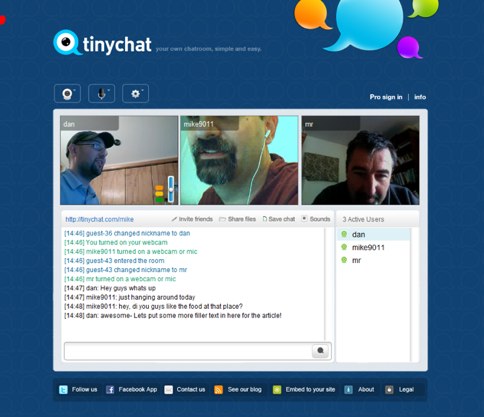
The startup has also rolled out a premium account, which is $20 per month, where you will be able to add screen sharing to members of the group. Once you enable screen sharing, you will be given a picture window, which can be dragged to the tab or screen where you want the webcast to take place. Additionally, the premium service lets you record and save video conferences as an flv file. The pro account also lets you create passwords for room privacy and offers higher quality video than the free account.
Of course video streaming and web conferencing is old news and there are significant amount of services that do the same thing including Cisco’s WebEx, Stickam, Ustream and a host of others. Entrepreneur Daniel Blake, who created TinyChat, TinyPaste and ControlC, says that TinyChat is aimed towards individuals and small businesses who don’t normally use these services but want an easy (and cheap) way to connect with others over the web. Blake also says that he’s hoping to sell the service to social networks like Facebook, to enable video chatting from the site. The interface of the new and improved TinyChat is still very spartan, but for a company or user who is looking for a free service and doesn’t need a whole bunch of bells and whistles, it could be an easy option for video conferencing.