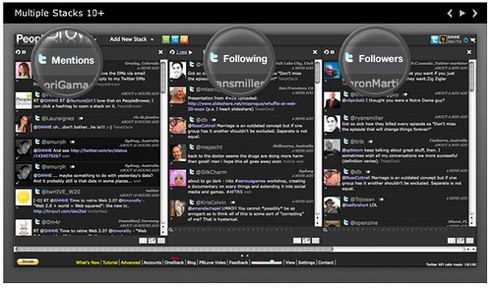
There is a heated competition taking place for which Twitter/Facebook desktop client is the fairest of them all. We’ve written about about TweetDeck, Twhirl / Seesmic Desktop, AlertThingy, Sobees, and the clients that focus only on Twitter (Tweetie, Nambu, Twitterific, etc.). Now, PeopleBrowsr, is entering beta with a free Adobe AIR-powered desktop app that integrates Twitter, Facebook and other social networks into one platform.
While in alpha, PeopleBrowsr was able to differentiate itself because it was a web browser based dashboard for social networks, sort of like what Streamy is now. Similar to Tweetdeck and Seesmic Desktop, PeopleBrowsr uses stacks. To add content, you add different stacks for each social network, including Twitter, Facebook, FriendFeed, LinkedIn, Flickr, YouTube, and your RSS feeds. Similar to all the Twitter clients mentioned above, Peoplebrowsr lets you do all the normal twitter activities (read, post, follow/unfollow, DM and reply). And you can update your Facebook status and engage in FriendFeed conversations from the dashboard.
Peoplebrowsr is offering different layouts of the streams according to the type of user you are. You are given the choice to run the app under Business mode, which is interesting given how Twitter, Facebook and others are now seen as marketing and PR tools. Companies, restaurants, brands and celebrities all seem to use Twitter as a business platform in some capacity. On first glance, Peoplebrowsr’s bells and whistles seem to cater towards the enterprise community. Business mode lets users manage multiple usernames within one dashboard (Seesmic does this too), conducts conversation threads within the client, and gives you the ability to share a “stack” via RSS or a URL link.
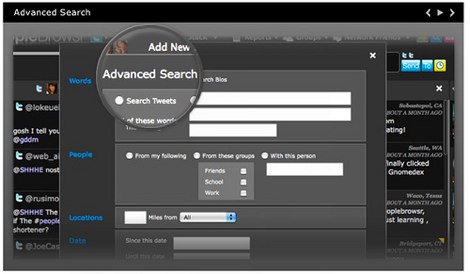
PeopleBrowsr also lets you create Twitter groups within the dashboard around keywords and #hashtags. If a group is built around a #hashtag, every time a new person uses that hashtag they are automatically added to the group. Users can browse public groups made by others as well as those based on popular hashtags.
PeopleBrowsr offers the ability to filter searches on Twitter by location, groups, specific individuals, posts containing links and sentiment associated with keywords. Results can be further sorted by the number of follower and searches saved for future access. PeopleBrowsr can be set up to send email alerts should a specific keyword appear in the stream. Updates and messages that are key can be flagged, and you can add private notes and comments to a specific user or post. You can also add users to a built in address book within the dashboard.

For businesses that want to create reports on Twitter feeds, keywords and direct messages, PeopleBrowsr lets you create custom reports can be exported as RSS feeds and retweets (to share publicly.

Like Seesmic and Tweetdeck, PeopleBrowsr is powered by Adobe’s AIR platform, which has some strange user interface bugs and quirks and tends to use a good amount of resources on computers.
PeopleBrowsr doesn’t seem to be for the individual who uses a Twitter/Facebook desktop client to simply tweet, follow, DM and update status messages. But for the enterprise community, this application may make tracking social networks for a brand or company much easier. The startup is also retaining the web based browser dashboard that will include all the features of its desktop client. On the consumer side, it will be tough to break into the current race of popular desktop client apps, including Seesmic, Tweetie and Tweetdeck, who all have loyal followings. But it’s wise of PeopleBrowsr to appeal to the enterprise space and this could help the startup make a name for itself out of all the other clients out there.