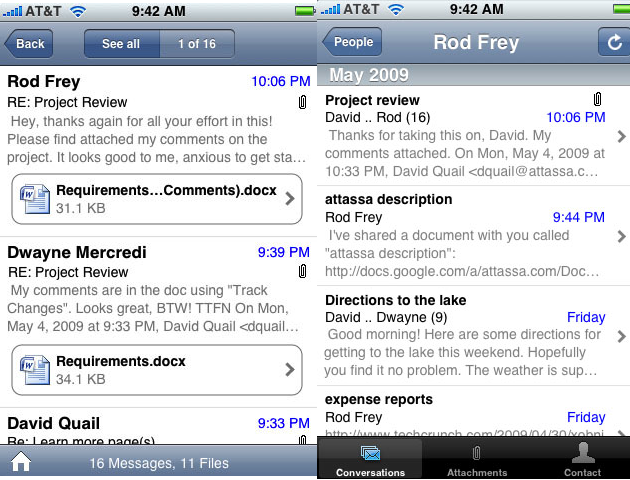
 I’ve made no secret of my dissatisfaction with the iPhone’s built-in mail client, which omits basic features like search that makes navigating through any sizable inbox nearly impossible. Things are going to get much better with the release of the iPhone 3.0 software update this summer, which includes some search functionality, but there’s still plenty of room for improvement. ‘All My Mail‘, a new application from Attassa, is a step in the right direction. The application is comparable to a stripped down, mobile version of Xobni, and is now available on the iPhone App Store.
After scanning through your inboxes, the application analyzes your Email messages and breaks them into conversation threads, similar to those found in the Gmail web interface. It also uses the Email addresses you typically interact with to generate a comprehensive address book (it can identify when the same person uses multiple Email addresses, and groups them accordingly). Whenever you click on one of these contacts, the application presents every Email thread you’ve had with that person, as well as related contacts. There’s also a very useful feature that allows you to look only at the attachments you’ve exchanged with other contacts, which is great when you’re looking for a particular file but can’t remember when exactly someone sent it to you.
At launch the application works with Gmail and AOL webmail accounts, as well as any Outlook accounts (you have to install a special plugin). Support for more services is on the way. A free version supports a single inbox, while the premium version (which is $4.99 plus a subscription fee) allows for an unlimited number of inboxes. For you privacy buffs, Attassa says that it does not store entire copies messages on its server, but that it does store encrypted meta information and snippets about each message. The company could theoretically look at this data, so it might be unwise to use it for highly confidential information, but this is really a risk with any startup service.
Attassa is free if you’re hooking it up to one Email box, and is charging $20 per year for the service if you’d like to tie it to multiple Email accounts (the first three months are included in the application’s $4.99 sale price). That’s obviously fairly inexpensive, but I’m not sure I’d be willing to pay it unless I could count on All My Mail as my default mail client – and it isn’t quite there yet. For one, you can’t compose a new message (though you can reply to them), and it’s frustrating to have to switch between multiple mail programs depending on what you’re trying to do. The company says that this will change as soon as the iPhone 3.0 update is released. I’d also like to see a more comprehensive search, similar to the impressive full-text search that was just released by ReMail last week (again, Attassa says search is coming in a future update). That said, All My Mail is definitely a very welcome addition to the iPhone’s otherwise anemic mail functionality, and we’ll be keeping an eye out for its future updates.