
Y Combinator’s ReMail Finally Brings Full-Text Email Search To The iPhone
by Jason Kincaid on May 11, 2009

I love my iPhone, but I’ve always harbored some contempt for its built-in Email application. Not because of the occasional message download issues and display quirks, but because the iPhone’s Email application has absolutely no search function at all. Given how much essential data is now stored in most peoples’ inboxes, from phone numbers to flight confirmations, this has been an endless source of frustration.

Today, these problems are solved: a new Y Combinator startup called ReMail has just released its application on the App Store, and it’s bringing full text Email search to the iPhone. The application is currently free during its Beta period, and you can grab it here.

Now, I know the first response people will have is that the upcoming iPhone 3.0 update is going to include Email search as part of the new Spotlight feature. This is mostly true – 3.0 will allow you to search through Email headers, which include the message’s subject line and its ‘To’ and ‘From’ fields. But that’s only half the battle. Spotlight omits the actual Email message, which accounts for a sizable chunk of an Email’s content.

So how is ReMail doing what Apple can’t? The company has built a server optimized for rapid Email search, which the iPhone client connects to and grabs results from in a few seconds. It works exactly as it should, offering suggestions as you type your query and presenting matches as threads so you can see the context that a result was found in. If you search for “Jason inbox”, it knows that you’re looking for a person named Jason in the folder “inbox”.

While the application requires internet connectivity if you want to search through your whole inbox, for most queries you won’t need a connection. ReMail has built in smart caching that locally stores all messages from the last two weeks, as well as any messages you’ve previously searched for (people often search for the same messages multiple times to look up things like phone numbers).
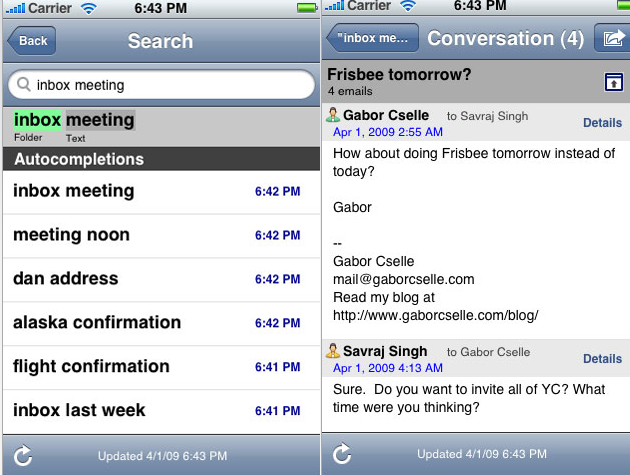
My initial reaction to the app was that it was great, but that it seemed to have a short shelf life – couldn’t Apple just update the 3.0 firmware to include full-text search? But CEO Gabor Cselle says that the iPhone simply can’t handle it in its current form. Even if the phone had an index of your Email stored locally (which would be costly in storage space), Cselle says that the iPhone doesn’t have the processing power to quickly scan through multiple gigabytes of messages.

ReMail was founded by Gabor Cselle, who completed his Master’s thesis on Organizing Email, worked on the Gmail team, and was also VP of Engineering at Xobni, which he left last year to pursue his own company. The company’s backers include Paul Buchheit and Sanjeev Singh, who built a little application called Gmail (they also co-founded FriendFeed). These guys know what they’re doing.

But there are some caveats that may keep some people from using ReMail. There are a few UI quirks (it appears that the client doesn’t render HTML), and the maximum inbox size is 10,000 messages, which is smaller than some users would like. It would also be nice if the app could serve as a replacement to Apple’s mail application (you can forward and reply to messages in ReMail, but for some reason you can’t compose a new one).

The biggest issue, though, is privacy. ReMail works by sucking in your messages from your IMAP server and hosting them on its own server, which is optimized for rapid searching. Cselle says that the server is secure and that all messages are encrypted, but acknowledges that ReMail does have access to your Email. The company vows never to access or read any of it, unless they are given written permission to do so in the case of a support issue. That may not be enough for some people, especially those who deal with confidential information on a regular basis, but for most people it probably isn’t a show-stopper. It’s also worth noting that the same issues are associated with many other startups that host your private data.

The application will stay free throughout the ReMail Beta, with plans to switch to a $3.99/month subscription plan later on.

Advertisement

Responses

Comments rss icon

  • Yes the biggest issue for me too is privacy!

    But I would try this application once and see if it is really helpful or not.

  • Amazing. Of course, G1 has been able to do this since I bought it last October…

  • Sounds like a good application but $3.99 / month for email search will be hard to justify. Which of course must be frustrating for the developers who’ve spent so much time developing this.

  • I’ve been using this application for a while and have found it very useful. They also have some cool features in the pipeline that they haven’t yet released.

  • About time..the Iphone lacks a lot of basic functionality..:(

  • (This is Gabor from reMail)

    Jason – thanks for the review! Happy to see you agree with the desparate need for full-text email search on the iPhone.

    Just wanted to drive emphasize two points mentioned in the article:

    1. If you have 10 GB of email in your archives, you can’t put all of it on the iPhone and attempt to have a full-text index, searchable offline. Apple solves this problem by only searching headers of your recent emails on the device, and relying on IMAP’s search function (which is slow and non-indexed) for everything else. reMail solves the problem via a full-text index on the device for your emails – except we store hundreds to thousands of emails on the device, not 25-50.

    2. We will never, ever look at people’s emails without their written permission for support purposes, period. I know that privacy is a crucial point for many, and this is not something we take lightly.

    I’ll respond to some other comments separately. :-) Gabor

    • Gabor-
      we’ve met (at Y Combinator) and you have my full endorsement of both you and this excellent, well-needed offering, even in an iPhone 3.0 world.

      Re #2 though: sure you realize that this is useless in the event of a subpoena, which does happen. *You* might not look at the emails but someone far scarier might. Just a detail, maybe a corner case, that applies to most every 3rd party provider situation.

      Best of luck,
      Ken

    • While its exciting to hear about this app, I think the assertion that IMAP search is slow and non-indexed is misleading as it entirely depends on the server implementation. For example, our corporate server has an IMAP implementation supported by a full text index. So, if Apple supported full text IMAP queries, it would address the core problem this app is trying to solve.

  • I’m running iPhone 3.0 OS on my iPhone and I have search.

    This product would have been great back in June of 2007. In about 3 weeks the iPhone will have search with a simple and free software update.

  • They must have something else in their pipeline, this product will obsolete in a year or less.

    IMHO, there is no technology behind it, which apple or others can’t replicate within weeks.

    • Hi Phillip, thanks for your comment! It’s actually surprisingly hard to implement fast, full-text search on an iPhone. On a desktop PC, you could probably whip something similar up in a few months, but on the iPhone you have pretty limited resources, timing constraints, limited memory, etc.

      So I respectfully disagree with your points of “no technology behind it” and “nothing that apple can’t replicate within weeks”. (Apple is building email search into 3.0, but it’s headers-only and caches only few messages on the device.)

      Gabor

  • Cselle said…
    multiple gigabytes of messages.

    Cselle , it looks to me that you’re still thinking of boolean search where the original dataset needs to be searched exhaustingly . In fact one can compressed the text dataset using Feature Extraction and Dimension Reduction. The extracted features are not text anymore. It is a matrix that represents the word-by-message features of the original gigabyes of texts which is being compressed in the extraction process. The search is done on the extracted features rather than original gigabytes of textual messages/files, which speeds up the process.

    • Falafulu – thanks for the links!

      Certainly you can’t perform FE or DR on the iPhone given the timing constraints(?). Also, if I understand these techniques correctly (maybe I don’t), they would actually lead to non-100% recall and precision. Users are very sensitive to not being able to find email using specific words that they remember from the original text.

      Would love to chat more over email – my address is on my website (www.gaborcselle.com)

      • If I understand correctly, feature extraction and data reduction are performed on the indexed data. So you would do this on the iPhone when you build the index, not when you actually perform the search. Therefore there shouldn’t be excessive timing constraints.

        Also, I believe you can use these kinds of techniques to cast a wide net over possible search results — a first-pass algorithm. Then you can refine to 100% precision with more traditional methods. Refining results would mean pulling down the full text for the first-pass results from the server. All theoretical, not sure if that would work in practice.

        • Yes, Hauser the index data is still raw. Features are extracted from this data and also indexed/stored for use in query computation time. Here is a good paper on it:


          Using Linear Algebra for Intelligent Information Retrieval

          The paper described the use of SVD (singular value decomposition) but there are other feature extractions algorithms that are reported to be superior than SVD. SVD is a linear algorithm, but other non-linear feature extractions algorithms are reported to have outpeformed SVD using the same test dataset.

          Cselle, I’ll send you an email.

  • The Aristotle app has had full text searching of email in Exchange email in the iPhone for months now. Works amazingly well. So for business customers using Exchange, we’re way ahead of you. :)

  • Just installed.
    “We’ll by syncing your emails in a moment.”
    I’ve been looking at that message for about ten minutes…

  • $3.99 one-time *might* I mean *might* be within reach. But per month? No way. Nobody pays for search, much less inbox search. I can see a flurry of free/open source alternatives emerging by WWDC. Unless of course the new ‘features’ yield the killer app bar none. But even that would be a stretch for a pay by subscription model.

  • Remail has a bunch of auto-complete features that are super-useful. If you start typing someone’s name, it autocompletes. Nice!

  • I’ve been waiting for such a long time for this!

  • Give all my private email to some unknown startup run by a guy in a garage?

    Riiiiiight!

  • If that works it would change my life.

  • I think there is a reason Apple aren’t including this and it has nothing to do with technical limitations. As Gabor should know, since he worked at Gmail, doing a full-text search on several gigabytes of e-mail is worthless most of the time. You invariably wind up with 200 matching messages to dig through, which for all intents and purposes is as worthless as having to dig through all 200,000 of them. It’s unlikely that you can remember an uniquely identifying phrase in the body of a random e-mail. (Try it.) You are much more likely to remember a) who sent it and b) when. Thus the Apple features. Once again, minimalism and simplicity carry the day.

  • The biggest risk in my view does not come from Apple but from Google and main email providers. Once they release an app to search in Gmail and others i think the game is over.

  • Couldn’t this simply be:

    ReMail IMAP
    ReMail ==> index email ==> Solr
    iPhone ==> search ==> ReMail ==> search ==> Solr

    So, relatively easy to implement?
    For AutoComplete lovers:
    http://www.sema...o-complete.html

  • dude, release 3.0 already has a search email functionality. why would i wanna pay 10 bucks for this retarded ap when i already have this functionality for free

Leave Comment

Commenting Options

Enter your personal information to the left, or sign in with your Facebook account by clicking the button below.

Alternatively, you can create an avatar that will appear whenever you leave a comment on a Gravatar-enabled blog.

Trackback URL
Short URL
bugbugbugbug
Techcrunch on Facebook