
As more mobile phones become full-fledged Web-browsing devices, a small but fast-growing segment of all visitors to any given Websites will be mobile. But with so many different mobile phones and browsers, it is difficult to figure out where most of that mobile traffic is coming from. A new mobile Website tracking service called PercentMobile lets you track mobile visitors by device, cell phone operator, country, and more. All you do is insert one line of pixel-based code into the header of your Website and it does the rest. All mobile browsers can read the pixel code, unlike the Javascript required by Google Analytics, for instance.
PercentMobile is in private beta, but we have 500 invites for TechCrunch readers. Use the code freecoffee at signup.
PercentMobile is free, but the high-level data in the reports become public. (They can be made private by request). The service is built on top of TigTags, an enterprise mobile analytics platform that starts at $1,000 a month. PercentMobile is basically a lead generator for that service.
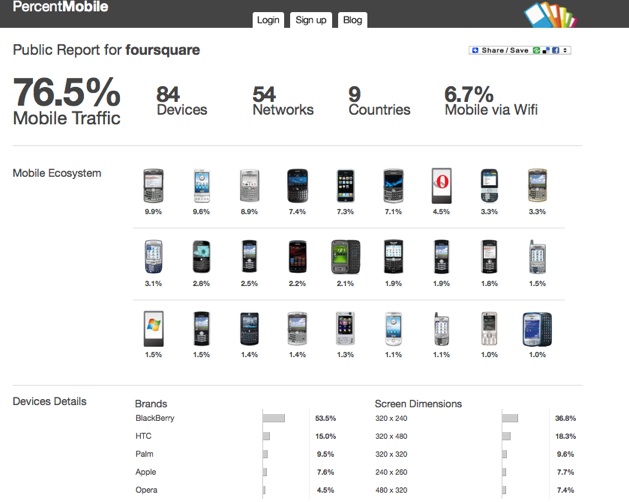
To get a sense of some of the data you would see, check out this report for FourSquare, the mobile social network that MG is in love with. Not surprisingly, 76.5 percent of all of its traffic is mobile. Although it comes as an iPhone app, you can also access it via a mobile browser. The most popular device accessing it that way is not the iPhone (since most people use the app), but rather the Blackberry (9.9%), followed by HTC’s G1 Android phone (9.6%), followed by two more Blackberry models (8.9% and 7.4%), and then the iPhone (7.3%), and then another Blackberry (7.1%). Guess which platform FourSquare is going to develop an app for next? Yup, the Blackberry.
Every Website should know how much of its traffic comes from mobile, and from what devices and geographies.


very interesting, i’m very interested in the percent mobile give me more info, i live in devonport tasmania australia. thank you
Thanks for telling me about this service. Installed and counting away.
Nice! Thanks for sharing. Do you know whether I need to do something special to use it with WPtouch iPhone Theme plugin for wordpress.org blog? Thanks!
@vojtech – since it’s a pixel code vs javascript code, it’s pretty easy to deploy. Just put it right after unlike other js codes that require you to put it down in the footer before .
Being that it’s a pixel, it loads quickly and doesn’t cause things to “hang” like some javascript codes can. I deployed it easily on my blog – WP blog – just stuck it in my header file right below where started or in my theme it said or something like that.
Rex
Thanks Rex! I did add the pixel code to the regular theme on my blog http://www.vojtechpr.com. What I was asking is whether this code will work even in the WPtouch iPhone Theme plugin, which is a Wordpress plugin that customizes blogs for the iPhone. I don’t believe I can add a code to this theme, because it is automatically generated.
@vojtech
Thank you for the question, I would like to suggest two things to also have you track your WPtouch iPhone theme’s visitors:
1. Create a separate PercentMobile account for the iPhone view of your site (use freecoffee as the invite with a different email-address). The reason is that it could be helpful for you to learn which phones get correctly redirected by the theme and which mobile devices still get ’stuck’ on your desktop-site. According with this you could alter your device-detection code in wptouch.php (line 251) to include those useragents.
2. To your question where to put the HTML snippet: Because this is a mobile view, it is safe to put the snippet (of your newly created PercentMobile account) in the footer of the theme, because the whole page is so low-weight. My suggestion would be to put it somewhere in footer.php around line 27.
Please let me know if this helps and how we can be of further support!
Please also note that it takes about 2-3 hours after installation for the first round of data to show up on your report
Thank you for the invitation code. I just installed it
more javascript to put on my pages, jeez
@fijidaddy
no javascript. since less than 15% of mobile phones can handle javascript the code PercentMobile provides is a lightweight image tag. all the work is done server side.
also, please place the code snippet at the top of your template after the body tag. many mobile web browsers gag on large broadband web pages or people click away before the complete page loads. we want to make sure we can track the mobile device before that happens.
This site could be worth $500 million. NO recession and no bubble in web 2.0 http://iamned.com/blog/ stock market keeps going up.
Thanks i used ur code.. thanks for the information
Very cool, i am gonna try this.
Your invite code is used up.
@DG
Additional invite codes can be requested here:
http://mobilean...ats-your-mobile
Is there a way to track blackberry visits with google analytics? I noticed that the iphone tracking is in their by default. Anyone know? Thanks