Free: Pack Of MySpace Branded Playing Cards »
Have Kindle, Will Travel — And Stay Up-To-Date Thanks To Offbeat Guides
by MG Siegler on April 26, 2009

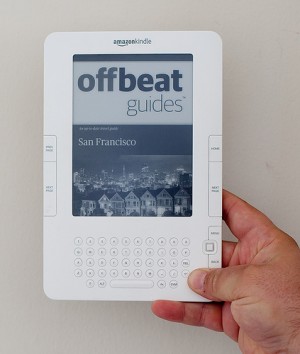
3476985377_9ce509d49aI used to think the Kindle was stupid. Then I bought one and realized I was wrong. It’s still way too expensive, but it’s great at what it does. And what it does keeps on expanding. Now, it takes a step into the up-to-date travel guide market, with a partnership with the customizable travel guide service, Offbeat Guides.

Starting tomorrow, you’ll be able to find 500 of the company’s newest guides in the Kindle store at prices ranging from $3.99 for smaller cities to $7.99 for larger ones. Here’s why these are great. Just like the Offbeat Guides regular guidebook products, its Kindle-ready guidebooks are way more up-to-date than traditional guidebooks. While there have been some guidebooks available on the Kindle in the past, most are only updated once a year. Offbeat Guides are updated every month.

This means they can include information such as real-time events for specific cities, like concerts or festivals. It also means the guides can have a Kindle menu option to find out something going on in the city you are visiting that night. For tourists who don’t know anyone in a particular city, that’s a great feature.

There are a couple downsides. Naturally, because the Kindle only handles grayscale images, you won’t get the full color pictures you usually find in other tour guides. And because the Kindle’s screen isn’t ideal for displaying maps, tailored, local maps that are a part of Offbeat Guides regular guides aren’t included here.

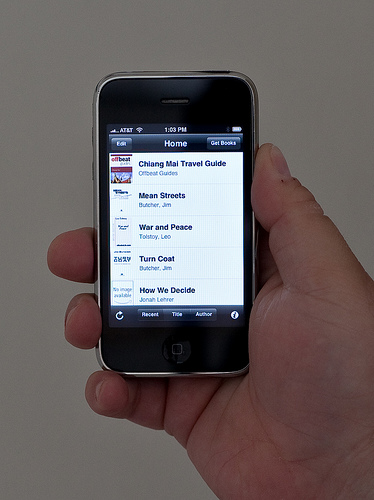
But, at 10.2 ounces (for the latest version), the Kindle is likely lighter than regular tour guides. And, if you’re planning a multiple city trip, you can obviously load up a bunch of these guides on one Kindle. One thing that particularly excites me is the fact that you can also view these on your iPhone if you go somewhere and don’t feel like carrying around a Kindle. Because the Kindle app on the iPhone stays in sync with the Kindle content, you can bookmark pages and look at them later on your phone.

Offbeat Guides has been working on these Kindle-tailored guides for 6 months now, CEO Dave Sifry tells me. He also notes that there are 5 times as many cities available as compared to other guides. Right now, if you plan on traveling to a city often and want the most up-to-date guide, you’ll have to buy a new one each time. But Sifry says they will explore the possibility of having subscriptions for certain cities if customers demand that. Such a feature may even be useful to locals of a particular city to know what is going on. But the focus right now remains on leisure and business travelers, he says.

Find a full list of the Offbeat Guides Kindle options here.
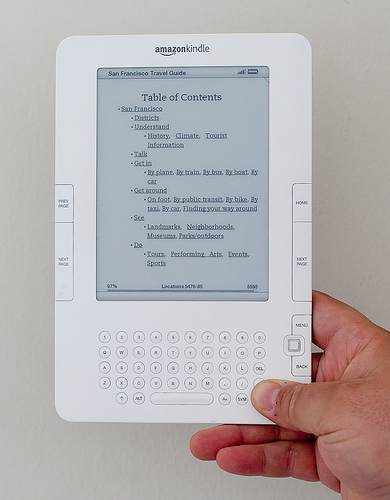
Table of Contents of the May 2009 San Francisco Offbeat Guide on 3477796562_c9ed04f47d

Advertisement

Comments rss icon

  • The Kindle looks nice but I can’t see it being adopted by the mainstream until the price comes down dramatically. Moreover, why would you buy one when you’ll eventually be able to view that content on your phone?

    • Remarkable. But the price may pinch our pockets a little. And also, why not someone try adding color to Kindle? Or is it already happening? Because, a tour/city guide is a riot of colors and Kindle’s guide will look lackluster in front of a city guide.

    • Good questions, and ones that I had too. However, after speaking with several friends who have Kindles and digesting their comments, I concluded a couple of things. First, while price is indeed high, the cost of books on Kindle is half or less than what you pay in bookstore. As someone who spends at least $75 a month on books, this will save me money. Also, it will save storage space in my house, which is so crammed with books there’s no room for anything else. The screen is large enough to read comfortably in contrast to cell phone, which is too small for easy reading, at least for me. Size of Kindle, especially with available “book cover,” makes it feel more like a real book, which I like, but it’s lighter and thinner. I travel much and usually carry at least 2 books with me, so the Kindle will be a big help–I can carry as many books as the trip will require, plus other publications, and delete them when I’m finished. No carrying around “dead” books or papers. I ordered mine last weekend and hope to get it tomorrow.

  • The kindle looks kinda cool. I’ll have to check it out sometime

  • Has anyone used Kindle 2 for showing PDF versions of the Powerpoint? If so, how did Kindle handled rich graphics. And while I am it, has anyone used Kindle 2 for books in other languages? Does it support Kanji scripts?

    • I’ve downloaded some of my .jpg photographs (family photos) to my kindle. They convert to black and white just fine.

    • The PDF conversion is labeled experimental. My experience with it is that it’s hit or miss. I suspect that crowded Powerpoints might not translate very well, since it tends to reformat things significantly in the PDFs I’ve sent through it.

      This new 10″ screen Kindle that rumor sites have been mentioning should do all of that much better, since it could just scale the image down a little from the original.

  • There’s more pictures showing Offbeat Guides on the Kindle (and on the iPhone) here: http://www.flic...57617357373152/

  • This is a great idea – might tempt me to buy a Kindle 2!

  • Offbeat Guides seems fascinating service. well done.

  • the point where kindle’s hardware is insufficient for satisfiing the possible market’s needs came very fast. as i read in a newspaper: the kindle has always been a product that has been developed to be placed in a museum after it hast been released.

  • Fabulous! Well done David & Team!

  • “you can also view these on your iPhone if you go somewhere and don’t feel like carrying around a Kindle”

    this pretty much explains why i’m not buying a kindle… it’s 10.2 ounces unnecessary hardware

  • Congrats Dave! Great news.

    This implementation makes sense for me, since I do not live in the US.

    I have generally used OffBeat Guides when I am traveling to somewhere and – at the last minute – realize I don’t have a guidebook.

    I’d buy a Kindle2, but they don’t sync wirelessly overseas!

  • It looks nice but Kindle is too expensive the price should down dramatically

  • Congrats Dave! I am jealous. I would love to see the @InYourPocket guides on the Kindle too. Could you give me a contact?! Thanks

  • it’s not the price that ’s holding back kindle, me thinks. i rarely use my ebook reader to browse the internet or read blogs. i find it excellent when i lie on the couch reading a book though. you easily forget it’s an electronic device. wish the screen was a little bigger … oh and maybe it was thinner … and bendable, maybe?

  • I’m a bit worried about the voice that it would use…

  • I absolutely love the new Kindle, I saw it for the first time a month back and was blown away by how vidid the screen was. The device itself was pretty ugly (maybe they should let Apple take a crack at it?) but the functionality was absolutely amazing.

  • Kindle–Price too big + screen too small + Doesn’t work outside of the USA = FAIL.

    This is a READING device. Why do we need “whispernet”? To inflate the price, that’s why.

    If I wanted to rent a book, I’d go to the library.

  • I’m a Kindle 2 owner and I love it! I read more now that I did before owning one (and even then I read a lot). I’m also reading books I probably never would have picked up anywhere else (e.g. The Count of Monte Cristo – amazing book btw). These new travel guides are a great add, thanks for sharing the info.

  • I originally bought the Kindle2 for reading books, but the surprise bonus is how much I like reading newspapers on it. It’s quick, it’s cheap, and no advertising.

    Newspapers: Break out of the current schedule of publishing only once a day. For eBook readers, you need at least two editions per day.

  • Funny, Toledo Ohio is only $3.99 while most other cities are $7.99. I guess Toledo really sucks..

  • If you want a larger screen and a more pliable device, wait for the e-reader by PlasticLogic which is supposed to be released later in 2009.

    http://www.plas...om/product.html

  • Will a great platform (Kindle) help rescue a mediocre product (Offbeat Guides) from extinction?

    My guess is that it will only delay it. These guides are mediocre at best and offer no advantage to either the avid or the occasional traveler.

  • This is just more proof that Amazon.com is thriving in this supposed recession. Kindle is the ipod of books. The iphone of readers. A new paradigm. http://iamned.com/blog/ kindle could one day generate billion in yearly sales.

  • Since I made the investment in October to get my Kindle (version 1) I have easily saved enough money in purchases to offset the cost of it. Frankly I am able to read so much more now I definately am pleased with the purchase.

    Everyone is touting v2 of the Kindle as much better but I am happy as a clam with mine. Since I travel on average once a month is really is helpful not having to lug around so many books. I have also started to keep it with me everywhere I go and find myself reading it at stop lights or waiting on my wife in the store. :)

  • I would like to note that I wrote Offbeat Guides a while back showing interest in the standard ePub ebook format and they showed great interest in that, so I imagine that will also be coming soon.

  • The content for Offbeat Guides is taken directly from WikiTravel which I can access on the internet and print out for free. I would save my money and buy a professionally written guide.

  • @BM… FINALLY! An experienced traveller! Thank you! For the rest of you folks, keep in mind that professional guides also tell you about local scams, danger zones, and “what to avoid when” – Just listing the local damned statue is not a travel guide make!

    @SolarCurve… GOD! Do we need a No Kindle traffic law too?!

Leave Comment

Commenting Options

Enter your personal information to the left, or sign in with your Facebook account by clicking the button below.

Alternatively, you can create an avatar that will appear whenever you leave a comment on a Gravatar-enabled blog.

Trackback URL
Short URL
bugbugbug