Mobile Gmail Becomes More Like Its Desktop Father
by Leena Rao on April 7, 2009

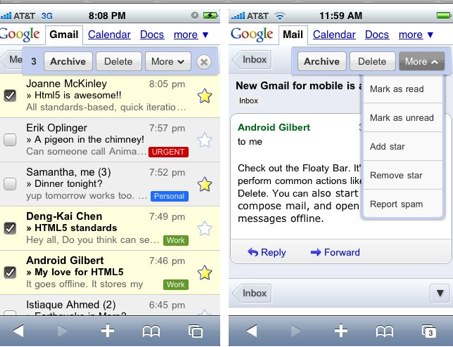
Google has launched a new Gmail mobile web app for the iPhone and Android-powered devices. The app has been revamped to have the same look and feel as your desktop Gmail. The app also has a new floaty bar (more on that below) and offers basic offline support.

Google says that the app is faster in performing actions like opening an email, navigating, or searching, and let’s you access your Gmail messages even if your network connection is flaky. All of these new features are enabled through leveraging Google’s browser technologies, especially HTML5 and Google Gears. Google has recently demoed the app at industry conferences, but Google engineer Joanne McKinley writes on the Google Mobile blog:

The full impact of this new architecture isn’t visible yet, but it will enable us to significantly improve performance and quickly roll out new features in the near future.

The new Gmail for mobile also lets you easily archive, delete or move emails via a “floaty bar” that appears near the top of a screen whenever you select a message. The floaty bar gives you the options to archive, delete and take other actions and stays with you as you scroll through your inbox. Messages are also easier to read and labels look more like the Gmail labels you see on your desktop site. Also, the search menu has been placed up into the top header. For more, see Greg Kumparak’s take on MobileCrunch.

Here’s a video on the new Gmail app:

Advertisement

Comments rss icon

  • this wasn’t the big Campfire One announcement, was it?

  • This is so timely. I’ve been fighting MobileMe all morning and am about to give up on desktop apps entirely. syncing is for chumps.

    • Good nice Michael, cloud-hosted (i.e. NOT on your desktop) is the way ahead.

    • Yes syncing sucks. I can never handle the questions I get about ‘conflicts’ that re-occur over and over no matter how often I fix it.

      What do you think about accessing contacts the same way – online on a mobile website instead of on your iPhone address book app?

    • I’m very curious as to why TC is so much on Apple’s d*ck here. I understand you have a iPhone but why not cover more apps for the iPhone’s competitors like the Pre, G1, etc…?

    • Michael,

      Syncing might be for chumps that own an iPhone.

      Don’t forget that there is another company called RIM that perfected email sync whether desktop or non-desktop which your Blog almost never covers regardless of the fact that it owns much of the enterprise email usage base.

      Apple will get there but it will not be before they will blame everyone else for their inability to do it right.

      As far as Mobile GMail, why depend on something that requires you to be online at all times and does not give you the ability to view it if you are out of the service area. At my house (in the hills) for example, I don’t get 3G and Edge is just unbearable.

      A better option will be to press on Apple to build a better email client or to at least allow email clients to be sold via the AppStore. But that is just a pipe dream….

      Jim

      • Hey there Jim, I’ve used a BlackBerry and now use an iPhone. Exchange sync is already there and working fine. MobileMe is not the same, no idea what their problem is.

        • I agree. I also have an iPhone and the sync to exchange is working very nicely. Same goes with Yahoo but there are still a couple of glitches. As far as the rest go, I believe that it is an infrastructure issue. RIM chose to go with a centralized distribution architecture via their webclient architecture which is proving to be very reliable and Apple chose to go via a much less reliable mechanism of having the phone itself do all the work. With GMail itself, that is tricky since it is not really a POP or IMAP server and it is just an emulation layer on top of it which leads to many issues. I still have a hard time with desktop email clients being able to work with Gmail properly. I sure as hell do not expect the iPhone email client to be better.

          Tried and true is usually the best way to go. In the case of email sync, RIM’s solution and ActiveSync are both tried and true.

    • When Google licensed Microsoft Exchange Activesync, I completely ditched MobileMe in favor of staying synced with my Google account, and it has worked wonderfully.

      And when you use Chrome’s application shortcuts (I guess, when Chrome comes around for Mac) and Gears, it’s like you have desktop apps, if you want them.

  • In terms of speed which is better, this one or the one that exists in Settings,Mail in iphone

  • It’s nice to see the potential of web based technologies and their ability to simply and enhance user experience.

  • I’m still waiting to be able to SET a label w/ the mobile app. I tend to set my label manually and then archive — on the laptop I do it w/ the GTDInbox addin, but with iphone mobile version I’m at a loss.

  • I think this is cool … thumbs up to the offline availability … !

  • Wow, I’ll have to check this out!

  • I wish they would update the Gmail widget in iGoogle. Since the revamped home page it’s become pretty much unusable :(

  • Why will I use this over how I currently use gmail on iPhone (IMAP)? This is a serious question. I want to know some of the advantages. Search could be one for sure.

  • You know, the iPhone does come with an IMAP e-mail program….

  • Great to see Google has worked to improve speed and response with this new update. I’m a huge fan of Gmail on iPhone’s Safari.

    One drawback: the one-line message preview really clutters the page. At best, it’s unnecessary (I need to read beyond the first seven words of almost all my emails). At worst, it’s distracting.

    Given these and other features to come, it’s probably time to let users customize their gmail iPhone interface…just like its desktop father -)

  • I still have the old version of Gmail Mobile. Does anyone know if they have a different URL for this or will I need to wait for it to be spread to my account ;/

  • How is this for Android? No one with a G1 uses the gmail mobile app; everyone uses the gmail application. Do the android and gmail mobile teams not communicate at all?

  • Looks as ugly as the web version. Congrats Google.

  • Pishabh Badmaash - April 8th, 2009 at 3:11 pm PDT

    Why no push to task in drop menu?

Leave Comment

Commenting Options

Enter your personal information to the left, or sign in with your Facebook account by clicking the button below.

Alternatively, you can create an avatar that will appear whenever you leave a comment on a Gravatar-enabled blog.

Trackback URL
Short URL
bugbugbugbug
Techcrunch on Facebook