 Meeting24.tv is a new web conference system that lets up to 24 users simultaneously hold meetings online through an extra-simple UI. The service is offered by WIT, a Tokyo-based research lab (meeting.24 is available in both English and Japanese). Utagoe, the same Tokyo- (and San Jose)-based company that runs Utagoe Live 100 (FriendFeed for video streams), developed the streaming technology behind it.
Like Utagoe Live 100, meeting24.tv also has a similar minimalistic feel to it, which is supposed to make it easy for anyone to use – even those with little web experience. The service is based on the assumption that other online meeting solutions such as TokBox (which we covered three times), Cisco’s Webex, Polycom or Skype are just too complex.
In fact, meeting24.tv tries to be useful through its lack of functions. There is no client installation needed, no registration, no document sharing, no video mail, no contact list and even no text chatting (short Twitter-style messaging is possible, though). And meeting.24 is simple indeed, and it’s also free in its basic version.
I tried the service out with a few participants within Japan (where I live), in Europe and the US and everything worked flawlessly.
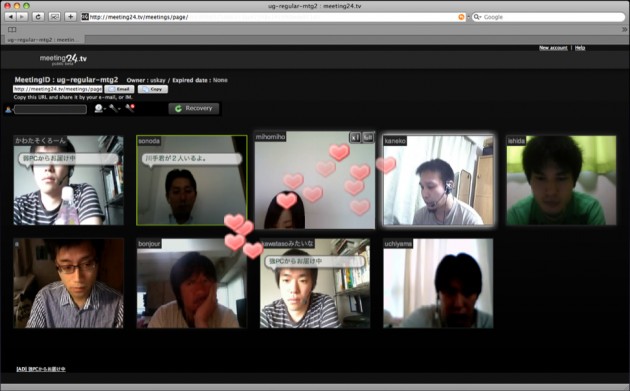
Only the organizer of the planned meeting is required to sign up and receives a dedicated URL (which looks something like http://meeting24.tv/meetings/page/tc_japan). The URL can then be mailed to a maximum of 24 users who just have to click on the link to go to the “meeting room”. They are then instantly able to see and talk to the other participants for up to 24 hours before the lights go out. (You can then add another meeting room with a different URL for free.)
But $100 a month get you a pro account, which lets you use a single meeting room without limitations and protect access with a password (users of the free version also get to see ads). The fee is a bit on the steep side, but in this economy holding meetings online should be a particularly attractive option for many companies trying to push down travel expenses.