
Yahoo has launched an Adobe AIR-powered desktop application called Sideline yesterday, once again validating the power of Twitter for real-time search. After taking it for a spin, I have to say it looks and feels really nice, but other than that there’s no real incentive for me to keep using it on a regular basis.
So what does it do?
Sideline is a straight-forward Twitter monitoring tool, giving you the opportunity to stay on top of the latest trends on the microsharing service and/or keywords you feed into the application. It has an auto-refresh feature (which you can tweak to have the search results reload between 1 minute and 1 hour), a notification system that alerts you of new keyword mentions in an overlay that appears whatever you’re doing and the ability to only look for favorited tweets containing the keywords you’re tracking.
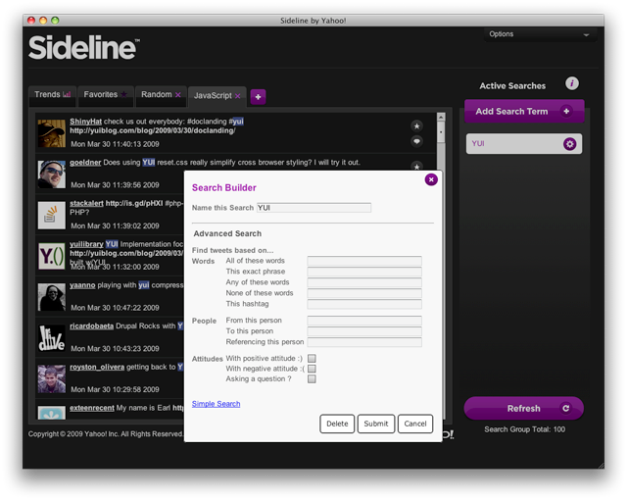
So far, nothing special, but what’s nice about Sideline is that it enables you to create so-called Search Groups which pull together multiple keywords for tracking purposes. This basically allows anyone to create e.g. a TechCrunch group and track different keywords and phrases like ‘techcrunch’, ‘crunchgear’, ‘michael arrington’, etc. Also really nice is the advanced search function, which lets you filter results down extensively, for instance by person, hashtag, ‘asking a question’, by negative or positive connotation (determined with smilies), and so on. Update: this is actually a layer over Twitter’s advanced search functionality, as a commentor points out.
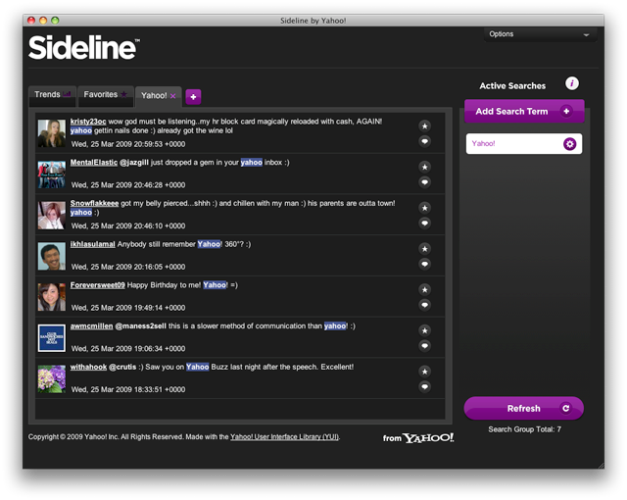
It’s slick and useful, but nothing major any way you look at it, especially since it’s not a functional client that lets you actually send direct or public Twitter messages. I wonder how many people will effectively keep using it after trying it out, but I doubt it will be many.
The desktop application comes from Yahoo’s User Interface (YUI) group, who explained in detail what inspired them to build it and how they did it. Sideline was developed with the Yahoo! User Interface Library (YUI) and HTML/JS/CSS. The code is open source under the terms of the BSD license and hosted on GitHub.


Gave it a go but I found it pretty much useless… what’s the point of finding tweets if I cant reply to them??
I can’t even go straight to that post on twitter to reply from the web, I can only go to the twitter users page and then try find the tweet in there… looks like its got a long way to go before it comes close to TweetDeck
My bad… I can reply to posts via twitter.com but I have to setup a ’search group’, then a ’search term’ for it (cant be done from trends)… then I have to be logged in to the correct twitter account online for me to send from the right account when I am directed to twitter.com (I like a lot of people have multiple accounts)
Would be much neater if I could just reply from inside the app.
Neatly put together… but in the end, without the ability to send tweets from it, I don’t think I’ll use it.
Wow..The looks are cool hope that the features are also good enough..
http://www.smartbloggerz.com
Do you think so?
Um? The advanced search is not something new or something that Yahoo invented…
http://search.t...er.com/advanced
doh. post updated, thanks.
Perhaps they should have called it “Window Shopping” or something similar. Seems like a pretty pointless waste of time even downloading it – thanks for saving me the effort
Nice app!
I’ve listed it at Twitdom – The Twitter Applications Database. We now have over 625 Twitter Apps listed in our database.
Personally, I will do anything to avoid that screaming Yahoo!!! logo in my otherwise harmonious pc environment. So, nope. Won’t even give it a try.
One of the big reasons to monitor twitter, especially for companies, is to monitor a brand and respond to customers. If you aren’t able to tweet from the application, that’s a huge feature lacking.
@Geoff You wouldn’t expect to be able to post from Twitter Search would you? So why expect to post from this service?
Plus, unless it uses the beta OAuth implementation you would need to provide your Twitter password to YATA (Yet Another Twitter App) – not good.
I recently launched a service over at http://www.twission.com that does something similar, except it adds a social layer on top of the Twitter Search results.
These monitoring services are useful to a lot of people, especially while following an event using a hashtag.
There is a lot of innovation still to be done in this space, so I welcome this app and look forward to seeing more like it.
Real time search will become the big cash cow in the next phase of the Internet’s long tail.
I don’t think I like the newest tools, I beliave they are not tested enough to be offered to crowrds of people. If I want to monitor a website I use “normal” monware like W3Monitor (http://www.w3monitor.com).
I launched a similar service early last month called tweetzi.
It is web based and allows for advanced search functions and keyword / trend following.
http://tweetzi....hp?q=techcrunch
But it probably won’t be much better than all the other ones. When will we get TweetDeck for Windows?
Eh? Now I’m confused – I have been using TweetDeck on windows for a while now, what do you mean?
I can’t see any personal value (to me) in an app for twitter that you can’t post tweets in. It’s going to take a lot to drag me away from TweetDeck. I only go to the twitter site to nosey at followers profiles/backgrounds!
What people really need for twitter monitoring is real-time sentiment, and for that, we have twendz.
http://twendz.w...neredstrom.com/
20% more awesomeness
I am going to come out and say it: AIR blows. I can’t think of a single AIR app that doesn’t come off as a cheesy Java Swing 2.0 wannabe.
I really hope either AIR gets retired for a much better replacement or it goes away entirely.
@Swag
The advantages of air apps are huge. No it’s not state of the art, access to the nitty gritties of your OS but it does allow for quick development of fairly useful apps.
Sideline’s functionality makes that monitoring process much easier for Twitter, where it’s even more important to set-up numerous keywords for individual brands or products.
Due to Twitter’s character limit, users often abbreviate or use slang for the brand or product they are referring to. Making it easy to miss relevant mentions. For instance, if I was working for RIM and I wanted to track all mentions of the Blackberry Storm on Twitter, I would need to set up searches for “Blackberry Storm,” “BB Storm,” “Berry Storm,” in addition to others – to make sure I wasn’t missing anything. Slide allows you to bundle all those search terms under a larger group name / tab. Therefore, I could set-up an all-encompassing “BlackBerry Storm” tab, in addition to other tabs that track competing products (i.e. the iPhone) and industry terms (i.e. touchscreen).
Using the tool now and find it fairly useful. Nice to be able to effortlessly monitor niche-tweets in real-time.
Seriously Yahoo, why aren’t you doing more stuff like this?
Innovation!
http://twitter....m/Spideroak_Inc
Code is open source. Less important what everyone above thinks today. More important is if a small developer gets inspired, and wants to leverage the code.
Wow looks like it has some potential.
What’s up with the blurry screen shots?
Well, whats the big deal, I built a similar one a few weeks ago : http://techcrunch.tweets.ws !!!
BTW: http://techcrunch.tweets.ws/ is GEOCODED… so the tweets are displayed from within a 2500KM radius of your current location.