
Free: Pack Of MySpace Branded Playing Cards »
Slick Website Builder SnapPages Gets A Big Upgrade
by Jason Kincaid on March 20, 2009

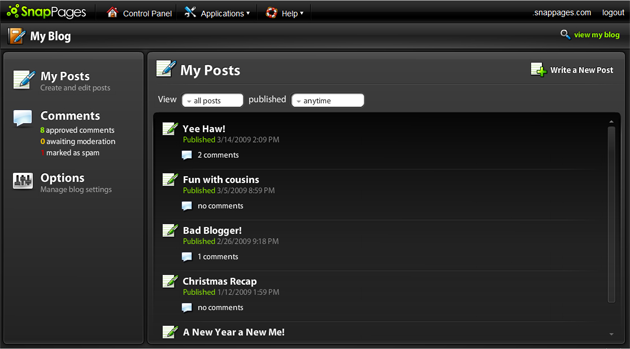
SnapPages, an impressive browser-based website publishing platform, has released a major new upgrade that introduces blogging functionality. Other changes to the service since we covered it last September include an improved control panel, support for favicons, and more flexibility for the service’s free accounts (though premium accounts, which run $50/year, still have much more functionality).

SnapPages is an all-in-one publishing platform that also includes a rich photo album and web-based calendar. The site tries to differentiate itself from competitors like SynthaSite, Wix, and Weebly by offering an intuitive interface that actually cuts back on the amount of customization options available to users. This isn’t to say you can’t make your site look the way you want it – there are quite a few themes and color schemes available, but SnapPages tries to prevent users from putting together ugly color combinations or oddly placed images, which can often ruin a perfectly nice looking webpage.

The new blogging system isn’t particularly unique, but it has been a oft-requested feature by many of the site’s users. The system features most standard features you’d find on platforms like WordPress, including tagging, multiple author support, and threaded commenting. The system plugs into the service’s other applications, so you can import photos from SnapPages’ rich photo application directly into your blog posts. And for the most part, it’s easy to use, especially because there is a minimal amount of setup involved.

I’m a big fan of SnapPages, not just because it has a very slick and polished interface but because the company consists of one full-time worker: founder Steven Testone (he says he’s planning to hire his first full-time employee next week). He has hired some part-time contractors, but he put together the vast majority of the site himself and it is very impressive.
Advertisement

Comments rss icon

  • I love how intuitive the site is. Is it possible to embed AdSense and ads?

  • I was thinking of putting a personal web site together this year. Maybe this will help to actually make it happen.

  • Just signed up for an account and played around. It’s really easy to use and very cool!

  • This is awsome. I am really gonna try this out because I want to switch blogger with another great blog host. If I can find not a better but best alternate then I will get out of it otherwise I love blogger.

    Mohammad Afaq
    Free Website Traffic

  • Featured site:

    http://churchatbeecave.com/

    - Missing DOCTYPE
    - We invite you to join us in serving during the week – there is a H1 tag you know

    Services like this are bad for accessibility and webstandards but they don’t tell you that. Just like anywhere else, get the right tools for a job and get the right people to implement those tools (there are many open source CMSes).

    You don’t build your own site with a tool like this if you take yourself or your business serious.

    • I think that you take yourself too seriously. I’m sure that businesses manage just fine without doctypes & h1 tags. While I agree that webstandards are a good thing, making such zealous comments don’t really help.

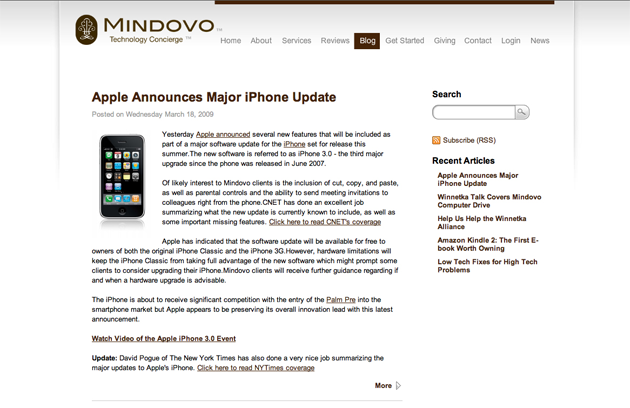
  • For a live example (screenshot pictured above) of what SnapPages and their new blogging tool is capable of producing visit http://www.Mindovo.com/blog

  • Looks like it has a lot of potential, but at least for me it is too buggy to use. I’m on Firefox on Linux, perhaps that has something to do with it. (But if this doesn’t work on all platforms, then how can I trust the websites I create will work for everyone visiting them – which is an absolute must?)

    For example, in the editor and the control panel, almost all pages appear ‘empty’, until I click in them and then press something on the keyboard.

    Worse, editing pages doesn’t accept keyboard input – dragging stuff with the mouse is fine, but entering text doesn’t work at all.

  • I think the biggest problem I will always have with these type of sites is that it assumes that the masses will achieve complex, incredible looking sites.

    I think Steve’s challenge is to overcome the Homer Simpson hurdle and communicate layout selection, color theory, typography choices, accessibility (yes, ukdavo, it IS very important whether you care or not), etc.

    Honestly, I don’t feel threatened as a designer/developer like a lot of people do. These tools just encourage mediocre designs from the ignorant people who view this as a hobby. While, they can be satisfied with “good enough” it never will be “professional enough”.

    • You say: “it assumes that the masses will achieve complex, incredible looking sites.”

      No it doesn’t! That’s a ludicrous claim to make. The vast majority of websites are very simple places where people post some text, images and, possibly video/music. This service is not aimed at business users and is not intended to supplant professional web design. It isn’t aimed at people who want to make “complex, incredible looking sites” (a very small proportion of web users in any case).

      There are very many large, popular websites out there that do not meet the kinds of web and accessibility standards you demand. There are very good reasons why that is so. It’s not a perfect world but guess what? It doesn’t need to be.
      The idea that a user needs to know anything about typography or colour theory in order to set up a decent looking site is complete and utter rubbish. And as was pointed out in this piece, Snappages tries to avoid the creation of ugly sites by limiting customization.

      So, get off your high horse, untwist your knickers and let people who want to use this service do so without being villified and patronised by those of you who think you are somehow better than everyone else.

  • What’s all the fuss about? Use these software for website prototyping – beats learning cryptic tools!

  • This is one of the best looking and functional sites to come out in a long time. It will never beat a true web design professional’s work, but if you want to make some simple pages for your school team, your hobby, etc. few sites or programs will come close to this.

    This looks like it would fit nicely into Apple’s iLife/iWork online portfolio.

  • Please try opnes.com. Similar type of site with lots of Features like e-commerce.

  • Found another slick website builder you guys forgot to mention: Devhub.com. Check out the music video site I was able to create on it. And like how they have revenue streams easily integrated.

  • Snappages shouldn’t have never gotten out of beta when they did. I started out on snappages in beta and while I thought it was good, it did lack functions and now more website themes and a blogging tool, I think it’s great it’s coming such a long way and gaining the exposure it deserves. But honestly, I don’t think it’s ready for a paid service since it is still buggy.

    But I suppose if he never started charging people he wouldn’t have been able to make it what it is today. It’s still a good service for people that want to create a stylish, easy design to keep up with. Especially without paying the fees of an actual web designer. $50 a year isn’t so bad.

  • Hi,
    WebXpress web builder has been developed with your business in mind. No business is too small or too big to have a WebXpress professional website. Customers do not need to know any web design or have any advanced IT skills. WebXpress is simple, easy and quick to use, no coding required. See link http://www.webxpress.mu/ for website builder.

Leave Comment

Commenting Options

Enter your personal information to the left, or sign in with your Facebook account by clicking the button below.

Alternatively, you can create an avatar that will appear whenever you leave a comment on a Gravatar-enabled blog.

Trackback URL
bugbugbug