Topify Lets You Manage Your Twitter Followers Via Email (200 Invites)
by Erick Schonfeld on March 6, 2009

If you are not a Twitter power user, you can ignore this post. But if you find yourself increasingly relying on Twitter and spending way too much time managing your followers, trying to figure out who they are, or responding to their private direct messages, you’ll want to try out Topify Created by former TechCrunch France editor Ouriel Ohayon and Arik Fraimovich as a tool they needed for themselves, Topify lets users manage their followers and respond to direct messages directly from their email inbox.

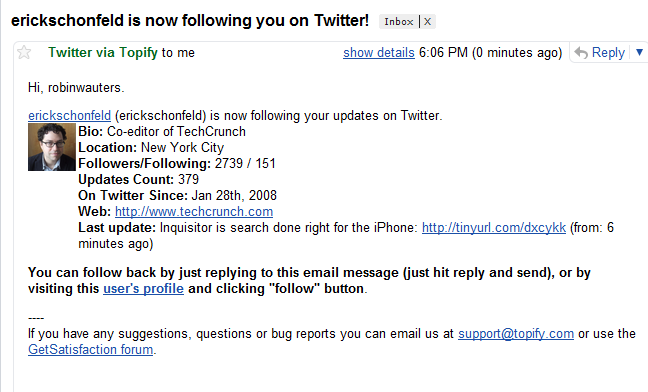
Topify is essentially a time saver. Once you set it up (we have 200 invites for TechCrunch readers) by replacing your email in Twitter’s settings with one that Topify provides which redirects back to yours, you get an email every time someone follows you. The email contains a snapshot of that person’s Twitter activity: a one line bio, location, number of followers and followees, Twitter update count, Twitter tenure, and last Tweet (see image). It basically tries to gives you enough information to decide whether you want to follow that person back, which you can do simply by replying to the email.

Topify also lets you reply to direct messages (Twitter’s version of private messages) by replaying directly via email. This saves you the step of having to go back to Twitter and login before responding. These are all basic features which should be part of Twitter, but until then you can use Topify.

For public replies to your Twitter messages, you don’t get an email (because Twitter itself does not offer such notifications). Adding @replies might flood your email inbox, but I actually would prefer getting those as well because I find myself often missing replies and not responding until days later, if at all. As Twitter grows and more people come on board, this tool is especially useful during its viral phase, when the number of followers any individual is accumulating on a daily or weekly basis should be accelerating.

Advertisement

Comments rss icon

  • Yeah, awesome tool – good on ‘em. Already changed the way I use the service.

  • Thanks for the invites. This is something I’ve been needing as well. Also a tool to automatically block spammers, or to give me a warning on the possibility of the new follower being a lame spammer.

    Now, about the business. I wonder how long they’re going to last, this could easily be done by Twitter and they’ll be out.

    • Twitter could and should indeed do it. But like many other things, Twitter don’t. We prefered not to wait and created this because we needed it.

      • I guess your best strategy will be to work on this and make it as good as possible and then get acquired by twitter, just like they did with search.

        I suppose you also assume they’re focusing in nothing but growth and stability, and to let other companies use the API to create things like this.

        Great initiative, can’t wait for my next new follower to see how it works and give you guys feedback.

  • I have been using it for a few days and it is such a time saver.

    Another great thing about Topify is that their emails are also optimized for the iPhone – the information is displayed above the fold and there is no need to scroll.

    And how come Twitter has not do it themselves? Here are my thoughts:

    http://www.meyd...r-weakest-link/

  • This is perfect, very useful indeed.. thanks for the info. Checking the site now.

  • Twitterdeck, Topify, or another interface – do we need another email-like system chock full of spam?

    Rather than another narcissistic view of Twitter, you can search for topics, get informed via photos and videos, and chat/follow Twitter users with the same interest. See http://b.tEarn.com/ for the business channels or http://m.tEarn.com/ for the music channels.

    Just a suggestion.

  • well that is good one for twitter

  • Awesome tool. I had already applied fo the beta a few days ago so thank for decreasing the wait time, TC!

  • Thanks, checking it now. However, I’m a tad bit concerned about the security of said service. Not so much how it functions, but the management.

    If you change your email to theirs, then they technically have full control over your account.

    Not that entering your password in another service does not give similar control, but this not only re-routes your traffic to them (for “good stuff monitoring”) but allows the owner of said email address to go into the account (knowing the password or not) and change everything (basically locking you out). Even the “forgot password” functionality stops working (for you) ’cause the email in the system is yours.

    Just playing devil’s advocate… otherwise I frequently use other apps… so I’m at great risk either way. ;)

    • We totally understand your concerns. Few things to mention:
      1. all emails that being sent to your Topify address are forwarded to your account, including (and not only) the remainder for the twitter password.
      2. we give great deal of concern and time for making sure that Topify is safe, so your password won’t be stolen.
      3. My name (and Ouriel’s) is on this. We won’t risk our reputation to gain some passwords…
      4. As you said, we just do what 90% of Twitter application do. And while most don’t know – these application can change your email via the API (without permission). Atleast, our application was whitelisted by Twitter.

      If you have further questions, feel free to ask (here, via email – support@topify.com, on twitter or whatever).

      Thanks,
      Arik

  • Useful for sure, but tell me it’s not a business?!? Twitter could replicate this internally in 2 days (max), and they are probably not *that* stupid to spend cash for this thing, right ?

    • Jose we did not create this as business, just as a useful service. If Twitter replicates, this is for us and all twitter users a great news. And even replicated Topify will soon add much more added value. Stay tuned

  • Just registered. We’ll see how useful it turns out to be.

  • twitter telling me that the topify email is not a valid email – even when i type it in manually – any else having this problem?

  • Check out http://twimailer.com – it’s up and running, works fine for me and you do not need an invitation.

    • This service is not as useful, i have tried both and prefer Topify because i can handle follow back directly from my email. In addition Topify let me reply directly by email to my direct messages. And on my iphone they also look better.

  • great idea. how come twitter did not do it ?

  • Being an ex-Techcrunch dude can get you free advertisement on Techcrunch. Nice job.

  • Brilliant idea. when are you releasing more invites? it seems they’re all gone

  • i manage my followers simply by not just adding anyone. i read folks updates first before i add them. if i like them i add them because i find their updates interesting.

  • I just started using another twitter mailer tool on my webtop but this looks interesting as well. More than anything, I would like to see a tool that incorporates into the email message whether I’m already following that particular follower. Then there’s no need to click through at all.

  • Congrats Ouriel and Arik ! great Job !

    Works great

  • Erick: On the missed @replies issue. I use tweetlater.com which sends me an hourly digest email of any @replies I’ve had that hour. That way I don’t always have to be in twitter while I’m working and I don’t miss anything. cheers

  • I love it! It’s perfect for the mobile BB user.

  • Arik & Ouriel, you guys rocks.

  • @Erik – what a great tip! I’ve used TweetLater to schedule tweets, but never to get an alert of my replies. Off to edit my settings now.

  • Thanks a lot for posting this.

    Looks very interesting.

  • So Twitter is awesome for Taking traffic to you website . It is very
    simple to setup and its a fun positive way to keep in contact with
    people. To get more followers on twitter check out this amazing
    tool.

Leave Comment

Commenting Options

Enter your personal information to the left, or sign in with your Facebook account by clicking the button below.

Alternatively, you can create an avatar that will appear whenever you leave a comment on a Gravatar-enabled blog.

Trackback URL
bugbugbugbug
Techcrunch on Facebook