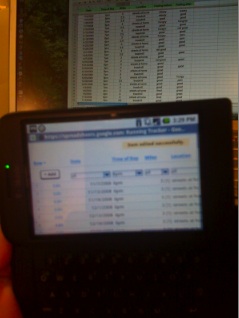
Google Spreadsheets can now be edited on Android mobile phones and iPhones. Up until now, all Google Docs (online docs, spreadsheets, and presentations) could only be viewed on mobile phones. Editable spreadsheets work inside the mobile browser, which for both Android and iPhone is based on Webkit.
Jonathan Rochelle, the senior product manager in charge of Google Spreadsheets, showed me the app on his Android G1 a couple weeks ago. As he added rows, edited, sorted, and filtered on his phone, the changes would automatically be reflected in the same spreadsheet on his desktop. (I took a photo of him doing this—with my iPhone, naturally). Each row can be edited by clicking on an “edit” link, and columns can be sorted via a box at the top of each one which then pops open an overlay screen that allows you to select each name or other variable you want to view in that column.
The feature went live this morning on Android G1 phones, but I am having trouble seeing it on my iPhone (that could be my phone, or the roll-out process to iPhones could be taking longer). Update: It is now working on my iPhone, although it is a bit buggy. The sort function brings up the slot-machine cylinder interface, but clicking on the Edit link doesn’t do anything. It works great on my Android, though. Nokia S60 series phones are also supported. You can check it out on a mobile phone by opening up the Google App or going to m.google.com/docs on your mobile browser.
The new feature will be welcomed by anyone who wants to change a spreadsheet while on the go. It works only when the phone is connected to the Internet (no Google Gears version yet). And it works only on spreadsheets. Docs and presentations remain view-only on mobile phones for now.
Update 2: Here is the Google Docs blog post on it.
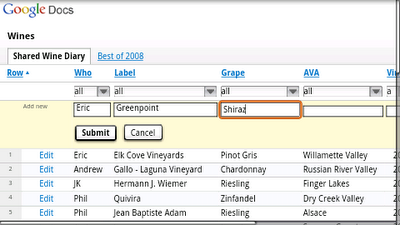


Works on iphone
It worked on Nokia N95!
This is really a tremendous engineering achievement. I don’t know if Google will ever make any money off of this product, but very impressive nevertheless.
Anjali Sen
Note that edits and adds do get reflected back to the spreadsheet for collaborators to see in real time, but the Sorting and Filtering does *not* get reflected back – those views are only local.
Well, I don’t mind missing the Sorting And Filtering functions if I can do more important things like editing content.. But yeah, it would be nice to have these features also! I am sure that the Google product team is listening
From a technical standpoint, this is a real coup. Amazing engineering job.
Yes it would be great to have many more features, but sometimes you juts need to stand back and give credit and respect to the engineers when it is due.
Anjai Sen
too hard to check spreadsheet on mobile device, though sometimes it’s useful ~
Holy Sheet! This is huge. It will definitely kill excel.
I love seeing one spreadsheet cell before I have to scroll.
You’re a tool.
Kill Excel? ha ha ha. Google uses Excel in their offices because Google Docs can’t do a 1/100 of what Excel can do.
I can’t wait till I can edit docs on the go. I love being able to proofread and stuff, but it’s lame not being able to make changes. The one work-around right now?
Write and edit it in GMail, then transfer it to docs later.
You saw it ten days ago? I thought Techcrunch wasn’t doing embargoes anymore…..
This is huge. I have been playing with Google Spreadsheets for a while and have already made poor man’s versions of a Google Tweet Sheet and Seinfeld Don’t break the Chain Calendar. Making this mobile opens up the possibilities even more.
I use Google Spreadsheets a sort of database for my website. You can publish your spreadsheet as a csv and then import it in your website. But I’m sure there are loads more stuff you can do with google spreadsheets.
Absolutely, you can even publish to Blogger and by extension I believe to Wordpress using Google Spreadsheets. BTW that Tweet Sheet thing and Don’t Break the Chain setup for those who interested are at http://garfield2.com
Testing
Hmm – I’ve been able to update Excel spreadsheets on my WinMo for a while. And with Live Mesh I can update a spreadsheet on my mobile and see those updates on my PC.
Big deal Google.
Tried it out, works on the G1 great. Still waiting for Google Documents editing.
Smartsheet also has mobile editing. Rich edit (not just free-text) and file viewing/forwarding available. Take a look: http://www.smar.../product/mobile
My PocketPC phone has been able to edit spreadsheets for years! How is this news?
And does your PocketPC synchronizes this spreadsheet that you have realtime online while editting…?
Google spreadsheets/docs are great, I use them for personal and commercial applications. I like mutli-user and password protected access it offers, editing/non-editing options, etc. I do check places like http://www.justaskgemalto.com before using things for commercial reasons though to make sure the data is secure.
Are these devices not a little bit to small for spreadsheet apps?
I use the spreadsheet with my team and its the best thing since sliced bread.
Is this a news item?
Just need the phone’s to get better so everyone hass the ability to use there phones like personal PCs.
Sports Contests, BetUSB.com