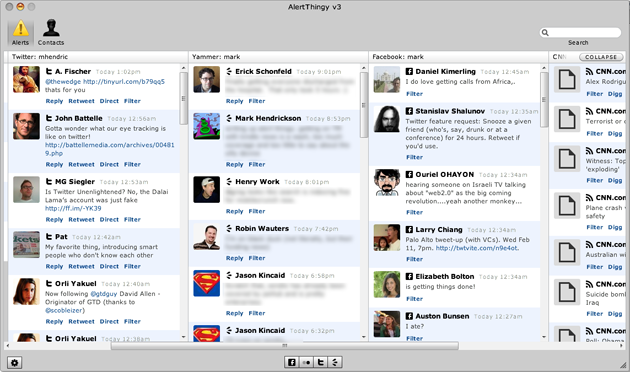
The battle between desktop notification tools continues. AlertThingy, one such tool with a knack for aggregating a handful of social networks, has released a third version that takes direct aim at competitor TweetDeck.
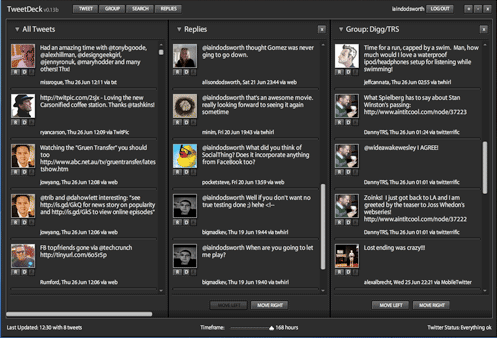
Just this past month we heralded TweetDeck as an innovator in the space for splitting notifications up into their own columns. While TweetDeck retrieves notifications only from Twitter, you can break up items into their own categories, such as all tweets, replies, groups, and search results. The categorization helps you stay on top of what would otherwise be one massive stream of information overload.
While not ripping off this aspect of TweetDeck completely, AlertThingy now also allows users to “expand” their stream of notifications into columns. AlertThingy is essentially an aggregator of disparate services, so it breaks each supported service — not each type of data pulled from Twitter — into its own column (although, as with TweetDeck, you can set up a separate column with Twitter search results). You can have all your friends’ Facebook statuses in one column, their Twitter updates in another, and their Yammer messages in yet a third. Since AlertThingy also supports RSS, you can create a column for each of your favorite blog feeds as well, turning AlertThingy into a messaging-system-cum-blog-reader.
In addition to the new expanded mode, AlertThingy has added support for six more services: Ping.fm, Basecamp, Huddle, TwitPic, TwitterSearch, and Yammer. That makes for a total of 13 services, which already included Digg, Facebook, Flickr, Jaiku, TinyURL, Tumblr, and Twitter. A variety of other incremental improvements have been made, such as improved automatic URL conversion via TinyURL and better memory usage.


There is a Firefox Addon for everything: iMacros
https://addons....efox/addon/3863
While it is no ..Thingy clone, it can be run via the command line and check all kinds of online accounts for status updates.
WOW this thing is a killer… definitely trying it out,,,and i am pretty sure it will provide good results…. i was just hoping for this type of application and I am glad its out….
Haven’t tried this out yet but will definitely upgrade AlertThingy when I get a chance. TweetDeck is currently my preferred client of choice so I’m sure this will get plenty of use!
Looks interesting.
If it’s less of a memory hog than TweetDeck, I can see a big market for it ‘just’ among Twitter users.
I hit over 450 MB of memory used on TweetDeck the other day. When I tried to close it, it continued to creep even higher. Was sort of fun to watch.
I have the same experience and I had to uninstall it. I never had any issues with TweetDeck – it just works and works well!
This thing is heavy .. (A PC WOULD BE BARELY ABLE TO RUN IT
)
True that, my comp hanged when i used it!
cooljobsalways
http://tinyurl.com/7uj5ay
Typo: “Just this ‘passed’ month” should be “past”
whoops thank you kind sir
typo on the image.
http://www.aler...friendfeed.html
FreindFeed = > FriendFeed
This is very interesting. I had one question, does this new AlertThingy support multiple Twitter accounts?
Yep, you can add multiple accounts for each of the supported services
If anything resembling that screenshot shows up on my computer, I’m just going to throw out my computer and start over fresh. What a mess.
Yes, I wonder if you have time to squeeze in your own life in between reading about other people’s? I can understand how this stuff helps people like the guys working at TC to do their job but I think the average Joe should question why they are so obsessed with reading about what everyone else is doing all the time.
AlertThingy is pretty fugly. Also, using it with Yammer is just asking for some really embarassing mix-ups. Imagine sending that snarky tweet about your boss to Yammer instead of Twitter. Sometimes convergence is not such a great thing.
Don’t like the new color settings in v3. I really liked the color scheme from v2. Try setting a black background in v3, can’t read the button labels. Yuk! And who picked the drab gray as the default color?
Whats next – you will accuse someone using Tables and Grids in their client of ripping off everyone in the web ?
Ha, maybe
It’s interesting to see all of the activity in desktop notification. People may want to check out Adobe Wave, a new application and service we’re offering to help publishers and developers communicate with their users.
Adobe Wave allows consumers to opt-in to receive desktop notifications from their favorite publishers and provides a REST API for developers to submit messages. When users click on the notification, they are take to a URL that the publisher specifies.
This product is currently in prerelease. You can find more informaiton and submit a prerelease application at http://wave.adobe.com. Though we have quite a bit of a backlog due to higher than expected demand, using invitation code “TC020909″ will get you priority access.
Sincerely,
John Shapiro
Adobe Wave Product Manager
hahahah. I know more apps that do this.
….
A more strenuous version of negative consequentialism may actually require active intervention, but only to prevent harm from being done. ,