Issuu Really Wants to Kill The Document Download
by Erick Schonfeld on December 19, 2008

One thing that I find increasingly anachronistic on the Web is the stubborn persistence of the PDF download. I really don’t need to download more junk onto my computer, especially if it is only something I am going to look at once or twice. Every document should just be viewable (and searchable) on the Web. That is why I am a big fan of services like Issuu, Docstoc, and Scribd that let you embed PDFs and other documents on any Webpage.

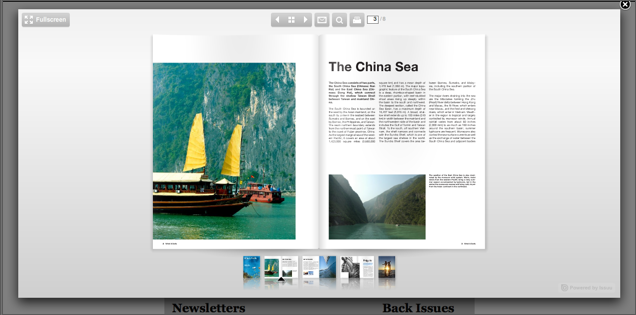
Today, Issuu (which raised $5 million in October) is introducing something it calls Smart Look, which turns all the document-download links on your site into browser-viewable documents. It works for PDFs, slideshows, or regular text documents. You just insert some code onto your site, and it does the rest. Instead of an embedded viewer, it launches a new overlay window where you can see the document in all of its glory, search it, page through it, and even print it (if you still do that kind of thing).

Once you insert the code, it turns on this feature for all document downloads on your site, instead of requiring you to create an different embedded viewer for each document.

You can check it out some on this sample site or watch the video below:
Advertisement

Responses

Comments rss icon

  • $5M for flash paper?

  • Issue, Issu, Issuu. I think it is important for start-ups to understand the power of a name. Issuu’s product is very compelling, but it might be hard to verbally tell somebody the websites url.

  • Big fan of this as well. However, for the corporate world PDF is used for more things than just marketing docs and other ‘public’ documents. Using a service like this to present pdfs of secure HR documents and such just isn’t a possibility. Uploading those docs to a Scribd server violates any privacy issues. I’d be all for a server based module that I can add to my site so that I can show people a pdf, keep it on my server, and to some degree control people from downloading it to their computers.

    Maybe this is their revenue model, or part of it.

  • Great post, I already have enough crap on my computer too, it takes me hours to put my files into a manageable hierarchy, and the last thing I need is more PDF’s and other stuff to find a home for in the abyss of folders.

  • With Ryan on this. These products need to come as server modules so that enterprises or enterprise software providers can use them.

    $5M… way too much!

  • Am I the only one who thinks that PDFs are superior to all these Flash-based abominations? If you’re on a Mac, PDFs are amazingly non-invasive.

    • No, you are not the only one. I agree with you 100%.

      Let me download the PDF – you can keep all of your lame flash based viewers.

    • I gotta say, once I switched to mac, this became a non-issue… Adobe should get their act together and make Acrobat Reader a much lighter-weight product, and all of this wouldn’t be necessary.

      The fact that it takes 3 minutes to open a PDF because Acrobat is huge and slow is really the problem here.

  • Great idea – but the Issuu popup still needs a DOWNLOAD button.

    You can’t really READ a document in their default view in the popup

  • I still like to be able to download the document. That is why I really don’t like all of this cloud computing stuff because I like to be able to keep stuff on my own computer.

  • The success of these sites should make adobe reconsider flash paper.

  • Anything you view on the internet is downloaded to your computer. If you view it through a web browser, it is likely an html file, if it loads the flash plugin, the file downloaded is a flash file. Viewing a pdf is no different from a “what you download to your computer” perspective than an html page. So your “I really don’t need to download more junk onto my computer” comment makes no sense, because any html page you view is downloading “junk” just as much as a pdf is. I expect more technically savvy posts from this site.

  • I dont like pdf, but this use flash and i dont like flash too.
    But looks interesting

  • Needs a download button! It also seems faster than IE loading this into the browser window – great stuff!

  • The user experience of Scribd is really awful, as is the user experience of Adobe’s Acrobat plug-in. I’d much rather download the doc and read it in the dedicated reader app on my desktop — proper window size; no advertising crap making the viewable area smaller; acceptable response time when advancing through the doc. Even better is the way my Mac handles it — PDF rendering seamlessly implemented in the browser, with no plug-in trying to hijack the user interface (a page is a page is a page — scroll, damn you!)

    I haven’t tried the others, but every time I get a link to a Scribd document, I sigh heavily and try to figure out how to download it natively.

  • I’d like to pop it out into its own browser window…

    What if you want to take it with you on the road with no internet access?

  • Amen. PDF is such a stupid proprietary format. I have no idea how it caught on.

  • I hate downloading PDFs, too! I love the idea of keeping them in my browser, but I often need to print them for reference, and many times you have to download the PDF to print a hard copy.

    I like the new Google PDF viewer, but I still have to download copies to my computer if I want to print.

  • Typically heavily designed files are created from QuarkXPress/InDesign and to a lesser extent from MS Word/MS Publisher/Apple Pages. Most of these tools are incapable of transferring anything more than text/images/graphic arts.

    Take a look @ http://labs.qua...ail.aspx?did=20 where we wrote an XTension to QuarkXPress which allowed creative artists to mark up areas on page that are “related” (say for example product image, description and price) and provide additional content to display as a popup/side element.

    Such a concept takes the whole “publish online” to a higher level.

  • I can’t *stand* those applications. Usually a crappy small window, in no way the efficient use of keyboard, mouse, screen (as in everything I am used to).

    And while many do offer a download button you have to log in to do so (and be tracked) for it.

    You don’t want crap on your computer? Setup your browser correctly, let downloads be done in the specific dirs and just clean them out regulary.

    Those are fine for some additional “look it is a document and if you really are stuck you can use this” but not and never as a replacement.

    Not to speak from the fact that uploaded documents are exactly that: uploaded documents in a different space outside of your reach and control and outside of your stats.

  • Looks very nice. Will test this out this weekend. Just deleted a document from DocStoc which I will try out on here. Great way for our clients to add documents to their websites. I know one client in particular will be really pleased to see this used. The overlay window adds value over DocStoc because the user does not feel like they have navigated away, i.e. less effort. Good luck to Issuu.

    For those who do not like pdf or Flash – create something better then.

  • For Ryan, Adobe has LiveCycle, coming soon to a web service near you.. (http://www.adob...om/devnet/aedp/, http://www.adob...t/aedp/dev_exp/)

    For others, there’s Adobe Share (acrobat.com), which also provides Flash previews of docs. Unfortunately, they want you to register for an “adobe id” … but it’s pretty much the same as these guys, however you spell their URL :-)

    Not sure Adobe really gets it, but they are pointing in some interesting directions.

  • yet another nice online service to read PDF files ,download button should be there to store on computer and for reading later.

  • Eric – I have looked at docstoc and scribd for my site but settled on issuu because I believe it to be a more elegant solution to document viewing and presentation. http://www.pcinb.com

  • I would love to have this locally, on my PC (as a Firefox add-on maybe?). I have to read a lot of PDFs that my colleagues send me and

    1. I hate that typical “fuzzy” look of fonts in normal pdf viewer – I would like to see pdf as a normal web page (Is that antialiasing? – I hate it, makes my eyes tired).

    2. I would love if I could use Firefox add-ons like that dictionary where you just point at the word you don’t know and you see a “bubble” with translation… it does not work with PDFs, only with html.

  • They should spend some of their money doing usability testing. Implementation of this is poor. When I click on a link marked as a PDF, I expect a PDF to open.

    Erick, what are you going to do with the issuu when it opens? I’m assuming that when you download PDFs, it’s usually because you’re researching something for work. You might be writing a story and need information in the PDF.

    OK, now try do what you normally do with a PDF in an issuu document. Copy and paste is impossible. Scribd and Docstoc support copy and paste (so did Flash paper), but issuu doesn’t.

    For the record, I hate PDF.

    • Good Point Dominic. I will say that I prefer that people not be able to copy and paste from my documents on my site (link in above comment). I think there is a place for both implementations. Issuu is more for presentation purposes.

  • That’s fine, but what about persistence? I download PDFs of conference presentations, technical papers, academic research constantly for two reasons:

    findability of the items online again, even with social bookmarking, meta-search, etc.

    persistence of items over time as sites change and content is removed – wayback doesn’t cut it

    Solve those problems first, then maybe I’ll give up downloading PDFs.

  • Internet is not nearly as ubiquitous as many of these Internet based applications would suggest. Often my connectivity is used to download articles to be dealt with when I don’t have connectivity, which is when my best free time is.

    While this is an attractive interface, based on the article anyway, one still should have the option to download the article if their connectivity is limited or expensive.

  • nice feature..although it needs a download button (some documents are worth downloading) and also a zoom button (some documents have pretty small fonts!)

Leave Comment

Commenting Options

Enter your personal information to the left, or sign in with your Facebook account by clicking the button below.

Alternatively, you can create an avatar that will appear whenever you leave a comment on a Gravatar-enabled blog.

Trackback URL
bugbugbug